Post the same idea everywhere, in the format each network rewards and inside each network's limits. That means a carousel or Reel on Instagram, a pin on Pinterest, a longer post on LinkedIn, an update on Google Business Profile, a short line on X, Bluesky and Threads, and a video on TikTok and YouTube Shorts.
Deciding what to post on each social media platform starts with one idea and ends with ten shapes of it, each sized to the network's text, image and video limits. Circleboom Publish drafts each platform's version with AI and schedules it to Instagram, Facebook, LinkedIn, Pinterest, Threads, Bluesky, X, TikTok, YouTube and Google Business Profile from one dashboard.
→ Write each social media platform's post with AI
The matrix below joins format, limit and AI setting for all ten networks in one table.
The short answer: one idea, ten formats, one source
The answer to what to post on each social media platform is the same idea in a different container. The facts, the offer and the visuals stay constant. What changes per network is length, the number of images, whether the idea is told as video, and how the first line is written.
Most guides list a separate content type for every network, which quietly turns one week of posting into ten separate ideas. That is the expensive route.
A single idea, reshaped ten times, costs far less thinking and keeps the message consistent.
Circleboom Publish is a multi-platform publishing suite that writes, schedules and publishes posts to ten social networks from one composer. Its AI generators turn one source text or article link into a separate post for a chosen network, and the per-platform preview shows how each version renders before it goes out.
That pairing is the practical way to turn one brief into a post for each social network. The rest of this page gives the format and the limit for each platform, then the steps.
How long can a post be on each social media platform?
Knowing what to post on each social media platform starts with what fits. Each network enforces its own text, image and video ceiling, and the table below lists the limits Circleboom Publish applies in its composer, next to the format that best carries one idea there. The last column says whether the AI generator can target that network directly.
| Platform | Format that carries the idea | Text | Images | Video | AI generator target |
|---|---|---|---|---|---|
| Carousel or Reel | 2,200 characters, 30 hashtags, 20 @ tags | up to 10, 8 MB each | up to 300 MB | Yes | |
| Page post with image or Reel | 5,000 characters | up to 10, 4 MB each | up to 10 GB | Yes | |
| Text post with images or a document | 1,300 characters | up to 20, 10 MB each | up to 200 MB | Yes | |
| One pin with a link | 500 characters | 1, up to 20 MB | up to 2 GB | Yes | |
| X | Short post or thread | 280 characters (standard accounts) | up to 4, 5 MB each | up to 512 MB | Yes |
| Bluesky | Short post or thread | 300 characters | up to 4, 2 MB each | up to 10 minutes, 300 MB | Yes |
| Threads | Short post or question | 500 characters | up to 10, 8 MB each | up to 1 GB | Write in its own composer |
| Google Business Profile | Update, Offer or Event | 1,500 characters | up to 10, 5 MB each | up to 75 MB | Write in its own composer |
| TikTok | Vertical video | 4,000 characters | none | up to 10 minutes, 4 GB | Write in its own composer |
| YouTube Shorts | Vertical video | 5,000 characters (description) | none | up to 60 seconds, 256 GB | Write in its own composer |
The table's real lesson: text decides X and Bluesky, images decide Pinterest, and video decides TikTok and YouTube.
The strictest-limit rule for one post sent to several networks
When one post goes to several networks in a single send, the strictest limit in the selection wins. A 500-character caption fits eight of the ten networks but not X at 280 or Bluesky at 300.
Six images fit Instagram and Facebook, while X and Bluesky take four and a pin takes one.
There are three fixes, and each suits a different situation:
- Shorten the text with the AI writer's Condense option so one version fits everywhere.
- Leave the tight networks out of the shared send and post a shorter version from their own composer.
- Turn the long version into a thread on X, Bluesky or Threads.
Full, current figures sit on the help page for text and media limitations. It is worth a bookmark if you plan posts for several networks a week.
Where a platform's own rules and the composer's limits differ
Platform rules and composer limits are not always the same number. YouTube's own help page on creating YouTube Shorts says a Short can run up to 3 minutes, while Circleboom Publish documents 60 seconds for Shorts in its composer. Plan for the shorter figure when you schedule through the tool.
Pinterest's Pin specs add a separate 100-character cap for the pin title, which matters because the title is what searchers read first. Bluesky video has its own wrinkle: the guide to how long videos can be on Bluesky covers the length ceiling in detail.
Which format carries one idea on each platform
The format follows the network's job, and the ten networks fall into five groups:
- Visual feeds (Instagram, Facebook, Pinterest) carry the idea as images: a carousel, a photo post, a single tall pin.
- Professional feed (LinkedIn) carries the reasoning behind the idea, in a longer text post or a multi-image set.
- Text-first networks (X, Bluesky, Threads) carry one sharp line, a question or a short thread.
- Video-only networks (TikTok, YouTube Shorts) carry the idea as a vertical clip.
- The local listing (Google Business Profile) carries it as an update, offer or event.
One idea traced through all ten formats
Take a single idea as an example: a local bakery adds a sourdough class on Saturday mornings. Here is what to post on each social media platform for that one idea, in the visual and local group:
- Instagram: a five-slide carousel from dough to loaf, plus a short Reel of the shaping step.
- Facebook: a photo post with the date, price and sign-up link for existing customers.
- Pinterest: one tall image of the finished loaf with a link to the class page.
- Google Business Profile: an Event post with the date and time, so people searching for the bakery see it.
- LinkedIn: a short post on why a small business teaches its own craft, with two photos.
The short-text and video group gets the same idea in fewer words:
- X and Bluesky: one line with the date and the link, under 280 characters so the same text fits both.
- Threads: a question, such as asking followers what bread they would bake first.
- TikTok and YouTube Shorts: the shaping clip from the Reel, kept under 60 seconds.
No network got a new idea. Each got the shape that suits how its audience reads, which is what to post on each social media platform in practice: one message, ten fittings.
Text-first networks need the tightest writing
For the text-first group, length is the whole craft. The Bluesky post guide shows how a 300-character limit shapes tone, and the same discipline works on X and Threads.
Text-first networks also have quiet days when no new idea exists. Those are the days to share a relevant outside article from a content discovery feed rather than leave the account empty, since these algorithms reward continuity.
A post that performs well on one network is worth promoting on the others with a short teaser and a link. Tag that link with a UTM code per network, and Google Analytics will show which platform actually sent the visitors.
One composer for every network, or each platform's own composer?
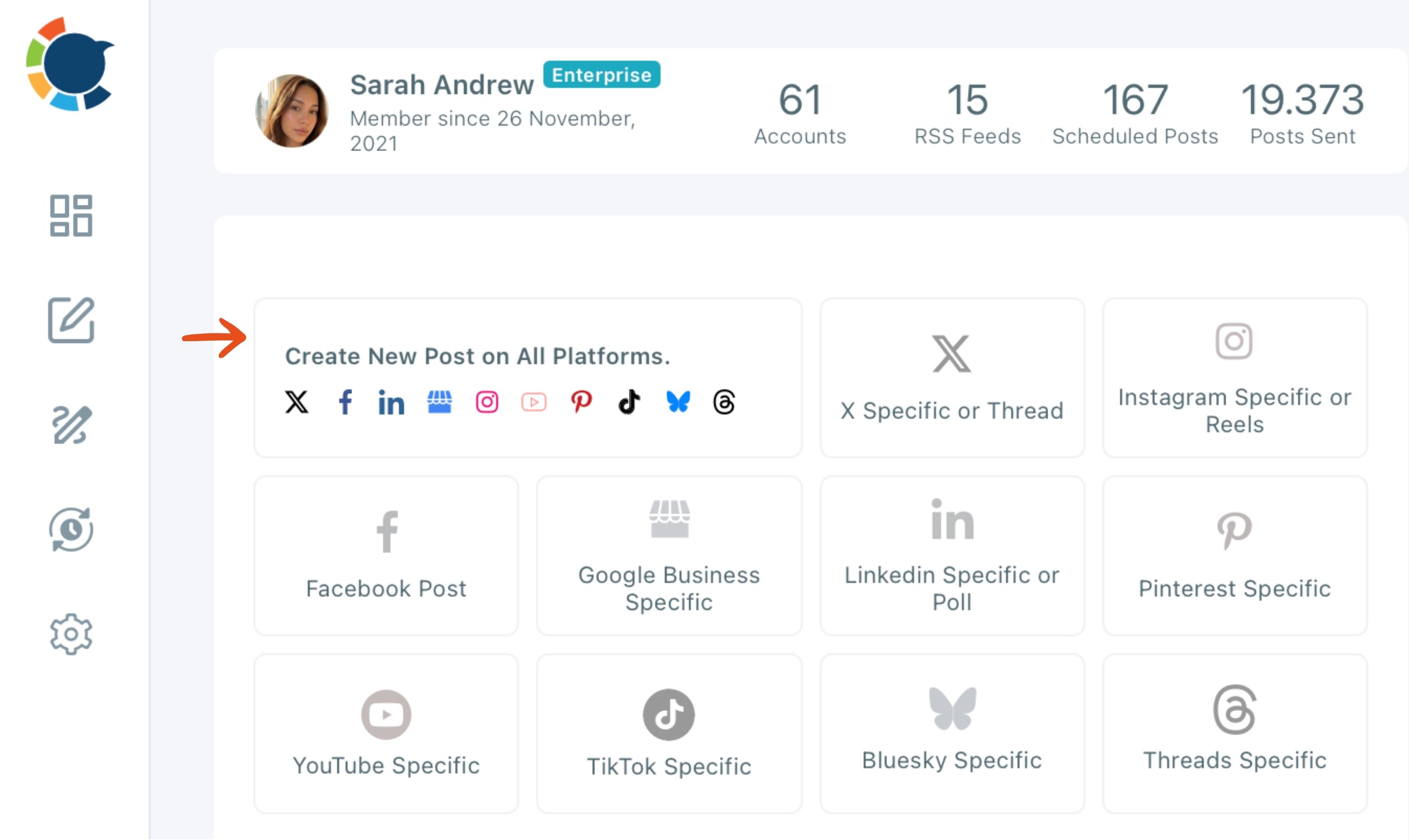
Use the universal composer when the same text and media suit every selected network, and use each platform's own composer when a network needs different words. The universal "Create New Post on All Platforms" composer sends the same composed content to every selected account. It does not hold a separate caption per network.
When a version needs its own composer
The deciding question is how many platforms this exact post needs to reach. More than one with identical content goes through the universal composer. A version that needs a thread, a Reel, a poll or a different caption goes through that platform's own composer, scheduled at the same time.
Each platform's own composer carries tools the universal one does not. Threads on X, Reels on Instagram, polls on LinkedIn and Google Business Profile post types all live there.
One detail catches people out: the AI writer does not apply a network's character limit by itself. For a short version, tell it directly, for example "make this under 280 characters," and it rewrites the draft in the same popup.
The guide on how to share a Facebook post on LinkedIn shows the same principle at a smaller scale: the content moves between networks, but the wording adapts.
Selecting the accounts once for every network
The account selection is where the time saving lives. Circleboom Publish lets you manage multiple social media accounts across all ten networks from one login, and a Share Group selects a recurring set of accounts in one click.
Circleboom is listed as an official X Enterprise Developer. The X version of your idea goes out through approved access rather than a workaround, next to the other nine networks.
The AI social media post generator is the fastest way to write a version for each platform before you open either composer. Every platform's dedicated AI writer is listed on the per-platform AI post generators page.
One video, four video platforms from a single upload
One short video can go to Instagram, Facebook, TikTok and YouTube from a single upload. Start from any of those four platforms' Reels or Shorts flow, add the other three platforms' accounts, and one click publishes or schedules the clip on all four.
Keep the video to 60 seconds and under 300 MB so it fits every one of them; the video cross-posting page covers the full flow.
How to turn one idea into a post for each social media platform
A tour of the Circleboom Publish dashboard where all ten versions are written and scheduled:
To decide what to post on each platform and produce it, generate a draft per target network from one source, then send the versions that match together and schedule the exceptions from their own composers. The process runs in two phases: drafting from one source, then sending. Seven steps cover both.
Draft each platform's version from one source
- Log in to Circleboom Publish with the account that already has your social profiles connected.

- Open AI Features on the dashboard and choose Generate Post from URL for an article, or Generate Post from Text for a brief with no link.
- Paste the source, then set the main goal, the tone and style, the language and the target platform, and click Generate Draft Post.
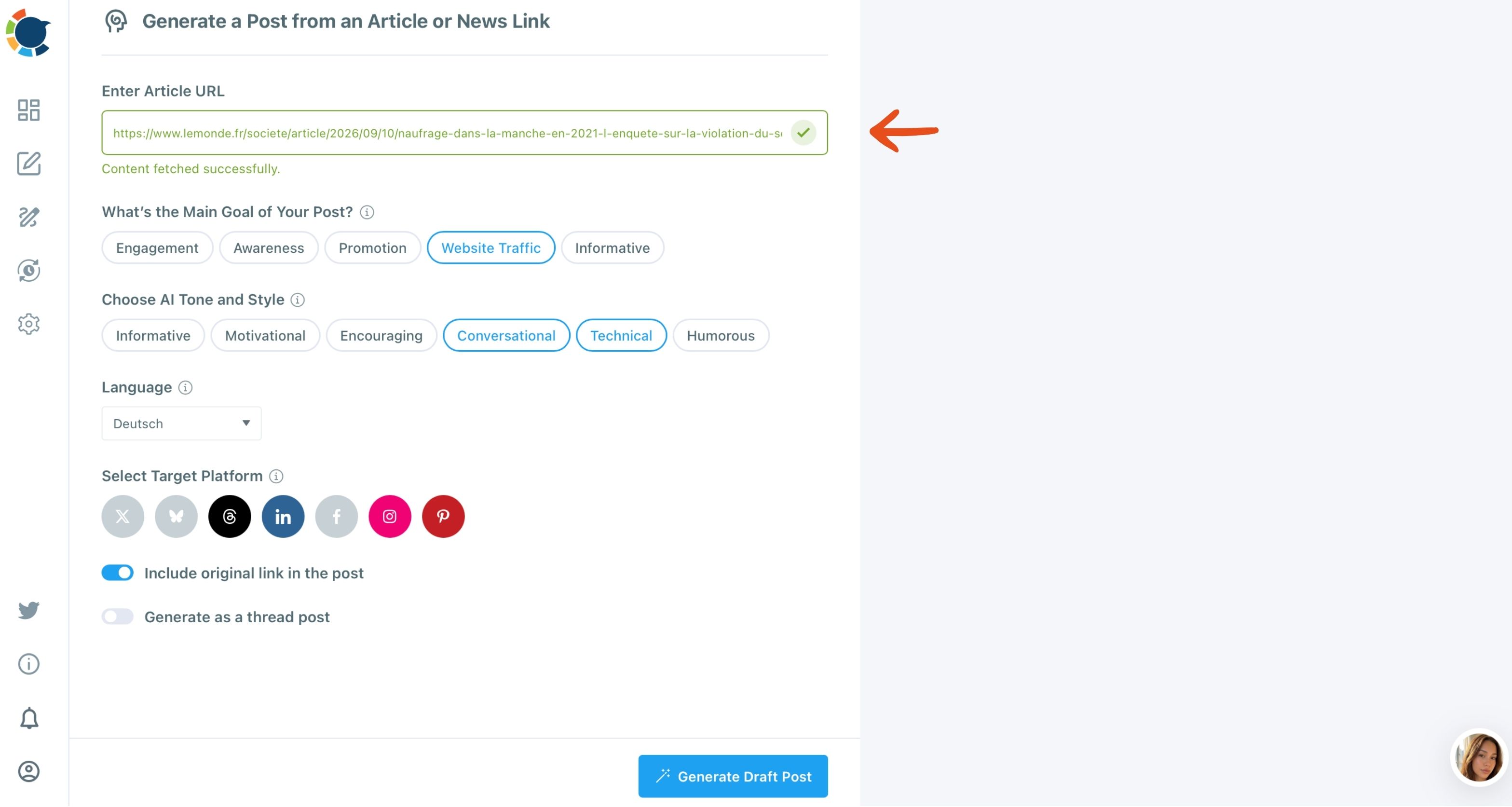
- Repeat the generation for each remaining target network, changing tone where the audience differs, for example more formal for LinkedIn.
Send the shared version and schedule the exceptions
- Open Create New Post on All Platforms for the networks that can share one version, and select their accounts.
- Check every Post Preview tab for truncation, missing media or a caption over the network's limit.
- Schedule the shared send, then schedule each platform-specific version from its own composer at the same date and time.
Drafting before sending keeps the strictest-limit rule from cutting your best version down to fit the weakest network. Each network gets the strongest shape of the idea, and the shared send still saves the repeated work.
In short: one source, one AI draft per network, one shared send, separate sends only where a limit or format requires it.
Your one-idea, ten-format checklist
Run this list each time a new idea arrives and you need to decide what to post on each platform:
- Write the idea once as a short brief with the facts, the offer and the visuals.
- Check the matrix for each network's text, image and video limit.
- Generate a draft per target network and give LinkedIn and the short-text networks their own wording.
- Send matching versions together and schedule the exceptions for the same time.
- Tag every link with a UTM code per network before it goes out.
Start your next idea from one brief and let each network get its own draft.
→ Open the AI writer for each social media platform
Frequently asked: one idea across ten platforms
Is posting the same idea on every platform duplicate content?
No. The same idea in a different format per network is not duplicate content; the risk is identical text posted repeatedly or to several accounts on the same platform. Give each account its own AI-written version, and see whether you can post duplicate content for the product's own rules.
Do I really need to be on all ten platforms?
No. Be on the networks your buyers use and where you can post consistently, and skip the rest. A 360 marketing plan helps decide which channels deserve the effort.
Can I schedule all ten versions to go live at the same moment?
Yes. Pick the same date and time in the Schedule modal for the shared send and for each platform-specific version, and the full set appears together in the Outbox calendar.