
A list of touchy topics covers only half of what not to post on social media. For a business, the mistakes that cost the most reach are often about how a post goes out: repeated, tagged badly or linked blind.
What not to post on social media as a business?
Keep divisive opinions, public fights with customers, unproven claims, private data and borrowed content off your feeds, and avoid repeats, risky hashtags and bare links that quietly cut reach. Circleboom Publish lets a business preview, rewrite, tag and approve every Facebook, Instagram or LinkedIn post before it publishes.
Which topics should a business keep off social media?
A business should keep off social media any post that spends customer trust to buy attention. That covers unwanted opinions, public arguments, claims without proof, data that is not yours to share, and tone-deaf timing. Each one can do more damage in a day than a month of good posts repairs.
Two sets of rules sit under every business feed. Facebook and Instagram accounts must follow Meta's Community Standards, and violations can lead to strikes or a disabled account. In the US, the FTC's advertising and marketing basics say claims must be truthful, not deceptive, and backed by evidence before they run.
Circleboom Publish, the multi-platform publishing suite behind this guide, gives a business one composer, one calendar and one approval queue for Facebook, Instagram, LinkedIn, Google Business Profile and its other networks. That matters here because a rule list only works when every post passes the same checkpoint.
Topics that spend customer trust
The content to leave out of a business feed:
- Political, religious or divisive opinions that sit outside what the brand is for.
- Public arguments with a customer, even a rude one.
- Jokes at the expense of customers, staff or a group of people.
- Cheerful promotions that go out while your community is dealing with bad news.
- A run of nothing but hard selling, with no reason to follow you.
A complaint answered once in public and then moved to private messages ends better than a thread. A clear direct message strategy gives your team a place to take that conversation.
When the reply in front of you is hostile rather than unhappy, the advice on how to deal with intimidation is a better guide than any instinct to answer back.
Material that is not yours to post
The second group is about ownership and proof:
- Customer names, order screenshots, messages or anything that identifies a person.
- Internal numbers, prices you have not announced, or staff details.
- Other people's photos, videos or text without permission and credit.
- Claims like "best in town" or "guaranteed results" that you cannot back up.
Proof deserves a closer look. A poll where followers say they love a product is weak evidence. People tend to answer in the way that makes them look good, a pattern known as social desirability bias.
Build claims on data you could show a regulator, not on a friendly vote.
Credit works the same way. A photo you found on a search page still belongs to someone, and a customer's post about your shop is theirs until they say you may share it. Ask first, credit the creator by name, and keep the permission somewhere your team can find it. That habit costs a minute; a takedown request costs far more.
Both lists cover what not to post on social media, the topics and the materials. The next section covers how not to post, which most lists skip. If you want the short route to a team that catches all of it, start with Team Management and the approval step behind it.
Posting mistakes that quietly limit reach on social media
The second list is about delivery: a perfectly safe post can still lose reach because it repeats, carries risky hashtags or hides an untracked link. None of these mistakes earns an angry reply, so they go unnoticed for weeks.
I find it useful to treat the two lists as one table. The left column is content you never post. The right column is the way you never post it.
| Never post this | Never post this way |
|---|---|
| Divisive or off-brand opinions | The same text again and again |
| Public fights with customers | Identical posts to several accounts on one platform |
| Claims you cannot prove | Hashtags you have not checked |
| Private or customer data | A bare link with no tracking tags |
| Borrowed content without credit | A queued post nobody has looked at since the news changed |
The left column protects your reputation. The right column protects your reach.
A business needs both, and most guidance only covers the first.
Can posting the same content twice hurt a business account?
Yes, platforms dislike duplicate content, and repeats can limit an account's reach. In serious cases the account can be restricted. The risk covers posting the same text over and over and sending one identical post to several accounts on the same platform.
Circleboom's help page on whether you can post duplicate content adds the practical detail. Circleboom checks your posts from the last seven days, and on LinkedIn or Instagram a duplicate of a post sent in that window fails rather than publishes. Google Business Profile and Pinterest have no such limit there.
The classic trap is the weekly promotion. A shop runs the same "20% off this weekend" caption every Friday, word for word, on both of its Facebook Pages. Each repeat looks harmless, and together they are exactly what not to post on social media as a business that wants its next post seen.
Letting the AI give each account its own version
The fix lives in the composer. Before reusing a post, ask the built-in AI writer to rephrase it, change the angle, or add something new, like a tip or a question. When one message goes to several accounts on one platform, let the AI give each account its own version.
The universal Create New Post composer is where that happens, with the AI button sitting right above the text:
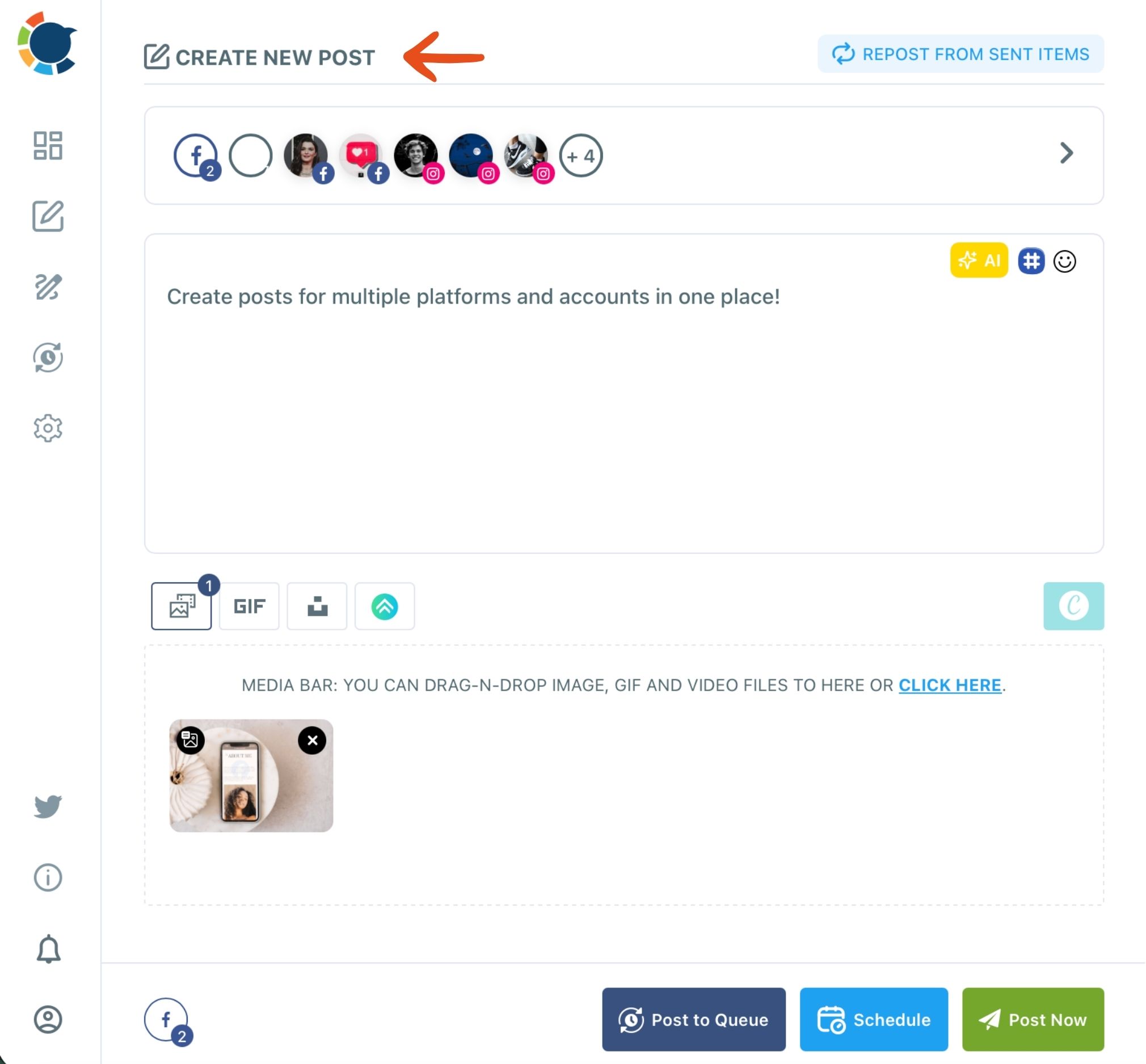
The same AI sits behind the social media post generator pages for each platform, so a fresh version is one instruction away. Here is the shared composer in motion:
Which hashtags can get a business post hidden?
Hashtags you have not checked are the risk: a tag tied to spam or banned content can push a post out of view. Pick tags that match the post's topic and drop any you do not recognize.
Circleboom Publish's social media hashtag generator pulls 20 to 30 hashtags matched to the post's topic and adds them in bulk. Matched tags are a better starting point than a list copied from a competitor, but read them once before you publish.
The usual sign of a hidden account, often called a shadowban, is a sudden, unexplained drop in reach on one platform. Platforms rarely announce it. The way to notice is to watch impressions per post over time in Post Analytics and treat a cliff that has no content explanation as a signal to review your recent tags.
If reach does fall, change one thing at a time. Drop the tags you added most recently, vary the next few posts instead of repeating a format, and keep a steady, queued cadence rather than posting in bursts. Activity that looks like a real, consistent presence is the opposite of what spam filters look for, and it gives the account a fair chance to recover.
Is it a mistake to post a bare link?
Yes, because a link posted without tracking tags can never be traced back to the post that sent the traffic. Once it goes out untagged, that post's clicks are lost to your analytics for good.
In Circleboom Publish, paste the link into the post, click the link icon next to it, and fill in source, medium and campaign. The UTM Link Builder swaps in the tagged URL automatically, so Google Analytics can show which post and platform drove each visit.
This matters most for sponsored or affiliate posts, where you will be asked what the post delivered. A tagged link answers that question; a bare one leaves you guessing.
Take a bakery that shares its new order page on Instagram, Facebook and LinkedIn in the same week. With three tagged links, the analytics show which network sent the orders. With three bare links, every visit lands in one generic bucket, and the next campaign is planned on a guess.
Why delivery mistakes go unnoticed longer than content mistakes
Delivery mistakes last longer because nobody complains about them. A divisive post gets angry replies within the hour, so you learn fast. A repeated caption, a spammy tag or a bare link gets silence, and silence looks the same as an ordinary slow week.
That difference in feedback is the real reason a business needs both columns of the table. The left column corrects itself through public reaction, painfully but quickly. The right column only shows up as a slow slide in reach, or as a campaign report that cannot say which post worked.
An account can spend months blaming its content for a drop that came from repeats and tags. The posts were fine. The way they went out was not.
Police only the topics, and you catch the loud mistakes while missing the expensive ones.
Knowing what not to post on social media is half the job. Knowing how not to post it is the other half, and that half needs a process rather than a gut check.
How Circleboom Publish catches these mistakes before they publish
Circleboom Publish puts every check from both lists into the steps a post already takes: write, preview, tag, schedule and, for teams, approve. You do not need a separate tool for each rule.
Previewing each network before it publishes
When you log in to Circleboom, the Create New Post composer shows a Post Preview tab for each selected network. You see how a caption and image will look on Instagram, Facebook or LinkedIn before anyone else does. The AI writer handles repeats, the Hashtag button handles tags, and the link icon handles tracking.
The preview also catches a quieter mistake: a caption that fits one network and breaks another. Circleboom's own limits put LinkedIn at 1,300 characters, Google Business Profile at 1,500 and Instagram at 2,200, so a 1,400-character post is fine on Instagram and Google Business Profile but too long for LinkedIn. Instagram also needs at least one image or video, while a text-only post works elsewhere.
Checking each tab before you send turns the rule about what not to post on social media into one habit: never publish a version you have not seen.
Approval as the last gate for teams
For a business where more than one person posts, approval is the last gate. A teammate added as a User schedules posts, and each one waits for an Admin to approve or reject it. That is how a team uses Admin approval to keep what not to post on social media off its feeds without slowing down.
Three related needs often come up at this point. A written posting policy is the first, and a clear set of community rules shows how to phrase one so people follow it.
The second is access: a proper team setup beats sharing one password, because each person gets their own login and only their assigned accounts. The third is timing, since a post scheduled last week can be edited or deleted from the Outbox when the news changes overnight.
Compared with checking each network's own app, the difference is coverage. One composer and one approval queue mean the same checks run on every post, whichever platform it is headed to.
Your pre-publish checklist for business posts
Before anything goes out under your brand, run through this list:
- Read the post against your never-post topics: opinions, arguments, unproven claims, private data and borrowed content.
- Rewrite any repeat with the AI writer, and give each account on one platform its own version.
- Check every hashtag, and keep only the ones that match the post.
- Tag each link before it ships, so its traffic stays traceable.
- Route posts from teammates through approval, and sweep the queue when the news turns.
Five checks, one composer. That is the whole habit behind what not to post on social media, run the same way on every network you use.
→ Approve every post before it reaches your feeds
Frequently asked about business posting mistakes
Can I make a teammate's posts wait for my approval?
Yes. Add them to a Circleboom Publish team with the User role. Every post a User schedules lands in Waiting for Approval, and it publishes only after an Admin approves it; a rejection can carry a comment explaining what to fix.
What private or security details should never appear in a business post?
Leave out customer names, order or message screenshots, addresses, login details and anything visible in the background of a photo. On access, give staff only what they need: Meta recommends granting Facebook Page access through Page settings rather than sharing a password, and a Circleboom Publish team ends a person's access the moment you remove them.