
Promoting a business on Google often gets framed as a question of ad budget, and for local visibility that framing is backwards. The free Business Profile is where nearby customers decide, and no ad budget can buy a better place in it.
How do you promote your business on Google without paying for ads?
Claim and complete your free Google Business Profile, then keep it active with regular posts plus small Offers and Events. Circleboom Publish writes those Google Business Profile posts with AI and publishes them on a schedule or through a Queue, so the profile stays current without daily work.
→ Start promoting your business on Google
Why paying for Google Ads is the wrong first move for local visibility
Google Ads buy a paid slot above the results for as long as the budget runs; they do not buy a better position in Google's local results. Google's own page on how to improve your local ranking states it plainly: there is no way to request or pay for a better local ranking on Google.
Ads buy a slot above the results. The profile earns the map listing.
That distinction decides how to promote my business on Google when money is tight. The paid slot disappears the day the budget stops. The listing keeps working as long as it looks active, and keeping it active costs time, not media spend.
Google says local results mainly rest on relevance, distance and popularity. Of the three, only distance is out of the owner's hands. A complete profile, steady posts and real customer activity all work on the other two.
Paid options still have a place once the free foundation is running. The list of cost-effective small business advertising ideas covers the ones that fit a small budget.
For owners who want more no-spend options beyond Google, there are low-budget marketing ideas to borrow from the nonprofit world.
Circleboom Publish is the posting side of this free route: it creates, schedules and automates Google Business Profile posts, so the listing keeps signaling an open, active business. If you want to start there, schedule your Google Business Profile posts without adding an ad line to the budget.
The free Google routine: three pillars and the time they take
The free routine on Google rests on three pillars, and only one of them happens inside Google itself:
- Profile completeness, done once in Google: verification, category, hours, photos.
- AI-written posts, so the owner does not need a copywriter for Standard updates, Offers and Events.
- Automation, through a Queue or an RSS feed, so posts keep going out on busy weeks.
Circleboom Publish covers the second and third pillars for Google Business Profile: its AI writer drafts the posts, and its Queue and RSS automation publish them without a daily login.
In time, the routine is small. Writing a week of posts with the AI Google Business Profile Post Writer and letting the Queue release them at the profile's suggested times takes about an hour or two a week.
Batching a whole week is its own topic; the point here is that the cost is hours, not ad money.
The Google Business AI post generator is included in a Circleboom membership at no extra cost, so the copywriting pillar adds no separate subscription.
For the automation pillar, the automatic posting to Google Business Profile setup connects a blog or news feed by RSS. Each new item then posts on its own.
RSS posts are not reviewed by a person before they go out unless the rule is paused, so connect only a feed you trust.
What one week on the free routine looks like
Take a plumber with one van and no marketing help. A workable week is a practical tip every few days ("how to unclog a drain without chemicals"), a weekend Offer, and an Event for a free home inspection day.
Each post answers something a nearby customer might search, which is how a listing starts appearing for more than its own name.
Written with the AI and dropped into the Queue, that week takes one short sitting. That combination of words and timing is the practical core of promotion on Google when the budget for ads is zero, and the Google My Business scheduler handles the timing.
No designer is needed for the visual side either, since Canva and a ready-sized Google Business Profile template sit inside the composer.
Clinics show why the routine fits owners with no marketing staff. The healthcare marketing tips to grow a clinic pair well with a weekly post rhythm, since patient questions turn into posts with almost no extra effort.
Is your Google listing ready to promote from?
A listing is ready to promote from when it is claimed, verified and complete inside Google; posts cannot make up for a wrong category or missing hours. Google's own Business Profile page confirms that creating a profile and listing the business on Google is free.
Check these items in Google Business Profile before writing the first post:
- The profile is claimed and verified, so it is eligible to show on Search and Maps.
- The primary category and any extra categories match what customers search for.
- Opening hours, phone number and website are accurate.
- The logo, interior and exterior photos are clear and current.
- The business description says what you do and where.
Google's ranking guidance gives two reasons this checklist matters. Verification tells Google you are authorized to represent the business, which makes the profile more likely to show up in results. Businesses with complete and accurate information are also more likely to appear in local searches.
All of these settings live in Google Business Profile itself. Circleboom Publish does not edit them; it handles the posting that keeps a complete listing active afterwards.
Setup makes the listing eligible. Posting keeps it visible.
Many listings stop exactly there: complete, accurate, and with no post newer than the setup photos. They passed part one of optimisation and went quiet. The steady second part, posting, is where most free visibility is won or lost.
Free on Google and free on social: one post, two audiences
The same Google Business Profile post can also go to Facebook and Instagram at no extra cost, which reaches people who follow the business on social media but never search Google for it. Circleboom Publish sends one piece of news to several platforms from its universal composer, and the AI can rewrite each version so no platform gets an exact copy.
The two audiences behave differently:
- Google searchers are nearby and ready to act: they call, ask for directions or book from the post.
- Social followers already know the business and need a reason to come back this week.
A weekday Offer on the Google listing can be echoed as an Instagram Story and a Facebook post. A workshop announced as a Google Event can go out as a Facebook post too.
In the other direction, a social post can point followers to the Google listing, where directions, hours and the Call or Book button sit.
People who see the news on Instagram often search the business on Google later, so the social echo feeds the Google side as well. Sharing business news on other social channels also builds the online mentions that help a business become better known, which is one of the things Google's local results weigh.
Managing those channels from one place is what keeps the echo free in time as well as money. The option to manage multiple social media accounts puts the Google profile, the Facebook page and the Instagram account in one Outbox calendar.
What changes between the Google version and the social version
The news stays the same; the shape changes. A Google Business Profile post holds up to 1,500 characters, and a nearby searcher scans rather than reads, so the Google version keeps to what, when, where and the button. An Instagram caption can run longer and carry more personality, and a Facebook post can add the story behind the offer.
That is why the AI rewrite matters. One instruction such as "shorter, with the date and the button first" turns a long social caption into a Google version, and a second instruction turns the Google version into something warmer for followers.
Tag each version's link with the UTM Link Builder, and Google Analytics shows which platform sent the visit.
How to promote your business on Google with AI posts and a queue
To promote your business on Google with posts, write each update with the AI Google Business Profile Post Writer and send it to the Queue, which publishes it in the profile's next open time slot. The routine below runs in three phases inside Circleboom Publish: open the Google Business Profile composer, write the post with AI, then queue it.
Open the Google Business Profile composer
- Open Circleboom Publish and check that your Google Business Profile is connected under Manage Social Accounts.
- Choose the Google Business Specific post from the dashboard card or the Create New Post menu; a single connected profile is selected automatically.
Write the post with the AI writer
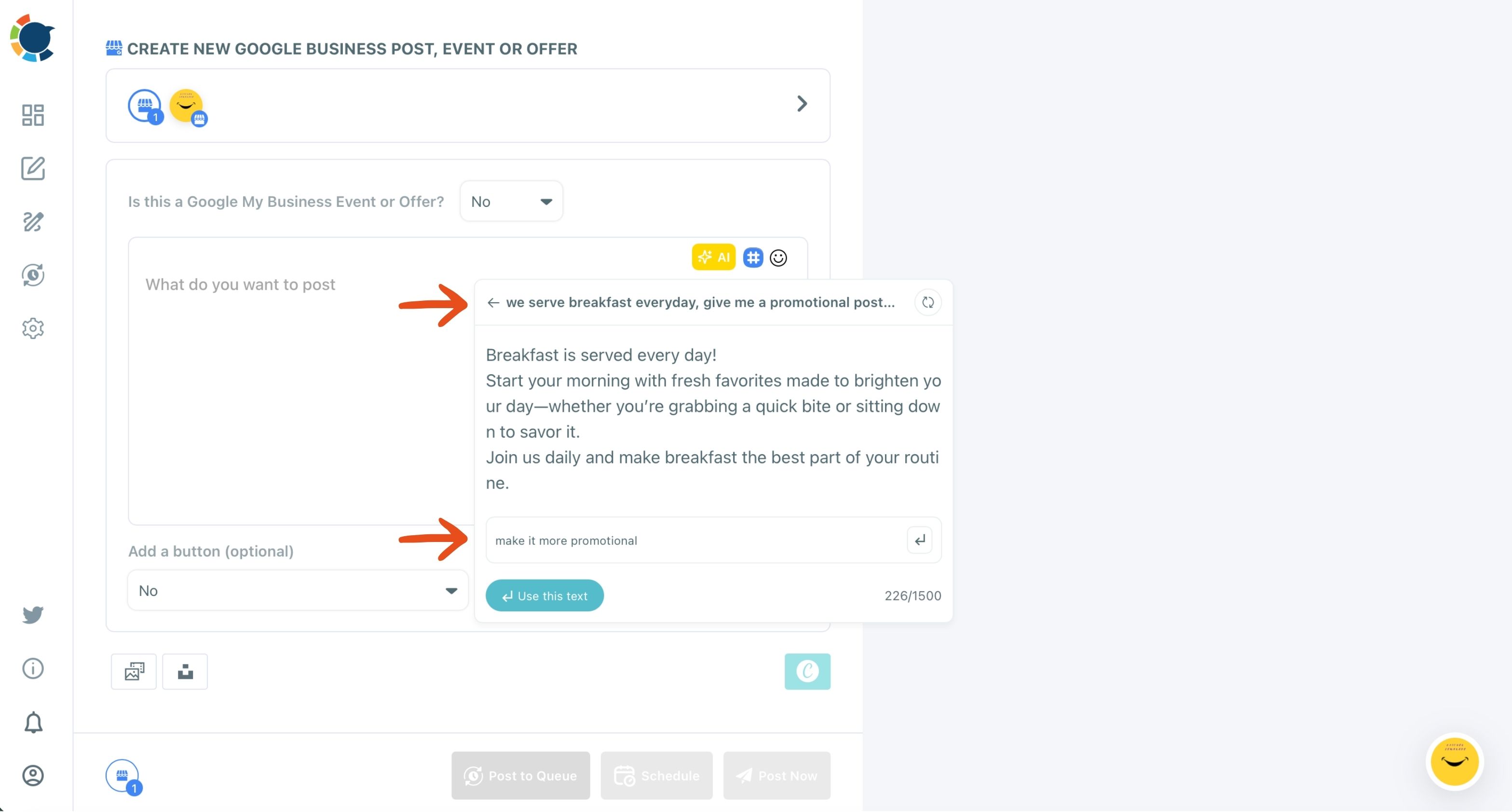
- Click the gold AI button above the text field and describe the promotion in one plain sentence.
- Type a second instruction into "Improve this response," such as "make it more promotional," until the draft reads right, then click "Use this text."
Queue the post so it publishes on its own
- Add an image and a button, for example a Canva design and an Order Online or Book button with your link.
- Click Post to Queue, or click Schedule and pick one of the suggested time slots for a post tied to a date.
Putting the AI first clears the hardest part, finding the words, before any design or timing decision. Queuing last means the post goes out at a good time for the profile even when nobody is at a desk.
AI writer in action: turning one plain sentence into a promotional Google Business Profile post, ready to publish.
What a steady free routine adds up to on Google
A steady free routine adds up to calls, direction requests, bookings and walk-ins from people who were already searching nearby. Circleboom's own profile shows the scale is real even outside retail: a software company, it reached 5,000+ Google Maps views a month through its Google Business Profile and turned those views into sales.
To see the free route working, watch calls, direction requests and website clicks rather than likes, and tag your post buttons with UTM links.
Standard posts aimed at real questions are the quiet engine here. A heating and cooling company that posts how to clean an air conditioner each year has a chance to show up for someone typing "how to clean my AC" into Google. That searcher never heard of the business and was not looking for it.
Repeat that across a season of posts, and the listing answers far more searches than its name alone ever could.
The effect compounds. Each post is one more reason for Google to show the listing for a search beyond the business name, and each customer it brings in is someone who may mention the business to the next person. Promoting your business on Google this way does not spike and stop the way a paused ad campaign does.
Promoting your business on Google without ads, in short
To promote your business on Google without paying for ads, complete your free Business Profile in Google first. Then keep it active with AI-written posts released by a Queue or RSS feed, and give people a dated reason to visit with small Offers and Events. Echo the same posts on Facebook and Instagram to reach the people who never search.
Paid placement ends when the budget ends. A well-run profile keeps its place on the map for as long as it stays active, and Circleboom Publish keeps it posting for an hour or two a week.
→ Promote your business on Google without ad spend
What People Ask about promoting a business on Google without ads
Does Google Maps make sense for a business that works from an office or sells online?
Yes, if the business has a real place where it does its work, it can hold a profile and show up on Maps. The location does not have to be where the selling happens: Circleboom's own listing belongs to a software company, and its posts point Maps visitors to the website.
Will this routine work for a dentist, a restaurant or a law firm?
Yes, it fits any business people search for nearby before they choose, from clinics to law offices. Restaurants are the classic case; for that side, see restaurant marketing.
How do offers and events turn profile views into visits?
An Offer appears in Search and Maps at the moment someone nearby is deciding whether to visit, and an Event shows a visible date range to people making plans. Run small Offers often, such as a free drink with lunch this week, and post each Event several days ahead so Google can surface it in time.
Can I change a queued Google post before it goes live?
Yes. Queued and scheduled posts sit in the Outbox, where the List View has Edit and Delete for each post, so a wrong date or price can be fixed before it reaches the profile.
Can I give customers a discount for leaving a review?
No. Google prohibits offering a discount, gift or anything else in exchange for a review, so tie every Offer to the visit or purchase, never to the review.