
To make your social media posts more appealing, fix three layers in order: the visual people see first, the words they read next, and the way the post is delivered. Each of the eleven fixes below is one change plus the composer control that makes it.
Appealing posts win the first second with a strong visual, hold attention with a clean opening line, and arrive in the right shape for each network. Circleboom Publish creates, edits and schedules posts for Instagram, Facebook, LinkedIn, Pinterest and six more platforms from one composer, with Canva, an AI Carousel Generator, AI caption edits and a Hashtag Generator built in.
→ Create more appealing social media posts
How to make your social media posts more appealing: the eleven fixes follow, grouped by layer, with a symptom table to pick the right one.
Most advice on this topic stops at "use better images and write a hook." That is correct and incomplete.
It skips the question of which fix your posts need, and it skips where each fix lives in the tools you already use.
Why social media posts that go out regularly still get ignored
Posts get ignored when the visual does not stop the scroll, the first line does not reward the stop, or the post arrives in a shape the network crops or cuts. Posting more often fixes none of those three.
A low-engagement account often has a consistency habit and a content gap at the same time. Steady posting keeps an account visible, but every network also rewards posts that earn engagement quickly after going live, and that part depends on the post itself.
Circleboom Publish puts the visual tools, the writing tools and the per-network preview for Facebook, Instagram, LinkedIn and Pinterest posts in one composer, which is why each fix below names a control instead of a separate app. The page on how to make social media posts more appealing shows the full set side by side.
The 11 fixes for more appealing social media posts
Here are the eleven fixes, grouped as visual, words and delivery. Work through the layer your posts are weakest in first.
Visual fixes: what stops the scroll
The visual is judged before a single word is read, so it gets the first look. Shape counts as much as subject here, and the platform specs further down show what each network asks for.
- Use your own photo, cut to the platform's shape. Your own photos beat stock, and each network wants its own shape; edit and resize in Canva from the composer's media bar, or pull a stock photo from Unsplash when you have none.
- Turn multi-point posts into a carousel. Give the AI Carousel Generator a short instruction, pick a template and edit fonts and colors, so the slides look designed without a designer.
- Switch to short vertical video with music for motion. Reels and Shorts are the stronger video formats, and the composer's music library scores Reels, Shorts, TikTok videos and Stories by genre, tempo and mood.
- Add a GIF for reactions and replies. Giphy sits in the media bar, so a reaction post never leaves the composer.
Word fixes: what holds attention
A visual earns the stop; the words decide whether the reader stays. Every fix in this group works on text you have already written, so none of them needs a blank page.
- Rewrite the first line. Run More Punchier from the gold AI button so the point arrives before the "more" cut.
- Break the wall of text. Improve Structure and Spacing turns a dense caption into short lines that read on a phone.
- Cut what does not earn its place. Condense trims filler, which matters most on short-text networks; if LinkedIn is your main channel, read how to make a viral LinkedIn post too.
- Use hashtags matched to the post. The Hashtag Generator pulls 20 to 30 topic-matched hashtags and adds them in bulk.
- Move hashtags, links and extra details to a first comment. On Facebook, Instagram, LinkedIn, YouTube and TikTok, the first comment is scheduled with the post, so the caption keeps only the message.
Delivery fixes: what arrives intact
A post that is strong in the composer can still arrive cropped, cut off or out of place on one network. These two fixes protect the work done in the first nine.
- Check every network's preview before sending. The Post Preview tabs show each network's version, including where the caption is truncated.
- Rewrite the whole post when the angle is wrong. Generate Post from Text turns your draft into a new post with a chosen goal, tone, language and platform.
One small addition sits outside the count: add Alt Text to images on networks that support it, such as Facebook, Pinterest, Google Business Profile and Threads. It describes the image to search engines, so people searching that topic can find the post through image search.
Few posts need all eleven. The symptom table below tells you which ones yours need.
Which fix fits which symptom in your social media posts?
Match what you see in your numbers to the layer that is failing. A symptom points to a layer; the layer points to the fix.
| What you see | Weak layer | Fixes to try first |
|---|---|---|
| People scroll past with no reactions | Visual | 1, 2, 3 |
| Reactions but no comments or saves | Words | 5, 6, 7 |
| Caption gets cut before the point | Words | 5, 9, 10 |
| Good on one network, flat on another | Delivery | 1, 10 |
| Hashtags crowd the caption | Words | 8, 9 |
| The post feels like every other one | Words and visual | 2, 11 |
The table works because each fix targets one failure. Applying all eleven at once makes the post busier and tells you nothing about what worked.
Start with the row that matches your most common symptom, apply its first fix to your next three posts, and only then move to the next fix. Small, separate changes are the only kind you can read in your numbers afterward.
What one Instagram and Facebook post looks like before and after the fixes
An illustrative case shows how the layers stack. Picture a bakery announcing a weekend special on Instagram and Facebook.
Before: a stock photo of bread, a caption that opens with the bakery's history, the price in the fourth sentence, and a block of hashtags under it.
Nothing in it is wrong, and nothing in it stops a thumb.
After: the bakery's own photo of the special, cropped square for the Instagram feed (fix 1). The first line names the special and the day (fix 5). The caption is three short lines (fix 6), the hashtags and the order link move to a first comment (fix 9), and the Post Preview tabs confirm that both networks show the price before the cut (fix 10).
Four small changes, no redesign, and the post now does its job in the first second.
To learn which fix moved the numbers, duplicate the post, change one thing, and compare both versions in social media post analytics.
If engagement was low long before any change, the cause may sit outside the post entirely, in posting gaps or a quiet account.
How Circleboom Publish applies these fixes in one composer
Circleboom Publish is a multi-platform composer that designs, writes, previews and schedules one post for Instagram, Facebook, LinkedIn and other connected accounts in a single send. Unlike a design app, a caption tool and a scheduler used one after another, every fix above sits in the same screen.
When you log in to Circleboom Publish and open Create New Post, you pick accounts across platforms, write the text and attach media. Post to Queue, Schedule and Post Now sit at the bottom of the same screen.
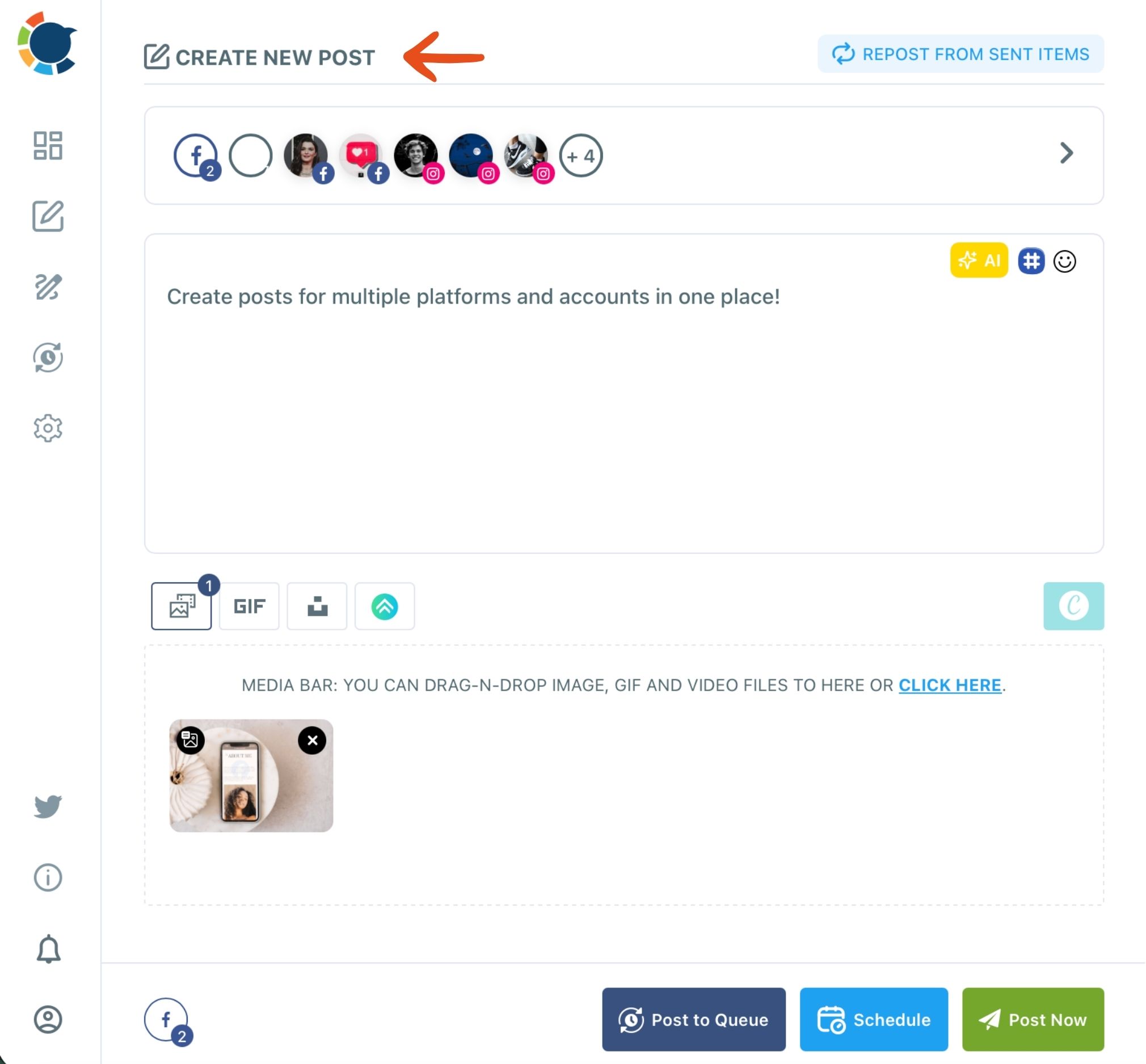
The gold AI button handles fixes 5 to 7, the Hashtag button handles fix 8, the media bar handles fixes 1, 2 and 4, and the composer's music library handles fix 3. The AI post generator covers fix 11 when a draft needs a new angle from the same source.
Habits that keep the fixes working at scale
Save as Draft holds a half-finished post, accounts, text and media included, so a fix never gets rushed. A saved Share Group selects the same bundle of accounts in one click, so the post you polished reaches every account it was meant for.
One limit matters here. The AI writer does not apply each platform's character limit by itself, so name the limit in your instruction when a version is headed for a short-text network.
The practical result is one session per post instead of four tools per post. To try the full set, start with the content creation tools in Circleboom Publish.
Building an Instagram post from an AI draft and a Canva design: Circleboom's walkthrough of fixes 1 and 11 working together.
How do you break up a wall of caption text on Instagram and other phone feeds?
Break a long caption into short lines of one idea each, put the point in the first line, and move hashtags and links out of the body. On a phone, a dense block reads as effort; short lines read as a message.
In the composer, Improve Structure and Spacing does the line breaks for you on text you have already written. Pair it with More Punchier on the opening line and Condense on the rest, then check the result in the Post Preview tab for each network.
Emojis can help a broken-up caption scan faster when the tone allows it. The AI edit list includes Add Emojis, and the composer's Emoji button gives a dedicated picker when you want one exact emoji in one exact spot instead of a general sprinkle.
Why the first line carries the whole caption
Most feeds cut the caption with a "more" link, so the first line is all that many readers see. The composer accepts up to 2,200 characters for an Instagram caption, but length is a ceiling, not a target. A caption that uses the space well puts its best sentence first and lets the rest support it.
A caption that reads well on a phone is a caption whose first line could stand alone.
Do scheduled social media posts reach fewer people than live ones?
No. A scheduled post is published like any other, and a well-chosen slot usually works in its favor. The Schedule window in Circleboom Publish lists suggested times drawn from when that account's followers are active, and choosing one of those over a random hour is tied to up to 300% more engagement on the same post.
The reason is the same signal from earlier: networks reward posts that earn engagement soon after going live. A post that lands while followers are online has a better chance at those early reactions.
The Queue then keeps the cadence steady, dropping each new post into the next open slot for that account. Add Best Times to Post fills those slots with each account's suggested times, so queued posts inherit the timing without any extra step.
Getting the timing right does not replace the eleven fixes. Good timing puts a post in front of more people; it cannot make those people care.
Instagram and Pinterest specs that make a visual look intentional
A visual looks intentional when it matches the network's own shape. Pinterest's creative best practices recommend a vertical 2:3 aspect ratio, a clearly visible logo, and text overlay stacked with key messaging at the top.
Instagram publishes its own guidance on image resolution for photos you share, including how photos outside its supported shapes get cropped. Check it before you design for the feed, so the subject of the photo is not the part that gets cut.
Inside Circleboom Publish, the composer's own limits apply per network: Instagram takes up to 10 images, Pinterest takes one image per pin, and a YouTube Shorts video in the composer runs up to 60 seconds. When one post goes to several networks, it has to respect the strictest limit among them.
Media rules differ too. A text-only post that is fine on a text network is not valid on Instagram, which needs at least one image or video, so check the Instagram preview before you send.
Facebook takes up to 10 images per post and LinkedIn up to 20, so a carousel built for one may need trimming for another.
If reach on one network drops suddenly while nothing about the posts has changed, the problem is likely reach rather than design. On LinkedIn, a LinkedIn shadowban checker is the place to start.
Make one change to your social media posts and measure it
Appealing posts are built, one controlled change at a time.
→ Fix your next post with Circleboom Publish content creation
Appealing social media posts FAQ
Do carousels get more engagement than single-image posts?
Often, when the post has several points to make. On LinkedIn, Circleboom has seen carousels draw around 200% more impressions and engagement than a plain post; a single image still suits a post built on one clear picture.
Can I post a social media post again if it did well?
Yes. Repost From Sent Items in Circleboom Publish sends a proven post out again, picked from that platform's Content Performance Analytics; for Facebook specifically, see how to repost on Facebook.
Should hashtags go in the caption or the first comment?
Where a first comment exists, put them there; you can also schedule first comments on LinkedIn with the post. Threads, Bluesky, Pinterest and Google Business Profile have no first comment, so keep a short, topic-matched set at the end of the caption there.