
You select your company account, your product account and your founder's account, paste the launch tweet, and only one X account stays checked.
That is not a bug. When you try to post the same tweet to multiple accounts on X, you run into X's rules against identical posts across accounts you operate, and Circleboom enforces that before X does.
Why can't you post the same tweet to multiple X accounts at once?
X's automation rules ban duplicative or substantially similar posts across multiple accounts you operate, so identical tweets risk limited reach or suspension. Circleboom Publish manages multiple X accounts one post at a time and uses its AI Social Media Post Generator to write a distinct version of the same message for each account.
→ Post the same tweet idea to multiple accounts, reworded for each
The symptom: one launch tweet, three X accounts, and only one checkbox
A typical SaaS team runs three to five X accounts: the company brand, a product or changelog account, a support account and one or two founders. On launch day, the natural instinct is to post the same tweet to multiple accounts at the same minute.
Two things then go wrong. In Circleboom Publish's X composer, the account selector lets you check only one X account per post. And teams that force the pattern through other means often notice quieter reach on all of the accounts, or a lock on one of them.
Both symptoms share one root cause. The safe way to post the same tweet to multiple accounts, in message rather than word for word, starts with understanding it.
The root cause: why X won't let you post the same tweet to multiple accounts
X prohibits posting identical or near-identical content from several accounts you control. The developer-facing X automation rules say you may not post duplicative or substantially similar posts on one account or over multiple accounts you operate.
X's authenticity policy lists the same behavior under "not allowed": operating multiple accounts that post substantially similar or identical content to one another, for example by cross-posting. Localized posts in another language are allowed.
To X, three accounts posting one tweet look like one operator trying to look like three.
That reading is the point of the rule. Identical posts from several accounts are the signature of spam networks and coordinated boosting, so X's systems treat the pattern as manipulation even when the intent is an honest product launch.
The consequences scale with how often it happens:
- Lower reach on the duplicated posts.
- Account restrictions, such as a temporary lock.
- Suspension in serious or repeated cases.
If one of your accounts has already been locked, why does Twitter keep locking my account walks through the usual triggers and the recovery steps.
How Circleboom Publish stops the duplicate before X sees it
Circleboom Publish builds two safeguards into its X tools, and both point the same way.
The first is the account selector, which stops any attempt to post the same tweet to multiple accounts at once. The X Specific composer allows one X account per post, as a deliberate guard against the identical, simultaneous posting pattern X's spam detection watches for. Composing for a second account means reopening the selector and choosing a different single account.
The second is a duplicate block. Circleboom does not let the same content go out again on X within one week, because X penalizes duplicate content. To reuse an idea, rephrase it; to resurface the original, repost it.
These are protections, not missing features. An account suspended for spam-like behavior loses its whole history and audience at once, which costs far more than writing a second version.
Circleboom is also a verified Enterprise partner of X, so every one of your accounts connects through X's official access, never through an unofficial workaround.
On every other network Circleboom Publish supports, selecting several accounts for one post is a normal workflow. On X it is the one pattern the product refuses, and that is the right call.
What SaaS teams should do instead: one message, a different tweet per account
The fix is to keep the message and change the tweet. You still post the same tweet idea to multiple accounts, but each X account gets its own version of the same announcement, written for its own audience and posted at its own time.
For a product launch, that looks like this:
- Company account: the announcement with the benefit and the link.
- Product account: the specific feature, with a short how-to.
- Founder account: the reason you built it, in first person.
- Support account: what changes for existing customers.
Each tweet carries the same launch, but no two share wording. That also serves the readers better, since the people who follow your founder rarely want the same sentence they just saw from the brand.
Write each X account's version with AI
Writing four versions by hand is where teams give up, and it is why so many try to post the same tweet to multiple accounts in the first place.
Circleboom's AI Social Media Post Generator removes that excuse. You give it the source text once and generate a new post per account, each with its own goal and tone.
If the launch already has a changelog entry or blog post, Generate Post from URL takes that link instead of pasted text and rewrites it the same way.
Every generated draft opens in the composer for a final edit, so each version can still read as if a person wrote it for that account. You can run several X accounts from one Circleboom login and still give each one a voice of its own.
Train each X account's AI voice once
AI Preferences is a per-account profile for X accounts. It sets the posting frequency, language, content interests, tone and style, and primary goal that the X composer's AI writes with by default.
Set it separately for every account. The founder account might use a conversational tone with engagement as the goal, while the changelog account uses an informative tone with traffic to a website. Once those profiles exist, the AI starts every draft in the right voice for that account, so versions differ from the first word.
How to post one tweet idea to multiple accounts without duplicate content
To post the same tweet idea to multiple accounts without duplicate content, generate a separate AI version of it for each account, then schedule each version from the X composer to one account at a time. The source text stays the same; the wording, angle and timing change per account. The steps below run in two phases: generate the versions, then schedule them.
Generate a distinct version for each account
- Log in to Circleboom and connect every X account your team runs under Settings, then Manage Social Accounts.
- Open Generate Post from Text in the AI Features menu and paste the launch notes or the original tweet into the text box.
- Choose a Main Goal and a Tone and Style for the first account, set the language, select X as the target platform, and click Generate Draft Post.
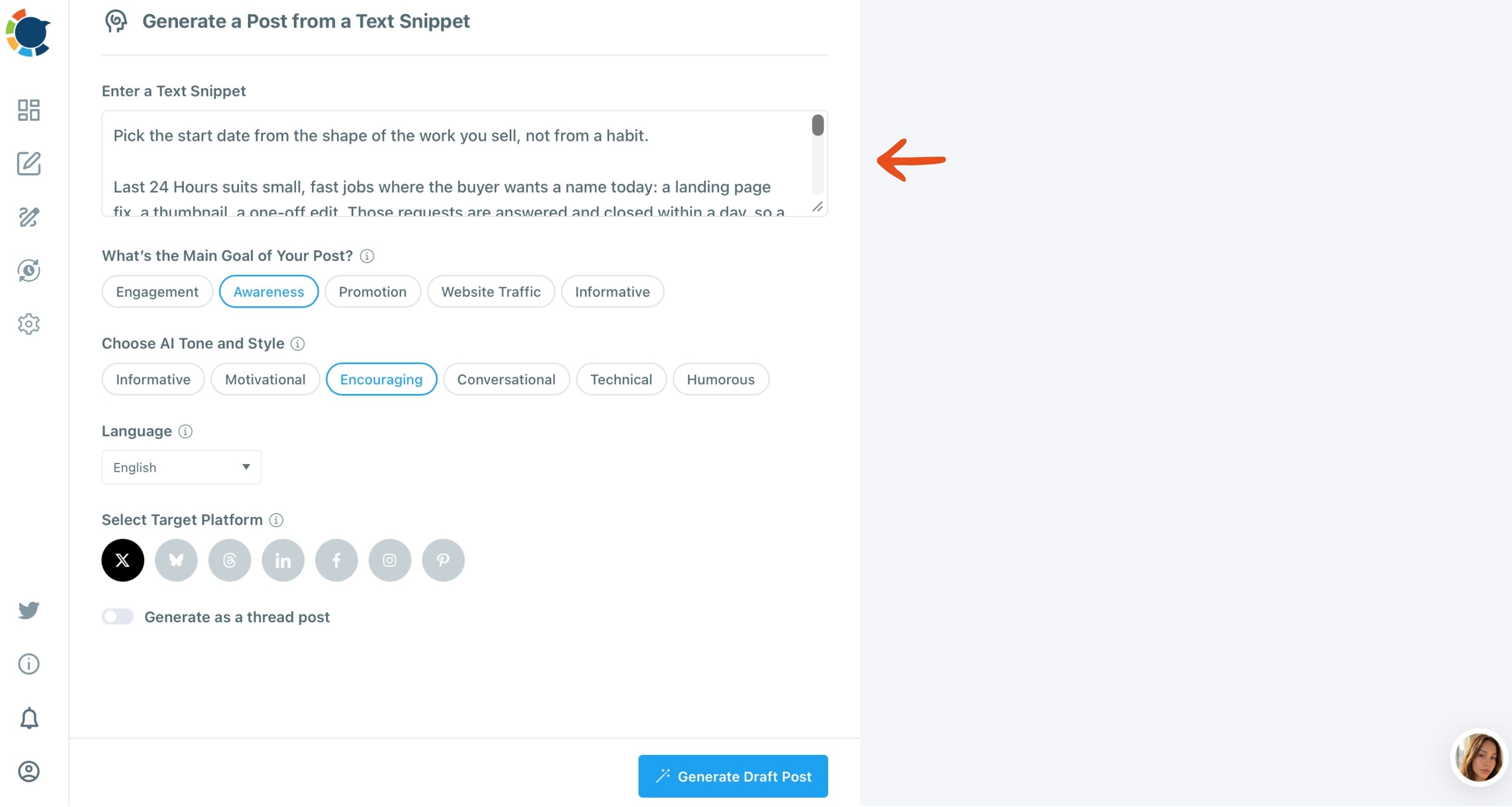
- Repeat the generation with a different goal or tone for each remaining account, so every draft has its own angle.
Schedule each version to one account at a time
- Edit each draft in the X composer and select the single X account it belongs to.
- Click Schedule and pick a slot from "Pick your best post time" for that account, spacing the versions across the day rather than the same minute.
- Check the Outbox calendar to confirm every account has its own version at its own time.
Generating first and scheduling second means the uniqueness exists before anything is scheduled. By the time a version reaches the composer, it is already a different tweet, so the one-account selector and the weekly duplicate block never have anything to stop.
The whole method fits in three lines:
- One source text.
- One AI version per account, each with its own goal and tone.
- One account per post, at separate times.
How to resurface a good tweet without posting a copy
Auto Repost resurfaces the original tweet itself, so it never creates a duplicate. It is the right tool when a tweet did well and you want more people to see it, instead of pasting it again next week.
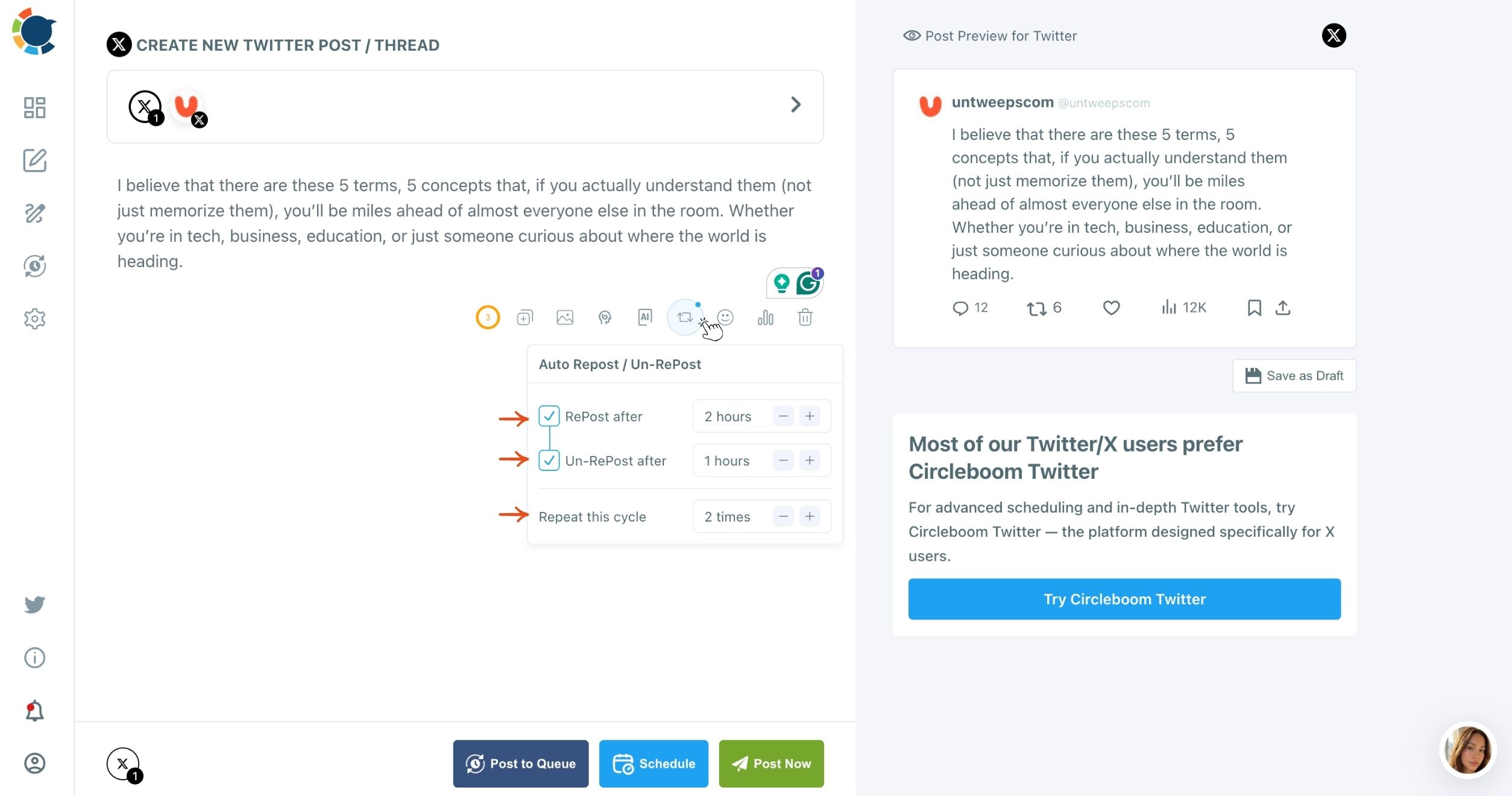
The settings live in the X composer and are set before the tweet is sent:
- RePost after: the delay before Circleboom reposts it.
- Un-RePost after: when that repost is removed again.
- Repeat this cycle: how many times the loop runs.
A tweet stays visible in a follower's timeline for roughly 12 minutes. Auto Repost gives the same tweet new windows hours later, which matters for SaaS teams with customers in several time zones.
By Circleboom's own observation, steady use of Auto Repost can lift impressions and engagement by up to 300% compared with a single post.
Auto Repost cannot be added after publishing, so turn it on while composing the company account's main launch tweet.
Can you post one message to X and other platforms at the same time?
Yes, with one X account in the mix. Circleboom Publish's universal composer, Create New Post on All Platforms, can send one post to an X account together with LinkedIn, Facebook, Instagram and other networks in a single action.
The X rule is about multiple X accounts, not multiple platforms. So a launch post can go to the company's X account, its LinkedIn Company Page and its Facebook Page together, while the founder and product accounts on X each get their own version from the X composer.
If that brand-wide combination repeats every launch, save it as a Share Group under Settings, then Manage Share Groups, and pick it in the composer under Select by Share Group. Keep one X account in the group, so the bundle never sends the same text from two X accounts.
If you write tweets often and want faster drafts outside the launch flow, the AI Tweet Generator covers single tweets and threads.
Teams that regenerate past winners can follow the approach in how I regenerated my viral tweets with AI.
Who should post on which X account in a SaaS team
The safest multi-account setup also decides who touches which account. Circleboom Publish's Team Management lets you add people as Admins or Users and assign only the accounts they handle, with a User's posts waiting for approval before they go live.
A support lead, for example, can draft for the support account without ever seeing the founder's account. That separation keeps versions from leaking across accounts by mistake.
For the account-access side on X itself, see how can I grant other people access to my Twitter account.
For a wider view of running several accounts day to day, how to manage multiple Twitter accounts covers switching, scheduling and staying organized.
"But we just want the launch to look coordinated"
That is the most common objection, and it is fair.
Coordination is good; trying to post the same tweet to multiple accounts word for word is not.
A launch can land on every account within the same afternoon, with each account saying it in its own words, and it will look more coordinated, not less.
The second objection is time. Four handwritten versions take real effort, but four AI versions from one source text take a few minutes, plus a quick edit each.
The rules of thumb in the dos and don'ts of Twitter automation point the same way: automate the work, never the duplication.
One message, a different tweet per account, posted at different times: that is the version X rewards.
→ Give every X account its own version of the tweet
Multi-account X questions for SaaS teams
Can a teammate's account repost our company tweet?
Yes, a person reposting a tweet by hand is normal X behavior. The rules target operators posting duplicative content across accounts they run, so avoid automating the same repost pattern across every account you control.
How different do two versions need to be?
Different enough that they are not substantially similar: change the angle, the opening line and the call to action, not just one word. A new hook or a fresh fact per account is a good test.
Is posting the same tweet in two languages allowed?
Yes. X's authenticity policy allows localized posts in another language, and Generate Post from Text can produce the version in a different language for a regional account.
What is the biggest mistake teams make with multiple X accounts?
Scheduling every account's launch tweet for the same minute. Even with different wording, spacing the posts across a few hours reads as natural activity and reaches more time zones.