A Twitter profile gets judged in a few seconds, and most people check more than the follower count. They open your Following tab, glance at who follows you and compare the two numbers. If those lists are full of empty accounts left over from old growth tactics, the profile reads as careless before anyone reads a single post.
Visitors judge a Twitter account by who it follows, who follows it and how those two numbers compare, so credibility comes from cleaning both lists rather than growing the count. Circleboom finds fake, bot and no-photo accounts on both sides of your Twitter network through approved X Enterprise API access and lets you unfollow or remove them in paced, confirmed batches.
→ Audit your follows to make your Twitter account look credible
Below: which accounts to cut first, which to keep, and how fast to go.
What people check before they trust a Twitter account
People who evaluate an account look at its network, not just its posts. A sponsor, a recruiter, a journalist or a potential customer usually runs the same quick check, whether they know it or not:
- Who the account follows, and whether those accounts look real.
- Who follows the account, and whether those followers look real.
- The follow ratio, meaning followers compared with following.
- Profile photos in both lists, because blank default avatars stand out.
- The account's own bio and recent posts.
The last item is the one most advice covers, and it matters.
But a sharp bio cannot make a Twitter account look credible on its own when the lists around it say otherwise. The first four are where accounts quietly lose trust, because they carry years of history that the owner stopped looking at.
Credibility on X is a network signal, and you control more of that network than you think.
If you want to make a Twitter account look credible, the fastest wins sit in those first four checks. You can run a follower audit that shows both sides of your network before you change a word of your bio.
Why your following list matters more than your follower count
Your following list is the half of your network you built yourself. Nobody can follow a bot on your behalf, so a Following tab full of empty profiles says something about your own judgment.
A messy follower list can be explained away; a messy following list cannot.
That is the part most credibility guides skip. They focus on posting habits and stop there.
But a visitor who opens your Following tab and sees rows of default avatars with 5,000 follows and 30 followers draws a conclusion fast: this account followed anyone who might follow back.
The arithmetic shows why the following side moves the needle. An account with 2,400 followers that follows 6,000 accounts has a follow ratio of 0.4. If 2,000 of those follows are fake, inactive or one-sided leftovers and you unfollow them, the account now follows 4,000 and the ratio rises to 0.6.
You gained zero followers and the profile reads differently.
Cleaning who you follow is the one credibility fix that depends on nobody else. Followers come and go on their own schedule. Your following list changes the moment you decide it should.
Accounts drift after you follow them
There is a second reason to start here. Accounts change after you follow them.
A real account you followed years ago may since have been abandoned, taken over or turned into a spam feed, and it still sits in your Following tab looking like a choice you made last week. A periodic review catches those drifted accounts along with the obvious fakes. That is why I treat it as routine upkeep, not a one-time fix, if you want to make a Twitter account look credible and keep it that way.
What fake followers do to how your account reads on X
Fake followers make an account look bigger and weaker at the same time. They add to the follower count but never like, reply or repost, so the engagement on each post looks thin next to the audience size. Anyone who compares the two numbers notices the gap.
The damage reaches past appearances. Bots distort your own growth analysis, and a sudden wave of them after a giveaway or a viral post can make honest growth hard to trust, even for you. The explainer on what happens if your Twitter followers are fake walks through those effects one by one.
There is one thing to keep straight. Removing fake followers does not guarantee more engagement or reach, and nobody serious will promise you that it does.
What it does is make your follower list describe real people, so the numbers you show a partner mean what they appear to mean. That is the honest version of a credible audience.
How Circleboom cleans both sides of your Twitter network
Circleboom audits the accounts you follow and the accounts that follow you, and flags the ones that look fake, inactive, one-sided or unfinished. Each flagged account appears in a sortable list with its tweet count, join date, following and follower counts, follow ratio and an activity label, so you review the evidence before you act.
The classification is multi-signal. No single trait flags an account. Circleboom looks for overlap: no profile photo, no bio, very few tweets for the account's age, a very recent join date, an extreme follow ratio and low engagement. The more of those line up, the stronger the candidate.
The label is a starting point, not a verdict. A real person who never uploaded a photo can still show up, which is why every list has an Open Profile action and a Whitelist button.
Why the data source matters for a credibility cleanup
Circleboom works with X as an official Enterprise API customer, so your follower and following data come straight from X, with no password handed over and nothing scraped. That matters when the whole point of the exercise is to look trustworthy.
Unlike opening each profile on X and unfollowing one account at a time, Circleboom lists every candidate in one filterable view and processes your selection in the background. You can make your Twitter account look more credible with one audit of both lists instead of an afternoon of scrolling.
For the follower side specifically, Circleboom's tool to remove Twitter X followers handles the bulk removal.
Walkthrough: spotting the fake and bot accounts in your Following tab and unfollowing them in one pass.
How to make a Twitter account look credible, step by step
The steps run in three phases, starting with the list you control completely.
Clear fake and bot accounts from your following list
- Log in to Circleboom Twitter and connect the X account whose profile you want to clean up.
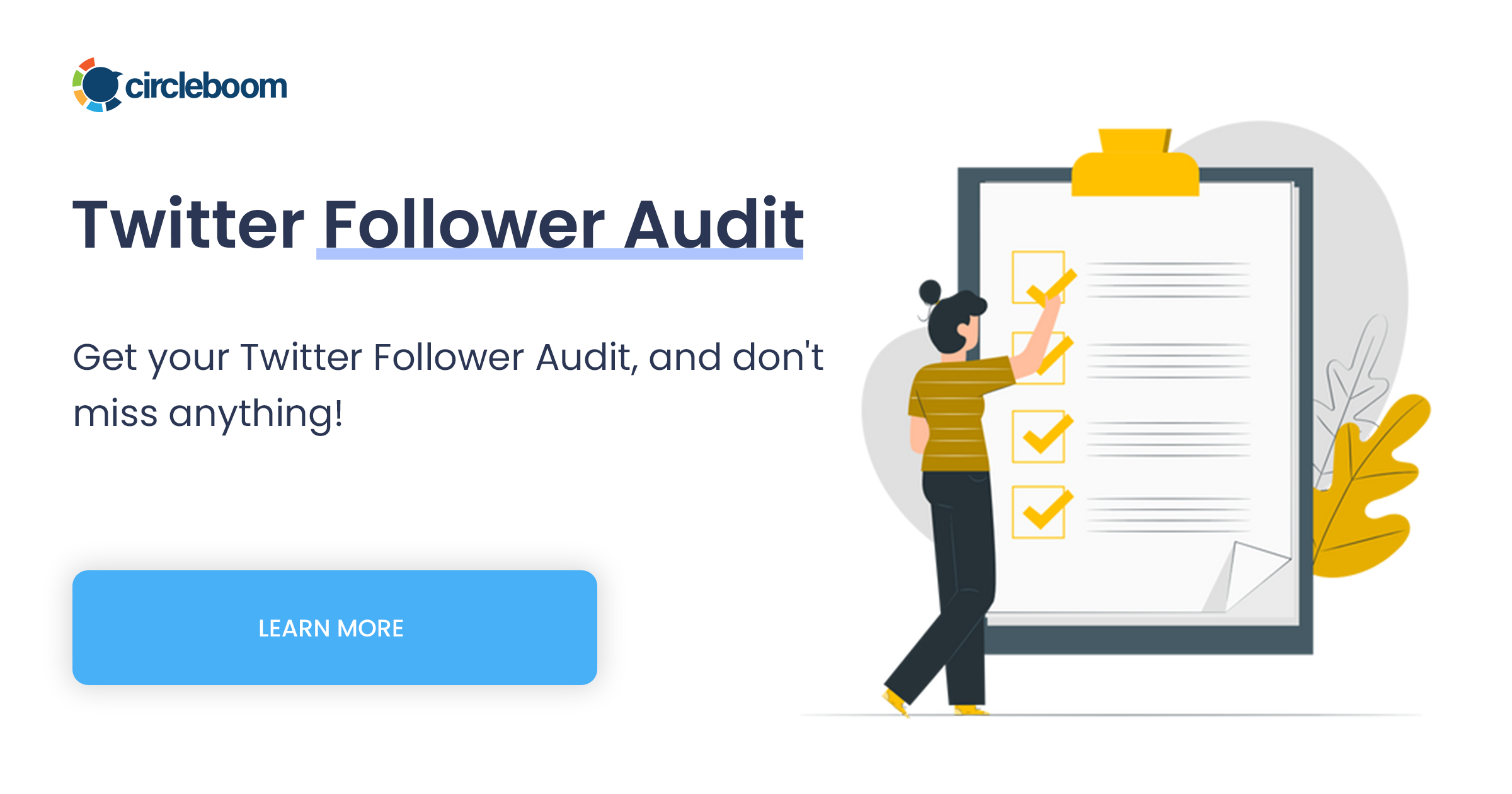
- Open the Followers and Following menu from the left sidebar. The cleanup views for both lists live here, grouped under Followers and Following.
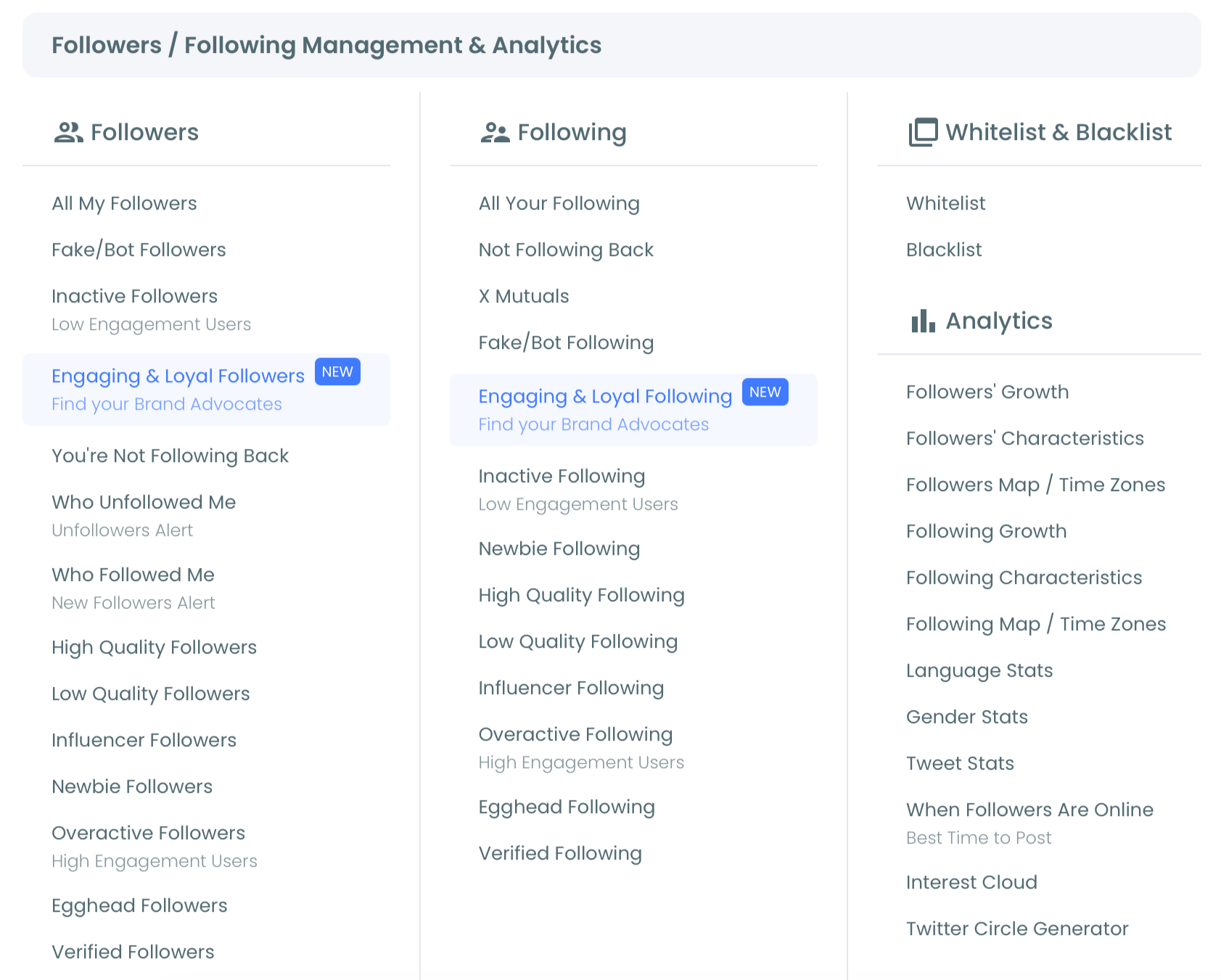
- Select Fake/Bot Following under Following. The page shows how many of the accounts you follow carry bot-like signals, for example "Displaying your 29 Fake/Bot of 2,677 following."
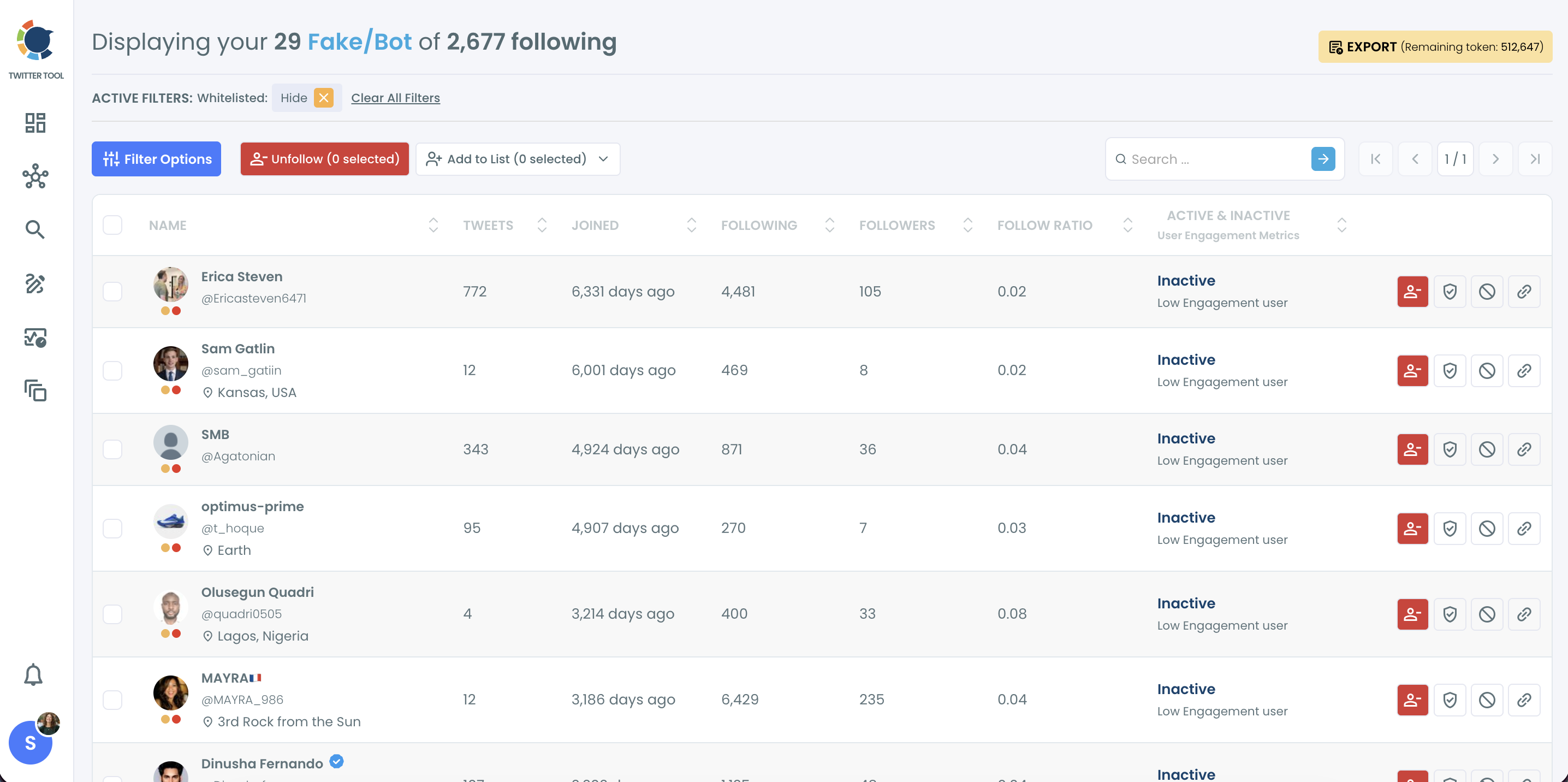
- Sort by Followers, highest first, and open the profiles near the top. A high-follower account in this list is the likeliest false positive, so check it on X and whitelist it if it is real.
- Select the confirmed accounts and click Unfollow. Circleboom asks you to confirm the count, then works through the queue at its paced speed.
Trim one-way follows that no longer serve you
- Open Not Following Back in the same Following group. It lists every account you follow that does not follow you, which is where old follow-for-follow residue usually hides.
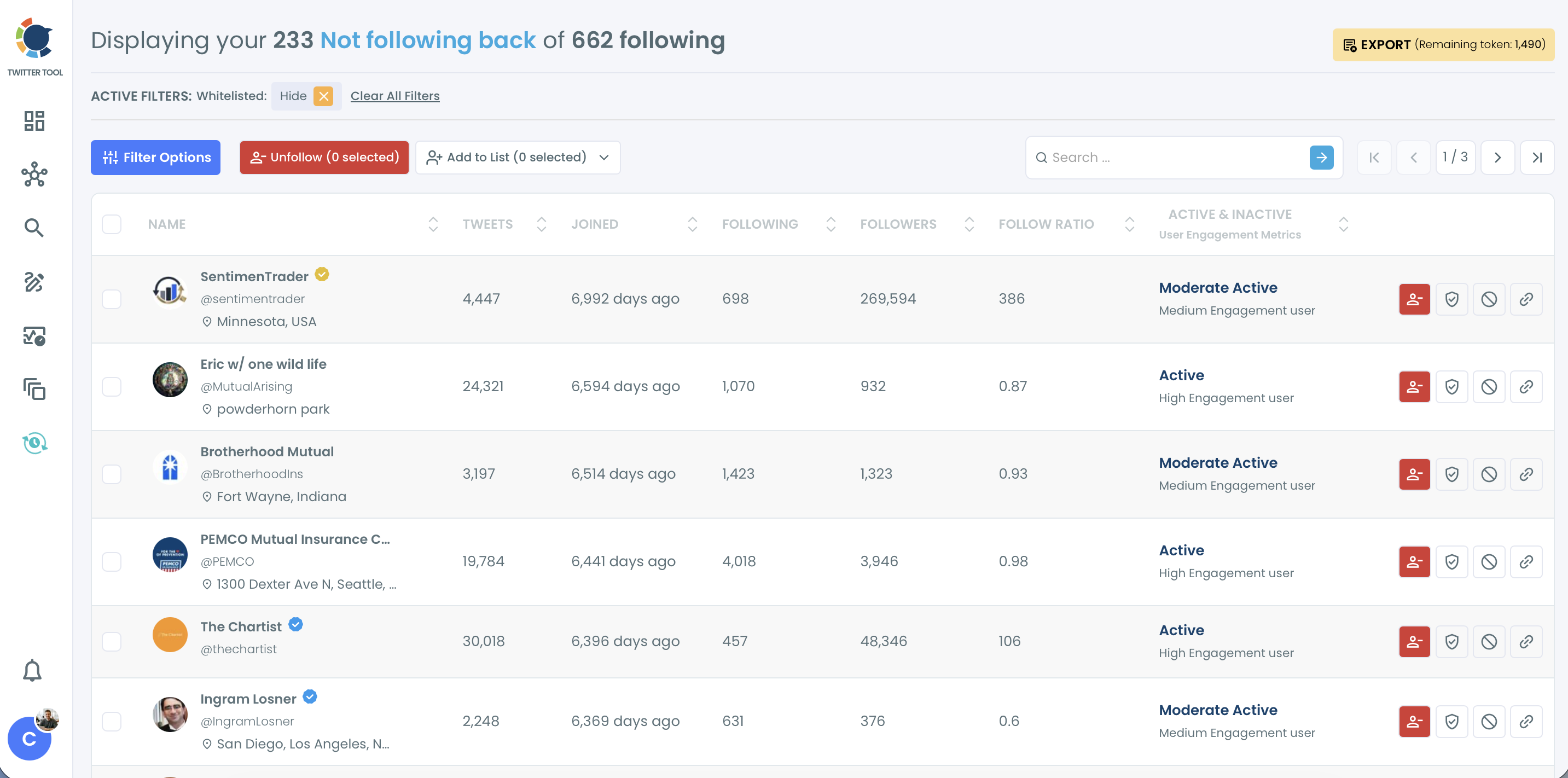
- Filter out the accounts you follow on purpose. Use Verification Status, Engagement and Follow Ratio in Filter Options, then whitelist journalists, partners and sources you read.
- Unfollow the rest in batches after a last look at the selected count.
Review who follows you
- Open Fake/Bot Followers under Followers and run the same review: sort, open borderline profiles, whitelist known contacts.
- Select the confirmed fake accounts and click Remove Follower. Confirm the pop-up, and the removal is handed to the Circleboom Remove Twitter/X Followers Chrome extension, which processes it gradually while your browser stays open.
Starting with the following list matters because it is the side visitors read as your own choices, and it is the side you can fix completely.
The follower side comes last because removals depend on the extension and on X's pacing, so you want your own list already tidy while that runs.
Is it safe to unfollow hundreds of accounts on X?
Yes, if you go gradually and only remove accounts you have reviewed. Circleboom paces unfollows at 50 every 15 minutes with a daily safety limit of 800, and anything left in the queue continues automatically the next day. You do not need to restart anything.
The pacing exists for a reason. X's platform manipulation policy names "follow churn" and "indiscriminate following", which it describes as following and unfollowing large numbers of unrelated accounts in a short time, particularly by automated means. A credibility cleanup should never look like the behavior it is cleaning up after.
Slow and selective is the whole method. A cleanup of 2,000 follows takes about three days at the 800-per-day pace. That is a feature: a steady trim reads as housekeeping, while a single burst reads as something else.
Keep a record before a big unfollow
Export the flagged list before a large unfollow if you want a record. Circleboom downloads the selected segment as a CSV, so you can show a client or a partner exactly which accounts went and why, and you have a reference if you ever want to re-follow someone by hand. Re-following is manual, because Circleboom cannot restore a relationship for you.
Two habits keep it safe. Whitelist anyone important before you select in bulk, and confirm the count in the button label before you click.
The guide on how to unfollow fake Twitter accounts in 3 steps covers the same review-then-unfollow rhythm in a shorter form.
Which one-way follows should you keep on Twitter?
Keep any one-way follow that gives you information, relationships or context, even if it never follows back. Not following back is a weak signal on its own. A journalist, an analyst, a competitor or an official account will rarely return your follow, and that is fine.
The accounts worth cutting combine several weak signals at once: they do not follow back, they are inactive or low quality, they have nothing to do with your field and you have no reason to watch them. That combination is what follow-for-follow leaves behind, and cutting it is how you make a Twitter account look more credible without losing a single useful source.
Circleboom's Not Following Back view lets you filter for exactly that overlap.
A quick rule for one-way follows
A simple sorting rule helps:
| Account type | Keep it? | Better move |
|---|---|---|
| News outlets, journalists | Yes | Keep, or move to a list |
| Competitors, market accounts | Yes | Add to a private list |
| Customers, partners | Yes | Whitelist |
| Inactive, irrelevant, no reply ever | No | Unfollow |
A private list is the trick most people miss. Add the sources you read to a private X List, then unfollow them. Their posts stay one tap away, and your following count drops without losing anything you use.
The older walkthrough on how to find who's not following back on Twitter shows the idea from the reciprocity angle.
Your Twitter credibility cleanup checklist
I run this list whenever a profile is about to be looked at closely, before a pitch, a launch or a hiring round:
- Clear Fake/Bot Following first, after whitelisting real contacts that got flagged.
- Move useful one-way follows into private lists, then unfollow the leftover follow-for-follow accounts.
- Review Fake/Bot Followers and remove the clusters, not every single odd profile.
- Let the paced queue finish over a few days instead of forcing it.
- Rewrite your bio last, once the network around it already looks intentional.
The bio deserves its own pass once the lists are clean. These 40 ideas for a Twitter bio give you starting points that fit different kinds of accounts.
A clean network will not make weak posts strong, but it stops a good account from looking like a bought one. That is the realistic goal when you set out to make your Twitter account look credible: a profile whose numbers hold up when someone checks them.
→ Start the audit that makes your Twitter account look credible again
Twitter credibility cleanup questions
Should I block fake accounts or just unfollow them?
Unfollow is the normal move for a weak or suspicious follow on Twitter. Use Circleboom's Add to Mass Block List only for accounts that are abusive, scam-like or likely to keep interacting, because blocking is stronger than an unfollow.
Does an account with no profile photo mean it is fake?
No. A missing photo is the weakest signal on its own, and many real people who only read X never upload one. Circleboom's Egghead Following view is most useful when you combine the missing photo with low tweet count, a recent join date and a poor ratio.
Do I need anything extra to remove fake followers in bulk?
Yes. Circleboom stages the followers you select, and the Circleboom Remove Twitter/X Followers Chrome extension carries out the removal gradually while your browser stays open. Unfollowing accounts you follow needs no extension.