What is the best time to post on social media? The honest answer is whenever your own followers are scrolling, and that changes from one account to the next.
When is the best time to post on social media?
There is no single best hour; the best time is when your own followers are active, and it differs for every account. Circleboom Publish reads each connected account's followers and suggests posting windows in the Schedule modal on Instagram, Facebook, LinkedIn, Pinterest and the other networks it schedules.
→ Find the best time to post on social media
Why there is no single best hour to post on social media
A best posting time belongs to an audience, so one hour cannot serve every account.
Your followers live in particular time zones, keep particular working hours and open particular apps at particular moments of the day.
A gym's followers and an accounting firm's followers can both be on Instagram and still be awake, commuting and scrolling at very different times. Even one brand can hold several audiences: a personal LinkedIn Profile and a Company Page, or a Facebook Page per location.
Three things shape an account's real posting windows:
- Where its followers live, and therefore their local clock.
- How their days run: office hours, school runs, shifts, weekends.
- Which apps they open, and when they open each one.
Your own schedule is the hidden mismatch
There is also a quieter mismatch: the poster's own schedule. Most posts go out when the person writing them finishes, which says a lot about the writer's day and nothing about the audience's.
A daytime social media manager with followers who scroll late at night will keep publishing into an empty room unless something tells them otherwise.
Your followers' routines are not visible from outside the account. You can read some of them by hand in each app's own insights, account by account, but the readings sit in separate apps and go stale as the audience changes.
Ask when your followers are online, and the hour follows.
Circleboom Publish answers that question for every connected account on Instagram, TikTok, Facebook and the other networks it schedules. It analyzes the account's own followers, works out when they are online and engaging, and turns that into suggested posting times. If you want to see this for yourself today, compare your accounts' posting windows side by side.
How Circleboom Publish finds each account's posting windows
Circleboom Publish suggests account-specific posting times in every composer's Schedule modal, computed from that account's own followers' activity.
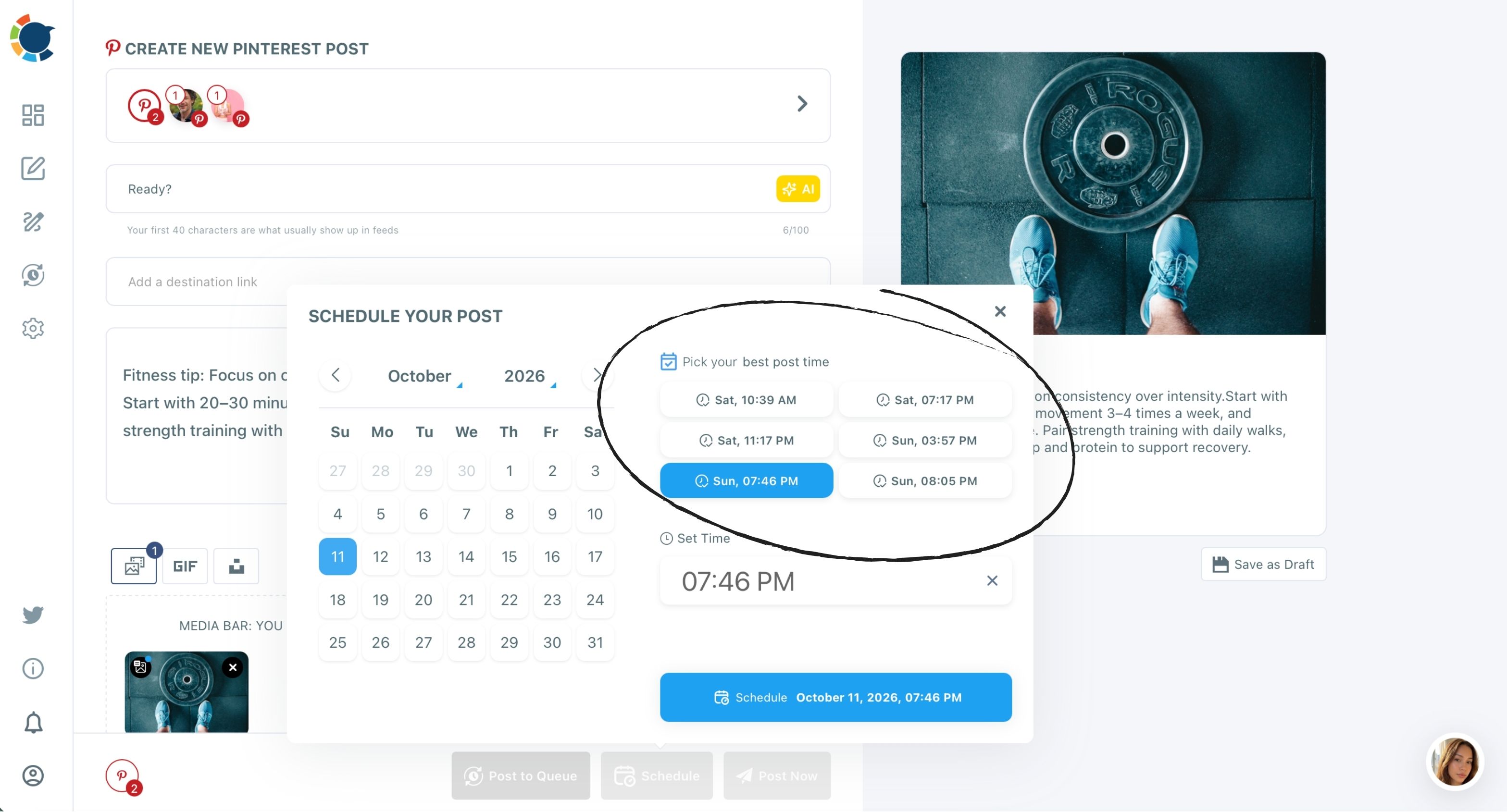
Open Circleboom Publish and click Schedule on a post. The modal shows a month calendar on the left and a "Pick your best post time" panel of clickable suggested slots on the right, with a manual Set Time field below it.
The mechanics are the same on every platform the scheduler supports:
- Write the post in the universal composer or a platform's own composer.
- Click Schedule to open the Schedule Your Post modal.
- Pick a date, then click one of the suggested slots, or type your own time.
- Confirm with the button, which shows the exact date and time chosen.
A post that goes out in one of those slots instead of at a random time is tied to up to 300% more engagement on the same piece of content.
That figure carries an important condition. Nothing about the post changes; only the hour does.
So the lift comes at no extra writing cost, which is why the suggestion sits at the moment of scheduling rather than in a separate report you have to remember to open.
What the suggestions are built from
A connected account gives Circleboom Publish access to that account's own followers and their real activity. From that, it measures when they are actually online and actually inclined to engage, and offers those windows as one-click options. The same engine works across every platform the scheduler supports, which is why the panel looks identical whether you are scheduling a pin, a LinkedIn post or a Facebook update.
Suggestions are per account. Two accounts selected for the same post can show different windows, because each one's followers keep their own routine.
You can open Circleboom Publish and check this with any two accounts you already run. You can also read how the suggestions work on the page about finding your best posting times.
How much timing matters on each platform
Timing always helps a post meet its audience, but how much the first hours count differs by platform.
Some feeds judge a post fast; some platforms keep surfacing content for months; one is driven by search instead of followers. Here is the taxonomy, built from what each platform says about itself and how Circleboom Publish behaves there:
| Platform or format | How much the posting hour counts | What to do with it |
|---|---|---|
| Feed platforms (Facebook, LinkedIn, Threads, Bluesky, TikTok) | High: feeds reward early engagement after a post goes live | Schedule into the account's suggested windows |
| YouTube | Early viewership only; key for Live and Premiere | Time uploads for early views, Premieres for live attendance |
| No set engagement window; pins can resurface for months | Use suggested windows for the early start, expect a long tail | |
| Instagram Reels, Stories, carousels | Same as the feed account | Use the same per-account suggestions for every format |
| Google Business Profile | Suggestions offered without a follower graph | Schedule posts into the profile's suggested slots |
The rows below explain each one.
Feed platforms reward a strong first hour
On a ranked feed, the first stretch after publishing is an audition. The algorithm watches for quick reactions, comments and shares, and it also favours accounts that show up on a steady rhythm. Reactions can only come from people who are online, so an off-hour post gives the ranking system little to work with.
Facebook makes the per-account point concrete. Picture a restaurant group with 12 Pages across 3 time zones: any single shared hour finds some locations' followers asleep or at work.
Because each Page gets its own suggested windows, the weekly special sent to all 12 can land at each Page's own best time.
That is why the posting hour carries the most weight on fast-moving feeds. TikTok belongs in this group too; for that network specifically, Circleboom's blog covers the best times to post on TikTok.
The account-level version for TikTok sits on the best time to post on TikTok page, where the same suggested slots appear inside the TikTok composer.
YouTube: publish time helps early views, not the long run
YouTube says publish time is not known to affect a video's long-term performance, though publishing when your audience is most active can help early viewership.
Its performance FAQ in YouTube Help adds that publish time does matter for formats like Live and Premiere videos, and points to the "When your viewers are on YouTube" report in YouTube Analytics.
For a channel, that changes the goal. You time a regular upload for a good start, and you time a Premiere or a live stream for the people who need to be there in the moment. If your channel works in short vertical video, the post on scheduling YouTube Shorts covers that side of it.
Pinterest: no set engagement window, so timing starts the tail
Pinterest states plainly that "there's no set engagement window for Pins."
Its guide on Pin performance and distribution says Pins last forever on Pinterest and that high quality, relevant Pins can continue to resurface seasonally. A Pin can gain engagement hours, days, months or even years after publishing.
So does timing matter there? Less for a pin's total lifetime than on a fast feed, but the first window still sets the pin off. Circleboom Publish shows the same suggested slots in the Pinterest composer as anywhere else:
The practical stance is to take the suggested window for a strong start, then judge a pin over months rather than days. Pinterest itself lets you schedule Pins up to two weeks in advance, while the Schedule button in Circleboom Publish takes a date months ahead just as easily.
This short clip shows a pin being scheduled into one of its account's suggested times:
A Pinterest walkthrough of user-specific posting times inside Circleboom Publish.
Instagram Reels, Stories and carousels share one set of windows
Reels, Stories and carousels use the same per-account suggestions as an Instagram feed post, because the windows describe the account's followers, whatever the format.
The people who watch your Reels are the same people who see your carousels and tap through your Stories, so their active hours do not change with the post type.
It also matters more than it sounds, because format choice and timing are often treated as one decision. A carousel is one of the highest-engagement formats available on the platforms that support it.
Pairing it with the account's own window gives that format its best chance; a carousel posted at a random hour wastes part of its advantage.
That saves a lot of second-guessing. You do not need separate format charts; you need one account's windows, applied to everything that account publishes. The account-level view for this network is on the best time to post on Instagram page.
Google Business Profile: windows without followers
Google Business Profile has no followers or following graph, yet Circleboom Publish still offers suggested posting times there, in the same Schedule modal. For a local business, that means a Standard post, an Event or an Offer can be scheduled into one of the profile's own suggested slots rather than whenever the owner has a free minute.
One caveat keeps this honest. The "strong first hour" argument from feed platforms does not obviously carry over, because Google Business Profile is driven by search rather than by a following-based feed. Treat the suggested slots as a better default than a random hour, not as a feed trick.
Does a scheduled post get less reach than a live one?
None of the platforms' own help pages says that scheduling itself lowers reach.
The evidence that exists is about when a post goes out, not how it was sent. YouTube's note that publish time can help early viewership, cited above, is a statement about the hour, and it applies whether a person or a scheduler presses publish.
What does change reach is landing in front of followers while they are online, and posting consistently enough that the feed keeps showing the account. A scheduler serves both, because it lets a post go out at the audience's hour even when you are busy at that hour.
The worry comes up most on newer networks, where every advantage feels important. The answer is the same there: the post on scheduling posts on Bluesky deals with that network, and the timing logic does not change because a scheduler sent the post.
The thing to avoid is not scheduling. It is scheduling at your own convenience instead of your audience's.
Which posting-time approach fits your accounts?
Use the branch that matches your situation:
- If you post to one account on one platform, schedule each post into that account's suggested window and stop checking generic charts.
- If you run several accounts or locations, treat each as its own audience; one post sent to several accounts can take each account's own suggested time.
- If you publish to Pinterest or YouTube, use the suggested window for the start, then judge results over a longer stretch.
- If you run a Google Business Profile, schedule posts into the profile's suggested slots, even though it has no followers.
- If a post must go out at a fixed moment (a launch, a live event), use the manual Set Time field and let timing data guide everything else.
Whichever branch you are on, the answer to the headline question stays the same: post when your own audience is there.
→ See each account's suggested posting windows
Best time to post FAQ
Why can't I just use a published best time to post chart?
A published chart averages the posting results of a huge number of accounts, so it describes no account in particular. Two accounts in the same industry can have completely different best times, which a generic chart cannot know and per-account suggestions can.
How do I make every queued post go out at my best times automatically?
Turn on Add Best Times to Post for the account's Queue in Time and Queue Settings, and Circleboom Publish fills that account's recurring slots with its own suggested times. Every post you add with Post to Queue then drops into the next open slot.
That works whichever network the account belongs to; if Threads is one of yours, see scheduling posts on Threads. The page on how to automate social media posts covers the wider setup.
What day of the week is best to post on social media?
The best day depends on the same thing as the best hour: your followers' routine. Circleboom Publish's suggested slots include the day as well as the time, so the account's own data answers both at once.
Are suggested times reliable for a newly connected account?
They improve with time. A newly connected account's suggestions may be less refined until Circleboom Publish has observed enough follower activity, so read a fresh account's windows as a starting point and give them a few weeks.