A post this week listing "books with the best opening lines" passed 285,000 views on X.
No thread, no video, no link. Just one short sentence and a row of cards you swipe sideways, each with a book cover, a first line and a portrait of the author.
That is a Twitter carousel, a carousel post on X, and it is quickly becoming the most copied post format on X.
So we made one ourselves, and this guide walks through exactly how.
What is a Twitter carousel?
A Twitter carousel, also called an X carousel, is a single post on X with several images that viewers swipe through sideways, like slides, instead of seeing them in a fixed grid. To make a Twitter carousel, you design two to four slides in the same size, attach them to one tweet in the order you want them read, and post or schedule it; the fastest way is to design the slides with Circleboom's free X Quote Maker or AI Carousel Generator and publish them with Circleboom's Twitter scheduler.
Circleboom is an Official X Enterprise Developer, listed in X's own Enterprise customer directory, so the tweet goes out through X's official API, not a workaround.
Why carousel tweets suddenly work on X
For years, a tweet with several pictures showed them as a small grid. Four images meant four thumbnails squeezed into one box, and most people never tapped to open them.
During 2026, X started showing multi image posts as a horizontal row instead. A hands on test published on note.com describes the change as gradual, from the old grid to "a carousel layout that you swipe horizontally," starting around the summer.
That small design change matters for three reasons:
- The first slide gets full size. It is no longer a thumbnail; it is a real image in the timeline.
- The next slide peeks in from the right. The cut off edge invites the swipe, the same trick Instagram carousels have used for years.
- Every swipe is an interaction. The X algorithm reads time spent on a post as a sign it is worth showing to more people, and swiping through four slides takes far longer than glancing at one photo.
And on X, time is short. A tweet gets roughly 12 minutes of real visibility before newer posts bury it.
A carousel buys more of those minutes.
We made one: 4 quote cards, posted from Circleboom
On November 23, 2026, we tested the format on a real account.
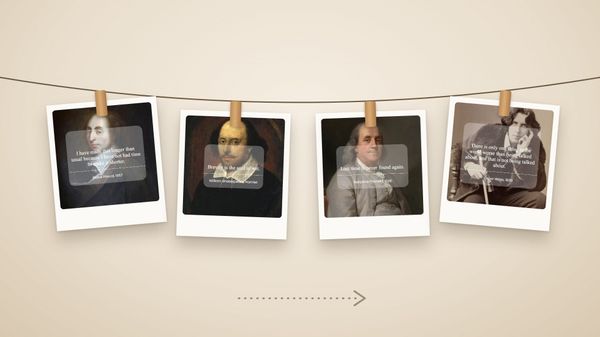
The idea: "Twitter advice from people who died before Twitter." Four quotes about writing short, saving time and staying visible, from people who never saw a timeline:
- Blaise Pascal, 1657: "I have made this longer than usual because I have not had time to make it shorter."
- William Shakespeare, Hamlet: "Brevity is the soul of wit."
- Benjamin Franklin, 1748: "Lost time is never found again."
- Oscar Wilde, 1890: "There is only one thing in the world worse than being talked about, and that is not being talked about."

The four slides, made with Circleboom's free Quote Maker. The portraits are public domain images from Wikimedia Commons.
Each card was made in Circleboom's free Quote Maker, then the four cards went out as one tweet from Circleboom Publish. This is how it looks on X:
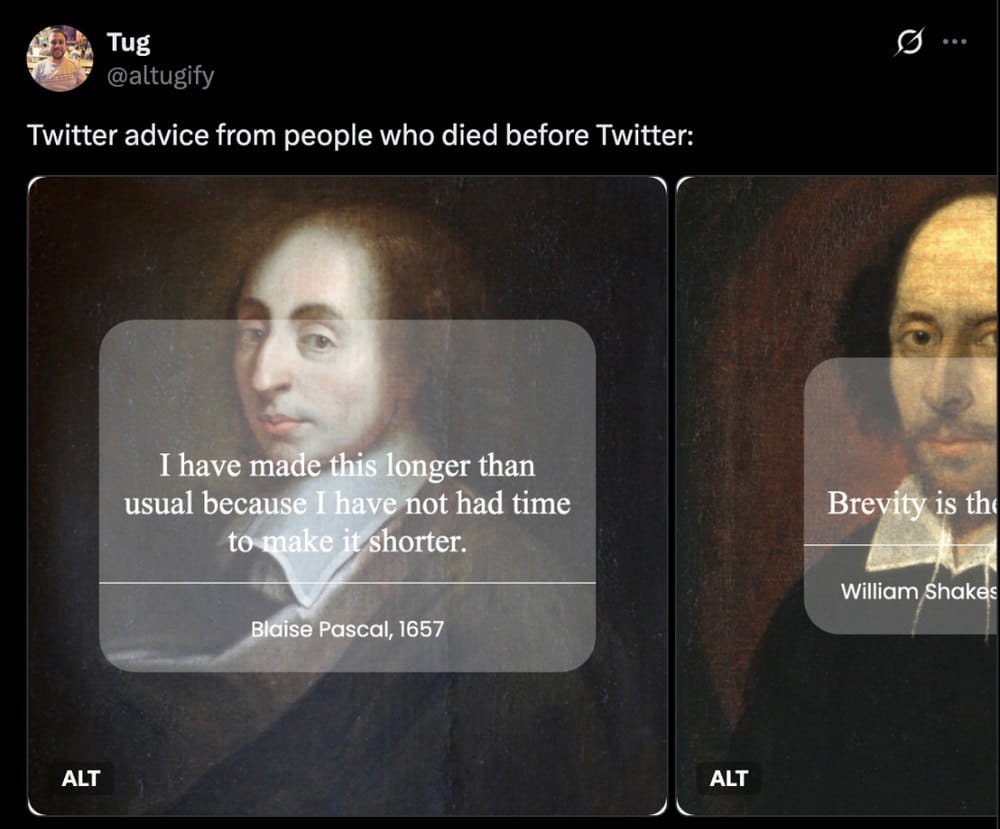
The live tweet: the first card shows in full, the second peeks in from the right and invites the swipe.
You can see the original post here: Twitter advice from people who died before Twitter.
Notice what the format does: the caption is one line, and the slides do the talking.
How to make a Twitter carousel in 5 steps
Step 1: Pick one idea that splits into slides
A good carousel is a list with a reason to swipe. Some formats that fit naturally:
- Quotes on one theme, like the test above.
- Before and after, slide 1 the problem, slide 4 the result.
- A mini tutorial, one step per slide.
- Ranked lists, "4 tools I use every day," with the best one last.
A bookstore can post four first lines from new arrivals. A fitness coach can post one exercise per slide. A SaaS founder can post four numbers from a monthly report.
Slide 1 is the hook. It is the only one everybody sees, so make it the strongest.
Step 2: Design the slides with Circleboom's free Quote Maker
You do not need a design tool for this. Circleboom's free Quote Maker has a dedicated X Quote Maker, and it is the tool we used for the cards above:
- Select Size. For a carousel we picked Instagram feed, a square 1080 x 1080 image that fills the swipe row better than the wide "Twitter post" size.
- Select Layout. We used Blur Quote, which puts the quote on a frosted panel over a background image. The other layouts are Standart, Border Quote, Nova Quote and Simple Quote.
- Enter the Quote Text and Author, and adjust the font size and color for each.
- Upload a Background Image. We used a public domain portrait of each author.
- Click Download and repeat for each slide, keeping the same size and layout so the carousel looks like one set.
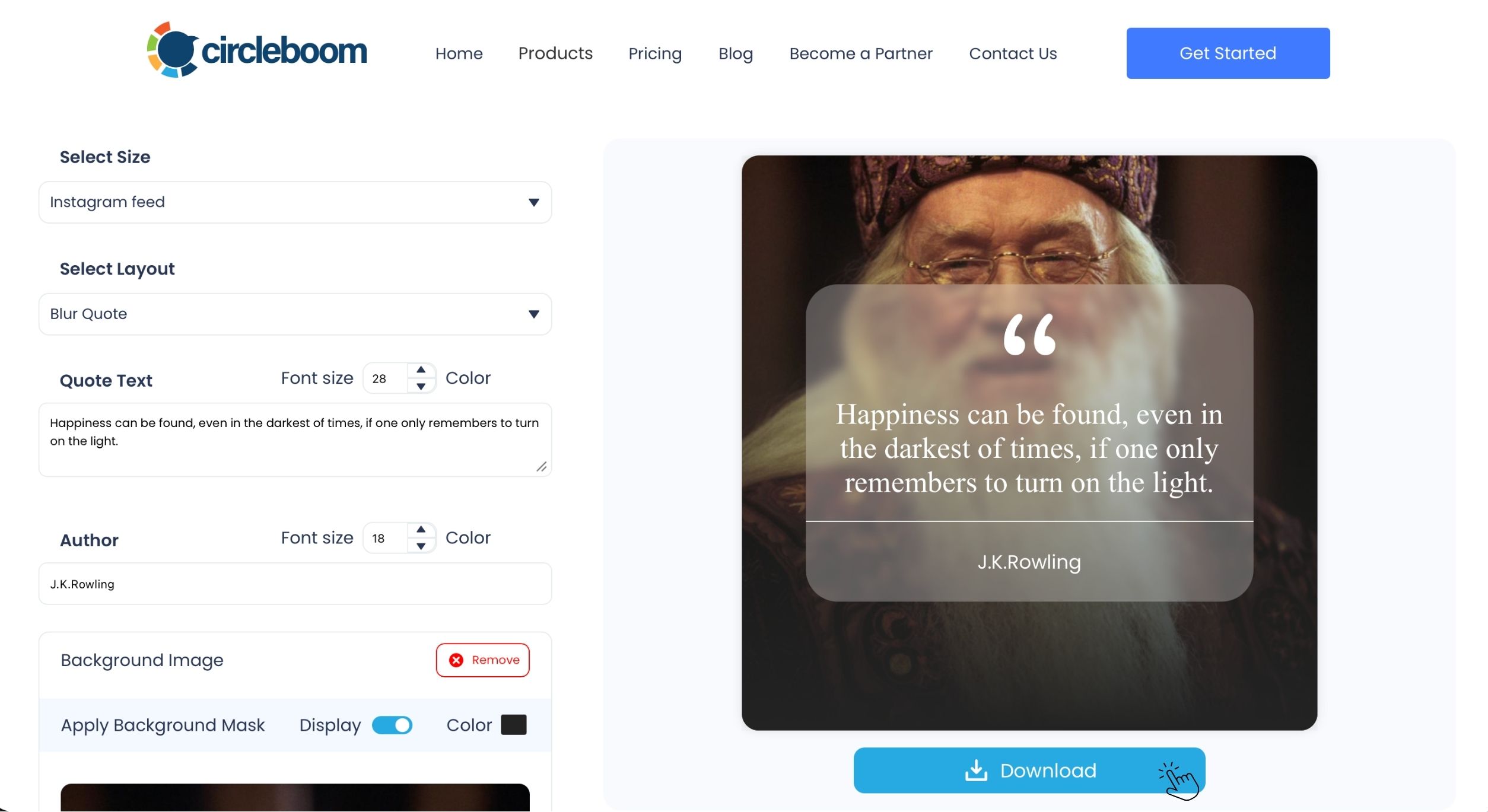
Circleboom's free Quote Maker: choose a size and layout, type the quote, add a background, download.
You can also watch this video to see how the Quote Maker works from start to finish:
Tip: if your slides are not quotes but tips, steps or data, the AI Carousel Generator inside Circleboom's X composer writes and designs the whole set from one topic, with templates, fonts and colors you can change.
Step 3: Put the slides in one tweet, in order
Open the X composer in Circleboom Publish, write a one line caption and add the images in reading order.
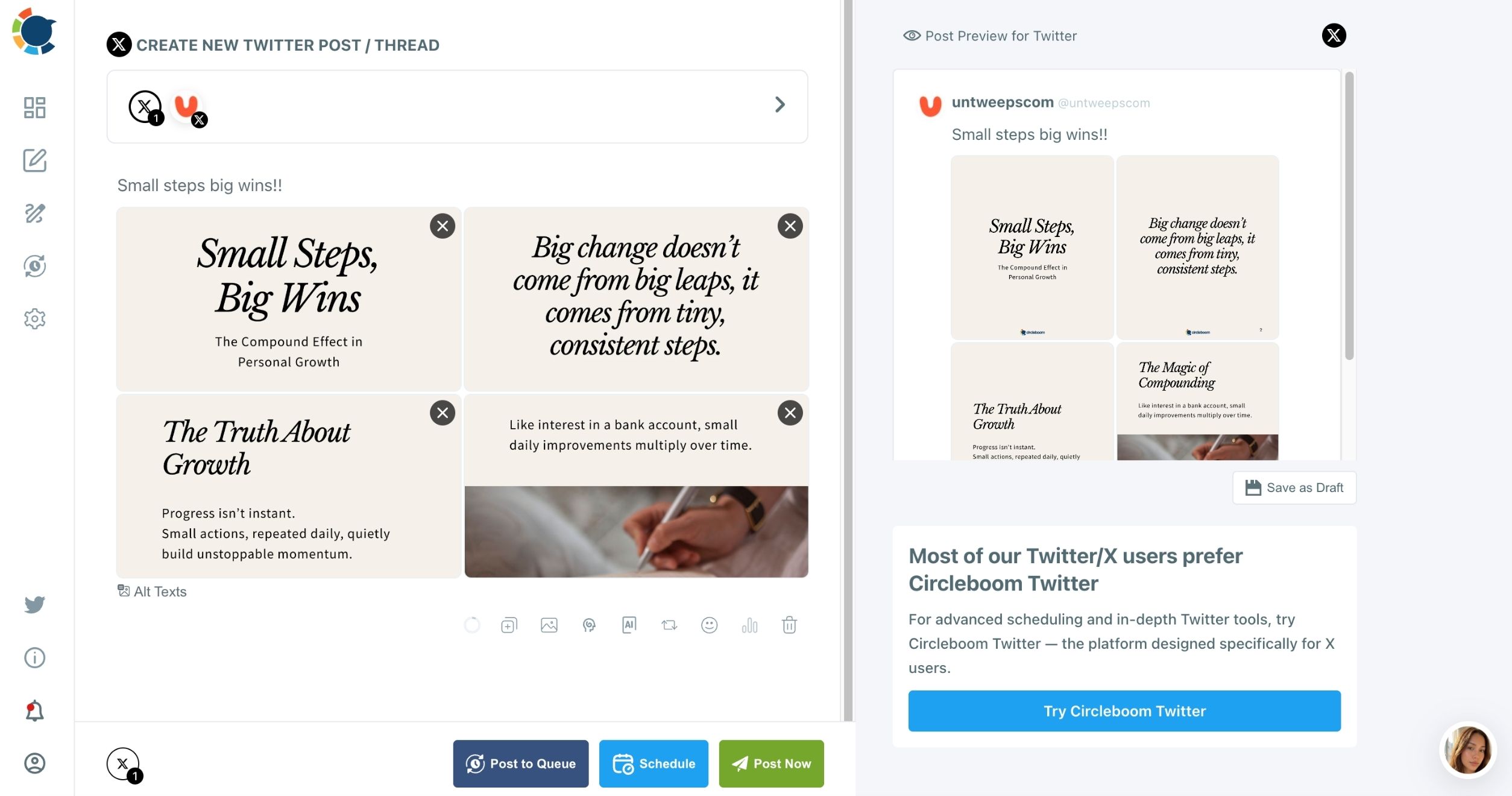
Four slides in one tweet, with a live preview on the right.
Two things to know here:
- Circleboom attaches up to 4 images per tweet. When we tried to add seven, the composer showed "Twitter supports up to 4 media files." Four slides is the classic X limit and still the one most tools work with.
- Add alt text to every slide. Under the images, click Alt Texts and describe each card, including the quote itself. Screen readers can read it, and search engines can understand an image they cannot see.
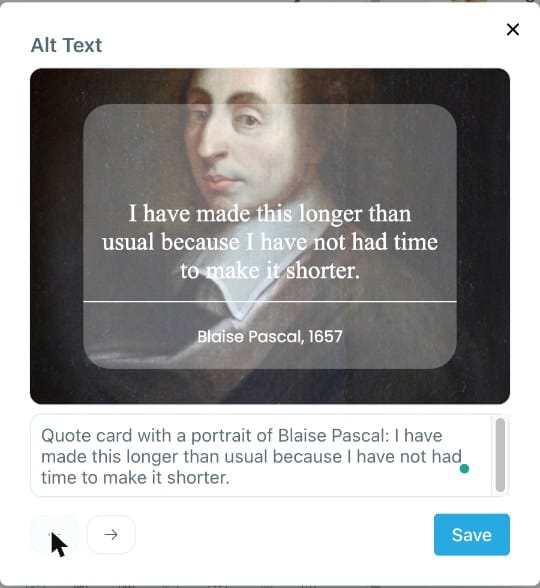
Alt text for each slide, written right in the composer before posting.
Step 4: Schedule it for your account's best time
A carousel that goes out while your followers sleep wastes its 12 minutes.
Click Schedule and look at Pick your best post time. Circleboom suggests times based on when your own followers are active, not a generic chart that treats every account the same.
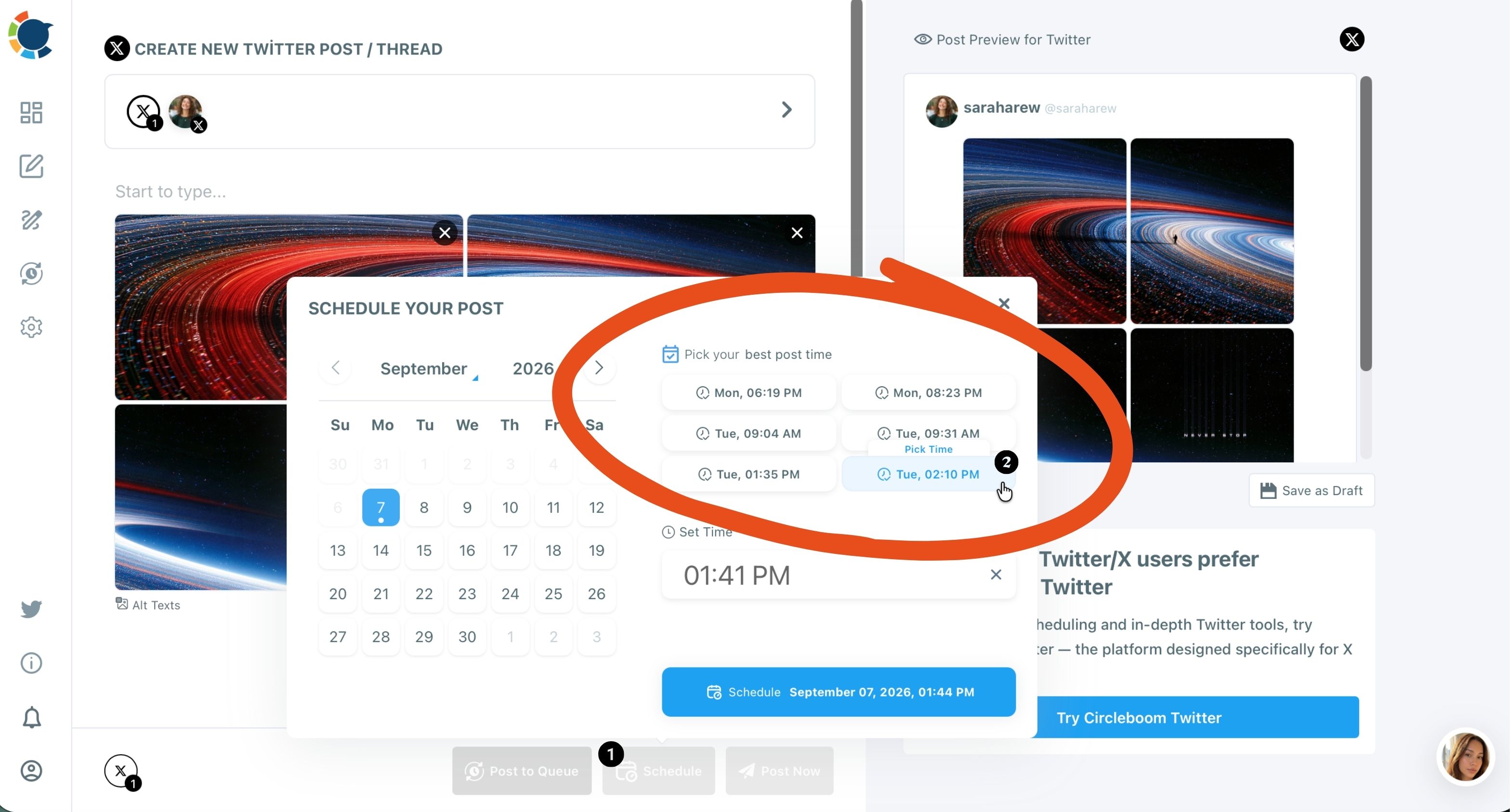
Pick your best post time: suggestions calculated for your own account.
Tip: carousels take a little longer to make than a plain tweet, so batch them. Design four on Sunday, schedule one every other day, and the week is covered.
Step 5: Turn on Auto Repost before you send it
This is the step most people skip, and on X it is one of the most useful ones.
A tweet's visibility window is about 12 minutes. Anyone who opens X after that probably never sees your carousel, no matter how good it is. Circleboom's Auto Repost fixes that by reposting the tweet automatically after a delay you choose, removing the repost later, and repeating the cycle as many times as you set, all decided in the composer before the tweet goes out.
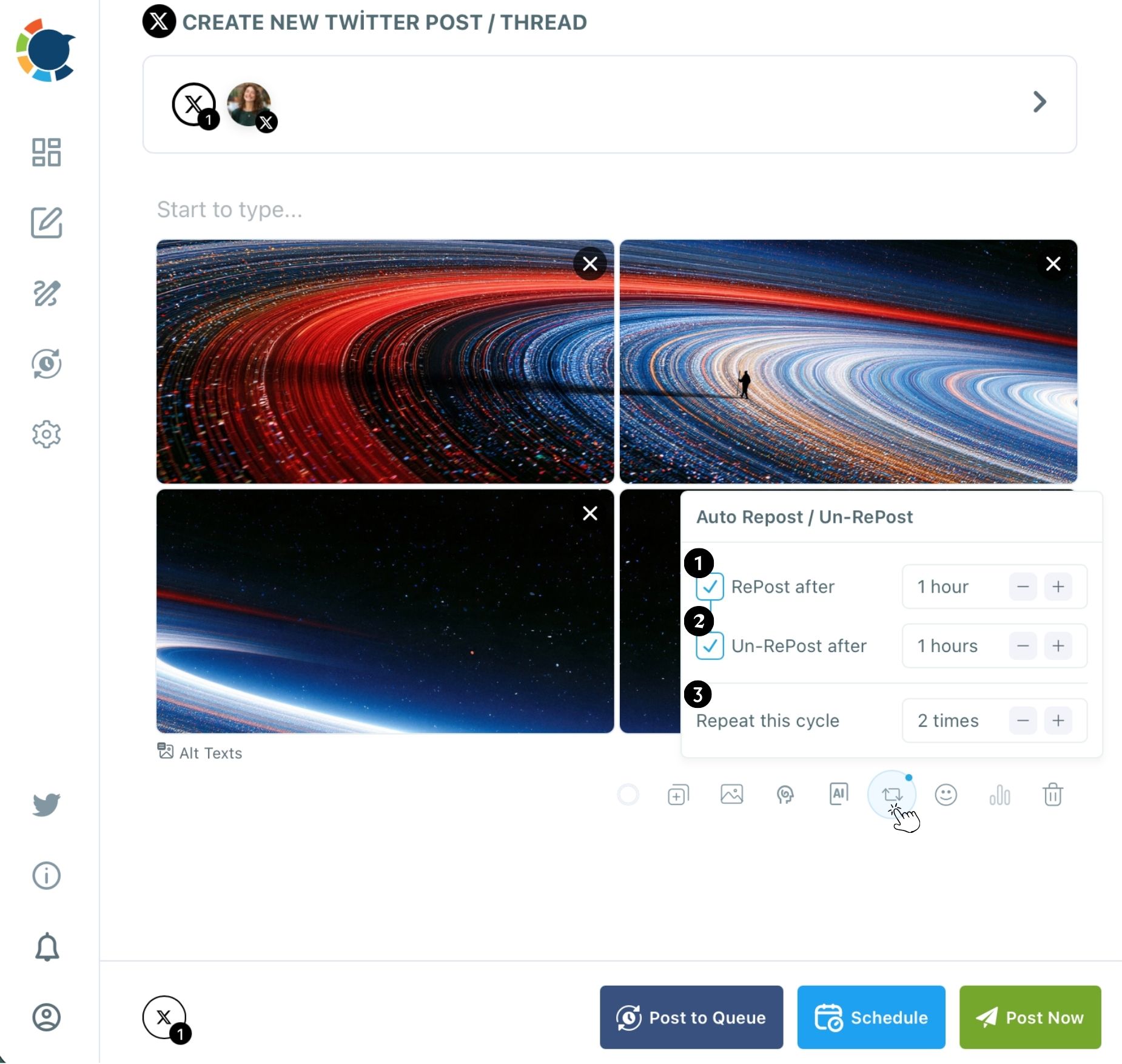
Auto Repost on a four image post: when to repost, when to remove the repost and how many times to repeat.
You can also watch this video to see how Auto Repost is set up:
For a carousel, a good starting point is a repost after 6 hours and two cycles, so followers in other time zones get their own chance to swipe. This guide on how to auto retweet your own tweets explains the timing in more detail.
Twitter carousel size: what works in the swipe row
The images should all share one shape. Mixed sizes make the row jump as people swipe.
- Square, 1080 x 1080 px. The safest choice, and the one we used.
- Portrait 4:5, 1080 x 1350 px. Taller slides take up more of the phone screen.
- Avoid 16:9 landscape. Wide slides get their edges cropped in the timeline preview, according to the same note.com test.
- File size: up to 5 MB per image on X.
Keep the text away from the edges, because the next slide overlaps the right side of the current one in the timeline.
Can a Twitter carousel have more than 4 images?
This is where it gets confusing.
The post with the book quotes had seven slides, so longer rows clearly exist on X. But X's own Help Center page on posting photos does not state a new limit, and most guides and scheduling tools, Circleboom included, still work with four images per tweet.
If your idea needs more than four slides, split it into a thread:
- Tweet 1 carries slides 1 to 4.
- A reply carries slides 5 to 8.
In Circleboom's composer, click Add another post to build the thread and schedule both tweets together. Threads also get a second boost on X, because opening them is a click and reading them is time spent.
8 Twitter carousel ideas you can post this week
- Quotes from one author or era, like our "advice from people who died before Twitter."
- First lines from books in your niche.
- Four mistakes, four fixes, one per slide.
- A product launch: what it is, who it is for, the price, the link.
- Monthly numbers: four stats from your report, one per card.
- Customer testimonials, with permission, as quote cards.
- A recipe or a workout in four steps.
- This or that: two options per slide, ask people to reply with their pick.
A local bakery could post four new pastries with prices. A recruiter could post four interview questions. A newsletter writer could turn last week's four best lines into cards and win back readers who skipped the email.
Do the math
Say you post three carousels a week, four slides each.
Designing 12 slides by hand in a general design tool, resizing each one and keeping the layout consistent, takes something like 10 minutes per slide: two hours a week.
In the Quote Maker, a slide is a size, a layout, a quote and a download, about 2 minutes each, so 12 slides take around 25 minutes. Scheduling all three tweets at their best times, with Auto Repost switched on, takes another 10 minutes.
That is about 35 minutes a week instead of more than two hours, and every carousel gets more than one chance to be seen.
Why schedule carousels with Circleboom instead of X directly
You can attach images and schedule a tweet on X itself. What X's own composer does not do is decide when your followers are actually online, give the tweet a second and third chance with Auto Repost, or let you write the caption with an AI writer and design the slides without leaving the tool.
Circleboom adds those layers: Pick your best post time for your own account, Auto Repost, the AI Carousel Generator, alt text for every image and one Outbox calendar for everything you have scheduled.
If X is the only network you post to, Circleboom's X Post Planner is the sharper fit: it learns from your own account's followers and posting history and builds the queue around that one account. If the same carousel should also go to LinkedIn, Threads or Bluesky, X Post Planner can cross post it there from the same schedule. Picture a solo newsletter writer who lives on X and LinkedIn: one carousel, both networks, one plan.
Turn swipes into traffic
A carousel that gets views but sends no one anywhere is a missed opportunity.
- Put the link in the caption or in a reply, not on the slides, where it cannot be clicked.
- Make the last slide the call to action: "Full list on our blog" or "Shop the collection."
- Add UTM tags to the link, for example
utm_source=x&utm_medium=social&utm_campaign=carousel, so your analytics shows how many visits, sign ups and sales came from carousel tweets.
That is the real payoff: not the swipe itself, but the visit and the sale it leads to.
FAQ
What is a Twitter carousel?
A Twitter carousel is one X post with several images that people swipe through sideways, like slides. X began showing multi image posts this way during 2026 instead of the old grid. Each slide is a normal image attached to the same tweet.
How do I make a carousel on Twitter?
Design two to four slides in the same size, for example with Circleboom's free X Quote Maker, then attach them to one tweet in the order you want them read. Add alt text to each slide and post or schedule the tweet from Circleboom's X composer.
How many images can a Twitter carousel have?
Four images per tweet is the classic X limit and the one Circleboom and most tools support. Some posts on X now show longer rows, but X has not published a new limit in its Help Center. For more slides, continue the carousel in a thread.
What size should Twitter carousel images be?
Square 1080 x 1080 px is the safest size, and 4:5 portrait at 1080 x 1350 px takes up more of the screen. Use the same size for every slide and avoid wide 16:9 images, which get cropped in the timeline preview. Each image can be up to 5 MB.
Can I schedule a Twitter carousel?
Yes. In Circleboom's X composer, add the slides, click Schedule and choose one of the Pick your best post time suggestions for your account. You can also turn on Auto Repost before sending so the carousel resurfaces later.
Is Circleboom's Quote Maker free?
Yes, the Quote Maker is a free Circleboom tool. You choose a size and layout, type the quote and author, add a background image if you want and download the finished card.
A plain tweet asks for a glance.
A carousel asks for a swipe, and on X, a swipe is attention.
Design your slides, schedule them for the right minute and give them a second chance with Auto Repost in Circleboom's Twitter scheduler:
https://circleboom.com/social-media-scheduler/twitter-scheduler