One scheduled Instagram post holds up to 10 photos or videos, and the Instagram app allows up to 20 when you post live from your phone. To post more than 10 photos on Instagram past those limits, a set needs a second post or a format that packs more into each frame.
Four routes past the 10-photo carousel.
• A series of carousels, up to 10 photos or videos each, scheduled back to back.
• Designed slides that place several photos on each of up to 10 slides.
• A Grid Post or Panoramic Post built from one large or wide image.
Circleboom Publish schedules every route as an Instagram post from one composer, starting from the 10-item carousel that Meta's publishing API allows. Schedule your Instagram carousel posts as a series that goes past the 10-photo limit.
Why Instagram carousels stop at 10 photos when you schedule them
Instagram carousels stop at 10 photos when you schedule them because Meta's publishing API, the only route a scheduling tool has into Instagram, caps a carousel at 10 items. Meta's Instagram content publishing documentation states that carousels are limited to 10 images, videos, or a mix of the two.
Circleboom Publish publishes Instagram carousels of up to 10 photos or videos through that API, so its composer follows the same ceiling. No scheduler can raise it, because every tool that publishes to Instagram goes through the same API.
The number most people remember keeps moving, which adds to the confusion. Instagram's multi-photo post launched with a ten-item limit, and the app now accepts up to 20 per Instagram's own help center, while the publishing API stayed at ten. The roundup of must-know things about the latest Instagram update shows how often these app-side changes arrive.
Ten per scheduled post is the planning number; twenty applies only to live posting in the app.
Meta's rules also keep a series light on the daily allowance. The API counts each carousel as one post however many items it holds, so a 30-photo set split into three parts uses three of the roughly 25 posts Instagram allows per account in 24 hours.
What happens when a set runs past the cap
Trying to force more files into one post usually ends in a blocked upload or a failed post, and the reader then goes looking for a fix. The guide on how to fix it if Instagram doesn't let you post covers the common causes.
File size is the other early wall. Circleboom Publish accepts Instagram images as JPG up to 8 MB, and videos as MP4 up to 300 MB, between 3 and 900 seconds long. The full table sits on the media limitations for social platforms page.
Every route below starts from that 10-item ceiling. The problem stops being how to post more than 10 photos on Instagram in one upload and becomes which route fits the set.
If you want the shortcut, you can go past 10 photos on Instagram with the series route and a first comment on each part.
The four Instagram routes, sorted by what you want the set to do
The right route depends on the outcome you want from the set. Circleboom Publish places each route in a tab or tool of the same Instagram composer ("CREATE NEW INSTAGRAM POST"), so choosing a route means choosing a tab.
| What you want | Route | Where it lives in the composer | Limit | Where the overflow text goes |
|---|---|---|---|---|
| One post that holds the set | Carousel, raw photos | Instagram Post tab | Up to 10 photos or videos | Scheduled first comment |
| More photos inside the same ten | Designed slides | AI Carousel Generator or Design on Canva, in the media bar | Up to 10 slides | Scheduled first comment |
| One profile moment | Grid Post | Grid Post tab | One image cut into 3x3 or 3x4 tiles, posted in exact order | Caption |
| One wide image | Panoramic Post | Panoramic Post tab | One wide image split into one carousel | Caption |
| A launch over days | Series of carousels | Instagram Post tab, one post per part | Up to 10 per part | One first comment per part |
Read the table by the first column, because two people with the same 24 photos can want very different results. Someone with 24 event photos who wants a single feed moment lands on the second row, because raw photos stop at ten. Someone with one stunning wide shot of a venue picks the fourth.
Every row starts from a format Instagram already supports, so nothing here is a workaround that might break.
The series route in one paragraph
The series is the route most sets end up on. Each part is a full Instagram Post of up to 10 items with its own caption, its own time and its own first comment, and the parts are prepared one after another in the composer. The Instagram post planner shows them on a calendar so you can see the whole run before any of it goes live.
Which route fits a shop, an event or a trip with more than 10 photos?
The route follows the kind of set you have. Three common situations cover most people who need to post more than 10 photos on Instagram, and each lands on a different row of the table.
A shop launching a product range
A shop with 20 to 30 product photos usually wants every item seen and every price findable. A series of two or three carousels does that: part one shows each product once, part two shows details and colorways, and each part's first comment lists names, sizes and prices in slide order.
Scheduled a few minutes apart, the parts read as one launch. A "one jacket five ways" styling set works the same way, with one look per slide.
An event, a wedding or a conference
Event sets tend to have many near-duplicates: the same table from three angles, the same speaker in five frames. Designed slides earn their place here, because three similar frames on one slide keep the moment without spending three slides on it.
The usual outcome is one strong carousel of raw highlights plus one carousel of collage slides for the rest. The first comment can carry credits for the photographer, the venue and the vendors.
A trip or a city guide
A trip set reads best as chapters. A "Rome in 3 days" set becomes three carousels, one per day, scheduled a day apart so the account posts across the week instead of all at once.
If the trip produced one wide view worth the whole profile, that single image is a candidate for the Panoramic Post tab on its own.
Where Circleboom Publish fits in each route
Circleboom Publish is the Instagram composer and scheduler that holds all four routes in one place. You log in to Circleboom Publish, open the Instagram composer, and pick the tab or tool that matches the route. From there, Schedule takes any date and time you set, or one of six suggested slots built from the activity of the account's own followers.
The practical difference from posting live is preparation, and it matters most when the set has more than ten photos. A three-part series, its captions and its first comments are written in one sitting, and each part waits in the Outbox until its time.
Nobody has to be in the Instagram app when the set goes out.
For a set that needs it, you can schedule over 10 photos on Instagram as a series without leaving that composer.

Mixed sets work too. A carousel can combine photos and videos, and the 10-item limit counts both together.
Designed slides: more of the set inside the same ten
Designed slides fit more of a set into ten by placing two, three or four photos on a single slide. They suit detail shots, comparisons and collections, where the viewer scans a set instead of studying each photo full screen.
In Circleboom Publish, the AI Carousel Generator opens from the Instagram composer's media bar, next to Giphy and Unsplash. You type a prompt, choose an AI model, and edit the templated slides, with colors, fonts and layout all adjustable to match a brand. The finished slides attach to the Instagram Post as a normal carousel.
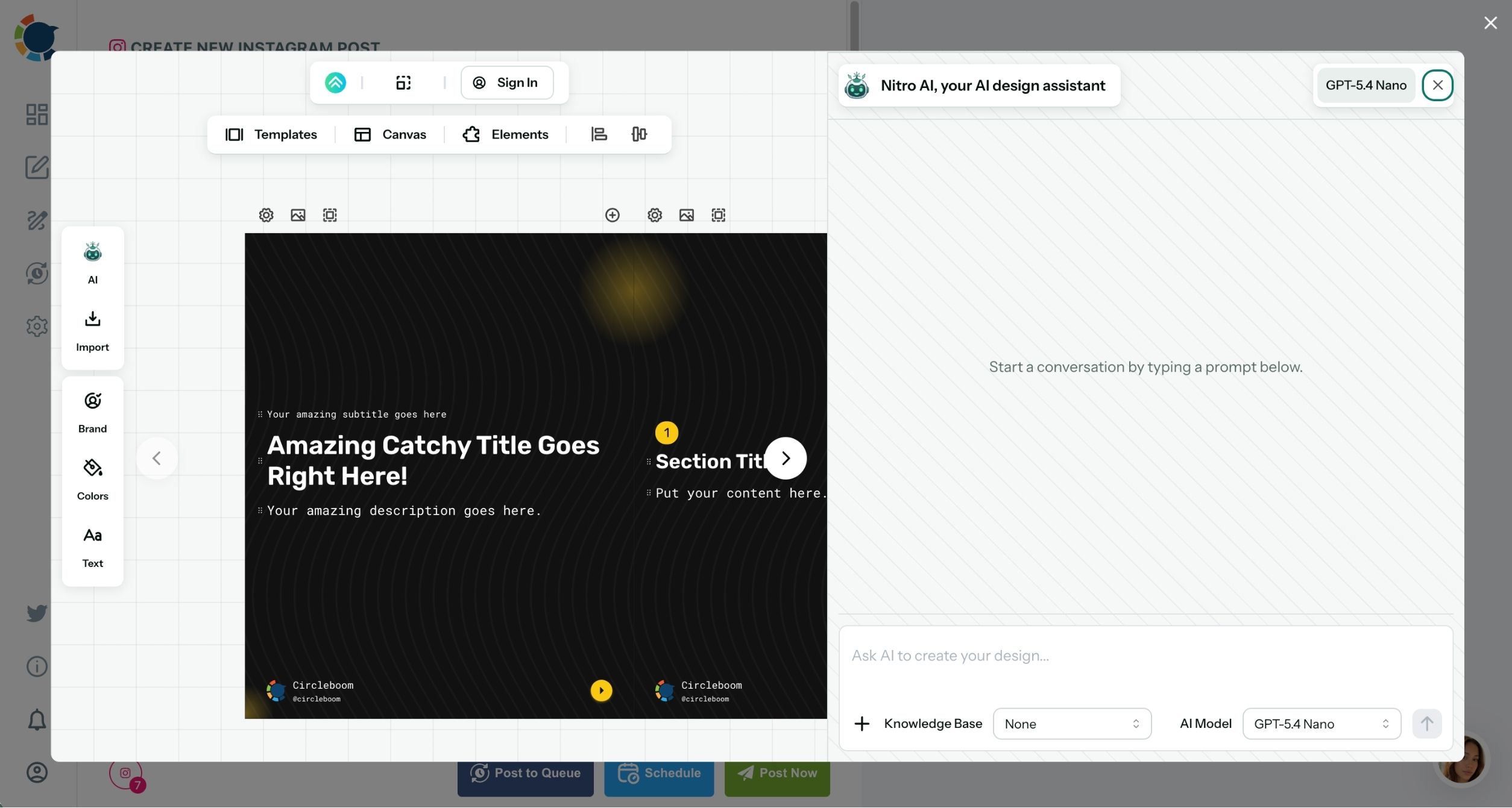
The AI carousel generator is strongest for text-led sets: a list, a tutorial, a before and after. For photo-led sets with no text, Design on Canva sits in the same composer for collage-style layouts.
Designed slides also change how the ten are counted. A set of 26 photos might become 10 slides where four hold a single hero shot and six hold a group of three or four details each, which puts every photo in one post.
I would test one rule before designing anything. If several photos show the same subject from slightly different angles, they belong on one slide. If a photo needs to be seen large to work, it keeps a slide of its own.
Once the slides exist, they attach in the composer like any other images, and the preview shows the swipe order.
The Instagram first comment as overflow space for every carousel
The first comment is where a carousel's extra text goes: sizes, prices, locations, credits or a note per photo. Circleboom Publish writes and schedules it with the post through the Enter first comment box on the Instagram Post tab, so it is live the moment the carousel is.
It solves two problems at once. Instagram's caption holds 2,200 characters, which fills quickly when a set of ten needs a line per photo.
Once a post goes live, the top comment belongs to whoever gets there first; a scheduled first comment makes sure that is the account itself.
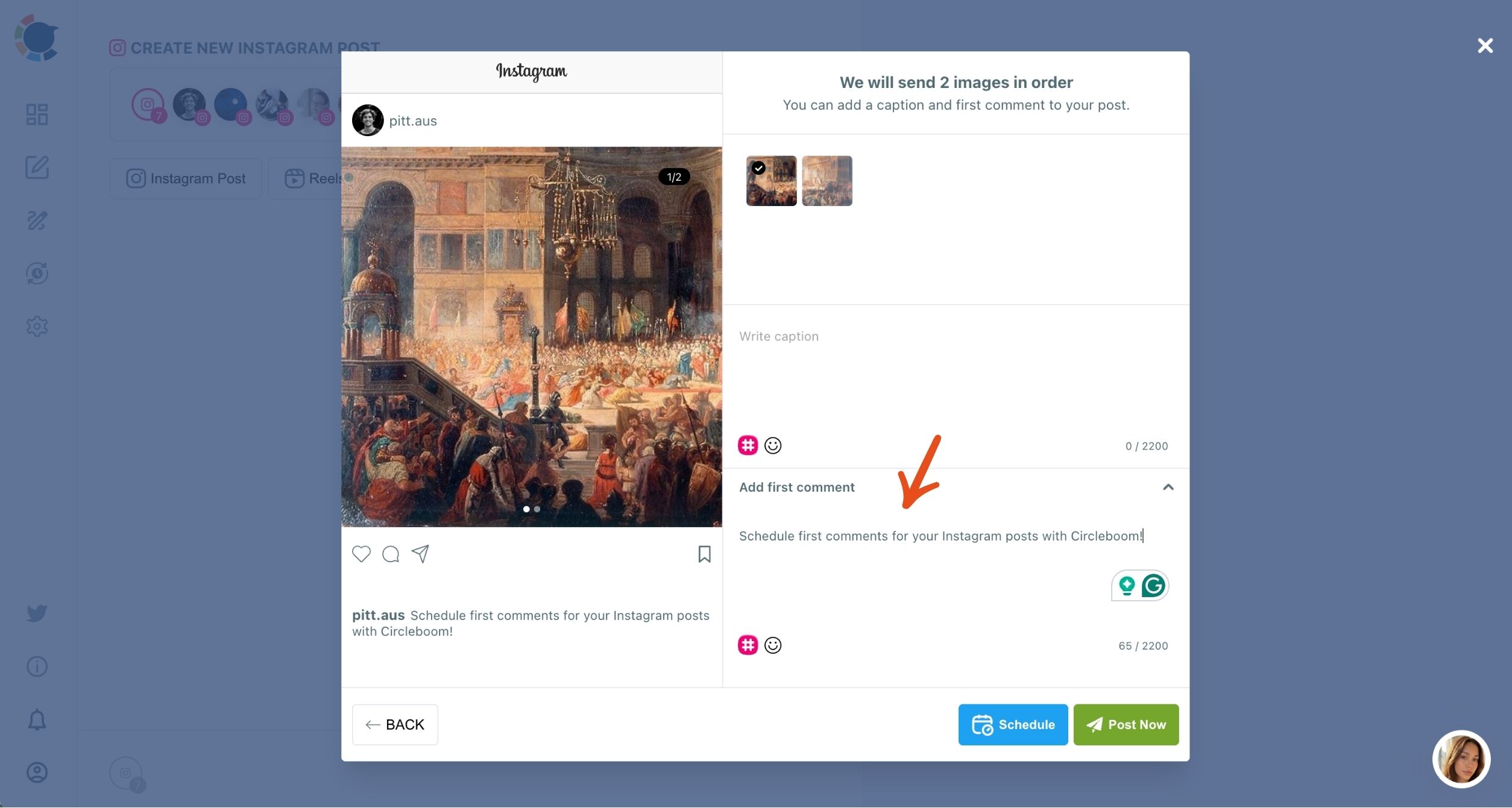
What goes in the first comment depends on the set. A shop lists names, sizes and prices in slide order. An event credits the photographer, venue and vendors. A trip names each location so viewers can save the spot.
In a series, give every part its own first comment that covers only its own photos. A viewer who sees only part two then gets the details for exactly the photos in front of them.
First comment walkthrough: writing the comment in the composer and scheduling it so it lands with the carousel.
The First Comment field is available on the Instagram Post and Reels types. For Grid and Panoramic posts, keep the essential details in the caption.
Grid or panorama: when one image is the better statement
A grid or a panorama is the better statement when the set can become one picture. Both start from a single image, so they trade the many-photo story for one strong visual.
A Grid Post cuts one image into a 3x3 or 3x4 set of tiles that reassemble on the profile. It needs exact, uninterrupted sequencing when scheduled, because any other post between the tiles breaks the picture. The tile approach is covered in the guide to an Instagram mosaic post maker.
A Panoramic Post turns one wide image into connected slides of a single carousel, revealed as the viewer swipes. Because it is one post, it carries no sequencing risk, and the Instagram panoramic post tab handles the split.
Neither route keeps 24 separate photos, so neither is a full answer when you need to post more than 10 photos on Instagram as distinct images.
Pairing a carousel series with one wide image
They work well as a companion, though. A trip set can run as a three-part carousel series and close with one panorama of the best view.
A brand launch can follow its carousels with a grid that turns the hero image into the top of the profile. In that pairing, the carousels carry the detail and the single image carries the impression.
Use them when one image deserves the whole profile, and use a carousel series when every photo needs its own moment.
Your checklist for an Instagram set of more than 10 photos
Run through these before you schedule:
- Decide what the set should do: one post, one profile moment, one wide image or a launch over days.
- Split raw photos into parts of up to 10 and merge near-duplicates onto designed slides.
- Write one caption and one first comment per part, covering only that part's photos.
- For a quick daily presence alongside the feed posts, learn to add multiple photos to an Instagram Story.
- Schedule the parts in order and check the calendar before the first one goes live.
→ Plan the series and fit more than 10 photos on Instagram
Still Wondering how to fit the whole set?
Do carousels get more reach than single-photo posts?
Yes, carousel posts get around 200% more impressions and engagement than regular posts, and every swipe to the next slide counts as an interaction. The lift depends on people actually swiping, so each slide needs to give them a reason to move on.
What happens if one part of a scheduled series fails to post?
It shows up under Failed Items in the Outbox, with the specific error reason beside it. Fix the cause, then use Share Again on that item to rebuild and reschedule it so the series stays complete.