A new visitor's first look at your Instagram profile is the grid as a whole, and that first impression often decides whether they follow. If the grid looks like nine unrelated photos, you can lose that follow no matter how good each photo is.
A recognizable look fixes that, and it comes from a short set of decisions rather than a design budget.
How to create a cohesive Instagram aesthetic: choose one theme for color, light and type, build every post from templates that hold it, and mark big moments with a Grid Post whose tiles publish in strict order. Circleboom Publish handles all three in one Instagram composer, with Canva templates, a 3x3 or 3x4 Grid Post tab and scheduling.
→ Give your Instagram feed a cohesive aesthetic
A source-image checklist, the grid choice and nine steps follow.
What makes an Instagram aesthetic recognizable
A recognizable Instagram aesthetic is a theme held across every post: the same colors, the same kind of light, the same type on images and the same tone in captions. Followers learn that pattern and start to spot your posts in their feed before they read the name.
In my experience, most feeds that look messy do not have bad photos. They have no rule. Each post was judged on its own, so nothing ties one square to the next.
A working theme fits on one line per element:
- Palette: three or four colors, one of them an accent.
- Light: one source and one time of day for product or portrait shots.
- Type: one or two fonts for any text placed on an image.
- Tone: a caption voice that sounds like the same person every time.
Write the theme so anyone who posts can check a draft against it at a glance.
Choosing a theme from what you already post
The fastest way to choose an Instagram theme is to start from what already works. Scroll your last thirty posts and mark the ones you would happily post again. The colors and light those posts share are usually your palette, already tested on your own audience.
Then check the theme against the brand outside Instagram. If the shop sign, the packaging or the website use a color, that color belongs in the palette, because followers who meet you in person should recognize the feed and the other way around.
Keep it narrow. A palette of three or four colors is easy to hold for a year; a palette of eight turns back into no rule at all.
Write the final theme down where everyone who posts can see it. A cohesive Instagram aesthetic that lives only in one person's head breaks the first week that person is away.
Match the profile around the grid
The grid is not the only thing a visitor sees. The profile picture, the name and the bio sit right above it, and they should speak in the same voice as the posts below. A bright, playful bio over a calm, muted grid reads like two brands sharing one account.
Consistency is also something Instagram itself points to. Its Instagram for Creators FAQ names consistently sharing feed posts or carousels as a way to engage your audience, and a shared look is what makes that consistency visible.
Circleboom Publish turns that theme into a working routine on Instagram: it schedules feed posts and Grid posts from one composer and keeps Canva in the same window, so every post can start from a brand template. For the grid side of that idea, see how to build a cohesive Instagram aesthetic around one Grid Post.
The grid moment that defines the profile
Templates keep everyday posts on theme. The moment that makes a profile read as one piece is different: a Grid Post.
Circleboom Publish splits one Instagram image into nine (3x3) or twelve (3x4) separate posts that reassemble into a single picture across the profile when they publish in order with nothing in between.
What does a source image need before you split it into Instagram tiles?
A source image needs enough resolution and clear space at the cut lines, because the composer divides it into equal tiles and fine detail gets lost, more so at twelve tiles than at nine. Check these before you upload:
- Resolution: a sharp, full-size export, not a screenshot or a compressed copy.
- File: a JPG of up to 8 MB, the image limit the Instagram composer enforces.
- Shape: a wide or tall image that suits three columns of three or four rows.
- Cut lines: faces, logos and words placed inside one tile, never across a seam.
- Theme: colors that match the palette of the posts that will sit around the grid.
The current specs for every platform sit on the help center's media limitations page, worth a look before exporting.
The Grid Post tab is a formatting tool, not an AI feature, so the final grid is only as good as the image you give it.
Check the cut lines in both directions
One practical habit: export the image once at full size, then zoom in on each third of it before uploading. If a word or a face crosses a line you would draw at one third or two thirds of the width, move it now.
Do the same for the height. A 3x3 grid has cuts at one third and two thirds of the way down. A 3x4 grid has three horizontal cuts instead of two, so a headline that fit in a nine-tile layout may land on a seam in a twelve-tile one.
Checking both directions takes a minute and saves a grid that looks broken on the profile for months.
3x3 or 3x4: picking the Instagram grid size
Default to 3x3. Nine tiles fill three full rows of the profile and make the shorter, lower-risk sequence to publish. Use 3x4 only for the biggest moments, a flagship launch or a full rebrand, where twelve tiles across four rows earn their longer sequence.
The trade-off is simple. A 3x4 grid gives a larger picture, but every extra tile is one more post that has to go out with nothing in between, and one more chance for a gap.
A quick way to decide:
- A new collection, an event or an announcement: 3x3, scheduled in one sitting.
- A full rebrand or a flagship launch that nine tiles cannot hold: 3x4, with the calendar cleared around it.
- Not sure: 3x3, since a smaller grid done cleanly beats a bigger one with a gap. The breakdown on how to make 3x4 grid posts for Instagram covers when the twelve-tile version is worth that.
Four rows instead of three: a 3x4 grid made in Circleboom Publish, for the rare moment that needs it.
Why cutting an Instagram grid by hand is the step to skip
Doing a grid by hand means cutting one image into nine exact tiles in a separate editing app, then posting them in reverse order as nine separate uploads, without a single slip.
By hand, nine crops and nine uploads take about 45 minutes with no room for one ordering mistake; the Grid Post tab does the same job in about 5.
That math gets worse at twelve tiles. The time is only half the cost; the other half is the risk that a single tile goes up out of order and the picture never assembles.
Uploading once and letting the composer cut and order the tiles removes both. The Grid Maker in Circleboom Publish handles both sizes from the same tab.
How to create a cohesive Instagram aesthetic in three phases
The process, step by step, from theme to grid to the weeks after.
Set the theme before any tile is cut
- Log in to Circleboom with the account whose Instagram profile you are restyling, so every template and tile lands on the right feed.
- Open the "Instagram Specific or Reels" card and select the Instagram account in the CREATE NEW INSTAGRAM POST window.
- Build two or three brand templates with Design on Canva from the composer's media bar, using your palette and fonts.
Build the grid moment
- Select the Grid Post tab and choose the 3x3 split, or 3x4 for a flagship moment.
- Upload the source image once. The composer divides it into tiles and shows them on a profile mock-up.
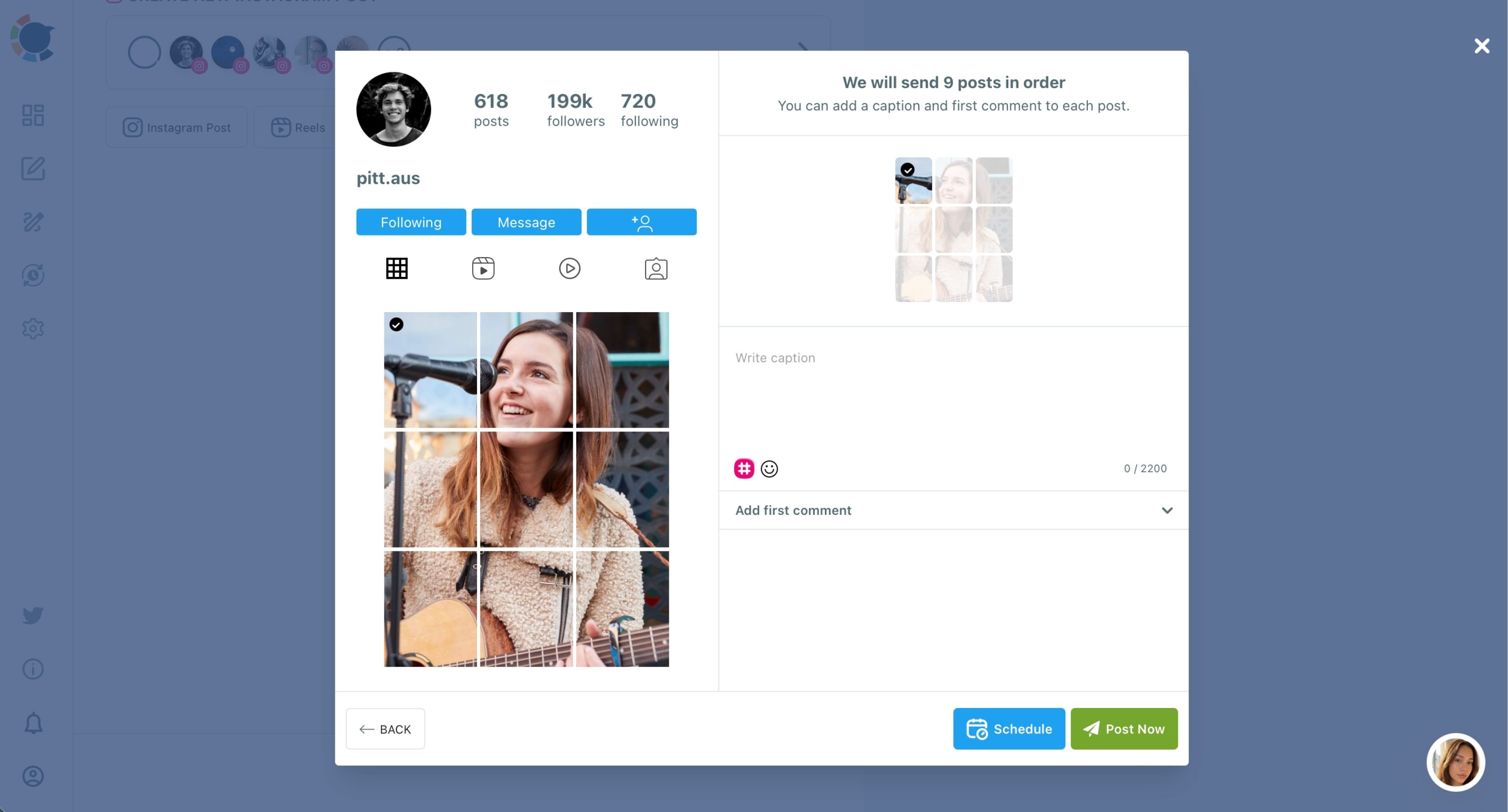
- Add a caption and a first comment to each tile, since every tile publishes as its own post.
- Schedule every tile in one sitting so no other post can fall between them. For the nine-tile version specifically, see the guide to the 9 grid Instagram post maker.
Hold the theme after the grid
- Double-check the tile order in the Outbox before the first tile goes live, and confirm nothing else is scheduled into the same window.
- Prepare the following posts from your templates, and when you need a photo you do not have, pull one from Unsplash in the media bar and keep it only if it matches the palette.
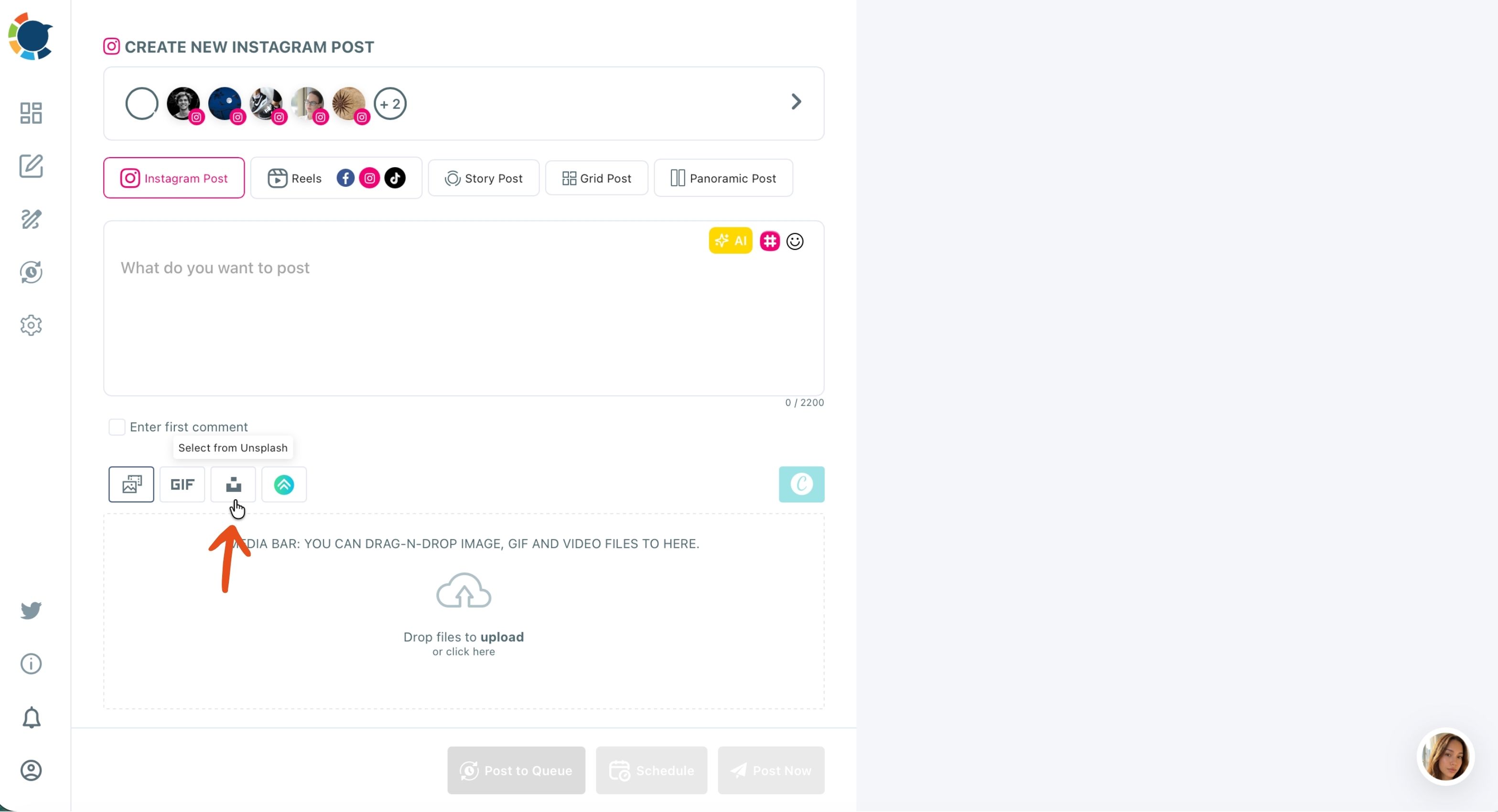
The sequence works because the theme exists before the grid, the grid is scheduled whole before anything can interrupt it, and the posts after it start from the same templates, so the look never depends on memory.
The clip shows that last phase in motion: composing with the toolbar tools, then saving or planning the post.
How to keep later Instagram posts on theme and check the colors
Keep later posts on theme by starting each one from a saved template and reviewing the month as a set before it publishes. A grid sets the look on launch day; the posts that follow decide whether it lasts.
Two checks catch most drift:
- The calendar check. Open the Outbox in Calendar View, switch to Month, and filter by account and post type. A thin week or an off-palette post stands out while it can still be edited.
- The color check. Look at the grid as a block rather than post by post. Lighter shots and a stray accent color are easy to miss one at a time and obvious side by side.
For laying out the next posts against the existing grid, the feed planner for Instagram is built for that view.
If you want to rehearse the layout first, read the walkthrough on the Instagram grid planner.
A cohesive Instagram aesthetic is kept in the calendar, week after week.
Rotate templates and reuse what worked
Templates also need a rotation, or the feed turns monotonous. Keep three or four designs in the same palette and alternate them, so neighboring squares differ in layout while sharing color and type.
That small variation is what lets a cohesive Instagram aesthetic feel lively instead of copied, and it is easier to plan when the whole month is in front of you at once.
Save as Draft and Duplicate help here too. A post that worked can be duplicated into an editable copy for next month, so the structure repeats while the content changes. Planning a full month this way is what the Instagram post planner is for.
Mix formats without breaking the look
A feed of nothing but grids gets tiring. Keep Grid Posts for planned moments and fill the weeks between with single posts, carousels and Reels in the same palette. The look holds because the theme carries across formats.
Summary: a cohesive Instagram aesthetic your followers will recognize
A recognizable feed comes from three habits:
- Write a theme and make every post pass it.
- Mark the moments that matter with a Grid Post, cut and scheduled in one sitting.
- Keep the following weeks on theme with templates and a monthly look at the calendar.
I would start with the theme even if the grid is weeks away, because every template and every tile depends on it. Once it exists, the rest is scheduling.
The value of doing it this way is that the look stops depending on who posts or how busy the week is.
A teammate who has never touched the brand can open a template and produce a post that fits. A grid that takes most of an hour by hand takes a few minutes.
And the month ahead is visible before any of it goes live, so a cohesive Instagram aesthetic becomes the default state of the account rather than a project you restart every season.
→ Start your cohesive Instagram aesthetic with the Grid Maker
Frequently Asked questions on grid posts and feed themes
Can I make a themed Instagram grid without design software?
Yes. The Grid Post tab cuts the tiles from one uploaded image inside Circleboom Publish, and Canva in the same composer covers the design, so no separate editing app is needed.
Is an Instagram puzzle feed the same as a grid post?
Close. A puzzle feed uses the same tile idea but designs across the tile lines so several images connect into one larger story. The guide to create an Instagram puzzle feed template walks through it. The Instagram puzzle feed template page is a starting point for layouts.
Does a panorama give the same effect as a grid without nine posts?
Not the same effect. A Panoramic Post turns one wide image into connected slides of a single swipeable carousel, so it is one post with no order to protect, but it lives inside the carousel rather than across the profile grid.