

The problem is specific and common: you can see a keyword's conversation on X, but you cannot turn it into a usable list of the accounts behind it. Native X search returns a feed, not a roster. There is no deduplication, no profile data, and no export button, so anyone who needs the people, not the posts, ends up copying handles by hand into a spreadsheet that loses its signal within a week.
A keyword export is the fix for that gap.It searches X by tweet content, not by profile, so intent comes first.It deduplicates authors, so each account appears once with full data.It produces a CSV you can import into a CRM or ad platform.
Start the workflow here: export accounts tweeted keyword.
This guide covers what the export contains, how to run it step by step, and how to keep the resulting list relevant.
What the Export Solves That X Cannot
X search was designed for browsing, not extraction. The feed resets on scroll, identical mentions are never collapsed, and there is no way to attach follower count or account age to what you find. Build a list this way and you spend more time cleaning duplicates than evaluating prospects.
There is also no result set you can return to. Close the tab and the search is gone; reopen it and the order has shifted. That makes any list from native search non-reproducible, a problem the moment you rerun the query next quarter or hand it to a teammate. A keyword export saves the search and lets you revisit it without re-collecting, so the workflow is repeatable rather than a one-time scramble.
Circleboom Twitter closes that gap as an official X Enterprise developer partner, querying the compliant data layer rather than scraping pages. The underlying X full-archive search reaches back to the first post in March 2006, per X's developer documentation. That depth is why a keyword can be scoped years into the past.
From there, the tool converts the matching archive into a deduplicated, exportable list of authors. This is the safe alternative to the workarounds described in export tweets extensions and how to safely download tweet data, where browser tools put both reliability and account safety at risk for a file you could pull cleanly instead.
What a Keyword-to-Account CSV Contains
The export is a deduplicated list of every unique account that authored a matching tweet. Each row includes the following:
- Username, display name, and bio text.
- Follower count, following count, and follow ratio.
- Account creation date and total tweet count.
- An active or inactive engagement signal.
One detail matters before you run it: the requested tweet count controls collection size, not the number of accounts. A pull of 500 tweets from 50 accounts returns 50 profiles.
This is the same portable-data principle behind the broader export Twitter accounts workflow, and it is what lets the file feed any downstream system without manual cleanup. Teams that have done this for audience building describe it in how to collect Twitter followers without coding.
How to Read Each Field Before You Trust the Row
Knowing what each column means turns a list of strangers into a qualified segment. Use this quick reading guide as you scan the file:
- Username and bio: the identity and self-description, useful to compare against the tweet that surfaced the account.
- Follower and following counts: reach and reciprocity. A high follower count with low following signals a broadcaster.
- Follow ratio: a single number that summarizes that balance, handy for sorting at scale.
- Account creation date: tenure, which separates an established operator from a fresh or throwaway handle.
- Active or inactive signal: whether the account still posts, the field that most often saves a wasted outreach attempt.
Read together, these columns let you qualify a row in seconds rather than opening each profile by hand. The same field-by-field discipline applies to any portable list, which is why teams that move data to other tools think the same way in how to export Twitter followers to a spreadsheet. The tweet view, separately, carries impression, like, retweet, quote, bookmark, and reply counts for content research.
How to Export Accounts That Tweeted a Keyword
Work through the steps in order. The early steps build a precise segment; the later steps download it.
Connect and Start the Search
1. log in to Circleboom and authorize the X account you want to run the search from.

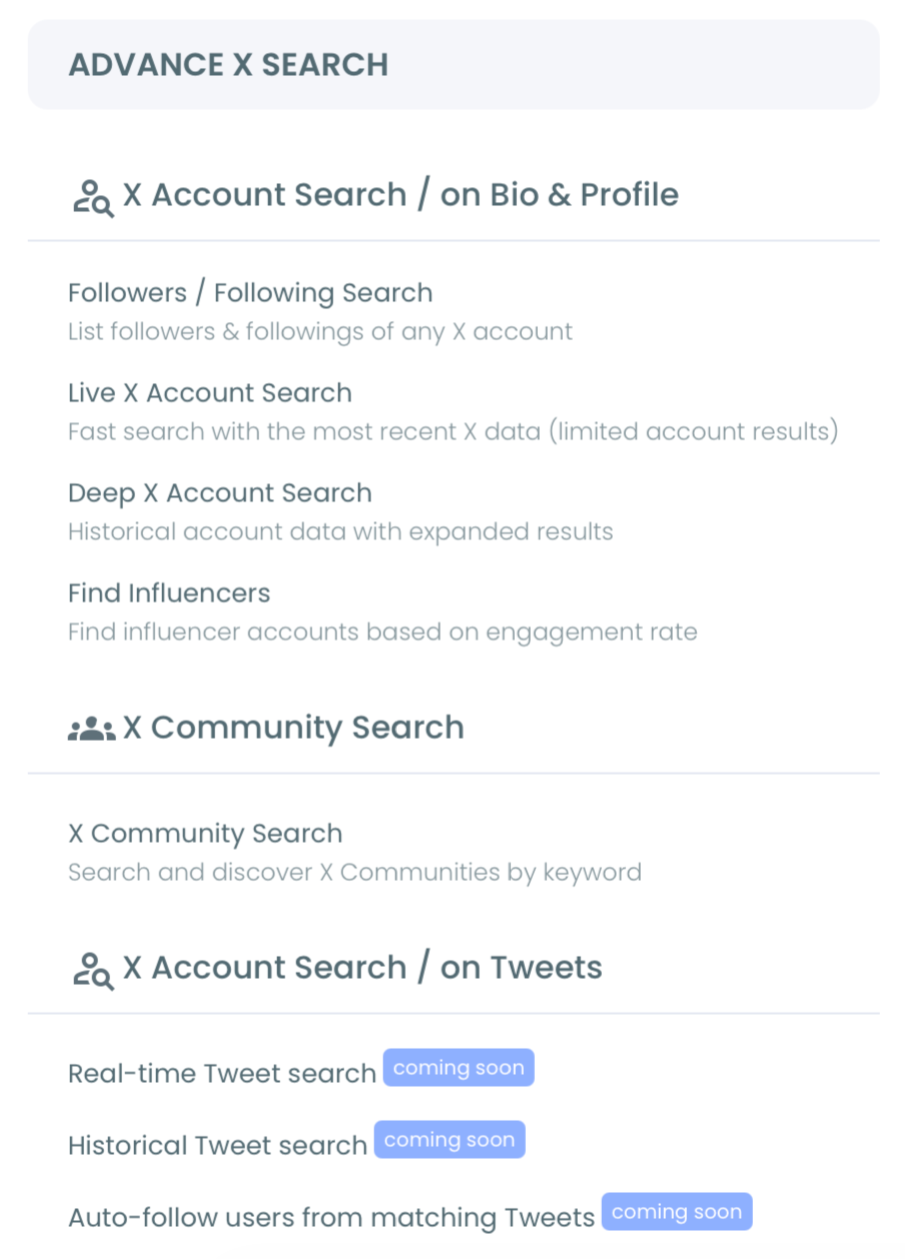
2. Open the Advanced X Search menu and select Historical Tweet Search.
3. Enter your keyword or phrase in plain language, then review the AI search suggestions and confirm the variation that best matches your intent.
Refine the Segment
- Apply filters to raise relevance: exclude unrelated terms, set a target language, and turn on the verified-only toggle if you need it.
- Set engagement minimums (minimum likes or retweets) so the result favors the tweets that carried weight rather than every passing mention.
- Choose a date range (last 30, 60, or 90 days, the past year, or a custom window) to scope the keyword to the period that matters.
Collect, Review, and Download
- Set the tweet collection size, run the search, and review the matching tweets to confirm the keyword is pulling the right conversation.
- Click "Display Profiles of this search" to switch to the deduplicated account view.
- Review the profiles, select the accounts you want, and click Export to download the CSV with every field attached.
Completing the filtering before the export is what makes the downloaded file usable immediately, because relevance, recency, and quality are already applied at the source.
A short video walkthrough of a related real-time keyword flow makes the search interface easier to follow:
Keeping the List Relevant
Two settings decide whether the export is sharp or noisy. The keyword itself is the first: a category word returns volume and low relevance, while the specific language people use when they have a problem returns fewer but warmer accounts. The date range is the second: scoping a search to a defined window reconstructs a conversation as it existed at that moment rather than returning only the latest activity.
Recency also has a caveat. An account that tweeted a keyword a year ago may have gone quiet, changed focus, or been suspended since. Review profiles before any bulk action, because a keyword match confirms what someone said, not that they are still the right contact today.
The same discipline applies when you sort signal from noise in llm-run Twitter accounts and how to find them, where automated posters can inflate a keyword's apparent reach. A few high-volume bots repeating a phrase can make a topic look busier than it is, so the activity signal in each row is worth reading before you trust the count.
A second guardrail is the follow ratio. Accounts that follow tens of thousands while being followed by a handful are often automated or low-value, and the ratio surfaces them without opening a single profile. Reading that one column the way you would read a good like-to-followers ratio on X lets you skim a noisy export and keep only the rows worth a message.
How the Filters Work Together
The filters are not independent toggles; they compound, and understanding the order helps you build a tight segment. Start with the keyword and its match type, which decides whether you want an exact phrase, a loose contains, or a partial match. A loose match casts wide and is right for discovery; an exact phrase is right when the wording itself is the signal.
Layer exclude terms next to strip predictable noise, such as a brand name that shares your keyword or a campaign hashtag you do not want. Language scopes the result to the market you serve, and the verified-only toggle narrows to accounts X has confirmed when authority matters more than volume.
Engagement minimums act as a quality floor: requiring a baseline of likes or retweets surfaces the expressions of a signal that actually traveled, rather than the quiet majority of one-off mentions. Media type and the replies or links toggles refine further, letting you keep only original posts or only tweets that linked out. Finally, the date range scopes the whole stack to the window that matters, whether that is the last 90 days or a custom stretch around a single event.
After the Export: Segment, Then Act
A downloaded list is raw material until you segment it. Split the file by the activity flag first, so dormant accounts never share a workflow with live ones. Then split by follower tier and account age, because a high-reach veteran and a small fresh handle deserve different messages even when they tweeted the same phrase.
Once segmented, the file has three common destinations. It can seed a CRM as a prospect list where every record opens with a public intent signal, it can become a custom audience on X Ads, or it can stay inside Circleboom as an X List for ongoing monitoring. If your next move is engagement rather than cold outreach, the tactics in how to engage with followers on Twitter apply directly to the warmer accounts the keyword surfaced.
Match the tool to the goal as well. For research where you need the full thread of a past discussion rather than a contact list, archiving someone else's tweets is the better fit. For live monitoring of a term going forward, the Keyword and Hashtag Tracker keeps the conversation in view without re-running the export each time the topic resurfaces.
Your Keyword-Export Checklist
Run through this list each time you build a keyword-to-account export:
- Choose the exact phrase people use when they have the problem, not the category label.
- Add exclude terms and a language filter to strip obvious noise.
- Set engagement minimums when you want the accounts that shaped the topic.
- Scope a date range to the window that matters for your goal.
- Switch to the profile view, review rows, then export the deduplicated CSV.
Each item raises the quality of the file before it ever reaches your CRM, which is the entire point of building the list this way. Skip the filters and you simply move the cleanup work downstream, where it costs more time and catches fewer errors.
→ export the accounts behind any keyword
Common Questions About Keyword Exports
What is the difference between exporting tweets and exporting accounts?
Exporting tweets gives you the posts themselves; exporting accounts gives you the deduplicated people who wrote them. Circleboom offers both views, and the account view is the one to use for prospect or audience lists.
How recent or old can the keyword window be?
You can scope to the last 30, 60, or 90 days, the past year, or a custom range. The underlying X archive indexes posts back to 2006, so historical windows are searchable as long as the posts remain public.
Can the file be imported into a CRM or ad platform?
Yes. The CSV includes follower count, account age, activity signal, and bio for each account, which is enough to import into a CRM or seed a custom audience without extra processing.
Are private or deleted tweets included?
No. Only publicly available tweets are returned. Private, protected, and deleted posts cannot be retrieved, and accounts that became private after posting may differ from the collected data.
What does it cost to run a search and an export?
Both the search and the export draw from a GetTweetTokens balance, with the cost proportional to how many tweets you collect. The balance appears during setup and decreases as you run. If it runs out mid-collection, the search stops at that point and saves the partial results, so you keep everything gathered before the balance hit zero.
Can I save a search and return to it later?
Yes. Each search is stored under a search log and can be revisited without re-consuming tokens, which makes the workflow reproducible rather than a one-time scramble. That matters when you rerun a query next quarter or hand the same segment to a teammate who needs to see exactly what you saw.






