Most yoga teachers believe each platform needs its own video. I believed it too, and it cost me more posts than it ever earned me.
The truth is simpler and a little embarrassing: my students on YouTube, Instagram and TikTok wanted the same 45-second hip opener. What kept it from them was my third upload, the one I never got around to.
Uploading three times: three apps, three captions, three music picks, and the last platform usually skipped. Circleboom Publish: one upload in the YouTube Short composer, with Instagram and TikTok added in the same post, so Circleboom Publish publishes the video as a YouTube Short, an Instagram Reel and a TikTok in one action.
→ Cross post YouTube Shorts, Instagram Reels and TikTok from one upload
Below is the exact routine I run after every filming session.
Why my TikTok and YouTube uploads kept slipping
Teaching six classes a week leaves one free afternoon for content. I would film a flow on my phone, edit it, and post it to Instagram first, because that is where my studio members live. YouTube came next, if I still had energy. TikTok came "tomorrow."
Tomorrow rarely came. Each platform wanted its own upload, its own cover frame, its own text, and in my head its own edit. I told myself TikTok viewers wanted something faster and YouTube viewers something more polished. So I kept a list of clips to "adapt" that grew every week.
A student's question made the gap obvious. She asked about the shoulder sequence I had posted "everywhere." It had gone to Instagram only, ten days earlier. The YouTube and TikTok versions were still drafts in my camera roll.
That is when the cost became concrete. Every clip that stayed on one platform was a class preview a potential student never saw.
The two audiences behave differently, which Instagram Reels vs YouTube Shorts lays out well, but both of them were watching vertical video, and I was feeding only one.
I tried to fix it with discipline first. A Sunday upload block, three apps open, one clip at a time. It lasted two weeks.
Uploading the same file three times is the kind of work that feels pointless while you do it, so it is the first thing to go when the week gets full.
Why one vertical video is enough for all three platforms
I expected to need three edits. What the platforms needed was one file built to the strictest rule among them.
YouTube Shorts are the tightest. In Circleboom Publish the Short composer takes videos up to 60 seconds, with vertical 9:16 recommended and .mp4 as the recommended format. A 9:16 clip under 60 seconds is also the right shape for an Instagram Reel and a TikTok video.
So the "adaptation" I kept postponing was mostly imaginary, and one file was enough to cross post YouTube Shorts, Instagram Reels and TikTok.
One 60-second vertical master file is the whole strategy.
When a flow runs long, I cut it to its strongest 60 seconds before anything else. An 85-second sun salutation becomes a 58-second one with the transitions tightened. That single cut then works on every platform, and the cut usually makes the clip better anyway.
What makes a short video travel is covered in how to make a YouTube video that goes viral. A tight first three seconds matters on every one of these apps.
Once I stopped treating the platforms as separate productions, the only real problem left was the uploading. That is a tooling problem, and it has a tooling answer: a way to cross post one video to YouTube Shorts, Instagram Reels and TikTok without opening three apps.
What Circleboom Publish does with one yoga video
Circleboom Publish has a shared video cross-posting engine: one uploaded short video, published at the same time to up to four platforms, YouTube, Instagram, TikTok and Facebook. It sits inside a multi-platform scheduler that covers ten networks, and it is how I cross post YouTube Shorts, Instagram Reels and TikTok from the YouTube composer.
Circleboom is a listed developer on X's official Enterprise customer directory, which tells me the company connects accounts through approved access rather than workarounds.
The engine has four doors. You can start from the YouTube Short composer, the Instagram Reels post type, the TikTok composer or the Facebook Reels post type, and each one offers the other platforms as extra destinations. From the Instagram side, the window looks like this:
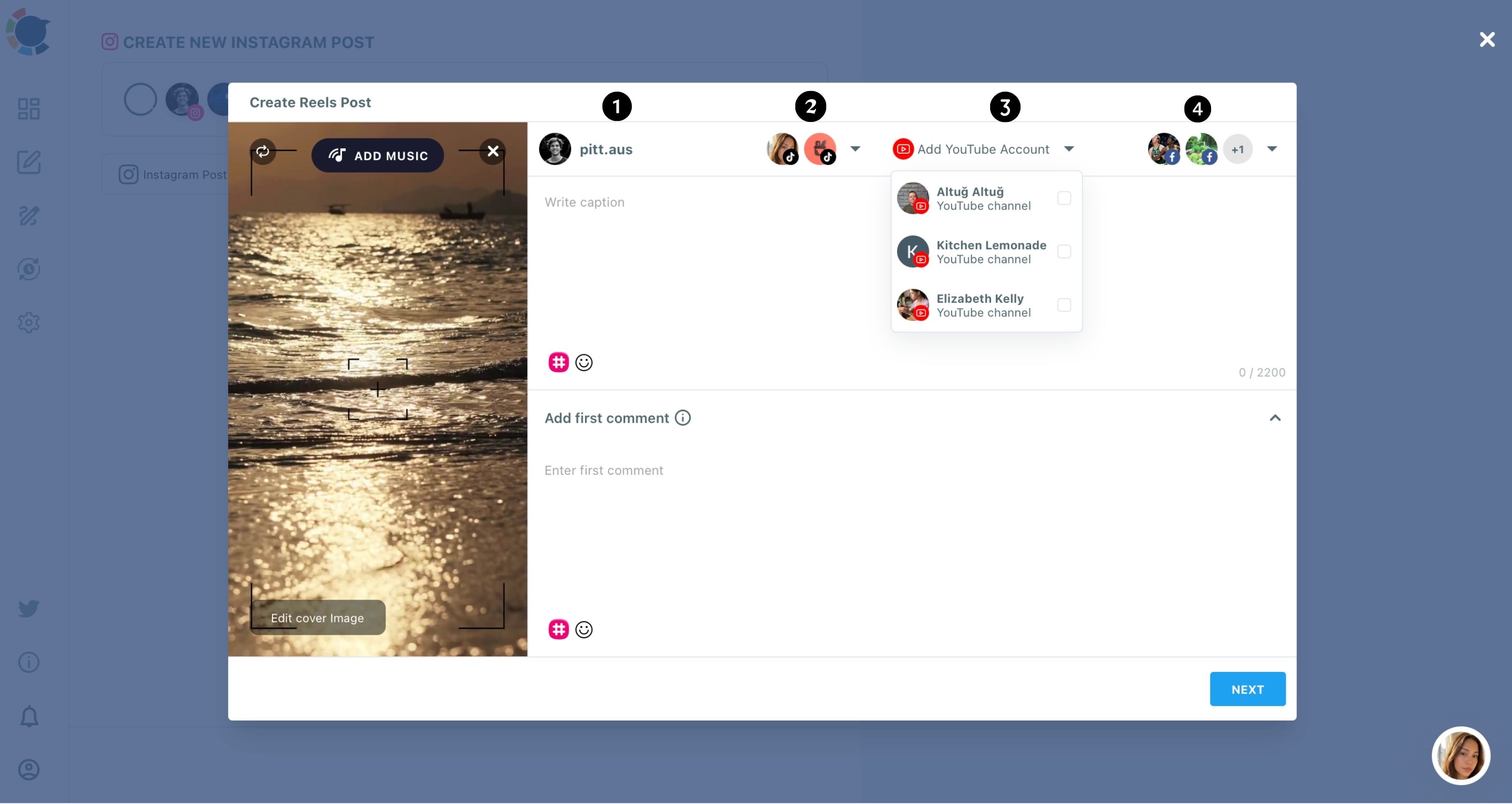
I start from YouTube because its form asks for the most: a required title, a description, tags, category and visibility.
Fill the strictest form first and the rest is easy.
In the YouTube composer, the Add More Accounts row offers Facebook, Instagram and TikTok, and each destination is a checklist, so I could add a second Instagram account later if the studio opens one.
That is how I now publish one yoga video on all three platforms at once.
Some weeks one platform needs its own post, such as an Instagram-only studio announcement. The Instagram Reels scheduler covers those.
TikTok gets the occasional solo post too, usually a trend reply that would make no sense on YouTube, and the TikTok scheduler handles it from the same dashboard.
Linking Instagram, TikTok and YouTube in Circleboom Publish, then posting one short video to all three (1:47):
How I cross post YouTube Shorts, Instagram Reels and TikTok in one step
The routine I run to cross post YouTube Shorts, Instagram Reels and TikTok after each filming session has three phases and seven steps, and the whole thing takes about as long as one manual upload.
Connect the accounts and open the right door
- Log in to Circleboom and open the dashboard.
- Connect your YouTube channel, Instagram account and TikTok account under Settings, Manage Social Accounts, with the CONNECT NEW ACCOUNT button.
- Open the YouTube Specific card to reach the CREATE NEW YOUTUBE SHORT POST composer.
Build the Short once
- Upload the 9:16 master file by drag and drop or Select a video file, then choose a cover frame with CHANGE THUMBNAIL.
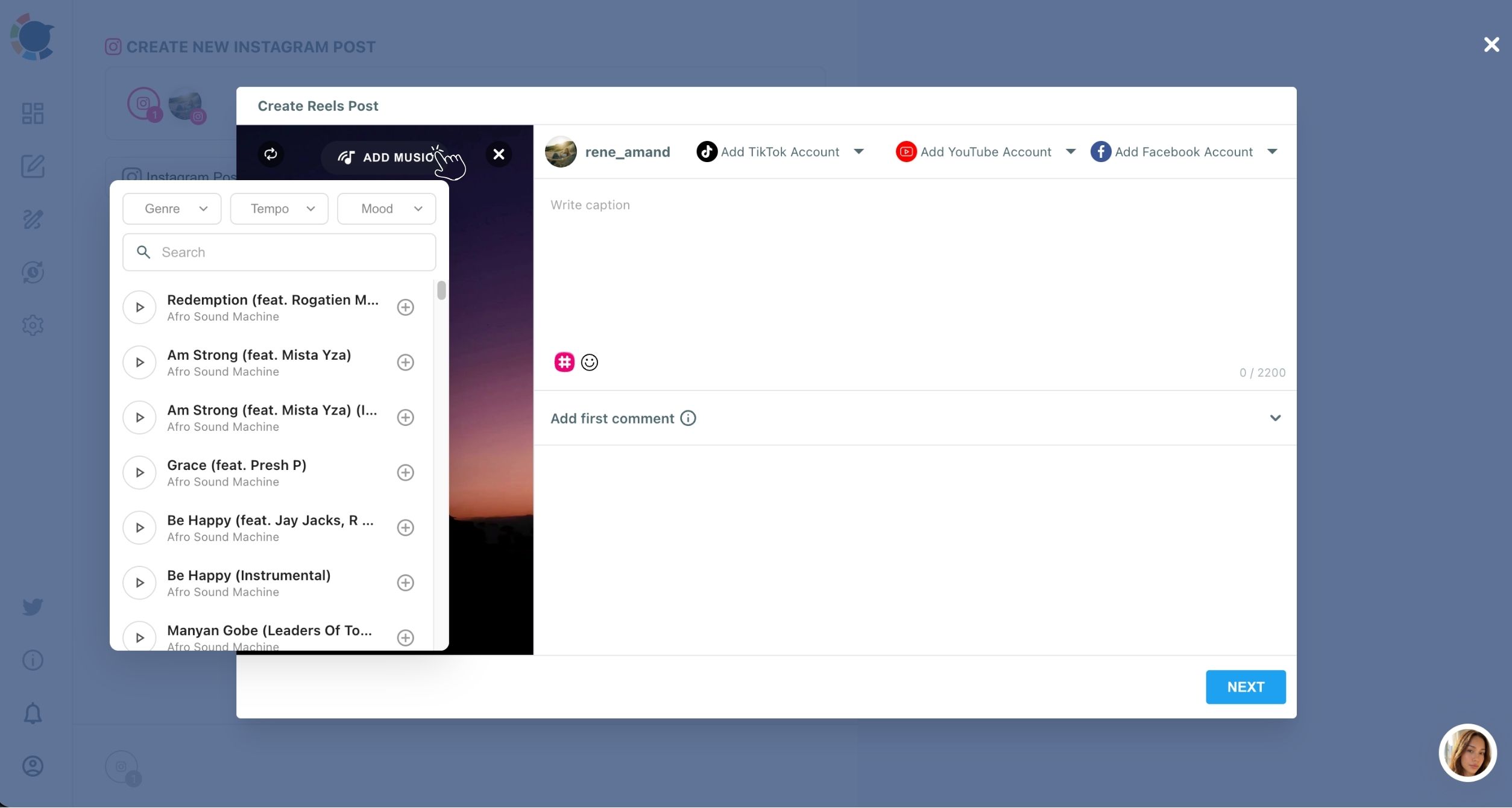
- Add a soundtrack with ADD MUSIC, filtering the library by Genre, Tempo and Mood, then write the title and description with the AI buttons beside each field (the guide on using AI to generate captions for YouTube Shorts shows the prompts that work).
Add Instagram and TikTok, then release
- Fill the Add More Accounts row with your Instagram and TikTok accounts, and Facebook too if you run a studio Page.
- Choose Post Now, Schedule or Post to Queue, so all three platforms go out in the same action.
Starting with the YouTube version means the strictest form is filled before Instagram and TikTok join, so nothing is missing. Adding them in the same post, rather than later, removes the "tomorrow" upload that used to never happen.
Adding music once for Shorts, Reels and TikTok
Music is where my old routine broke most often, and it matters even more when you cross post Shorts, Reels and TikTok videos from one file. I used to pick a track inside each app, and the same flow ended up with three different moods.
Worse, I never knew whether a track I had pulled from somewhere else was fine to use.
The ADD MUSIC library in Circleboom Publish sits inside the composer, and a track chosen once travels with the video to every platform it is cross-posted to.
One choice scores the Short, the Reel and the TikTok.
There is a reach reason too. Audio a creator does not have rights to is a common cause of limited reach on video platforms, so a built-in library is the safer default for a slow, instrumental flow track than whatever I found online.
Does posting the same clip on three platforms hurt my YouTube channel?
No, not when the clip is my own original video. YouTube's Partner Program rules on reused content target channels that "repurpose content that's already on YouTube or another online source" without significant changes. They also list "short videos you compiled from other social media websites" as content that cannot be monetized.
That describes compiling other people's clips, not publishing my own class preview on three platforms.
Still, I keep two habits.
- I never upload a downloaded copy of my own TikTok to YouTube. I post the original file from one upload, so every platform gets the clean master.
- I keep the YouTube title specific. The pose and the benefit go in the title, because that is what search reads.
If the channel ever grows toward the Partner Program, how to earn money from YouTube Shorts explains the requirements in plain terms. Original class clips sit on the right side of those rules.
What changed once one upload covered YouTube, Instagram and TikTok
Once I could cross post YouTube Shorts, Instagram Reels and TikTok from one upload, the first change had nothing to do with metrics: every clip went everywhere. No list of clips to adapt, no Instagram-only weeks, no TikTok drafts aging in my camera roll.
The second change was cadence. Because one sitting now covers all three platforms, I could plan a week of flows at once and spread them out.
The YouTube Short composer suggests best times from each channel's own viewers, and the Queue can fill recurring slots automatically, so the clips go out on a rhythm my students can rely on.
The third change was trust in the system. I used to wonder whether a scheduled post had gone out at all.
Now I check the Outbox once a week. Sent Items lists every video that published, and Failed Items lists anything that did not, each with the specific error reason. A TikTok that failed because of a connection issue gets fixed the same day instead of discovered a month later.
I also stopped writing the YouTube description from scratch. The AI button beside the description field drafts it from a one-line instruction, such as "describe a 45-second hip opener for tight hips after desk work," and I edit the result so it sounds like me.
The hashtag icon next to it bulk-adds relevant hashtags, which I trim to the few that describe the pose and the benefit.
The writing part of each clip shrank to a quick edit.
A studio's short videos are also its best advertising. A student who finds a 45-second hip opener on TikTok and then sees the same teacher on YouTube has two reasons to book a class.
The habits that turn those viewers into subscribers are in how to promote your YouTube channel.
You do not need a content team to be on YouTube, Instagram and TikTok
If you teach, you already have the hard part of a plan to cross post YouTube Shorts, Instagram Reels and TikTok: something worth showing. You do not need three edits, three music subscriptions or a social media manager.
You need one vertical clip under 60 seconds and one upload that reaches every platform your students use.
The cost question is smaller than it looks too. Circleboom Publish starts at $34 a month for 10 accounts with one team member, which covers a YouTube channel, an Instagram account, a TikTok account and a studio Facebook Page with room to spare.
For a single-platform post, the YouTube Shorts scheduler is the same composer without the extra rows.
Start with the clip you filmed last week and never posted to the third platform.
→ Send your next class clip to Shorts, Reels and TikTok in one step
Yoga video cross-posting FAQ
Can I post a 75-minute class recording this way?
No. Circleboom Publish's YouTube composer is Shorts-only, up to 60 seconds, so full class recordings need YouTube Studio or a separate long-form workflow.
Can I add Facebook Reels to the same post?
Yes. The Add More Accounts row in the YouTube composer also offers Facebook, so the same video can go out as a Facebook Reel on your studio Page. Facebook support in the cross-posting engine is Pages-only.
Can I schedule the three platforms for later instead of posting now?
Yes. When you cross post YouTube Shorts, Instagram Reels and TikTok, the video uses the same Post Now, Schedule and Post to Queue actions as any Circleboom Publish post, so all three platforms can be scheduled together.