To upload video to multiple YouTube channels is to publish one Short as its own upload on every channel you run. For a cook with an English channel and a Spanish channel, the work sits in what each channel needs so the second upload does not read as a copy.
Can you upload one Short to two YouTube channels at the same time?
Yes. Circleboom Publish uploads one YouTube Short to several connected YouTube channels in a single send, so an English and a Spanish channel can get the same video from one composer. For two languages, give each channel its own title and description.
→ Upload video to multiple YouTube channels from one composer
What two YouTube channels in two languages ask of one cooking Short
A bilingual cooking creator usually films once and wants both audiences to see the result. The paella Short is the same 50 seconds of rice, saffron and a pan. What changes is the language around it: the title, the description, the tags, and any spoken words or on-screen text.
On YouTube itself, that means two separate uploads. You open Studio on the English channel, upload, write the title, fill the settings, then switch accounts and do it all again on the Spanish channel. With six Shorts a week, that is twelve uploads, twelve forms and twelve chances to pick the wrong channel.
The file is shared. The metadata is not.
That split decides everything below. YouTube ranks and recommends each upload on its own signals, which how the YouTube algorithm works explains in detail. The Spanish Short has to earn its audience with Spanish words.
Being able to upload video to multiple YouTube channels at once removes the double upload. A tool that lets you send one Short to several YouTube channels handles the file, but it cannot write your second language for you unless you ask it to.
Does YouTube treat the same Short on two channels as duplicate content?
Before you upload video to multiple YouTube channels, it helps to know what YouTube actually writes down. Its policies do not ban one creator from posting their own video on two of their own channels.
What they target is reuse without added value.
YouTube's reused content and inauthentic content rules for the Partner Program cover channels that "repurpose content that's already on YouTube or another online source" without significant commentary or changes.
The same page renames "repetitious content" to "inauthentic content" and says it "includes content that is repetitive or mass-produced," including content that "looks like it's made with a template."
Two points matter for a bilingual cook:
- The policies are about monetization. They apply to channels in, or applying to, the YouTube Partner Program, and a reused content problem can cost monetization for the whole channel.
- The page is silent on your own channels. It does not say that the same original Short on your English and Spanish channel breaks a rule, and nobody should promise you it does or does not.
What keeps you on the safe side is visible effort per channel: a Spanish title, a Spanish description, Spanish tags, and Spanish captions or voice where the Short speaks.
If either channel earns or plans to earn ad revenue, read YouTube monetization before you set up the second upload, because the Partner Program review looks at the channel as a whole.
One bilingual YouTube channel or two language channels?
Two channels is not the only way to reach Spanish speakers. YouTube's own tools to translate your video titles and descriptions let one channel add translated metadata to each video. YouTube then shows each viewer the title and description in their language, and it can show the video in search for speakers of that language.
So the fork looks like this:
| Your situation | Better setup | Why |
|---|---|---|
| Same recipes, mixed audience | One channel, translated metadata | One subscriber base, one upload |
| Separate communities, separate creators | Two language channels | Each channel keeps its own voice |
| Spanish voiceover, English voiceover | Two channels, two cuts | Audio language cannot be translated in metadata |
If you already run two channels with their own subscribers, keep them. The work then is making each upload native to its channel.
Captions do a lot of that work. How to add captions to YouTube Shorts covers the on-screen text that lets one cut serve a viewer who reads Spanish but watches with the sound off.
Which recipe Shorts can go to both YouTube channels as they are
Not every cooking Short needs a second edit. Sort them by what the viewer hears and reads.
Language-free Shorts (hands, ingredients, music, no voice, no text) work on both channels as the same file. Only the title, description and tags change.
Text-on-screen Shorts need a Spanish text layer, so they become two cuts of the same footage.
Voiceover Shorts need a Spanish voice or Spanish captions. A dubbed cut is its own video.
The practical shift for a bilingual creator is to film more language-free Shorts.
A plating Short scored with a track from a music library travels to both channels with zero editing, and the only per-channel work is the words around it. The second audience then costs a few minutes of writing per Short.
How Circleboom Publish handles two YouTube channels
Circleboom Publish connects several YouTube channels to one account and lets you upload video to multiple YouTube channels from the YouTube Short composer.
It is a multi-platform scheduler for ten networks, and its YouTube composer covers Shorts only: videos up to 60 seconds, vertical 9:16 recommended. There is no long-form upload flow, so a 12-minute recipe video stays in YouTube Studio.
Circleboom is a verified Enterprise partner of X, the same official access standard the company applies when it connects your YouTube channels and the other accounts you add.
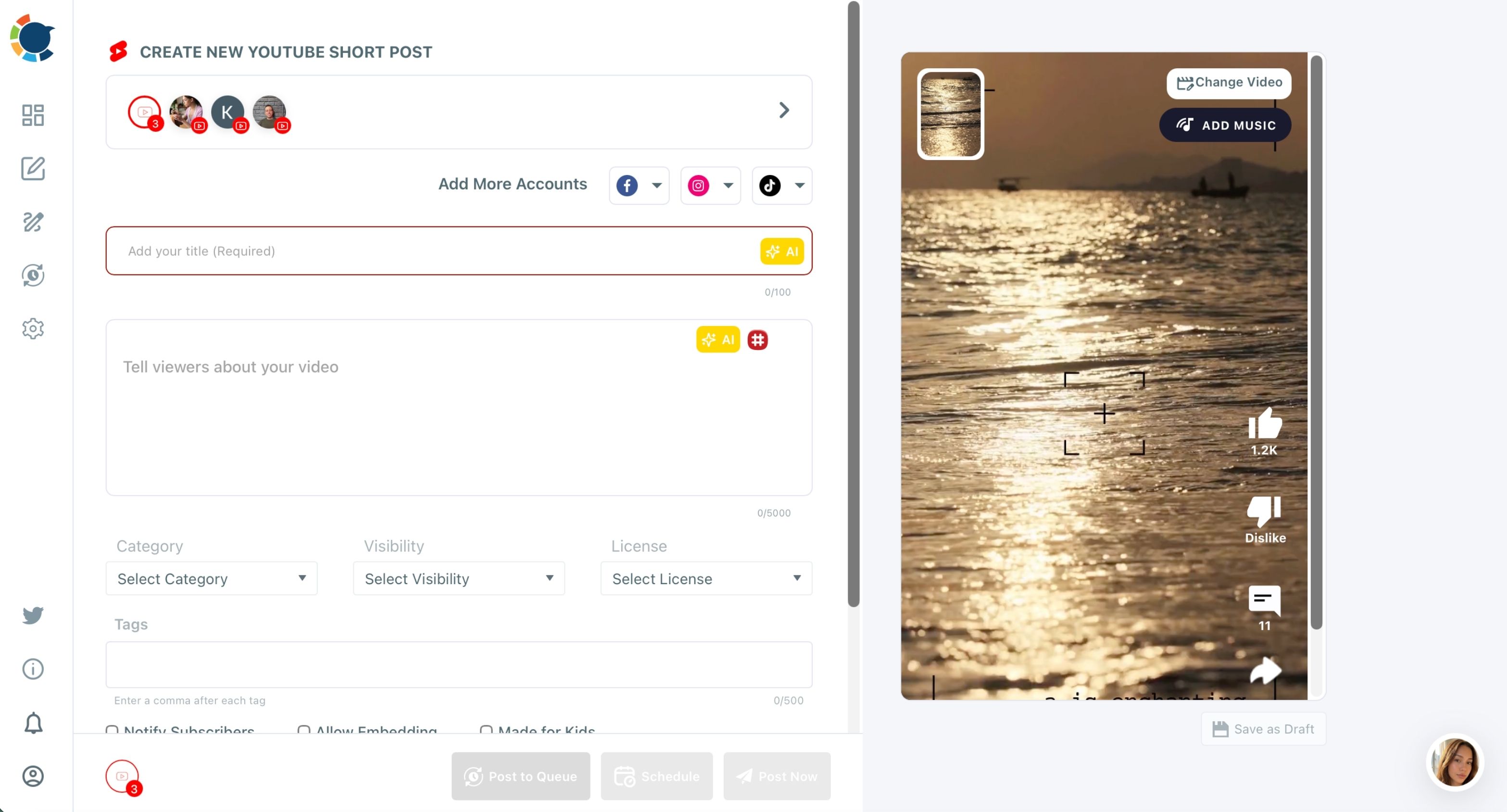
The account row at the top of the composer starts with your selected YouTube channels. Tick both and the same Short, with the same form, is scheduled to both.
That single send is the right tool when channels share a language, such as a main cooking channel and a baking spin-off.
You can also watch this clip to see channels being picked for one upload.
For an English and a Spanish channel, the title and description must differ, so build two posts from one upload: the English one first, then a copy switched to the Spanish channel.
When you are ready, upload video to multiple YouTube channels with each channel's own words.
If the same team also runs Instagram, TikTok or Facebook accounts, manage multiple social media accounts from the same dashboard so the cooking brand lives in one calendar.
How to upload video to multiple YouTube channels in two languages
To upload one Short to an English and a Spanish YouTube channel, connect both channels and compose the English post with its own title and description. Then copy the post, switch it to the Spanish channel and rewrite the words in Spanish.
Each upload then carries native metadata while the video is uploaded once. The four steps below take about the time of one manual upload plus a rewrite.
- Open Circleboom Publish and connect both YouTube channels under Settings, Manage Social Accounts, with the CONNECT NEW ACCOUNT button.

- Open the YouTube Specific card and upload the Short in the CREATE NEW YOUTUBE SHORT POST composer, then select only the English channel and fill in the English title, description, tags, category and first comment.
- Click Schedule and pick one of the suggested best times for the English channel, or set your own time.
- Duplicate the post, switch the account to the Spanish channel, and use the AI button next to the Title field to write a Spanish title, then do the same for the description before you schedule it at the Spanish channel's own best time.
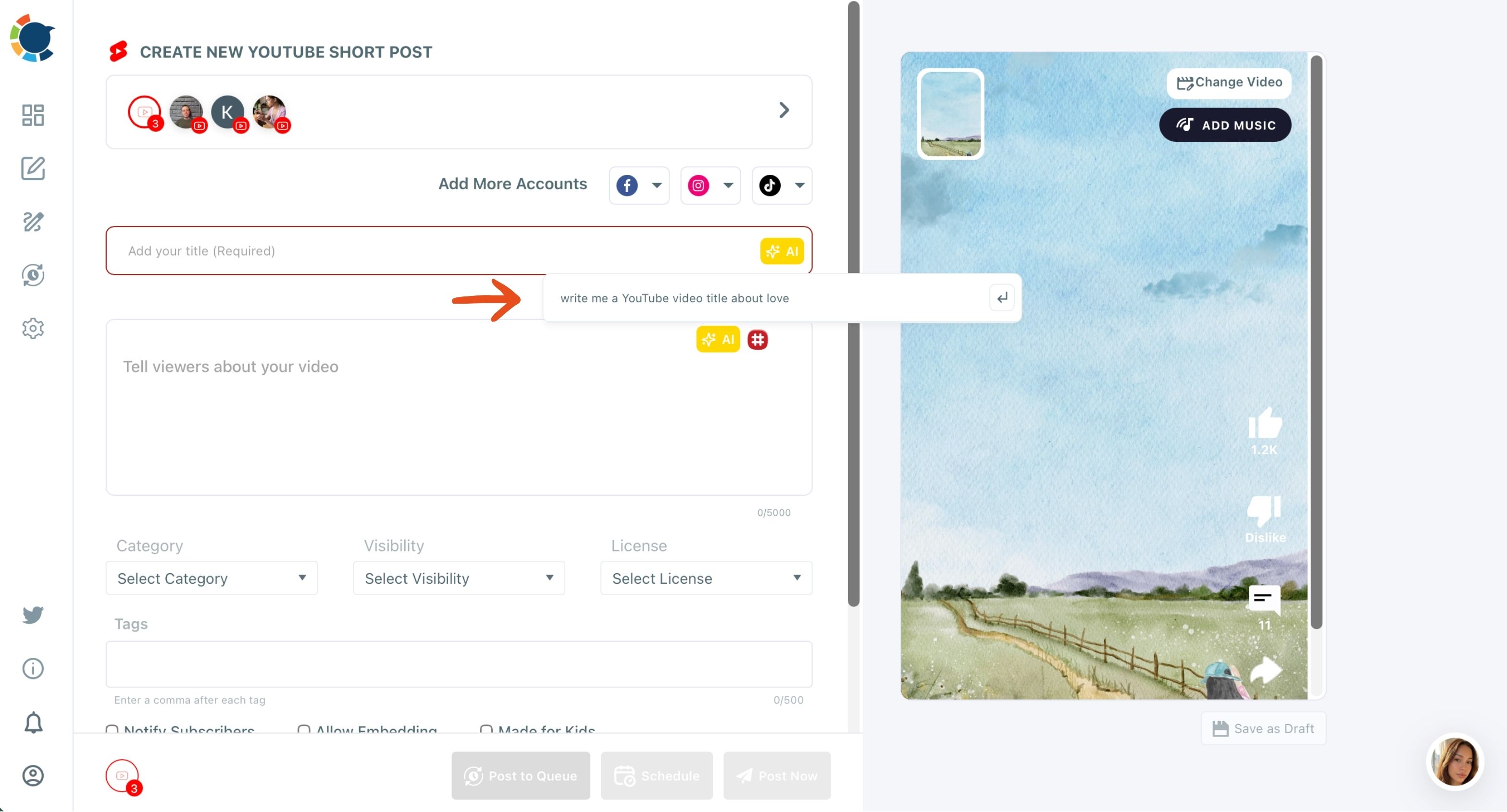
The order matters because the English post becomes the template. Category, visibility, tag structure and first comment are set once, and only the language changes on the copy.
Each channel also gets a time slot built from its own viewers, which a Spanish audience in another time zone needs.
One upload, two native posts, two time slots.
The AI writer is the AI YouTube Shorts caption generator built into the composer. Ask it to "write a Spanish title for a 50-second paella Short" and review the result before you schedule.
A machine translation of your English title is a starting point, not a finished Spanish title.
Getting the Spanish Short found on its own YouTube channel
When you upload video to multiple YouTube channels in two languages, the Spanish upload needs Spanish search words, not translated English ones. Spanish speakers search "paella fácil" or "arroz con mariscos", and those phrases belong in the title and the first lines of the description.
They also belong in the Tags field. The composer flags Tags as one of the most important fields for reach and gives it up to 500 characters.
The full checklist for that is in how to SEO YouTube Shorts, and it applies to each language separately. Write the tag list per channel rather than translating it line by line.
If keyword ideas run dry, a YouTube tag generator can suggest terms per language. Then paste the Spanish set into the Spanish post only. Mixing both languages into one tag field weakens the signal for both channels.
Two more fields deserve a Spanish version. The first comment, entered in the same form as the title, holds the channel's top comment slot from the moment the Short goes live, so put the Spanish recipe card or a question for Spanish viewers there.
The thumbnail can change too: CHANGE THUMBNAIL lets you pick a frame or upload a cover image, and a cover with Spanish text tells a scrolling viewer the Short is for them.
Keeping English and Spanish accounts apart with Share Groups
A bilingual cooking brand rarely stops at YouTube. The English Short often goes to an English Instagram and TikTok, and the Spanish cut to their Spanish twins. Picking the right accounts by hand every time is how a Spanish caption lands on the English TikTok.
Circleboom Publish solves that with Share Groups. You create one under Settings, Manage Share Groups, as a saved bundle of connected accounts, and pick it in the composer under Select by Share Group.
One group per language keeps every post in the right language. The English group holds the English channel and its matching accounts; the Spanish group holds the Spanish set. One click selects the whole bundle, and the Outbox can be filtered by Share Group, so a week of Spanish posts can be reviewed on its own before anything goes out.
Is the second YouTube upload worth the extra minutes?
The most common objection is time: if Circleboom Publish can send one Short to both channels in one click, why spend extra minutes on a Spanish copy?
Because the click saves the upload, and the rewrite earns the audience.
A Spanish viewer who sees an English title in their feed scrolls past, and YouTube's inauthentic content wording shows the platform is watching for repetitive, templated uploads.
The math is still on your side. Natively, six Shorts a week on two channels is twelve uploads and twelve full forms. In Circleboom Publish it is six uploads, six copies and six rewrites, with the music, settings and first comment carried over.
Use the one-click send to upload video to multiple YouTube channels that share a language, and give your Spanish channel words written for Spanish speakers.
→ Publish each cooking Short on both language channels
Bilingual YouTube channel upload questions
Can I schedule the English and Spanish Shorts at different times?
Yes. When you upload video to multiple YouTube channels as separate posts, each post has its own Schedule step. Circleboom Publish suggests best times from each channel's own viewers, so the Spanish Short can go out when that audience is online.
Can I upload a long recipe video to both channels with Circleboom Publish?
No. The YouTube composer in Circleboom Publish is Shorts-only, up to 60 seconds, so long-form uploads stay in YouTube Studio.
Can the Spanish Short also go to TikTok and Instagram?
Yes. The Add More Accounts row in the YouTube composer adds Facebook, Instagram and TikTok accounts to the same post, so the Spanish cut can reach Spanish-speaking followers on those platforms in the same action.
What is the biggest mistake bilingual cooking channels make?
Translating the English title word for word is the most common one. Write the Spanish title from what Spanish speakers search, and let the AI writer draft it in Spanish from a plain instruction.