To undo a single accidental like on X, tap the pink heart on that post again and it turns back to an outline. To undo likes on Twitter in bulk, for example after a scroll session full of mis-taps or a phone left unlocked, open Circleboom's Delete My Last Likes feature, filter your recent likes by date, keyword, or @username, and click Unlike Selected. Every matching like is removed in one action.
It happens to everyone. You are scrolling with one thumb, the feed jumps, and a heart turns pink on a post you never meant to touch. Sometimes it is harmless. Sometimes it is a three year old tweet from an ex, a coworker's political rant, or a post from a brand you are publicly feuding with.
One accidental like is easy to fix if you notice it. The trouble starts when you do not. A long scroll on a bumpy train, a phone handed to a kid, a late night session where your thumb did more than you remember. By the time you check, there could be dozens of likes you never chose, mixed in with hundreds you did.
X does not help you find them. The Likes tab is a long feed with no search and no date filter. You scroll, squint at each post, and try to remember whether you liked it on purpose.
With Circleboom Twitter, you can load up to your latest 3,200 likes in one list, narrow it to the exact day or topic where things went wrong, and undo all the accidental likes at once without touching the ones you meant.
When one tap is enough, and when you need Circleboom
Not every accidental like needs a tool. Here is a simple way to decide:
- If you just did it and can see the post, tap the heart again. That is the fastest fix there is.
- If you know it happened but cannot find the post, filter your recent likes by keyword or @username in Circleboom instead of scrolling.
- If it happened many times in one session, filter by that date and unlike the whole batch.
- If someone else had your phone, filter by the day it happened, review the list, and unlike everything that is not yours.
- If the likes are older than your latest 3,200, use Delete All Likes, which reads the like.js file from your X archive.
Circleboom's Delete My Last Likes works straight from your connected account with no archive needed. It shows your liked posts with their impressions, likes, retweets, replies, and dates, and the filter panel lets you narrow by date range, keyword, @username, hashtag, language, media, post type, or engagement count.
Because Circleboom is an Official X Enterprise Developer, every unlike goes through X's official API. You do not share your password, and nothing clicks around inside your account in a browser. The unlike requests are the same kind X expects from approved apps.
How to undo likes on Twitter in bulk with Circleboom
Step 1: Open Delete My Last Likes. Log in to Circleboom Twitter, connect your X account, and open Delete My Last Likes. Circleboom loads up to your latest 3,200 liked posts with their metrics and dates.
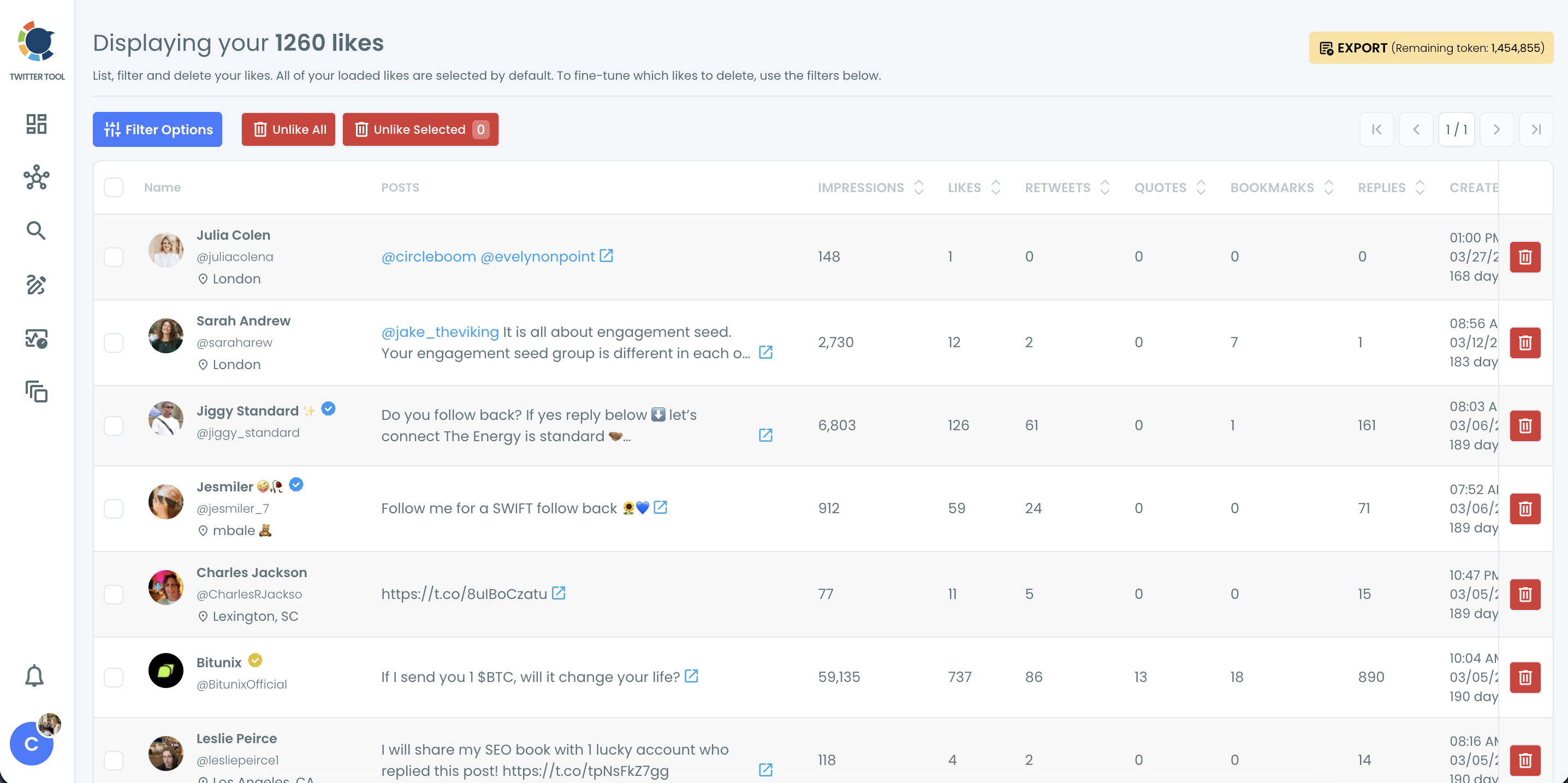
Step 2: Narrow it to the accidental likes. Click Filter Options. Set the date range to the day the mis-taps happened, or type the @username or keyword from the post you liked by mistake. Click Apply Filters.
📌 Every loaded like is selected by default. Always filter first, then review the list, so you only unlike what you actually meant to undo.
Step 3: Review and select. Go through the filtered list and keep only the likes you want to remove selected. If a post in the list was a real like, uncheck it.
Step 4: Unlike. Click Unlike Selected to remove only the checked likes, or Unlike All to remove every like in the filtered list. Confirm in the "Unlike your likes?" pop-up.
⚠️ Unliking is permanent. If you remove a like by mistake, you will have to find the post and like it again yourself.
Why accidental likes are so easy to make and so hard to find
The like button sits right where your thumb rests. On a phone, a fast scroll that stops a little early or a double tap meant to zoom on an image can land a like. X does not ask for confirmation, and the heart animation is over before you notice.
Finding them afterwards is the harder part. The Likes tab shows posts in the order you liked them, but it has no search and no date filter. It also loads in batches and can stop showing older likes after a while. Our post on why you can't see your Twitter likes explains what is going on there.
So if you liked ten things by accident at some point last Tuesday, you scroll back to Tuesday and check each post one by one. On a busy account, that can mean hundreds of posts to read through.
📌 Likes also shape your feed. X uses what you like as a signal of what you are interested in, which affects the For You timeline and recommendations. A batch of accidental likes on a topic you do not care about can tilt your feed toward it until those likes are gone. If you want a broader reset, see how to reset your Twitter algorithm.
What happens if you don't undo likes on Twitter
An awkward signal to the wrong person. A like on someone's post can show up in their notifications. An accidental like on an old photo, a rival's announcement, or a controversial take can be read as a message you never meant to send. Undoing it quickly limits how long it sits there.
A feed that drifts. Likes tell X what you want to see more of. A cluster of mis-taps on sports, politics, or a niche you have no interest in pulls your recommendations that way. Removing them lets your real interests take over again.
Mixed signals on a brand account. For businesses, likes on competitors, off-brand content, or sensitive topics can look like endorsements. Filtering by @username or keyword makes it easy to catch those after a team member's slip.
Clutter you can't search. Accidental likes sit alongside the posts you actually wanted to save. If you use likes as informal bookmarks, they get harder to find. For saving posts on purpose, Twitter bookmarks are a better fit.
Time lost scrolling. Hunting for a handful of mis-taps in a long like history can eat an evening. A date filter turns it into a minute.
FAQ
How do I undo a like on Twitter?
Tap the pink heart on the post again. It turns back to an outline, and the like is removed. If you cannot find the post, use Circleboom's Delete My Last Likes to filter your recent likes by keyword, @username, or date.
Can I undo many likes at once on X?
Not in X itself. With Circleboom's Delete My Last Likes, you can filter your latest 3,200 likes and unlike all matching posts at once with Unlike All or Unlike Selected.
How do I find a post I liked by accident?
Filter your recent likes in Circleboom by the @username of the person who posted it or by a keyword from the post. You can also set the date range to the day it happened.
Does the person know if I liked and then unliked their post?
A like can trigger a notification for the person who posted it, and X does not offer a way to recall that. Undoing the like quickly removes it from the post and from your likes.
What if my accidental likes are older than my last 3,200?
Use Delete All Likes. It reads the like.js file from your X archive, so it reaches your full like history with the same filters.
Will unliking remove the post from my feed?
Unliking removes your like from that post. Over time, removing likes on topics you do not care about also reduces how much X shows similar content in your feed.
Is it safe to unlike posts with Circleboom?
Yes. Circleboom is an Official X Enterprise Developer and sends every unlike through X's official API. You do not share your password.
Final thoughts
An accidental like takes half a second to make and can take much longer to track down, especially when it is buried among hundreds of real ones. X makes the first part effortless and leaves the second part to you. Circleboom gives you a way to undo likes on Twitter by day, by account, or by topic, so a careless scroll or a borrowed phone does not leave a trail you have to hunt for. Find them, uncheck the ones you meant, and let the rest go.
Undo your accidental likes with Circleboom's Delete My Last Likes:
https://circleboom.com/twitter-management-tool/unlike-delete-all-twitter-likes