
How many followers can you safely remove on X in a day, and how do you clear a large batch without losing people you meant to keep?
The removal extension sets a safe pace for you, so the part you control is preparing the batch properly before you start.
Removing followers on X in bulk has no fixed daily number: you stage a reviewed batch, and an extension removes it gradually within X's rate limits. Circleboom stages your selected X followers in a removal queue, and its Chrome extension removes them through X Enterprise API access, pausing 1 to 20 minutes whenever X's limit is reached.
→ Bulk remove followers on X with a self-pacing queue
Below: the two things to prepare, then the run itself, step by step.
Why bulk follower removal on X is paced by rate limits
The native route on X handles one follower per tap, in the app or on the web. With no sortable view of your whole follower list, a bulk cleanup on X itself turns into scrolling and guessing.
Bulk tools close that gap, and they all run into the same wall.
X limits how many requests an app can make within each time window, as its documentation on rate limits for the X API explains. A tool that removes followers has to slow down when a window's quota is used up, and wait for the next one.
That is why the useful question is pace.
In Circleboom, the figures you may have seen, 400 a day and 800 a day, are the safety limits for Follow and Unfollow. They do not apply to removing followers, which runs gradually through a Chrome extension with automatic pauses instead.
The question I get most often is how many followers someone can remove today.
The better question is what has to be ready before they start.
Circleboom gathers your X followers into one view you can filter and sort, so you can clean up followers on X in reviewed batches. The two preparations below decide whether that batch goes smoothly.
Do you need the Chrome extension to remove followers in bulk?
Yes. Every Remove Follower action in Circleboom, for one account or a thousand, is carried out by the Circleboom Remove Twitter/X Followers extension in Google Chrome.
The requirement does not change with your Circleboom plan: without the extension, the accounts you select stay staged in the queue and are never removed from X.
Three conditions have to be true at the same time while a removal runs:
- The extension is installed and active in Chrome.
- Your Circleboom web session is logged in alongside it.
- The browser stays open until the queue is empty.
The setup itself is short. Circleboom's guide on how to install the Circleboom Remove Twitter/X Followers Chrome extension walks through Add to Chrome and the confirmation pop-up.
Once it is installed, the followers you select in Circleboom load into the extension automatically, so there is no list to copy across.
If you click Remove Follower before installing it, the confirmation pop-up carries a link to get the extension, so a missing install shows up before anything is staged.
If removals have failed for you before, read why you can't remove followers on Twitter before you queue anything.
Note one detail that trips people up: Mass Block and Mass Unblock use their own, separate extensions, so having one of those installed does not cover removal.
Why export a record before you remove followers on Twitter
Export first because a removal cannot be undone through Circleboom. Once the extension processes an account, Circleboom cannot restore that follower relationship; the person can only choose to follow you again.
A CSV of the batch is your only list of who was removed.
A record pays off in a few common situations:
- An agency has to show a client exactly which accounts were cleaned up.
- A creator wants a dated audit trail before a sponsor reviews the audience.
- A brand wants to compare the timing of a bot wave with a campaign or a viral post.
- Anyone needs to check later whether a real person was caught by mistake.
The Export button sits on the same list you remove from, so the segment you export is the segment you are about to stage. It downloads as a CSV and uses export tokens, with the remaining count shown next to the button.
Tokens depend on your plan and restore each plan cycle, so a big export right before a cleanup is worth checking against your balance.
If you want the whole follower base on file rather than one segment, start with how to export your Twitter followers.
For a filtered set of accounts beyond your own followers, the export Twitter accounts page covers the wider export options.
What Circleboom handles for you during a bulk removal on X
Circleboom finds the likely fake and bot followers on your X account, keeps your protected contacts out of every bulk action, and removes the batch you approve at a pace X accepts.
As an X Enterprise API partner, it reads your follower records from X itself, which is the basis for reviewing real profile data rather than scraped copies.
Who does what in a Circleboom removal run
The work splits cleanly between you and the tool:
- You decide who goes.
- Circleboom ranks candidates by signals such as follow ratio, tweet count, join date and profile completeness, remembers your whitelist, stages your selection, and hands it to the extension.
- The extension processes the queue, pauses when X's limit is reached, and resumes without a restart.
One habit makes the whitelist reliable. Before staging, open the Whitelisted & Blacklisted filter and confirm that the accounts you protected show up in the current view.
If someone is missing, whitelist them from the same screen with Add to List before you select anything.
Bots are not the only accounts worth reviewing. The low-quality followers and friends view catches weak accounts that never cross the fake or bot threshold but still thin out your audience.
Removing versus blocking during the cleanup
Removal is also lighter than blocking. It ends the current follow and nothing more, so the account stays free to follow you again later.
If you want to remove followers from Twitter without blocking them, this is the action that does it. For abusive or persistent accounts, mass block Twitter accounts is the stronger tool.
Compared with tapping through profiles one at a time on X, the difference is scale with a review step built in. When you are ready, you can set up a paced removal of followers on X from the same list you reviewed.
Bot purge on camera: a full cleanup of fake followers on Twitter, from flagged list to removal queue.
How to remove followers on X in bulk, step by step
The full run, in order, from login to an empty queue.
Open your follower tools in Circleboom
- Log in to Circleboom Twitter with the X account you want to clean up.

- Open the Followers and Following menu from the dashboard.

Build the batch and protect your contacts
- Select Fake/Bot Followers and sort the Follow Ratio column from lowest to highest, so the most lopsided accounts come first.
- Narrow the list with Filter Options, for example a recent Join Date combined with a low Tweet Count, and check the Active Filters bar before you go on.
- Whitelist the people you know through Add to List, then Whitelist, so they stay out of this run and every later bulk action.
- Export the remaining segment as a CSV, so you keep a record of everyone you are about to remove.
Stage the removal
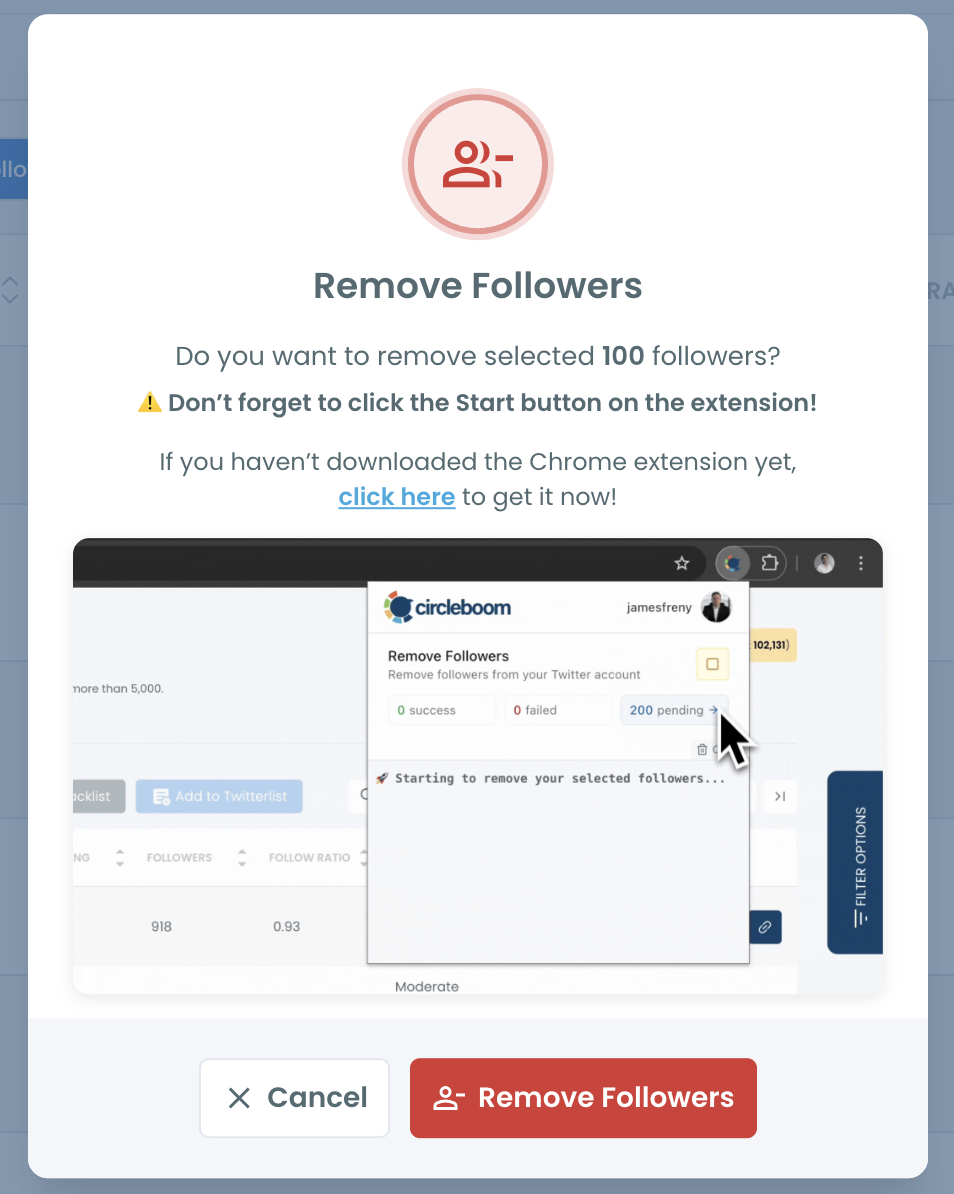
- Select the accounts and click Remove Follower (N selected), then confirm the count in the Remove Followers pop-up.
Let the extension finish the queue
- Open the Remove Twitter/X Followers extension and click Start. The accounts you staged are already loaded in it.
- Keep Chrome open until nothing is pending. When X's limit is reached, the extension shows when the removing process will continue, waits 1 to 20 minutes and resumes on its own.
Preparation sits before the click because the click is not the removal.
Clicking Remove Follower only stages the selection; nothing leaves your follower list until the extension processes it.
The export and the whitelist come first, and the open browser comes last, for exactly that reason.
Planning batch sizes for a bulk removal on X
For a batch in the thousands, plan on hours. The extension removes about 10 followers a minute on average, and the speed varies with your connection and device.
A batch of 2,000 is about three hours and twenty minutes of active removal before any pauses, and each pause adds 1 to 20 minutes.
Because there is no daily counter, the practical limit is how long you can leave Chrome open.
Splitting a large cleanup into a few batches across separate sessions works with that limit, and it gives you a natural point to check the list between runs.
Sizing each batch for a safe daily pace
Order the batches by how sure you are. Start with the accounts where several signals line up, since a cluster of new profiles with no photos, almost no tweets and thousands of accounts followed is the clearest case.
Leave single-signal accounts for a later batch, after you have opened a few of their profiles.
A sensible order for a large cleanup looks like this:
- The newest, emptiest cluster, ideally within the first week after the spike that brought it.
- Accounts matching two or more signals, sorted by follow ratio.
- Borderline accounts, checked by hand with Open Profile before they are staged.
The pauses inside each batch are the extension waiting for X's quota to renew, and they are part of the protection.
Restarting the extension during a pause does not speed anything up.
Every batch runs at the same average speed per account, and a smaller one is easier to verify.
After the last batch, run Fake/Bot Followers again: the list reflects your follower base at that moment, and a second pass shows whether suspicious accounts are still arriving.
What a rushed removal costs on Twitter, and what a prepared one saves
Without preparation, a bulk removal is a one-way door.
Skip the whitelist and a customer or a colleague can go out with the bots, and without an export there is no list to find them again. Close the browser too early and the run stops halfway, with the rest of your selection still sitting in the queue.
With preparation, the same run is calm. The whitelist guards the people who matter, the CSV records every decision, and the extension's pauses keep the pace inside X's limits while you get on with your work.
You end up with a follower list you can explain to anyone who checks it.
The same preparation also makes the next cleanup shorter. Your whitelist carries over, your last export shows what was removed, and a fresh Fake/Bot Followers check after each campaign or follower spike catches the next wave while it is still small.
To remove followers on X at a safe daily pace is less a single event than a short routine you repeat.
→ Prepare your first batch and remove followers on X safely
What to know about follower removal limits on X
Is a big follower cleanup risky for my X account?
The risk sits in speed, and the extension controls it: removals go out gradually and pause each time X's limit is reached, which is meant to help protect the account. No tool can guarantee X will never restrict it. Before a large run, decide whether you want more followers or fewer, more engaged followers. That choice shapes how deep the cleanup should go.
How can I tell a real person from a bot in the flagged list?
Count how many signals line up. A single weak signal, such as a missing photo, calls for opening the profile, while a cluster of new accounts with no photos, few tweets and extreme following counts is a much stronger sign. Real people trip the filters too, for example a colleague who only reads or a customer who never added a photo, so whitelist anyone you recognize.
Can I remove just one follower from inside Circleboom?
Yes. Each row in the follower lists has its own Remove Follower icon, which stages that single account, and the Remove Twitter/X Followers extension still carries out the removal at the same pace as a batch.