
Plenty of apps go quiet on X a few weeks after launch, because the plan was a launch thread and nothing after it. The people who would install your app are still on Twitter every day, asking for recommendations, complaining about the app they use now, and following a handful of voices in your niche.
Reaching them is an ongoing job with three parts, and none of them is posting more feature screenshots.
To promote an app on Twitter after launch, reply to live tweets from people asking for an app like yours, recruit niche influencers whose followers match your users, and keep your best posts resurfacing on a schedule. Circleboom finds those requests and influencer accounts on X through X's Enterprise API access, so every list comes from source data.
→ Promote an app on Twitter through influencers in its niche
The three jobs, the exact Circleboom steps and a weekly checklist follow below.
Why most app promotion on Twitter stalls after launch week
Most attempts to promote an app on Twitter stall because they speak only to people who already follow the app. A new app account might have a few hundred followers, most of them friends, early testers and other developers. Every feature tweet lands in front of the same small group, and the people who have the problem your app solves never see it.
The search behaviour of a future user looks different. They post things like "any good app for tracking habits?" or "what do you use to split rent with roommates?" and wait for replies. Those tweets are public, they are written in plain language, and they stay useful for hours or days.
The demand already exists on X. Most app teams are not looking at it.
B2B apps run into the same wall, because buyers ask peers before they ask vendors. The playbook for how to use Twitter for B2B marketing starts from that same buyer behaviour.
The second gap is borrowed trust. A recommendation from someone your user already follows carries more weight than anything your own account says. That is why it pays to promote your app on Twitter with influencers who already reach your users instead of waiting for them to find you.
What it takes to promote an app on Twitter after launch
To promote an app on Twitter over months rather than days, run three jobs side by side:
- Catch live demand: find tweets from people asking for an app like yours and reply while the question is open.
- Borrow reach: find the influencers in your app's niche and build relationships with them.
- Stay visible: keep a posting plan that runs every week, with your strongest posts coming back for followers who missed them.
Where Circleboom fits on X
Circleboom covers all three from one account. Circleboom collects live tweets that match your keywords on X and lists the people behind them, so a recommendation request becomes a reply opportunity instead of a tweet you scroll past.
The same tool searches influencer accounts on Twitter by keyword and sorts them into High, Mid and Low engagement tiers.
Native X search can show live tweets, but it does not collect them from a start date into a saved result, extract a clean list of the accounts behind them or export that list. When you compare the best third party Twitter apps, check this gap first.
Data source matters here. Circleboom is one of the Enterprise developers X itself vouches for in its docs. The tweets and profiles you act on come from X's own records, not from a scraper that can miss posts.
The Real-time Tweet Tracker handles the live-demand job. For the reach job, the quickest start is to find influencers to promote your app on Twitter by the topic your users care about.
How to promote an app on Twitter with live search and influencer lists
Demo: tracking tweets posted after a chosen date, the same flow you use to catch app recommendation requests.
The steps below run in two phases, both inside the Advanced X Search menu: first the live-demand search, then the influencer search.
Catch people asking for an app like yours
- Log in to Circleboom Twitter and connect the X account you use for the app.
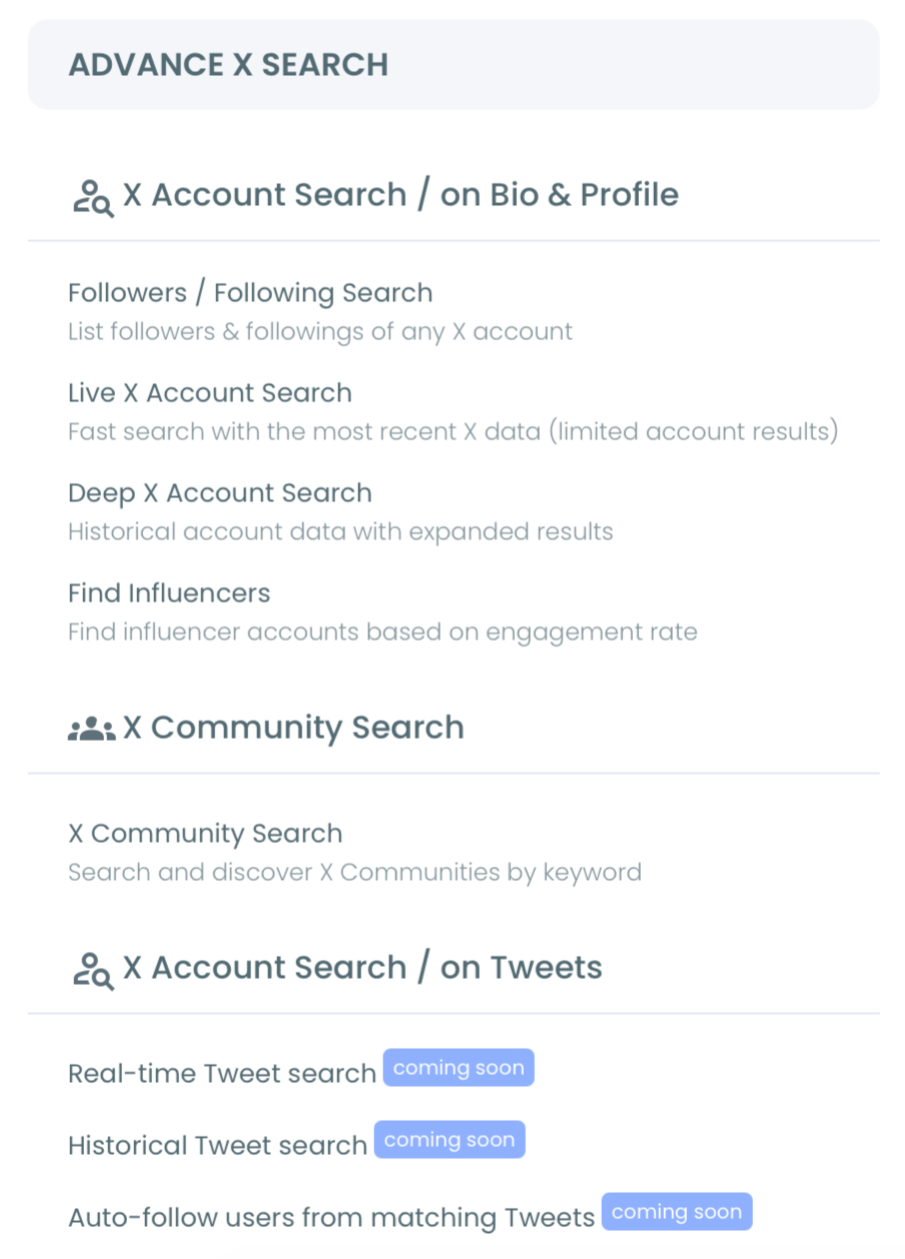
- Go to the Advanced X Search menu from the left sidebar.
- Open Real-time Tweet Search and describe the tweets you want in plain words, such as "people asking for a habit tracker app recommendation."
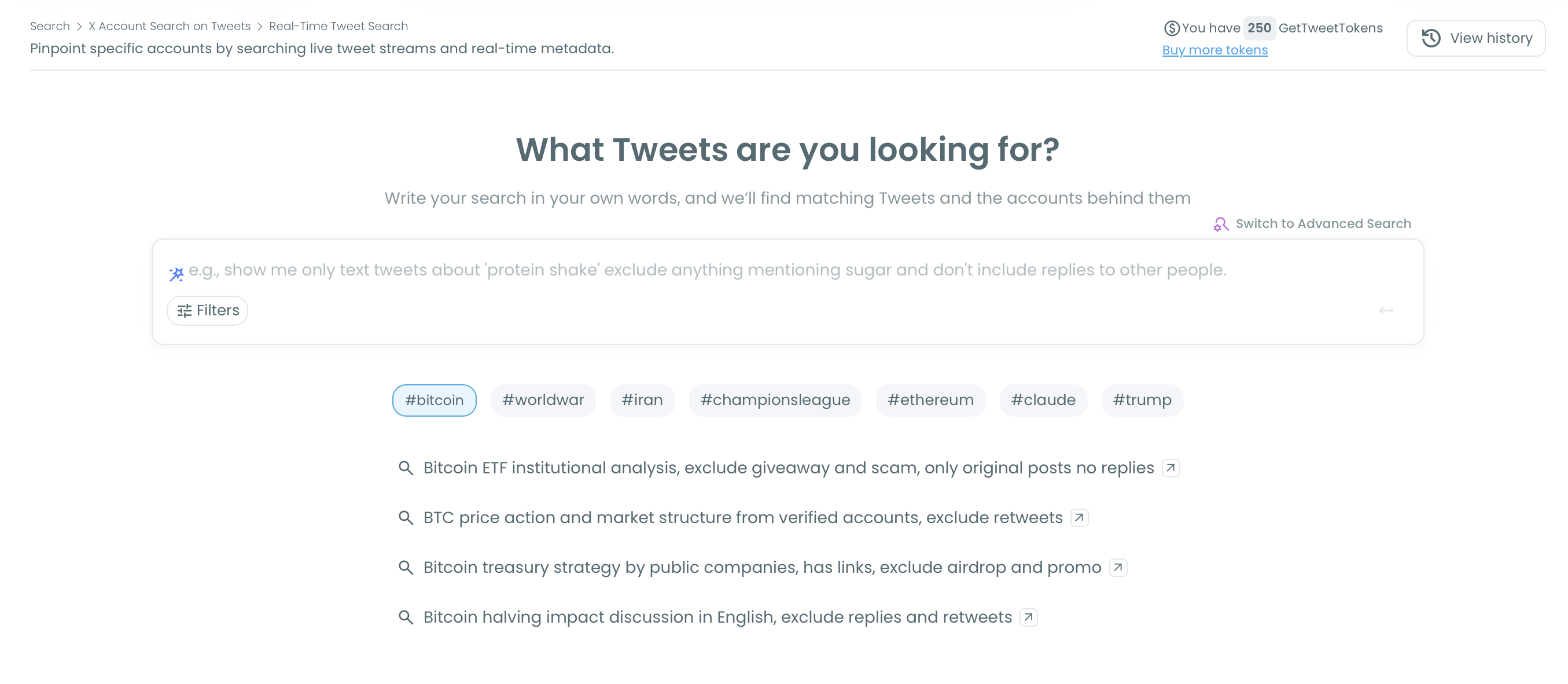
- Add request phrases and exclusions in Filters: combine "any recommendations for", "looking for an app" or "what do you use for" with your category, exclude your own brand name, and set the language your app supports.
- Choose a start date and a tweet count. Pick a recent window (Last 24 Hours, Last 7 Days, Last 30 Days) to catch open questions, or a forward window such as Next 30 Days to keep collecting new requests as they are posted.
- Review the tweets view, then switch to profiles. Reply to each genuine request with a short, useful answer, and add the best-fit accounts to a list for follow-up.
Recruit influencers who already talk to your users
- Open Find Influencers in the same menu, type your niche keyword ("habit tracking", "productivity", "self improvement"), and keep High, Mid and Low Engagement Influencers checked.
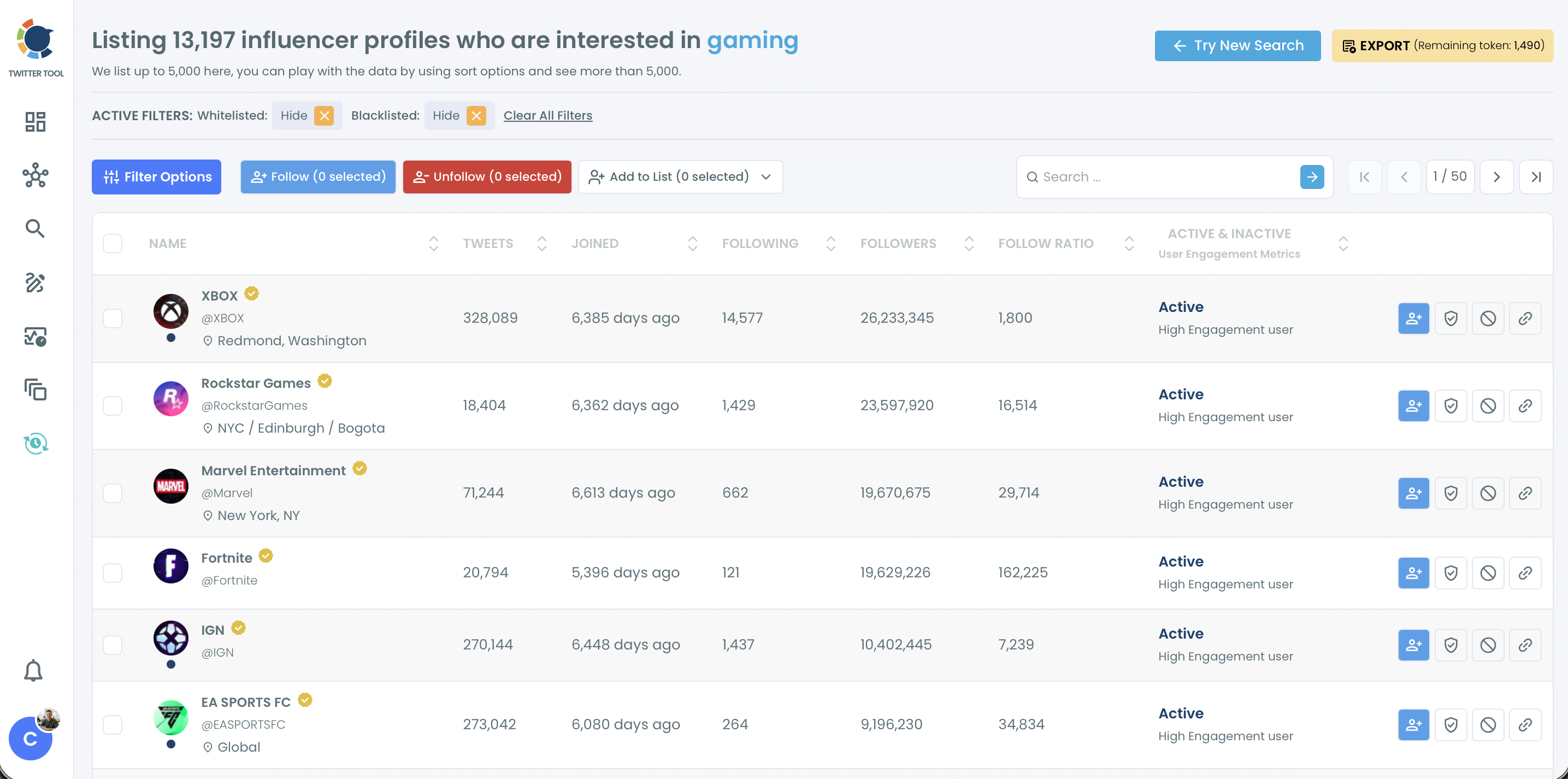
- Narrow the list with Filter Options: set a follower count range for the tier you can realistically approach, add a language and a location, and check the follow ratio.
- Select your shortlist and act on it: add it to a Twitter List for monitoring, export it as a CSV for outreach notes, or follow the accounts you want in your feed.
Run the live search before the influencer search.
It tells you which words your users actually type, and those words make better influencer keywords than the category names in your app store listing, so you search for influencers in your users' vocabulary, not your own.
How do you reach users who are unhappy with a competing app?
You reach them by searching the competitor's name together with complaint words, from today forward, and replying with help rather than a pitch. In Real-time Tweet Search, a query such as "[competitor] alternative", "[competitor] down" or "[competitor] not syncing" collects the people who are frustrated right now.
That timing is the whole point. A complaint posted this morning is a switching moment; the same complaint found three weeks later is a closed decision.
A few rules keep this from reading as opportunistic:
- Read the context first. Some complaints are jokes, some are about a bug that was fixed an hour later.
- Answer the actual problem. If your app solves it, say how in one sentence and offer the link only if asked.
- Skip pile-ons. When dozens of brands are replying to the same thread, a follow and a later reply land better.
The profiles view turns these posts into an account list you can export for whoever handles support or sales, so nobody has to copy usernames by hand.
Keep your app influencers in view with a private Twitter list
Most influencer outreach fails at the second step, not the first.
You find twenty good accounts, follow a few, and a week later you cannot remember who posted what.
A private list fixes that: it shows their posts in one feed without following them and without telling them you are watching.
From the Find Influencers results, select the accounts and choose Add to List, then pick an existing list or create a new one. The Twitter List Manager handles the lists afterwards, so you can split them by stage: to watch, to reply to, contacted, partner.
Check the list once a day and reply early to new posts that touch your app's problem. A useful reply on a niche influencer's tweet is read by everyone in that conversation, and it gives the influencer a reason to recognise your name before you ever send a message.
Some relationships grow into a real offer: a free lifetime licence, an affiliate code or a joint thread. The guide to Twitter influencer marketing covers how those partnerships are usually structured.
Build an always-on posting plan for your app on X
The third job is your own feed. An app account that posts in bursts teaches followers to ignore it, while a steady plan keeps the app in front of the people the first two jobs bring in.
X Post Planner holds that plan. Write a week of posts in one session, schedule each one at least 15 minutes ahead, and use Find your best posting time to pick from six suggested slots based on your audience's activity.
A balanced week for an app account might look like this:
- Two use-case posts showing one real task the app solves.
- One short thread answering a question you saw in the live search.
- One poll asking which feature users want next.
- One reply roundup quoting a helpful answer you gave to someone's request.
Bring your best app post back with Auto Retweet
Your best evergreen post should not go out only once.
A tweet stays in timelines for a short time, and many followers are offline when it goes out. Auto Retweet reposts it after a delay you set, removes the repost after a second delay, and repeats the cycle as many times as you choose.
Here is the arithmetic for a single how-to post about your app. With RePost after set to 5 hours, Un-RePost after 2 hours and Repeat this cycle set to 3, the post gets its original window plus three repost windows, four chances in total, without writing a new word.
You can schedule automatic retweets of your best app posts from the same editor, and the setting travels with the post when you schedule it.
Keep the cycles for evergreen posts only. A post that says "new this week" or names a limited offer should never come back after the offer ends.
Your weekly checklist to promote an app on Twitter
Promoting an app on Twitter works when the three jobs become a weekly routine rather than a campaign. I keep the routine short enough to survive a busy week:
- Monday: run your saved Real-time Tweet Search for request phrases and reply to every genuine question.
- Tuesday: check competitor complaint searches and help where your app fits.
- Wednesday: open your private influencer list and leave two or three useful replies.
- Thursday: schedule next week's posts in X Post Planner and set Auto Retweet on one evergreen post.
- Friday: add new influencer candidates from Find Influencers and move contacted accounts to the next list stage.
Monday is the easiest day to skip, because scrolling the feed feels more productive.
It is not: a reply to someone asking for your exact app is the shortest path between a tweet and an install.
→ Find the niche influencers who can promote your app on Twitter
App promotion on Twitter: FAQ
How many tokens does a live tweet search use?
Real-time Tweet Search uses GetTweetTokens in proportion to the number of tweets you choose to collect, and your balance is shown during setup. Saved results can be reopened from the search log without using tokens again, while exporting uses tokens separately.
Is it safe to follow the accounts these searches find?
Yes, when you follow selectively. Circleboom follows selected accounts in batches of 50 every 15 minutes, up to 400 per day, and continues the rest of the queue automatically the next day. A shortlist of 120 influencers is followed in three batches within the first hour.
What should my app link look like when I share it?
Your app link should open as a card with an image, a title and a short description, because a bare URL gets fewer clicks in a reply. Twitter Cards 101 explains how cards work and what your app's landing page needs for one to appear.