To make a 3x4 grid post for Instagram, design one image at 3240 x 5760 px, split it into 12 tiles of 1080 x 1440 px (three across, four down), and post them from the bottom right to the top left with nothing in between. Circleboom's Instagram Grid Maker splits the image into 12 and schedules the tiles in order.
Sometimes you just want to make some changes to your Instagram posts! Splitting an image into 12 equal pieces and making a grid photo is one of your options.
Do you want to make a 3x4 grid post for Instagram?
If you do, Circleboom Publish’s Instagram Grid Maker is the best option you can try! You can make 3x4 or 3x3 grid posts with your own photos from your computer or Google Photos.
Circleboom Publish, Instagram Grid Post Maker
You can make 3x3 and 3x4 grid posts for Instagram quickly and easily on Circleboom Publish.
Yes, you heard it right! You can post from Google Photos to Instagram quickly with Instagram.
Or, you can curate and design pictures from built in extensions on Circleboom: Canva and Unsplash.
So, let’s move on and find out how to make 3x4 Instagram grid posts on Circleboom.
Make 3x4 Instagram Grid Posts with Circleboom’s Grid Maker
You should follow these steps to split an image into 12 and create 3x4 Instagram grid posts:
Step#1: Log into Circleboom Publish. If you don’t have an account, sign up for a new one in seconds.
Step#2: Connect your Instagram account(s). It is possible to manage multiple Instagram accounts on Circleboom.
Step#3: On the dashboard, navigate to the left and click “Instagram Specific & Reels Post.”

Then, you will see your options. You can create and schedule Instagram Reels. Or, you can create 3x3 or 3x4 grid posts. Also, you are able to create panoramic Instagram posts.
Step#4: After selecting your Instagram account(s) and the “3x4 Image Grid” option, you can upload your image from your computer.
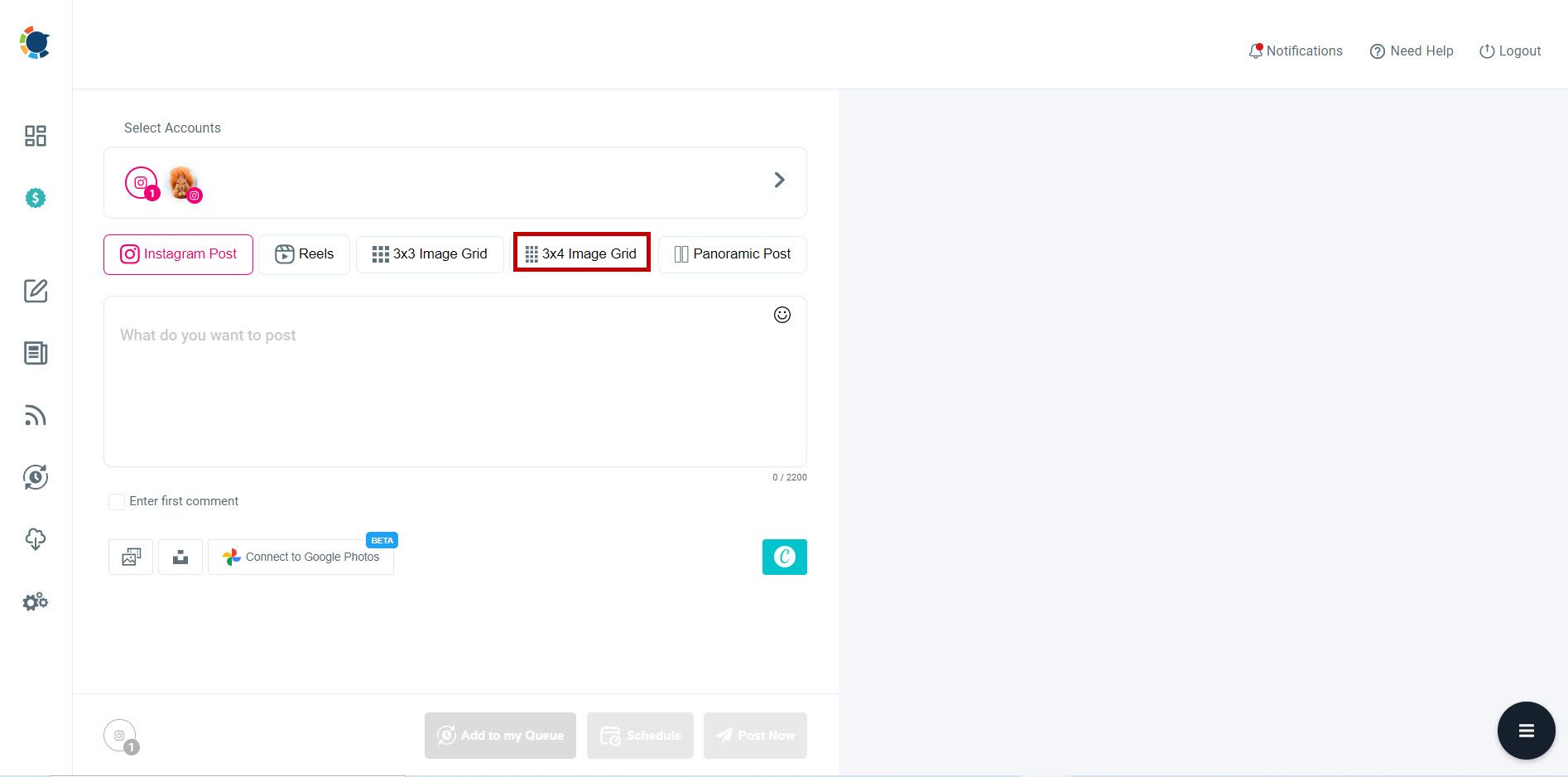
Or, you can select images from Unsplash and Canva. You can design images with ready made post templates, filters, effects, emojis, etc., on Canva’s built in extension.
Also, you can post from Google Photos to Instagram on Circleboom Publish quickly.
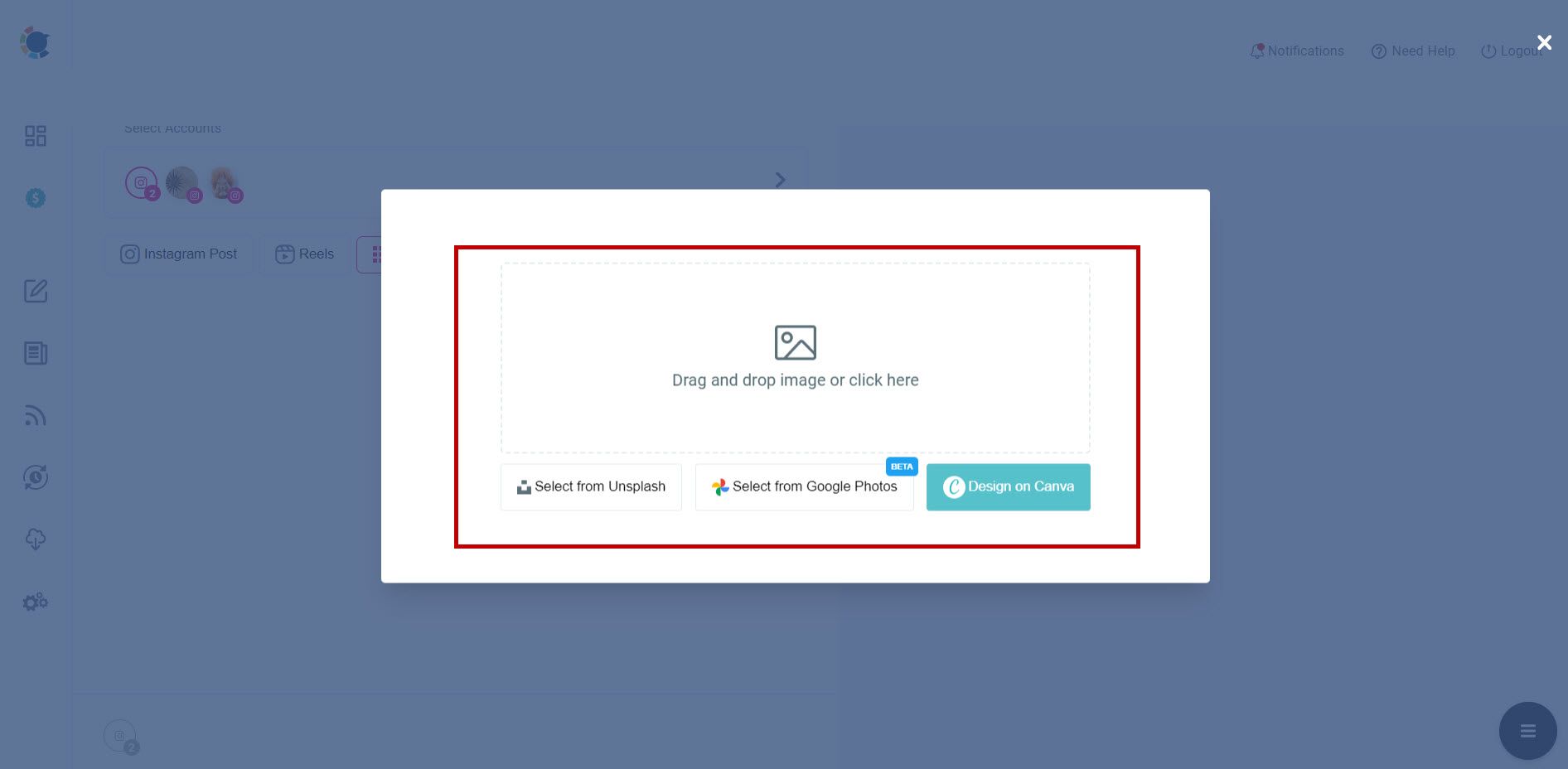
Step#5: When you upload your image, Circleboom will split it into 12 automatically.
You can arrange or turn the post into other post types. Then you should click on the “Use Image” button.
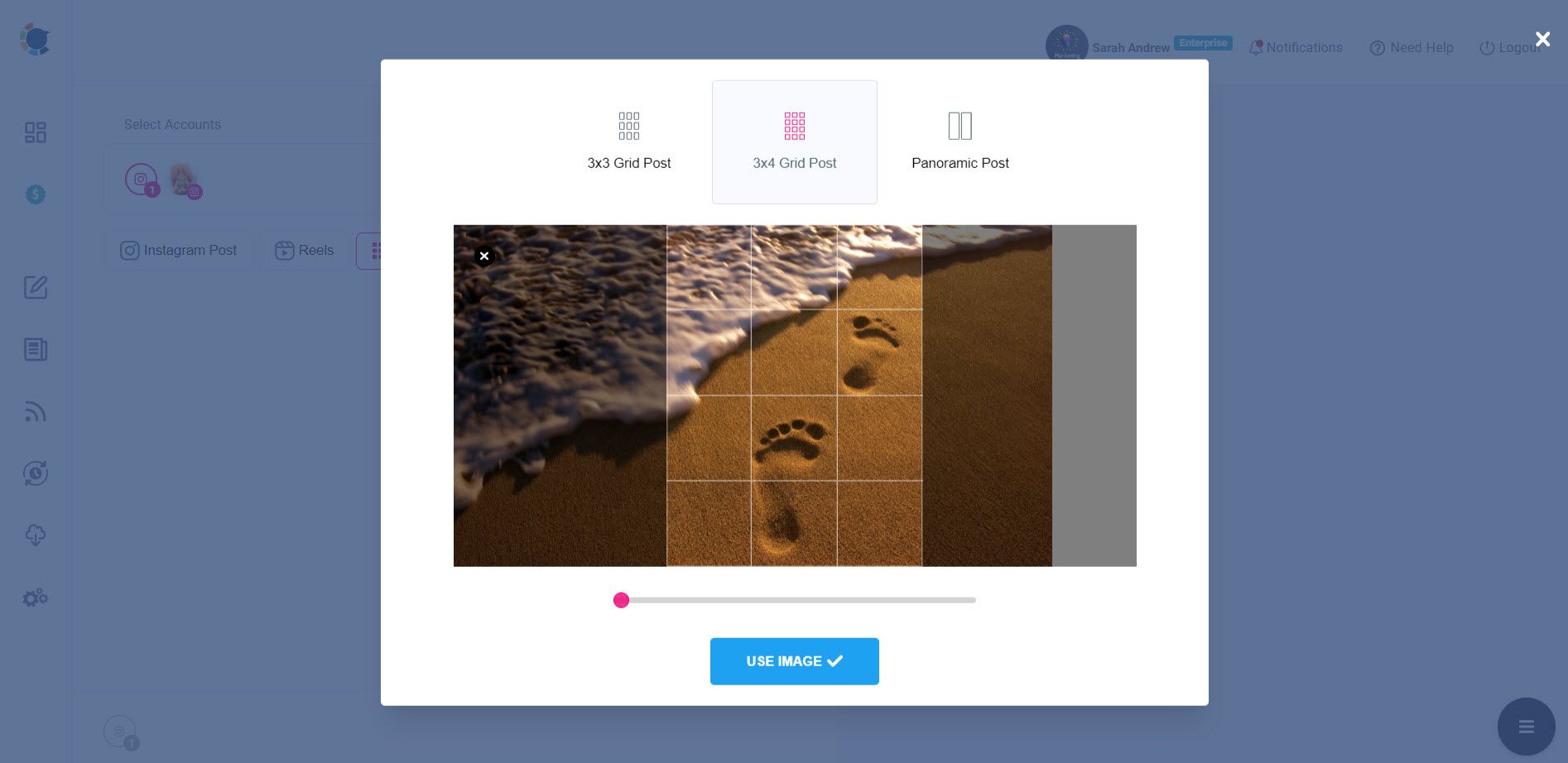
Step#6: Then, you can add captions to your posts. On Circleboom, it is also possible to schedule the first comment for your post before you publish it!
Also, you can find relevant hashtags with the Instagram hashtag generator on Circleboom.
When you finish it, you can post your 3x4 Instagram grid post immediately or schedule it later.
3x4 or 3x3: Which Instagram Grid to Choose
Pick a 3x3 grid when you want a clean statement that fits the first screen of your profile. Pick 3x4 when the image is tall, holds more detail, or should own the profile for a big moment such as a launch or a rebrand. Twelve posts is a longer sequence to keep uninterrupted, so save 3x4 for the grids that matter most.
Instagram 3x4 Grid Sizes and Posting Order in 2026
| Grid | Posts | Full image | Each tile |
|---|---|---|---|
| 3x3 | 9 | 3240 x 4320 px | 1080 x 1440 px |
| 3x4 | 12 | 3240 x 5760 px | 1080 x 1440 px |
| 1x3 banner | 3 | 3240 x 1440 px | 1080 x 1440 px |
Since early 2025, Instagram shows profile posts as tall 3:4 rectangles instead of squares, so these sizes keep the tiles from being cropped at the edges. Not sure how a tile will look? Check it with the Instagram 3:4 crop preview, or lay out the whole grid first in the free Instagram Grid Planner.
Order matters as much as size. Instagram puts your newest post at the top left, so the tile meant for the bottom right goes out first and the top left tile goes out last. A single Reel or extra post in between shifts every tile and breaks the picture, and pinned posts sit above the grid, so unpin them or plan around them. Circleboom schedules the whole set together, which keeps anything else from landing in between.
La Fin
Circleboom Publish allows you to split your images into 12 for Instagram and create, design, publish, and schedule Instagram 3x4 grid posts.
You can also schedule Instagram Reels, carousel posts, 3x3 grids, and panoramic posts on Circleboom.
Then, you can enrich your posts with relevant hashtags that you can discover with Circleboom's hashtag generator.
Take advantage of these and more Circleboom features at affordable prices.
FAQ: 3x4 Instagram Grid Posts
How many posts is a 3x4 grid?
Twelve: three columns and four rows, posted as twelve separate posts.
What size is a 3x4 Instagram grid?
Design the full image at 3240 x 5760 px, so each tile is 1080 x 1440 px in Instagram's 3:4 profile shape.
Can I make a 4x4 or 5x5 grid instead?
Not across separate posts, because your profile shows three posts per row. A 5x5 grid only works as a design inside one post.
Can I schedule a 3x4 grid for several accounts?
Yes. Select several Instagram accounts in Circleboom, and each one receives all twelve tiles in order.