
Each pet care Reel used to cost me three uploads, one per clinic account. Now it costs one.
The video never changed. A 25-second clip on brushing a dog's teeth is the same clip for every clinic.
What changed was the workflow around it, and the arithmetic is simple: three Reels a week across three accounts meant nine uploads, and at roughly ten minutes each that was an hour and a half every week spent repeating myself.
Can you post one Reel to several Instagram accounts at the same time?
Yes. Circleboom Publish posts a Reel to every Instagram account you select in its composer from one upload, with music, caption and schedule set once, so three clinic accounts get the video in a single publish action.
→ Post Reels to multiple Instagram accounts from one upload
Three clinic Instagram accounts and one Reel I kept uploading three times
Running three clinic accounts on Instagram means three audiences that want the same advice. Pet owners near the main clinic ask about dental care. Owners near the second clinic ask about dental care. The newest clinic, still building its following, needs the content more than either of the others.
So every Reel we film is useful to all three. That part was never the problem.
The problem was the posting. I would export the video, open Instagram on my phone, post it to the main account, switch accounts, post it again, switch again, post it a third time. Each pass meant pasting the caption, fixing the hashtags and remembering which account I had already done.
On a busy day, the third clinic simply got skipped.
That skip was the real cost. The account that needed reach the most was the one that lost out whenever surgery ran long.
If you are in the same spot, start here. You can post Reels to multiple Instagram accounts without touching the phone's account switcher at all.
I had already learned how to schedule Instagram Reels in advance for one account. What I had not worked out was how to post a Reel to three Instagram accounts without tripling the work.
Why the Instagram app's account switcher was not the fix
The Instagram app lets you hold several accounts in one place, and Instagram's own help page on how to add and switch between up to 5 Instagram accounts describes exactly that. Three clinic accounts fit inside that limit with room to spare.
But switching is not posting. The app lets you move between accounts without logging out. It does not let you send one Reel to all of them in one action.
My failed attempt looked like this. I tried batching: film on Monday, then post all three versions in one sitting on my lunch break. It worked for two weeks.
In week three a long case ate the lunch break, and the Reels went out on Thursday for one clinic, Friday for another and never for the third.
What I wanted was not a faster phone routine. I wanted the choice of accounts to happen once, at the same moment I chose the date.
Circleboom Publish schedules one Reel to several Instagram accounts from a single composer, and that is the gap it filled.
The number of accounts should not change the number of uploads.
Is it safe to post the same Reel on three Instagram accounts?
It is safe when each clinic's post reads as its own. Posting the identical Reel with the identical caption across several accounts is what Instagram treats as duplicate content, and accounts that keep doing it risk lower reach and, in serious cases, restrictions.
That was the insight I did not expect. I thought the risk was the video. The risk is mostly the sameness around it.
Here is what I change between clinics:
- The caption opening, so each one names its own neighborhood.
- The first comment, which carries each clinic's booking line.
- The hashtag mix, with local tags for each area.
The clip can stay identical while the post around it becomes local.
The first comment does more work than people expect. Viewers read a Reel's first comment right after watching, and if the clinic does not claim that slot, whoever comments first sets the tone. Writing it in the same window means each clinic's booking line is already in the top spot the moment the Reel goes live.
The caption is where the AI helps most. I describe the Reel once and ask the AI Instagram caption generator for three versions with different hooks. Reviewing three drafts takes less time than writing one from scratch.
Instagram also caps an account at roughly 25 posts per 24 hours. A clinic will never reach that with Reels alone, but it matters on days with feed posts and Stories too.
The file limits that decide where a pet care Reel can go
Before uploading, check two numbers: Instagram takes video up to 300 MB, and if the same Reel will also go to YouTube Shorts, it has to be 60 seconds or less. Those limits come from Circleboom's own media limitations for social platforms page.
For a three-clinic Instagram plan the 300 MB line is the one that bites. Phones record in 4K by default, and a 40-second 4K clip can pass that size easily. I export at 1080p, which fits comfortably and looks no different on a phone screen.
Length is the other choice. Our dental clip runs 25 seconds on purpose. The research on the best length for Instagram Reels to maximize engagement points to 15 to 30 seconds. That is the range where people watch to the end. That range also keeps every cross-posting option open.
What Circleboom Publish does with one Reel and three Instagram accounts
Circleboom Publish lets me pick all three clinic accounts in its Instagram composer, upload the Reel once and schedule it for every account in the same action.
Circleboom is an official X (Twitter) Enterprise API partner listed on X's customer directory, so the company behind the tool connects accounts through approved access rather than workarounds.
That mattered to me. A vet clinic's Instagram is where new clients judge us before they ever phone, and I was not handing three accounts to a tool I could not vouch for.
The composer has a dedicated Reels tab. Inside it sit:
- The upload.
- A built-in music library.
- The caption field with an AI button.
- A first comment field.
- The Schedule, Post to Queue and Post Now buttons.
You can schedule one Reel for every clinic account from that one window.
Compared with my phone routine, the difference is where the account choice lives. On the phone it happens three times, after the video is ready. In the composer it happens once, before the video is even uploaded.
The Instagram account selector that picks all three clinics
The account selection is part of how Circleboom handles multiple Instagram accounts in general. The selector is scoped to Instagram, and any number of the connected accounts can be ticked together.
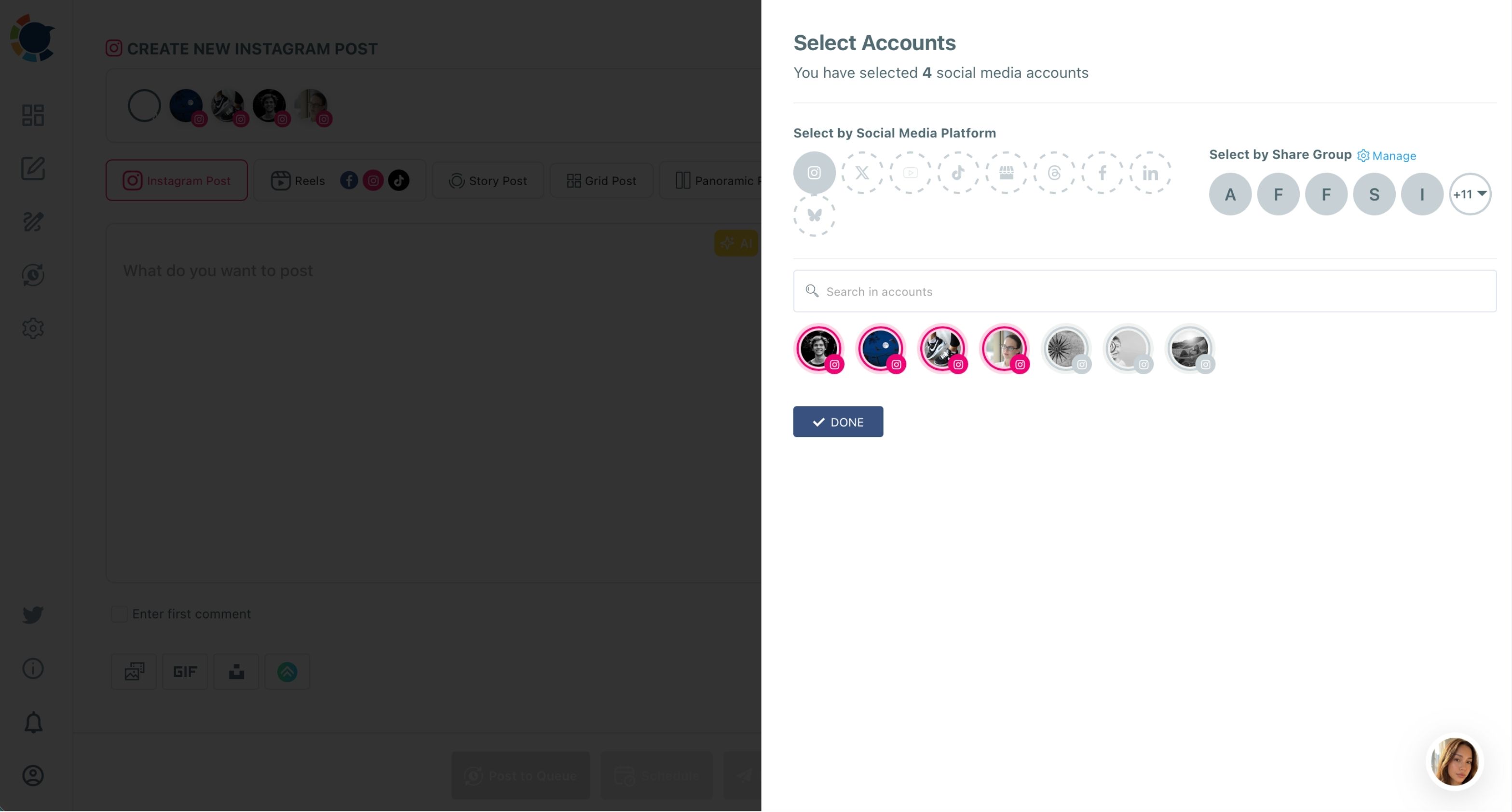
Ticking the three clinics takes a few seconds, and that one choice holds for everything else I set in the window.
Other users seem to agree with the trade: Circleboom Publish is rated 4.8/5 on Capterra, which told me I was not the only one running several accounts this way.
Watch the Reels tab at work: one video, several Instagram accounts and one future date and hour.
How I post Reels to multiple Instagram accounts at once
The process I settled on runs in three phases and takes about ten minutes per Reel.
Connect the clinic Instagram accounts once so selection takes one click
- Log in to Circleboom Publish and open Settings, then Manage Social Accounts.
- Connect each clinic's Instagram business account with the Connect New Account button, one after another.
- Save the three accounts as a Share Group under Settings, then Manage Share Groups, so the whole clinic set is one click in the composer.
Build the Reel in the Instagram composer
- Open the Instagram composer and tick all three clinic accounts in the account selector, or pick the clinic Share Group.
- Select the Reels tab and upload the video, adjusting the cover image if the first frame is a blur.
- Add a track with Add Music, filtering the library by genre, tempo and mood.
- Write the caption with the AI button and add a first comment for the booking line.
Schedule once for all three Instagram accounts
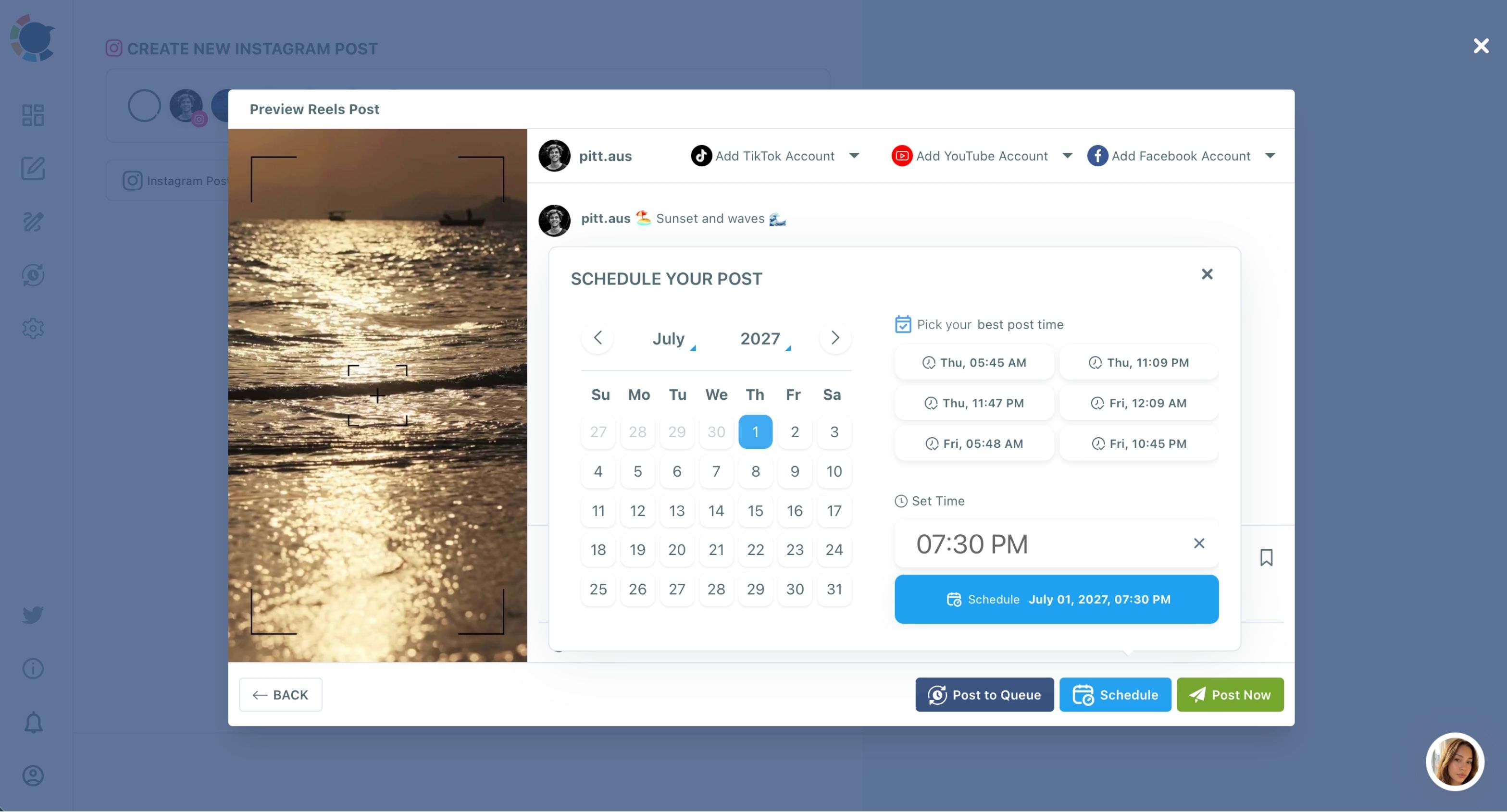
- Preview the Reel, then click Schedule and choose a date and one of the suggested best-time slots.
- Check the Outbox in List View to confirm the Reel sits under all three accounts.
Choosing the accounts first is what makes the rest automatic. Once the three clinics are ticked, the music, the caption and the time all apply to every account, and nothing depends on my memory of which clinic already has the Reel.
When I want each clinic to read differently, which is most weeks, the Duplicate option copies a post into an editable version, so I swap the account and rewrite the caption without re-uploading anything.
For timing, the guide on the best time to post Reels on Instagram explains why the suggested slots beat a fixed habit.
Sending the same pet care Reel to the clinics' Facebook Pages
Once the Reel is ready for Instagram, the same window can send it to the clinics' Facebook Pages too. The Reels tab has an Add Facebook Account dropdown, and it is a checklist, so all three clinic Pages can be ticked at once. Facebook support here covers Pages only, not personal profiles.
The same tab also offers TikTok and YouTube. We do not run those for the clinics yet, but the option is there, and the cross-post videos flow is how a single upload reaches all four platforms. If you go that route, the 60-second limit from earlier becomes the rule for every clip.
Facebook matters for us because older pet owners live there. A Reel that reaches a young dog owner on Instagram reaches that owner's parents on Facebook, and the parents are often the ones booking the senior cat's checkup.
Sometimes a Reel underperforms on one clinic account but not the others. The breakdown of why Instagram Reels are not getting views is where I start, before I change anything about the content itself. Usually the cause is timing or a weak first second, not the account.
The next 90 days of Reels across three Instagram accounts
Over the next 90 days, the ability to post Reels to multiple Instagram accounts from one upload turns a weekly chore into a filming habit.
The arithmetic holds up. Three Reels a week for three clinics used to be nine uploads. Now it is three Reels built once each, plus a few minutes of caption edits. Across a quarter that is roughly 100 fewer uploads, time that goes back into filming better clips.
The third clinic stops getting skipped. That alone was worth the change.
Some Reels deserve a second life months later. The guide on how to repost a Reel on Instagram covers giving it a new hook and caption rather than posting the same thing twice. A flea season reminder from spring is worth bringing back in autumn with a different track from Add Music.
Circleboom's standing as an official X Enterprise partner is part of why I trust the setup with all three accounts, but the daily reason I use it is simpler: the account choice happens once.
→ Send your next Reel to every Instagram account you run
Questions vets ask about Reels on several Instagram accounts
Can I post a Reel to multiple Instagram accounts if one of them is a personal account?
Circleboom Publish connects Instagram business accounts, so a clinic account still set to personal needs to switch to a professional account in the Instagram app first. The switch is free and keeps the account's followers and posts.
Does the music I add in Circleboom travel with the Reel to Facebook?
Yes. A track chosen once with Add Music travels with the video to every platform it is cross-posted to, so the clinic Pages on Facebook get the same soundtrack as the Instagram accounts.
Can staff at each clinic post Reels without seeing the other clinics' accounts?
Yes, with Team Management. Each staff member can be added as a User with only their clinic's accounts assigned, and their scheduled Reels wait for an Admin's approval before going live.