
Watching what an account follows is one of the clearest early signals on X, and the platform gives you no way to catch it. There is no alert when an account you track follows someone new, so unless you open their following list by hand every day, you miss it. The fix is simple: let a tool watch the list and email you when it changes.
What this guide gives you.A reliable alert the moment any public X account follows someone new.Full profile context on every new follow, not just a username.A dated history you can scroll back through over time.
Built on Circleboom's account tracking and delivered through official, approved X API access.
→ set up follow alerts on X
Why Manual Checking Always Fails
Manual checking breaks the moment your attention drifts. You can open a profile and read its following list any day you want, but X never marks what is new, so you are left comparing today's list against a memory of last week's. Miss one day and the change disappears into the count.
This is why a follow goes uncaught so easily. A competitor adds two recruiters on a Saturday, the number ticks up by two, and by Monday it looks identical to any other follow.
To actually get notified when someone follows on X, you need the comparison done for you and the result pushed to your inbox. A good app to monitor Twitter activity does exactly that.
How Circleboom Turns Follows Into Alerts
Circleboom monitors any public X account's following list and emails you each time it adds someone new. It snapshots the list on a schedule, compares each snapshot to the last, and reports the difference as a dated event with the new account's full profile attached.
Because Circleboom is an official X Enterprise Developer, it reads that data through sanctioned API access, never scraping, so the list is complete and the tracked account is never notified. The same engine powers its Twitter unfollowers alert for your own account, here pointed at someone else's follow activity.
How to Set Up a Follow Alert on X
Here is the flow, in order. It takes about four steps and a few minutes.
- Log in to Circleboom Twitter and connect your X account with official OAuth.

- Open the Monitoring menu and choose to monitor a new account.
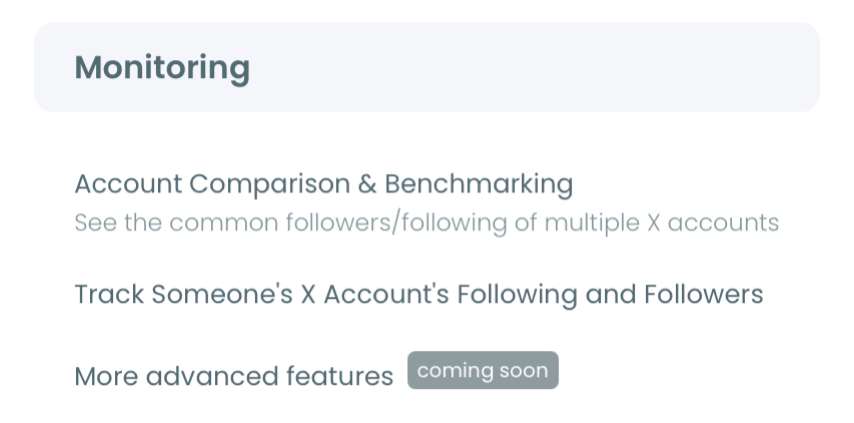
3. Enter and validate the username, then select Following and switch on the new-follow rule.
4. Pick a daily or weekly email, so Circleboom alerts you only when a real new follow is detected.
That sequence holds up because each step narrows the work: the login earns official access, Monitoring scopes it to one account, the rule defines what counts as an alert, and the cadence controls how often you hear about it. Drop the validate step and you might track a private handle that returns nothing.
Hands-on demo: setting a new-follower alert so every change pings you automatically.
What You Get After Setup
Once the rule is live, you stop hunting and start receiving. Each alert tells you who the tracked account followed, when, and enough profile detail to judge whether it matters, all without opening X.
You also get a pattern over time, plotted as new follows and unfollows on a dated chart. A quiet stretch and a sudden cluster of follows look completely different, and the cluster is usually the signal worth acting on.
Pair this with a wider tool for monitoring Twitter unfollowers and you can read both sides of an account's network shifts as they happen.
The same approach works to track someone else's number of new followers when growth, not follows, is what you care about. And if you only want the live count, a live follower counter covers that lighter need.
When a Follow Alert Is Worth It
A follow alert earns its place when a single follow can change a decision you make. Not every account clears that bar, so it helps to be selective about who you watch.
- Direct competitors. Their follows hint at hires, partnerships, and market moves before any announcement.
- Investors and analysts in your space. A burst of follows toward one category often marks the start of diligence.
- Key prospects or partners. Their follows can tell you when they are actively researching a problem you solve.
- Your own account. Tracking who you follow and who follows you back keeps your network intentional.
For accounts that only matter occasionally, a lighter touch works. A simple Twitter follower count tracker covers the headline number without the full alert, and you can always upgrade a casual watch into a tracked rule later.
The mistake to avoid is over-tracking. Set alerts on twenty accounts and the daily emails blur into background noise within a week. Pick the few accounts whose moves you would genuinely act on, and the alerts stay sharp enough to be useful.
What to Know Before You Start
How many accounts can I set alerts for?
As many as your Tracking Token balance allows. Each account you monitor uses one tracking rule, and tokens are consumed per active rule, so focus on the accounts where a follow genuinely matters.
Can I track follows and unfollows in the same alert?
Yes. A single rule can detect both new follows and unfollows, listed as separate events, so you see additions and drops in one place.
How current is the data?
Alerts run on scheduled snapshots, so expect a short delay between the follow on X and the email. The trade-off is reliability: you get a complete, dated record instead of a live feed that misses events. For most monitoring goals, a follow you learn about a few hours late is far more useful than one you never catch at all, which is what manual checking tends to produce.
Will I get spammed with empty emails?
No. Circleboom only emails you when a snapshot finds a real change. Quiet periods produce no messages at all, which is what keeps the alert worth opening instead of training you to ignore it like every other notification.
Following vs Followers: Two Different Signals
It helps to know which side of an account you are watching, because following and followers answer different questions.
Tracking what an account follows tells you what it is paying attention to. New follows toward recruiters, founders, or category accounts reveal what the account is studying or planning, usually before it says anything out loud.
Tracking who follows an account tells you who is paying attention to it. A surge of new followers can mean a campaign landed, a mention went wide, or a niche audience just discovered it.
Each direction is a separate tracking rule, so you pick the one that fits your goal, or run both on a key account. Most people start with Following when they watch competitors and investors, because intent shows up there first. They add Followers later, once audience movement becomes the thing worth measuring.
There is no penalty for changing your mind. If you start with Following and realize the audience side matters more, add a Followers rule on the same handle and keep both running. The history you have already collected stays intact, so expanding what you watch costs you nothing.
Your Next Move
Setting this up is a short checklist:
- Log in and open Monitoring.
- Validate the account you want to watch.
- Turn on Following plus the new-follow rule.
- Choose your email cadence and let it run.
Once it is live, the next meaningful follow lands in your inbox with full context attached, and you never have to refresh a following list by hand again. The watching becomes automatic, and your attention goes back to acting on the signal instead of hunting for it. You can set up your follow alert here and let the tracking do the watching.