
Sharing a tweet on Instagram is not as simple as copying and pasting. Instagram doesn't support plain text posts, so a tweet that worked perfectly on X can't just be dropped into your Instagram feed as-is. It needs to become a visual first.
That usually means opening a design tool, picking a template, pasting the text, adjusting the layout, exporting the file, and then uploading it. For one tweet it's manageable. As a regular habit, it's the kind of friction that makes most people just skip it.
Circleboom Twitter removes that friction entirely. With the Tweet to Instagram feature, your tweet is automatically converted into a styled visual and published directly to your Instagram feed, story, or reels without touching a design tool.
How Do You Convert a Tweet to an Instagram Post?
Instagram doesn't support plain text posts, so tweets can't be shared there directly. To convert a tweet to an Instagram post, you need a tool that transforms the text into a visual format compatible with Instagram's feed, stories, or reels.
Circleboom Twitter's Tweet to Instagram feature does this automatically. ⬇️
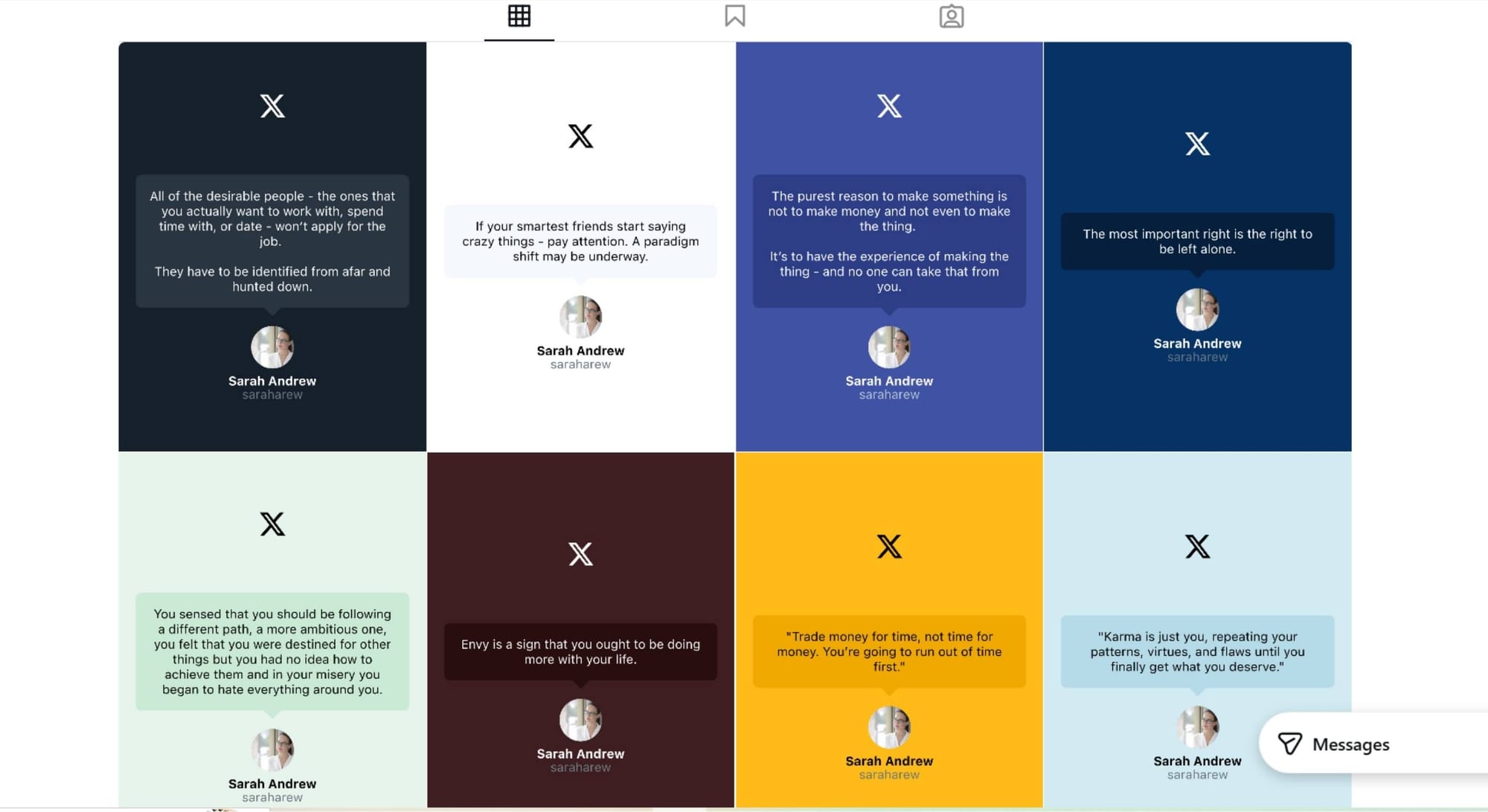
It takes your tweet, wraps it in a designed visual layout, and publishes it to your Instagram account without any manual design work.
 infocircleboom.com
What Is Circleboom Twitter?
Circleboom is an Official X Enterprise Developer, which means everything runs through X's official APIs.
Your account data is handled securely, and the entire workflow is fully compliant with X's platform policies.

Beyond converting tweets to Instagram posts, Circleboom handles a wide range of content and account management tasks:
🟢 Convert tweets into Instagram posts, stories, or reels automatically
🟢 Cross-post content to Instagram, Facebook, LinkedIn, Threads, and Bluesky
🟢 Schedule tweets in advance or in bulk using a CSV upload
🟢 Analyze tweet performance and identify your top-performing content
🟢 Manage followers, clean up inactive accounts, and track audience changes
For converting a tweet to an Instagram post, the Tweet to Instagram feature is what you need.
How to Convert a Tweet to an Instagram Post with Circleboom Twitter
Step #1: First, log in to your Circleboom Twitter account.
If you don't have an account yet, you can create one in seconds!

Step #2: On the Circleboom Twitter dashboard, navigate to the left menu.
First, find the “Post Management & Analytics” and then click on “Write and Plan Your Post”.
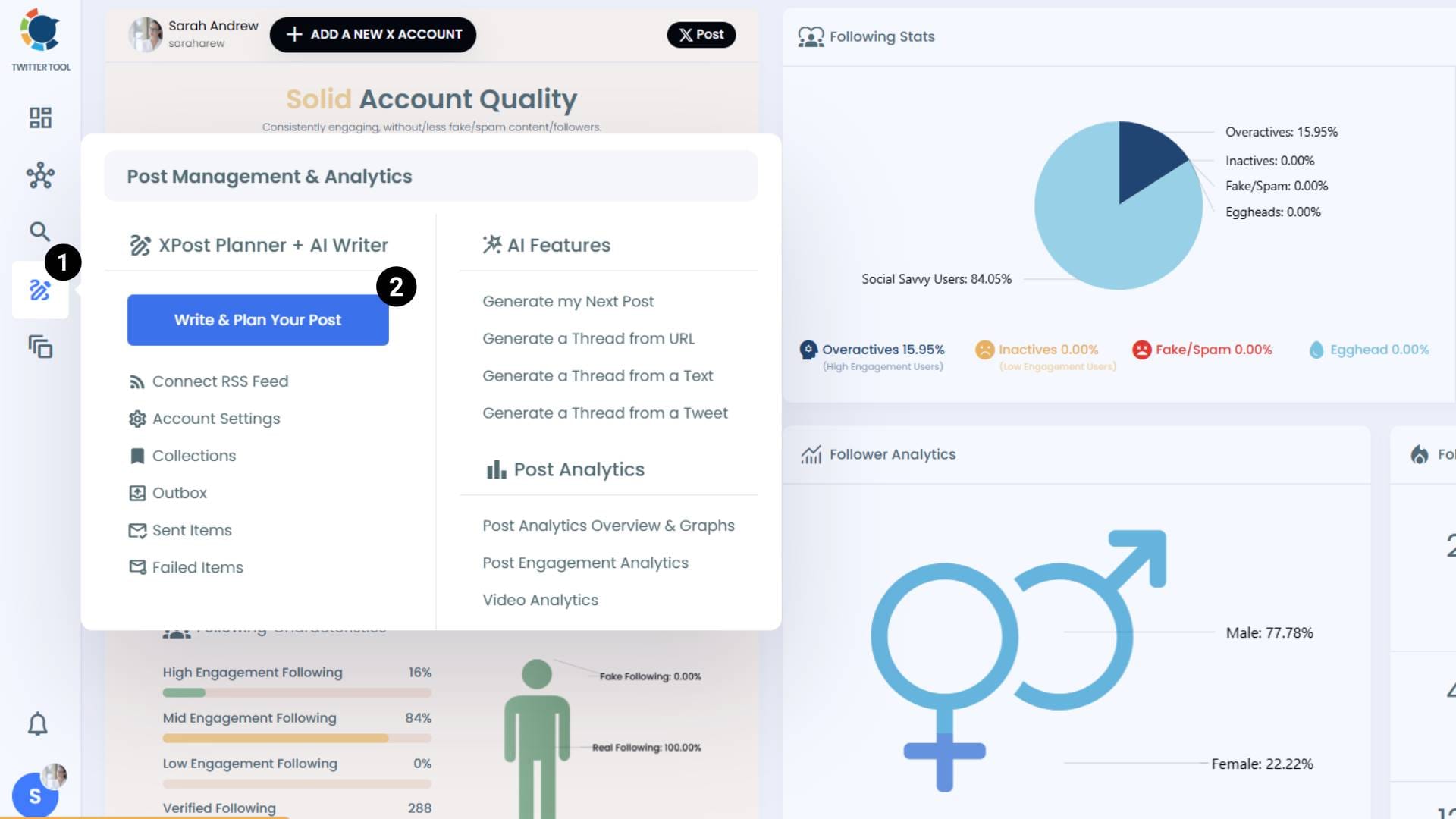
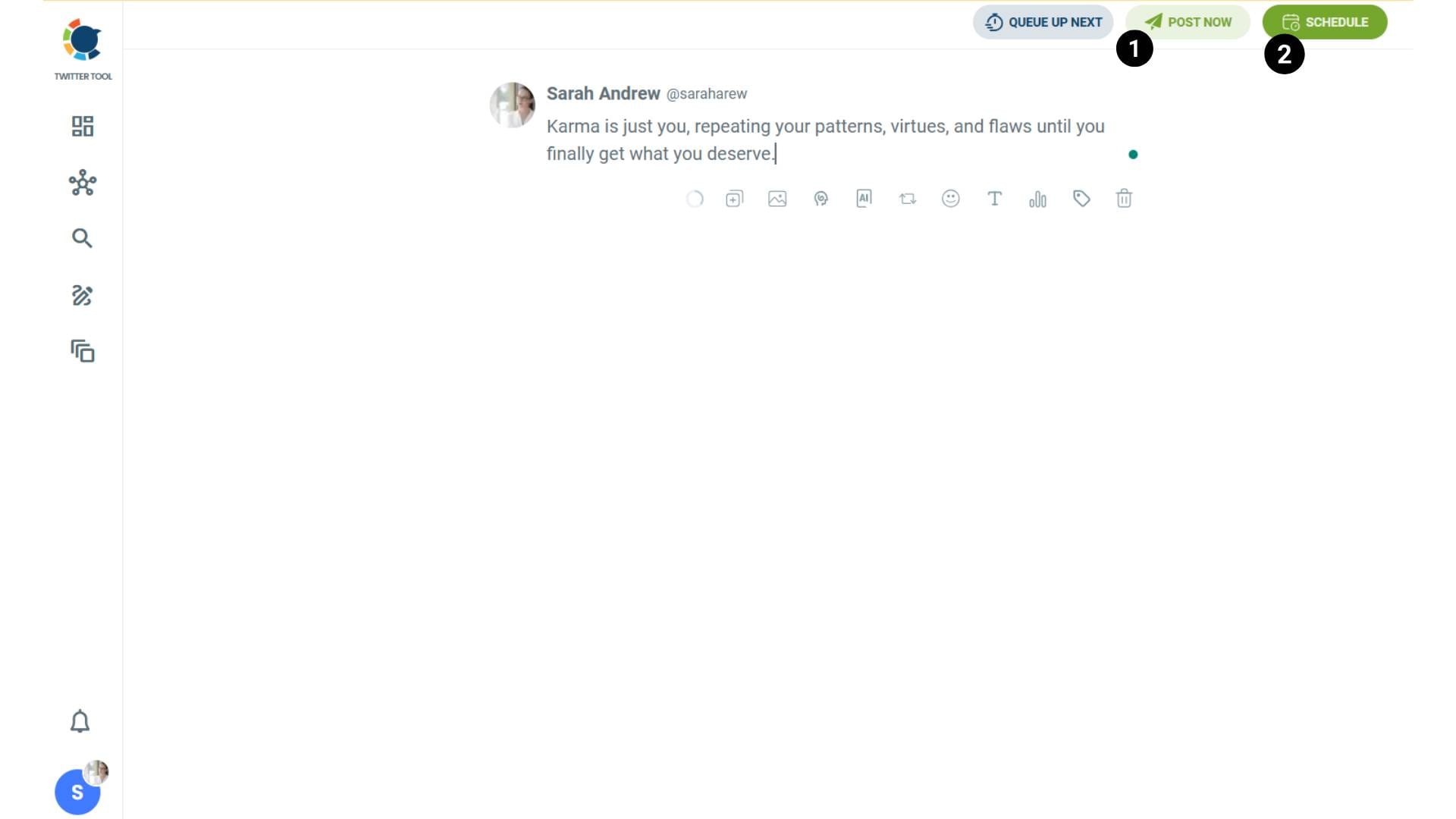
Step #3: Write your tweet. Circleboom’s AI options can generate tweets for you automatically.
When it is ready, you can “Post” or “Schedule” your tweet. To see your cross-posting options, you should click on one of them.
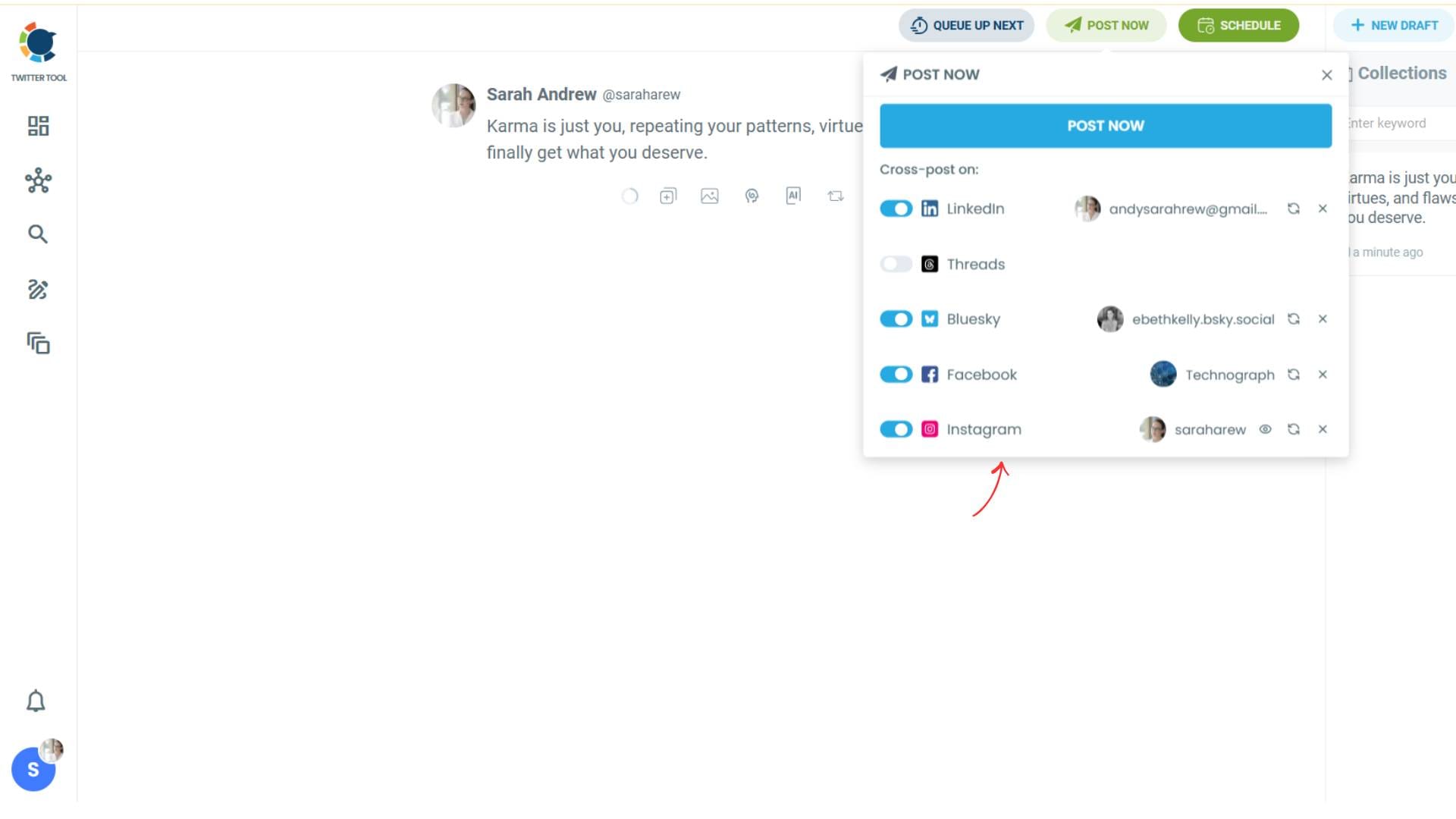
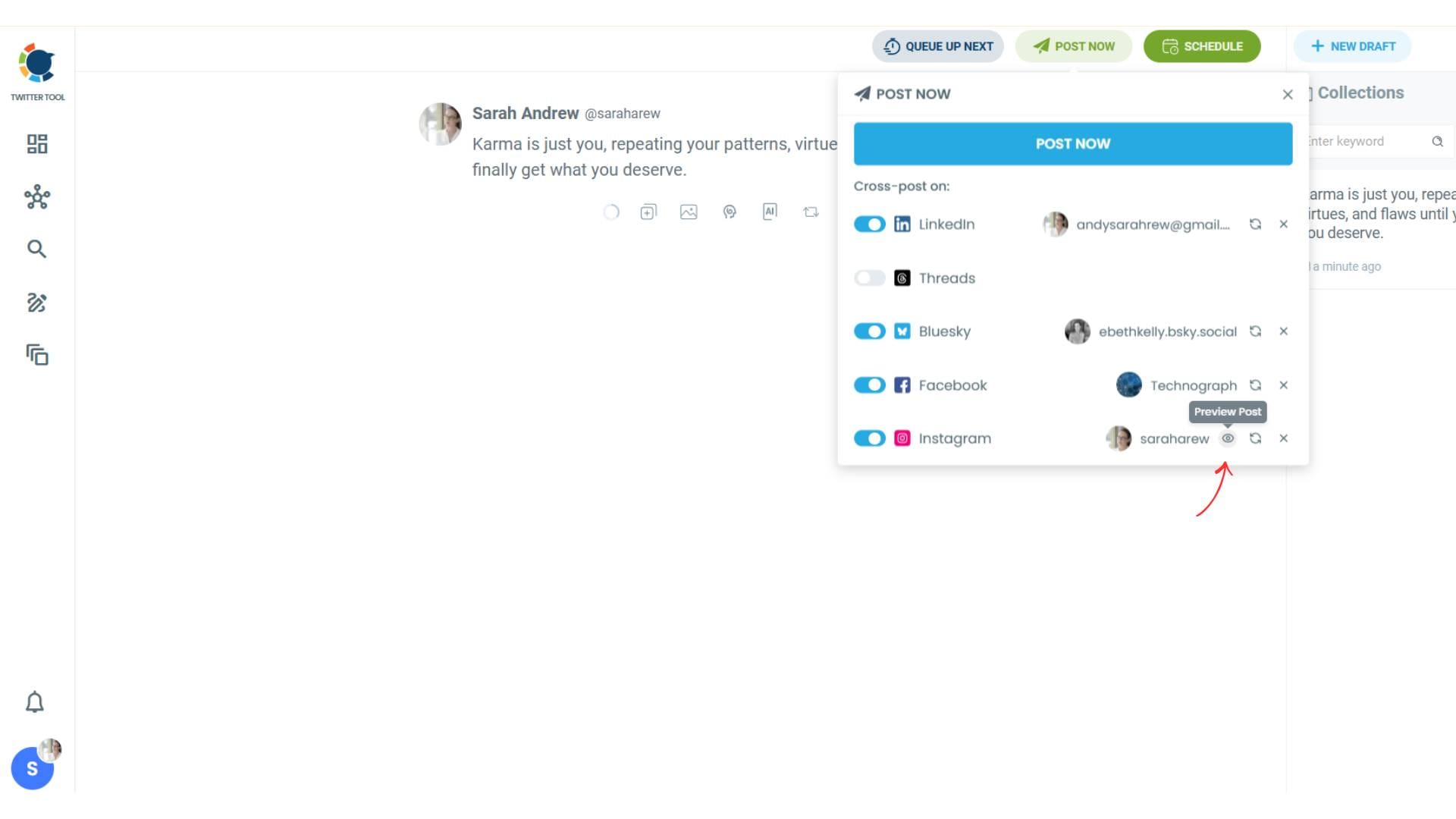
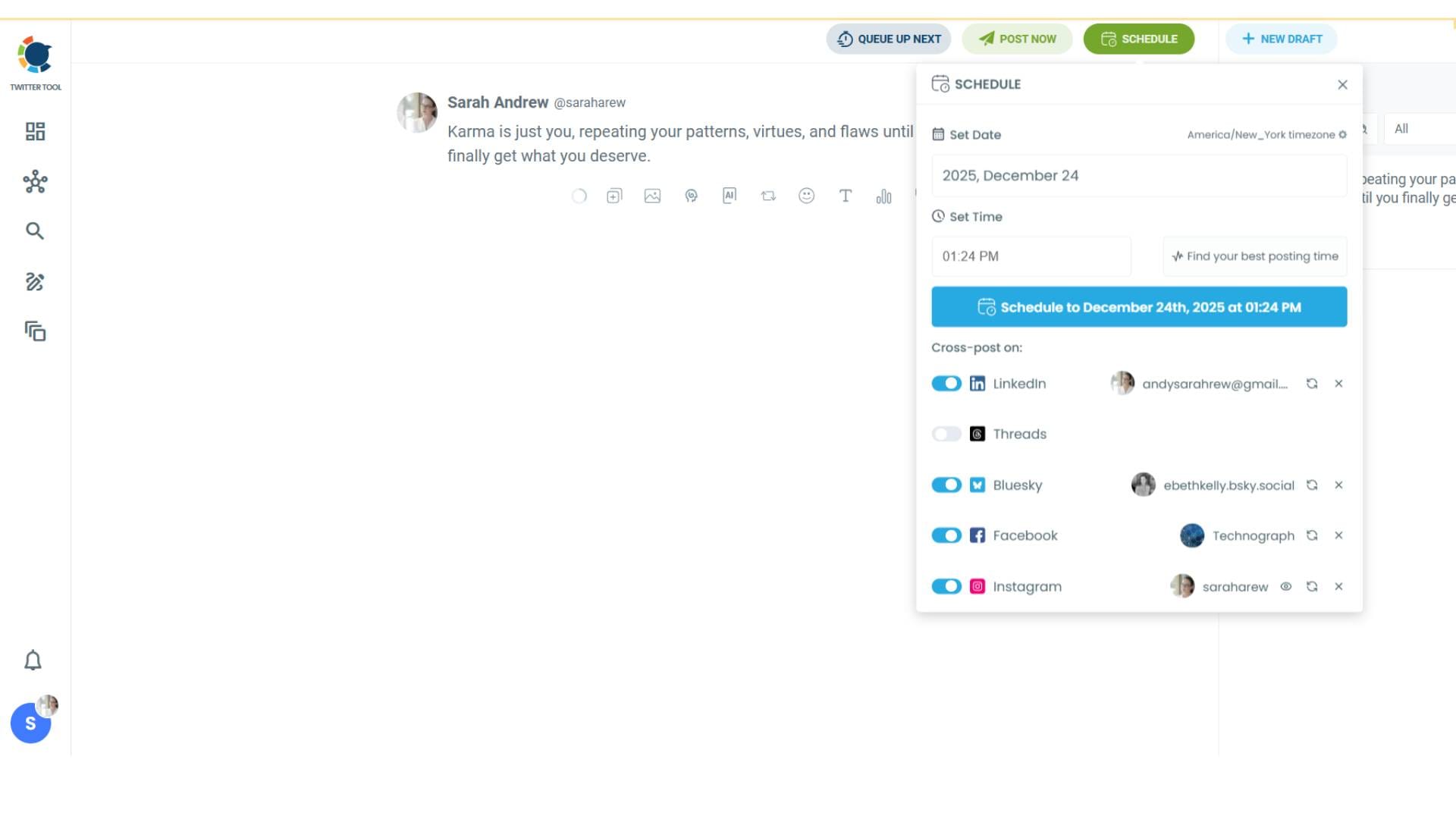
Step #4: You will see your connected platforms. You can cross-post your tweets to these accounts automatically.
You can share tweets on LinkedIn, Facebook, Threads, Bluesky, and finally, Instagram!
To decide if it is going to be a standard Instagram post or Story or Reels, and decide layouts and colours, click on “Preview”.
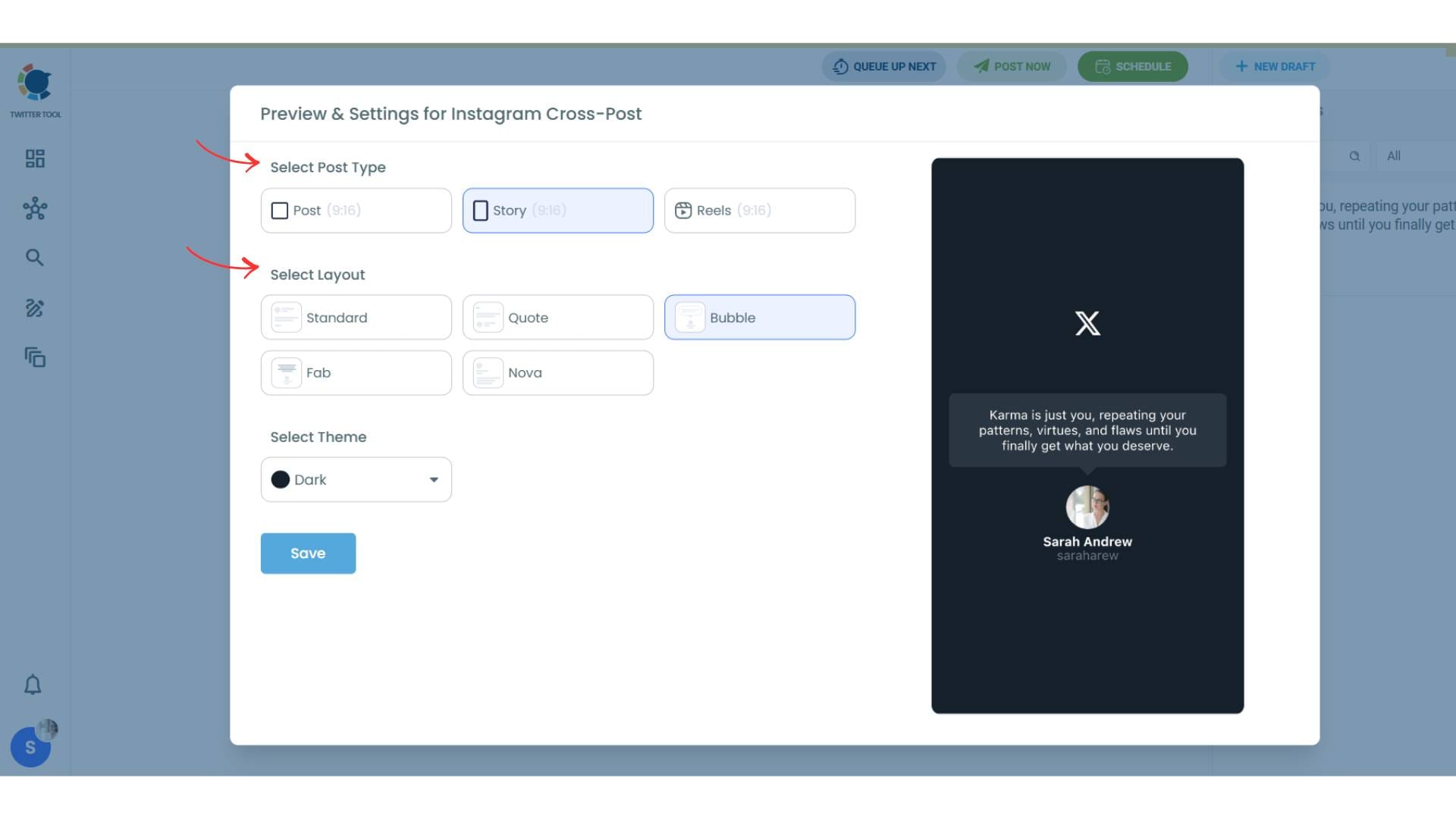
Step #5: Here you can select Instagram post type: “Post”, “Story”, and “Reels”.
You can also select the post layout.
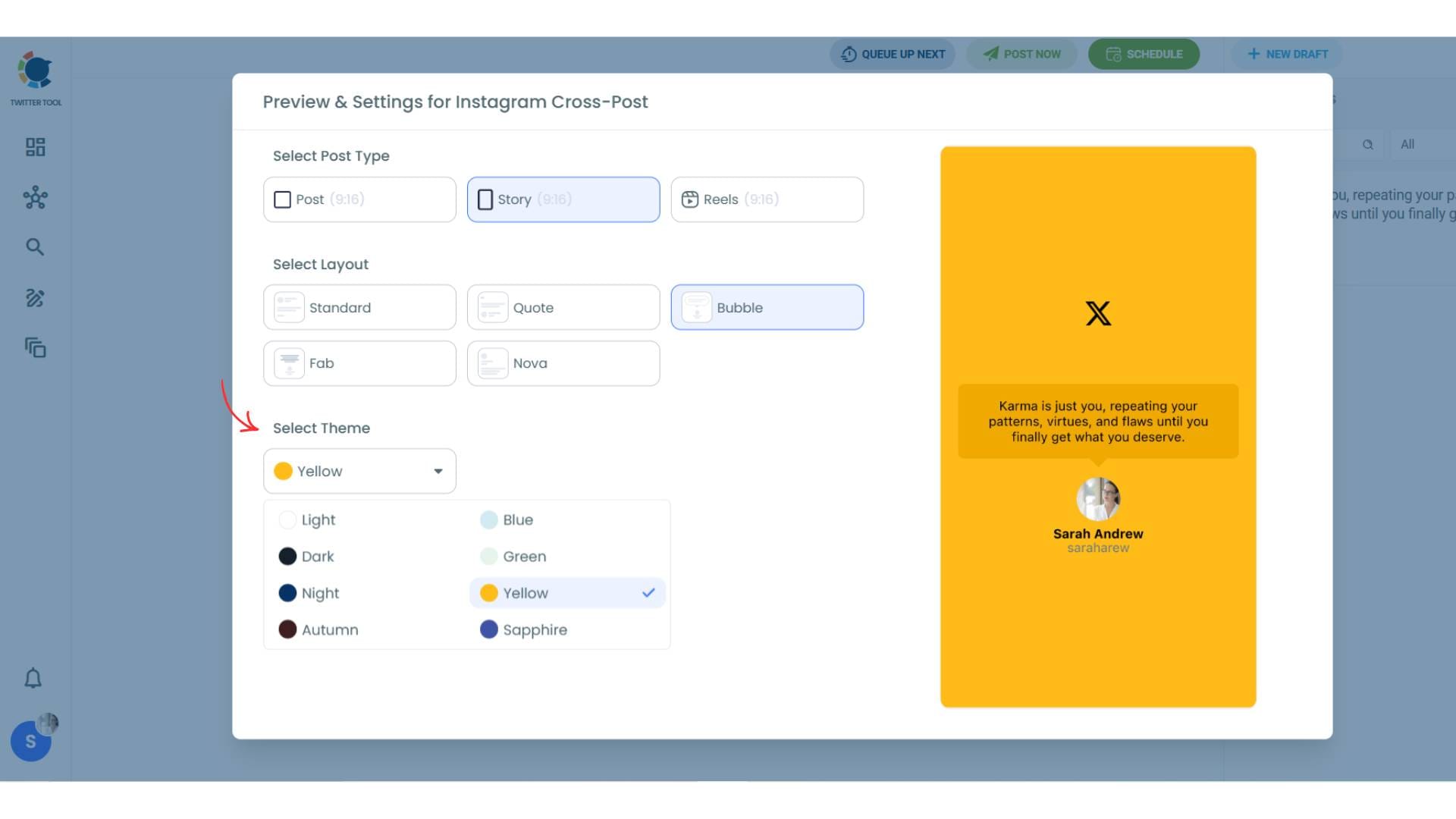
You can also select different themes. Share your tweet on Instagram with different colors.
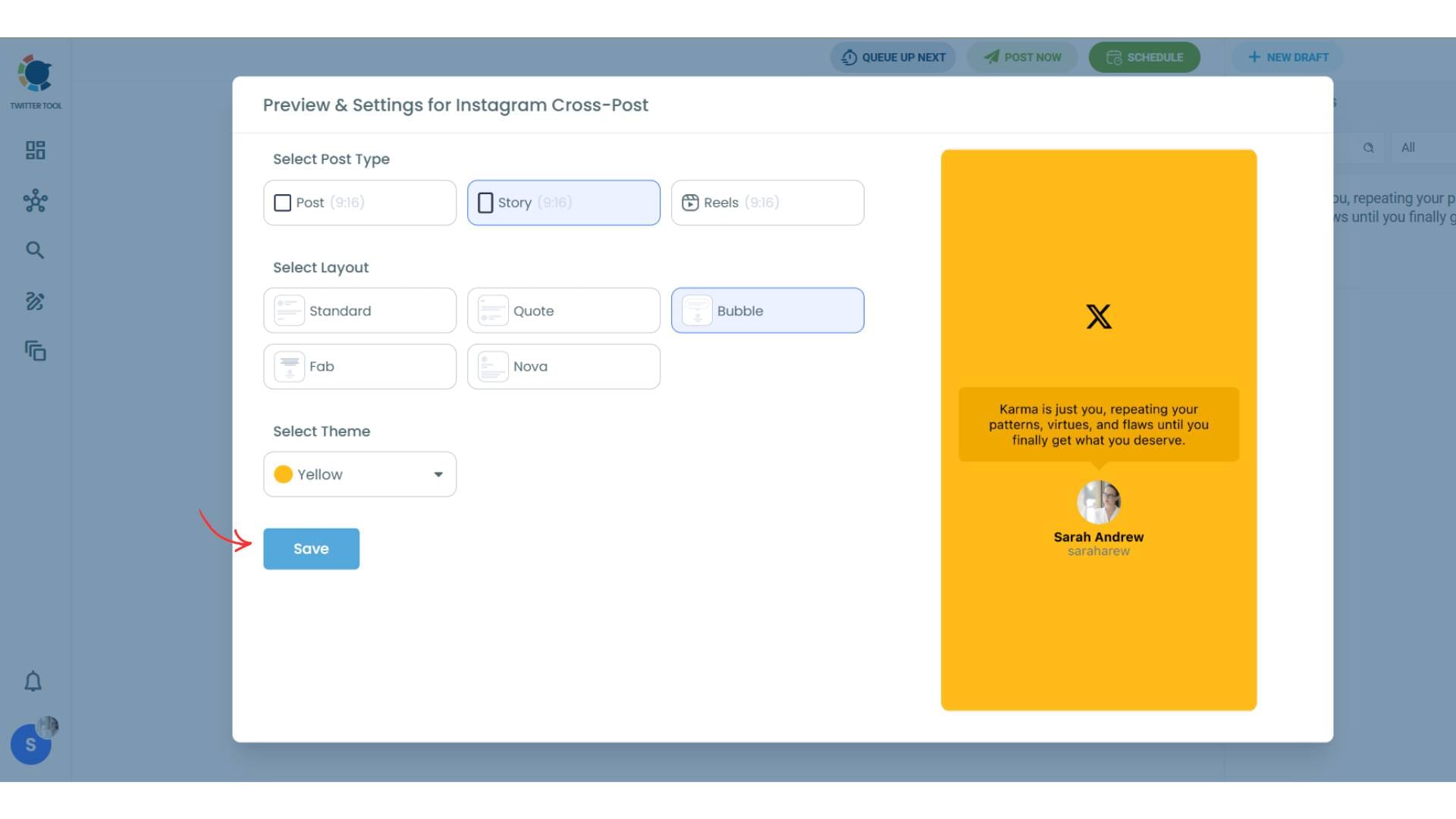
Lastly, you should click on “Save” and your Instagram cross-post is ready.
Step #6: When all is set, you can share your cross post immediately or schedule it for a later time.
You can select the day and hour and click to share your tweet!
You can get more impressions and engagement for your tweets on Instagram. Don't limit yourself to Twitter (X).
Share your tweets on Instagram to reach a wider audience.
What the Conversion Actually Looks Like
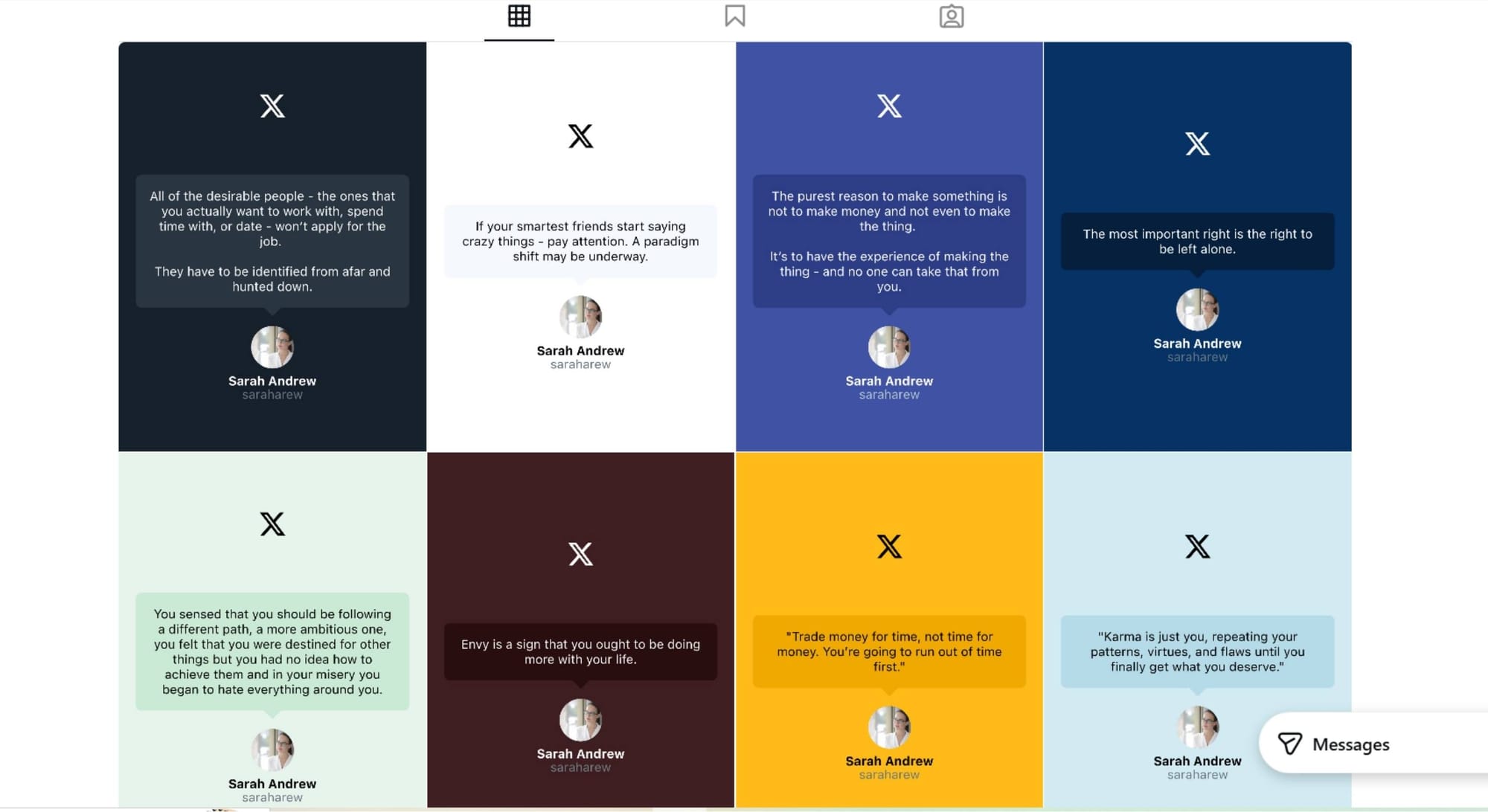
This is not a screenshot. Circleboom takes your tweet text and renders it inside a purpose-built visual layout designed to look good on Instagram.
You can choose the Instagram format. Post for your feed, Story for the vertical full-screen format, or Reels for video-style content. The same tweet can work across all three depending on what fits your strategy.
You can choose the layout style. Circleboom offers several options including Standard, Quote, Bubble, Fab, and Nova. Each one presents the tweet text differently, so you can match the style that fits your brand or the mood of the content.
You can choose the theme. Light, Dark, Night, Autumn, Blue, Green, Yellow, Sapphire. If you have a consistent visual identity on Instagram, you can align the tweet conversion to it rather than letting it look generic.
There's a live preview before anything goes live. You see exactly what the Instagram post will look like before it's published, so you can adjust layout or theme if something doesn't feel right.
The result is content that looks like it was made for Instagram, not just dumped there from another platform.
Why This Is Worth Building Into Your Workflow
Most people treat X and Instagram as completely separate content channels and create different material for each. That works, but it's slow and it means good content often reaches only half the audience it could.
Repurposing your best tweets is one of the highest-return things you can do. The tweet is already written. The idea is already tested. You know it worked because you saw the engagement. Converting it to Instagram is not recycling, it's distribution.
Your Instagram audience and your X audience are not the same people. Even if you have overlapping followers, most of your Instagram followers are not reading your tweets, and vice versa. A tweet that got 200 reposts on X is still new content to your Instagram audience.
Consistency across platforms builds recognition. When the same voice and the same ideas show up across multiple channels, people start to associate that perspective with you specifically, regardless of which platform they first found you on.
Circleboom's Tweet to Instagram feature fits naturally into a broader cross-posting strategy. If you want to distribute content across Instagram, Facebook, LinkedIn, Threads, and Bluesky simultaneously, the Cross Posting feature handles all of that from the same place.

Frequently Asked Questions
Can I convert any tweet to an Instagram post, or only my own?
You can convert your own tweets that are created or managed through Circleboom's X Post Planner. The feature is designed as part of a publishing workflow where you create or schedule a tweet and choose to simultaneously convert and share it to Instagram.
Do I need a design tool to convert a tweet to an Instagram post?
No. That's the whole point of the feature. Circleboom handles the visual transformation automatically. You pick the layout and theme, preview the result, and publish. No external design software required.
What Instagram formats can I publish to?
You can publish to Instagram Posts (standard feed), Instagram Stories (vertical full-screen), or Instagram Reels (video-style format). The same tweet can be converted into any of these depending on your content strategy.
Can I customize how the converted post looks?
Yes. You can choose from multiple layout styles and visual themes to match your brand identity or the aesthetic you want for your Instagram profile. There's also a live preview so you can see exactly what the post will look like before it goes live.
Does the tweet get published to Instagram at the same time as it's posted on X?
Yes. Once your Instagram account is connected and the feature is enabled, your tweet is converted and published to Instagram automatically when the tweet goes live, whether that's immediately or at a scheduled time.
What if my tweet is long? Will it still look good on Instagram?
Shorter tweets generally produce cleaner visuals because there's more space for the text to breathe within the layout. Longer tweets can still be converted, but readability on mobile is worth keeping in mind. Circleboom's live preview lets you check this before publishing.
Do I need to connect my Instagram account first?
Yes. You need to connect your Instagram account through Circleboom's settings before the Tweet to Instagram feature can publish on your behalf. Once connected, the process is fully automated.
Final Thoughts
Good content shouldn't be stuck on one platform. If a tweet worked on X, there's a real audience on Instagram that would find it just as useful or interesting, and the only thing standing between that content and those people is a format problem.
Circleboom's Tweet to Instagram feature removes that problem. The conversion is automatic, the design options are flexible, and you get a proper preview before anything goes live.
Convert your tweets to Instagram posts with Circleboom Twitter:
infocircleboom.com