

The operator was at the cross-post dashboard mid-Tuesday afternoon, picking three tweets from the prior week to convert into Instagram carousels for the next morning's publish slot. The first was a six-tweet thread about a product launch; the second was a single tweet with a strong engagement rate on X; the third was a poll result the operator wanted to extend to a second audience.
The Tweet to Instagram tool was loaded with three template options (post, story, reel), and the carousel-post selection was the right format for the thread, the story selection for the single tweet, and the post selection for the poll-result.
The three conversions ran in under twelve minutes. The thread carousel auto-paginated the six tweets into six carousel slides with consistent design; the story preserved the single tweet as a vertical-formatted graphic; the poll-result graphic kept the chart-style visual that the X poll had produced. All three publishes were queued for the Instagram audience's strongest morning window, and the cross-post that would have taken an afternoon of manual screenshot-and-design work shipped in a single session.
The cross-post workflow starts with Tweet to Instagram, which converts tweet text and threads into designed visuals optimized for Instagram's three content surfaces (posts, stories, reels). The workflow runs through the official X Enterprise APIs for the source content and the platform's sanctioned Instagram publishing endpoint for the destination. Carousel layout, theme, and format are operator-controllable; the publish is queued to Instagram on the operator's schedule. → Convert tweets into Instagram carousels
Why the Tweet-to-Carousel Conversion Matters for Cross-Platform Operators
The audience that follows the operator on X usually overlaps with the audience that follows the same operator on Instagram by 30 to 60%, but the two surfaces favor different content formats. X rewards short, text-first content with optional images; Instagram rewards visual content with optional text overlay.
An operator who produces strong text content for X and ignores Instagram leaves the half of the cross-platform audience that engages primarily on Instagram out of the loop entirely.
The cross-post-to-carousel solves the format-mismatch problem. The carousel format is Instagram's strongest engagement-driver for text-heavy content because each slide can carry one tweet's worth of text in a designed visual, and the slide-swipe interaction keeps the user engaged across the full thread.
The Circleboom piece on how to turn tweets into Instagram posts and reels automatically covers the framing of the conversion options and is the right starting point for operators planning their cross-post workflow.
What the Carousel Format Adds That a Single-Image Crosspost Cannot
The carousel format is structurally different from a single-image cross-post in three ways that matter for engagement.
The first difference is the swipe-engagement mechanic. Instagram's recommendation algorithm reads the swipe action as a strong engagement signal, and carousels typically earn 1.5x to 3x the engagement of single-image posts on the platform. A thread-to-carousel conversion captures this lift by structurally encoding the multi-tweet thread as a multi-slide carousel.
The second difference is the narrative pacing. A single image has to make its point in one frame; a carousel can build the point across multiple slides, which matches how text-first audiences consume content on X (one tweet at a time in a thread). The conversion preserves the original pacing rather than collapsing it into a single visual.
The third difference is the cross-platform consistency. The carousel format lets the operator deliver the same narrative arc on Instagram that the audience experienced on X, which builds cross-platform brand consistency without requiring fully separate content production for each platform. The Circleboom piece on cross-posting tweets to Instagram Stories covers the related story-format conversion that complements the carousel for single-tweet cross-posts.
How to Turn Tweets Into Instagram Carousels Step by Step
The workflow runs in two phases: tweet selection and format conversion, then carousel review and scheduling. Both phases together typically run 10 to 20 minutes per cross-post session.
Phase 1: Select Tweets and Run the Conversion
Log in to Circleboom Twitter
- Log in to Circleboom Twitter with the X account and the Instagram account connected. OAuth keeps credentials with each platform directly and supports cross-platform publishing through sanctioned endpoints.
Open the X Post Planner menu and find Tweet to Instagram
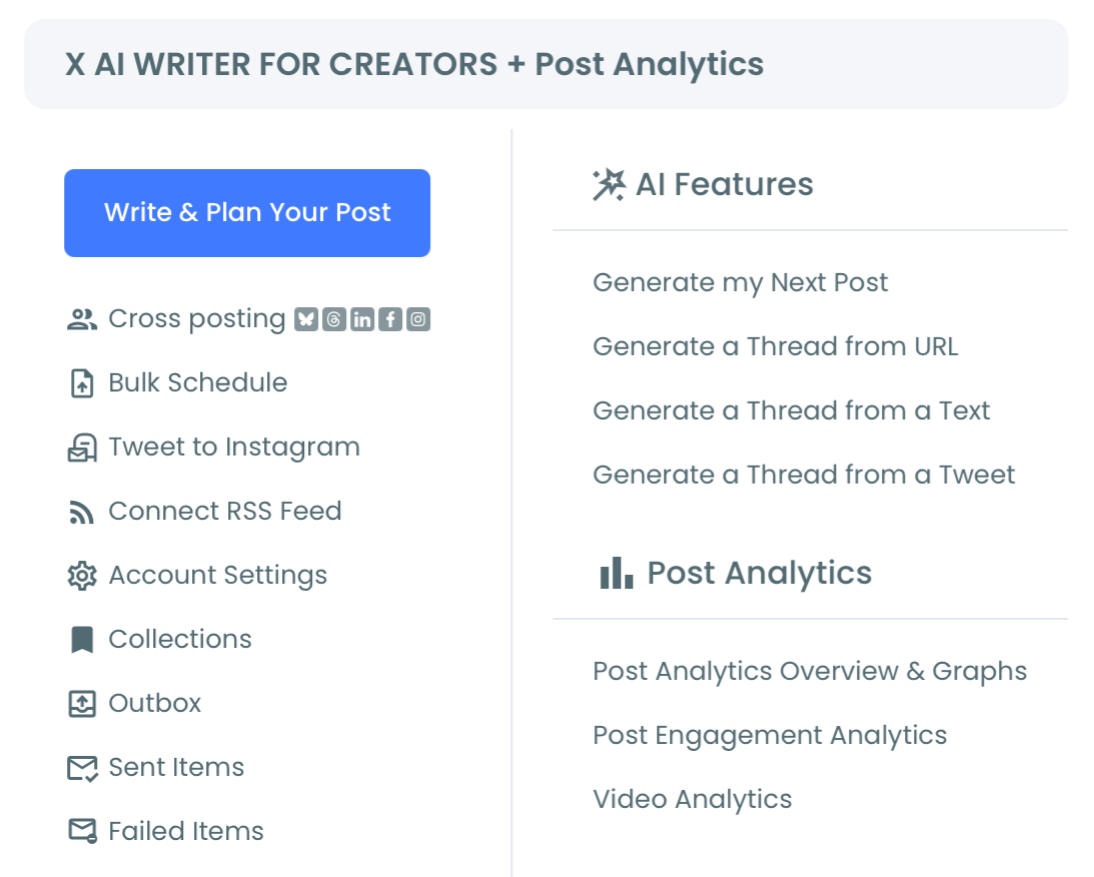
- Open the X Post Planner menu in the left navigation and find Tweet to Instagram under the cross-posting tools. The tool surfaces the source X account and the destination Instagram account.
Select the source tweets or thread for conversion
- Select the source tweets or thread for conversion. Single tweets convert to single-slide posts or stories; threads convert to multi-slide carousels with each tweet mapped to one slide.
Phase 2: Review the Carousel and Schedule the Publish
Choose the Instagram format and customize the design
- Choose the Instagram format (post, story, or reels) and customize the design (theme, layout, fonts). The conversion produces a default visual that the operator can adjust before the publish.
Pick the publish time against the Instagram audience's online data
- Pick the publish time against the Instagram audience's online data. The Instagram audience often has different optimal publish windows than the X audience; calibrate against the Instagram engagement history rather than reusing the X window.
Confirm the schedule and let the publish queue
- Confirm the schedule and let the publish queue. The Instagram post publishes at the chosen moment through the sanctioned API, and the carousel appears on the Instagram feed with the designed visuals.
The six-step sequence is the full workflow. The tweet selection and design review are the strategic steps; the publish is mechanical.
Video walkthrough: how to share tweets on Instagram as posts, stories, and reels.
What the Cross-Post Workflow Produces Over a Quarter
The output is a doubled content surface area for the operator's strongest X content. The carousels reach the Instagram-half of the cross-platform audience that the X-only publish misses, and the engagement-rate lift on Instagram typically pays for the additional production time within the first month.
The compounding payoff lands in audience growth across both platforms. The cross-platform consistency signal, the same narrative arc on both surfaces, reads as a coherent brand across the platforms, which improves the operator's profile credibility for sponsors and partners who evaluate cross-platform reach.
The Circleboom piece on how to create a fake tweet post for Instagram covers the design-side framing of the visual style; the Tweet to Instagram conversion produces a similar visual coherence without requiring the operator to design each carousel from scratch.
Two adjacent surfaces extend the cross-post workflow. The Cross-Post landing covers the parent cross-posting suite that handles Twitter, Instagram, LinkedIn, Threads, and Bluesky in a unified workflow. The Instagram Post Scheduler landing covers the destination-side Instagram scheduling for operators who want native Instagram content alongside the cross-posted tweets.
Related Circleboom reading on the cross-post theme.
- Schedule Instagram carousel posts on the scheduling-side workflow that handles the publish-time decision for Instagram carousels.
Where the Workflow Goes Next
A first month of cross-post conversions usually produces enough engagement data to calibrate the format mix (carousel for threads, story for single tweets, reel for video-anchored content) for the operator's specific audience. The mix is operator-tunable and shifts over time as the operator learns which content patterns travel best across platforms.
Convert tweets into Instagram carousels and the X-only publish that reached half the cross-platform audience becomes a two-platform publish that reaches the full audience with content optimized for each surface.
Common Questions About Tweet to Instagram
Does the carousel maintain the original tweet text exactly, or does it get edited during the conversion?
The default conversion preserves the tweet text exactly, with the design layer adding visual styling around the text rather than rewriting it. The operator can edit the text during the design-review step if a tweet contained an X-specific reference (a @-mention to an X account, a hashtag that doesn't carry to Instagram) that would not make sense on Instagram. Most operators run light edits at the conversion step rather than wholesale rewrites.
How many slides can a carousel have, and what happens if my thread has more tweets than the limit?
Instagram supports up to 10 slides per carousel. Threads longer than 10 tweets either get split across multiple carousels (with consistent design across both) or compress the longer thread into a 10-slide summary. The conversion workflow surfaces the slide count and lets the operator pick the strategy at the conversion step.
Will the cross-post affect my X account or the original tweets in any way?
No. The cross-post reads the X content but does not modify it. The original tweets remain intact on the operator's X timeline; the Instagram publish is a separate piece of content on the Instagram surface. The two publishes are independent at the platform level.
How does Instagram's algorithm read auto-converted carousels compared to native-designed ones?
Instagram's algorithm reads the carousel format the same way regardless of how the visuals were created; the engagement-rate response is shaped by content quality and audience match rather than by the tool used to produce the carousel. Operators sometimes see slightly different performance for auto-converted vs. fully native-designed carousels, but the difference is usually small relative to the content and timing variables.
Can I run the conversion in batch, or do I have to convert one tweet or thread at a time?
The conversion supports both single-item and batch modes. Batch mode is useful for operators who want to queue a week of cross-posts in one session; single-item mode is useful for the most-engaging tweets that warrant individual design attention. Most operators run a mix of both, with the batch mode for the routine cross-posts and the single-item mode for the highest-priority content.






