Take an account where 300 new followers landed in one week, and most of them carry adult links in their bios. Filtered by join date, missing profile photo and a bio keyword, those 300 profiles become one reviewed list, and a single Start in a Chrome extension blocks them one by one while the real followers stay where they are.
That is the whole job, and it takes one sitting instead of a month of tapping Block.
Three moves clear an adult bot wave.
• List your followers on the Mass Block page and filter them by join date, missing photo and bio words.
• Review the selection, then add it to the Mass Block List.
• Press Start in the Chrome extension and let it block each account at X's pace.
Circleboom finds NSFW spam accounts among your X followers with data from X's Enterprise API access and blocks them in bulk through its Chrome extension. Block NSFW accounts in bulk on Twitter from one reviewed list.
The rest of this guide covers why these accounts arrive, when a block beats a softer removal, the setup you need, the exact steps and what to do with your own feed afterwards.
Why adult spam accounts pile into your Twitter followers
Adult spam accounts arrive in clusters, not one at a time. A batch of new profiles follows you within a few days, likes a few of your posts and points back to the same handful of links in their bios.
Each one looks small on its own. Together they change what a visitor sees when they open your follower list.
The cost is not only how the list looks. A brand account with explicit profiles in its follower list hands a reason to doubt it to every partner, recruiter or client who checks. A creator who posts for a general audience now has adult spam sitting under their replies.
You may already have asked why all your posts are being liked by adult spam bot accounts. The likes and the follows come from the same wave.
Why one-by-one blocking on X falls behind
Manual blocking on X does not keep up with a wave. You open a profile, tap the menu, tap Block, confirm, go back and repeat. At 300 accounts that is 300 rounds of the same taps.
That is why people end up searching for a way to block NSFW accounts in bulk on Twitter instead of one at a time. Adult bot waves leave a pattern you can filter for.
Circleboom turns that pattern into filters on your X follower list. From there you can bulk-block the adult accounts following you on Twitter from a single filtered list.
Should you block or remove NSFW followers on X?
Block them when you want them gone for good, and remove them when you only want a cleaner count. Before you block NSFW accounts in bulk, know that the two actions do different things.
A removed follower leaves your follower list, but nothing stops that account from following you again the next day. A blocked account cannot follow you, reply to you, message you or engage with your posts.
Circleboom's Remove Twitter/X followers action is the softer choice; Mass Block is the strong one.
For adult spam, the strong one usually fits, because the problem is repeated contact, not one stray follow. Use this split:
- Block profiles that post or link explicit content, send adult DMs, or keep returning after you removed them.
- Remove accounts that look like empty bots but have never posted anything adult.
- Leave alone real people with a missing photo or an odd bio until you have checked them.
For a lighter first pass before any block, see how to clean up adult bot followers on your Twitter profile.
Blocking is the right call for adult spam because it closes the door the removal leaves open.
Blocking one profile at a time on X versus one list in Circleboom
On X, you block accounts one profile at a time. To block NSFW accounts in bulk on Twitter, you need a screen that lists the followers who match a pattern and blocks them together, and X has none.
Circleboom's Mass Block X Accounts page gives you that screen: it lists the followers or following of any public account, including your own, lets you filter them, and sends the ones you select to a Mass Block List.
That list then appears automatically in the Twitter X Mass Blocker Chrome extension. You press Start, and the extension blocks each account in order, inside your own logged-in X session. When it reaches X's blocking limit, it pauses for 1 to 20 minutes and continues on its own.
Where the follower data comes from
The data side matters too. Circleboom reads your followers under its listing as an official X Enterprise Developer, so the list you filter comes from X itself, not from a scraped copy. You block the accounts that are on your list today, with the profile details X holds for them.
Put plainly, Circleboom lists every follower of your X account with join date, tweet count, follow ratio and bio text, then blocks the ones you choose in one paced run. You can mass block NSFW Twitter accounts this way without touching a single profile by hand.
From follower list to finished block run: the filters, the Mass Block List and the Start button in the Chrome extension.
What you need before blocking adult accounts on Twitter
Three things need to be in place before you start blocking NSFW accounts in bulk on X, and missing any of them stops the job halfway:
- Chrome on a desktop computer. The Twitter X Mass Blocker extension runs only in Google Chrome on desktop, not on a phone or in another browser.
- The Mass Block extension installed. The help page on how to install the Mass Block Twitter X extension shows the Chrome Web Store steps, including checking that the publisher is Circleboom Inc.
- Both sessions logged in. You need to be signed in to Circleboom and to the X account you are cleaning, in the same Chrome window.
One more resource to plan: each follower search on the Mass Block page uses a search token, and the page shows how many you have left. A single search of your own followers covers every wave that has already followed you.
With those in place, the steps below take one sitting.
How to block NSFW accounts in bulk on Twitter, step by step
The steps fall into three phases: load your followers, filter them down to the adult spam, then queue the list and let the extension run.
Load your own follower list for blocking
- Log in to Circleboom Twitter and connect the X account that the adult bots are following.
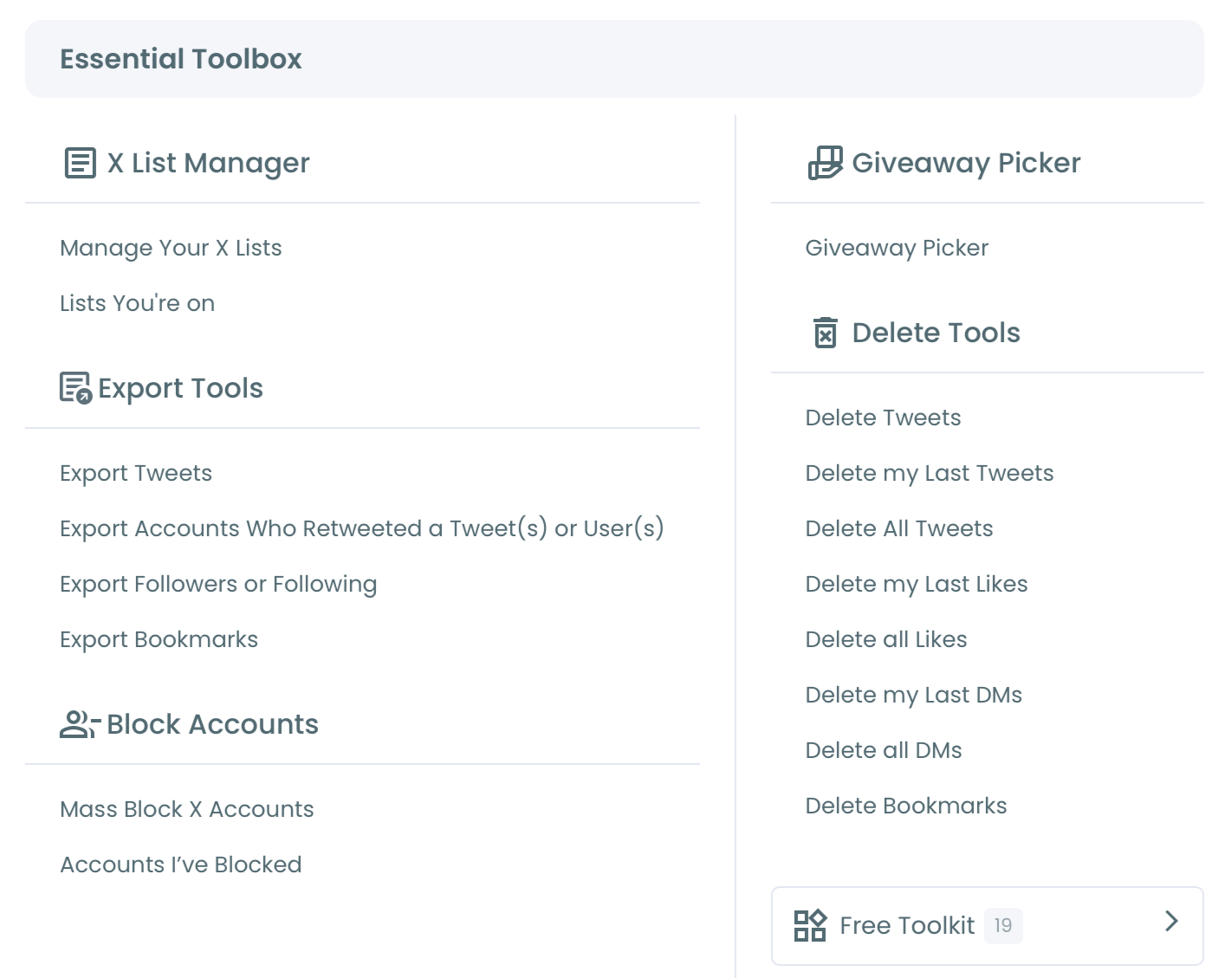
- Open the Essential Toolbox menu, then Block / Unblock Accounts, then Mass Block X Accounts.
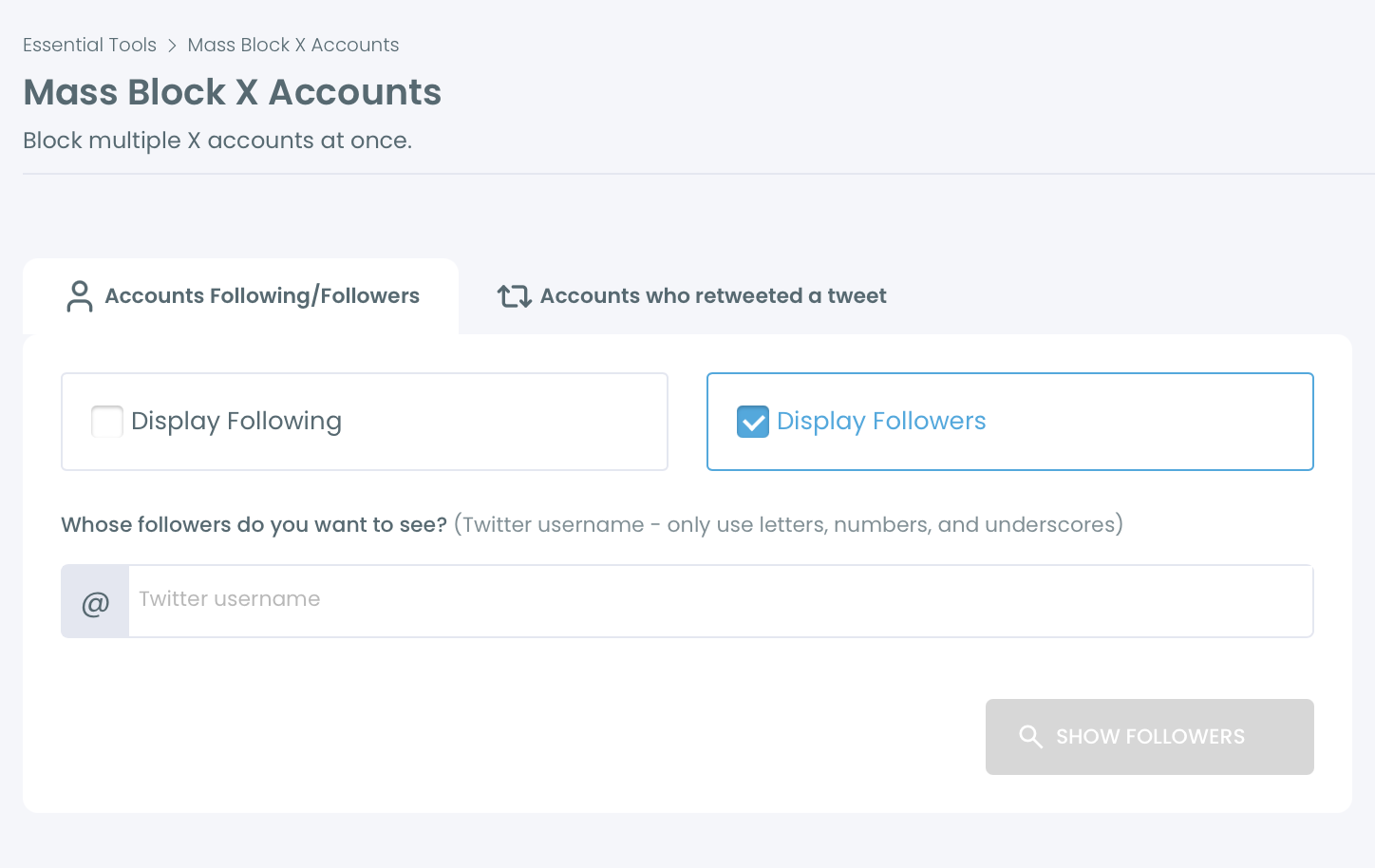
- Stay on the Accounts Following/Followers tab, tick Display Followers, type your own username without the @ and click Show Followers.
The table lists up to 2,500 accounts at a time with name, tweets, join date, following, followers, follow ratio and activity level. Sorting the columns lets you reach accounts past the first 2,500.
Filter the list down to the adult spam profiles
- Open Filter Options and combine the signals the wave shares. Use Find in Bio & Name with a word that appears in the spam bios (for example NSFW or 18+), Join Date set to the days the wave arrived, and Eggheads under Follower Quality for profiles with no photo.
- Sort by follow ratio or join date and open a sample of profiles with the link icon on each row before you select anything. Keep the Whitelisted: Hide filter on, so accounts you protected never enter the list.
Queue the list and start the extension
- Select the confirmed accounts and click Add to Mass Block List, then confirm the count in the pop-up.
- Open the Twitter X Mass Blocker extension and click Start. Keep the browser open; when X's limit is reached, the extension pauses for 1 to 20 minutes and resumes by itself.
Filtering by the pattern the whole wave shares, instead of judging profiles one by one, is what keeps real followers out when you block NSFW accounts in bulk. The sample in step 5 is your last check before a strong action, and the extension's pacing keeps the run inside X's limits.
There is a second route too. If a follower list inside Circleboom (Fake/Bot Followers, for example) already shows the spam, select the accounts there and choose Add to Mass Block List from the Add to List menu. The extension picks them up the same way.
Use the bio pattern, not the profile photo, to catch an adult bot wave
A common instinct is to look for fake-looking profiles. An adult spam bot can carry a real-looking photo, so a "looks fake" check lets it through.
What a wave shares is structure:
- accounts created in the same short window;
- a follow ratio far below one;
- bios that repeat the same words or the same link.
That is why, when you block NSFW accounts in bulk, the filter combination in step 4 works better than any single filter. Join Date isolates the wave, Find in Bio & Name catches the shared wording, and Follow Ratio separates a fresh bot from an old account that happens to share a word. The Eggheads filter is a helper, not the main test.
A worked example with illustrative numbers
Here is how the filters stack. Say your follower list holds 4,000 accounts and 350 joined X in the same ten days. Of those 350, a bio keyword match narrows the set to 260, and a sample of 20 profiles shows every one is adult spam. You block the 260 and leave the other 90 for a second look.
One more pattern worth using: if the bios all promote the same account, that account's followers are the next wave. The Mass Block page lists the followers of any public username, so you can block that network before it reaches you.
For the account-wide version of this job, see how to block all NSFW accounts on Twitter.
A wave shares a pattern, and the pattern is what you filter for.
The Twitter bot checker is useful when one account in the sample still leaves you unsure whether it is automated.
Keep adult media out of your own X feed after the block
Blocking NSFW accounts in bulk stops them from following and engaging with you, but it does not change what X shows you from everyone else. That part is a separate setting on X.
X's help page on sensitive media explains that you control whether you see sensitive media in posts from your settings on x.com.
It also shows how to report a post through Report post and "It displays a sensitive image." Reporting brings the media to X's attention; it does not remove it automatically.
Two settings jobs, two different tools:
- Your follower list and your mentions: blocking, which is what the steps above handle.
- Your timeline and search results: X's own sensitive media settings, covered in more detail in how to filter adult content out of your Twitter feed.
Treat the two as one routine. Block the wave, then check the feed setting, because a clean follower list with an unfiltered timeline still leaves you looking at the same content.
Which blocking route fits your Twitter account
Your next move depends on what you see when you open your follower list:
- If a recent wave of adult profiles followed you, filter by join date and bio words on the Mass Block page and block the reviewed list.
- If the spam keeps coming from one promoter account, list that account's followers on the same page and block them before they follow you.
- If you see a few empty bots but nothing adult, remove them instead of blocking.
- If you are not sure about some accounts, blacklist or export them and decide after a second look.
Whichever branch you land on, the sequence holds: filter on a pattern, sample before you select, then let the extension do the blocking at X's pace.
That is how you block NSFW accounts in bulk without blocking a single real follower by accident.
→ Clear the adult spam from your Twitter followers in one run
Questions about blocking NSFW followers on X
How long does it take to block a few hundred adult accounts?
Circleboom's help page on how long it takes to block users gives an average of around 10 accounts per minute with the Mass Blocker extension. Add the 1 to 20 minute pauses when X's limit is reached. So when you block NSFW accounts in bulk, a list of a few hundred accounts runs in under an hour of active blocking, longer if pauses stack up.
Can I check later which adult accounts I blocked?
Yes. Circleboom's check blocked Twitter accounts page lists every account on your X block list, and from there you can unblock any account that was caught by mistake.
Does blocking an NSFW account also report it to X?
No. Blocking only changes how that account can interact with you. To flag the media itself, X's help center says to open the post, choose Report post and select "It displays a sensitive image."