
Most people look for their follow-backs in notifications, but notifications only show who followed you, never whether you followed them first. The real answer sits in the overlap of two lists: the accounts you follow and the accounts that follow you.
How do I find people who followed me back on X?
Open a list of your mutuals, the accounts you follow that also follow you. Circleboom cross-references your following and follower lists on X and puts every two-way connection in one sortable table, using X's official API at Enterprise level.
→ See who followed you back on Twitter in one list
Why X notifications can't show who followed you back
A notification tells you that an account followed you. It cannot help you see who followed you back on Twitter, because it never says whether that follow answered one of yours, and it does not stay in front of you long enough to count.
Two very different events look the same in the bell tab. A stranger who found one of your posts and followed you is an arrival. An account you followed last week that followed you in return is a follow-back.
Only the second one is the answer to the question in the title.
X also gives you no screen that separates them. Your mutuals are mixed into your following list and your follower list with no flag, no filter and no count.
There is no dedicated place on X for two-way relationships, which is the gap Circleboom fills by listing every Twitter mutual you have in one view.
So the job is to match two lists.
To get the result without doing the matching yourself, list every account that followed you back on X and then read on for what to do with it.
Can you see who follows you back on X without a tool?
Yes, but only one account at a time. X shows your followers and your following as two separate lists, so the built-in route is to take each account you follow and look for it in your followers list by hand.
That works for ten accounts. It stops working at scale. Here is the arithmetic for an account that follows 1,200 people:
- 1,200 names to look up, one per account you follow.
- About 20 hours of checking at one minute per name.
- Zero saved results, because X keeps no record of what you checked.
Manual checking answers the question once and then goes stale the moment anyone follows or unfollows.
Free checker sites try to close that gap. Before you hand any of them access to your account, the comparison in best Twitter X follow back checker tools is a useful read.
What counts as a follow-back on Twitter?
A follow-back on Twitter is a mutual: you follow the account, and the account follows you. Both sides have made a deliberate choice, which is what makes this the most relationship-dense part of your network.
If the term is new to you, what is a mutual on Twitter defines it in plain terms.
The practical side matters more here. X's Following FAQs say that following someone means their updates appear in your Home timeline and that person is able to send you Direct Messages.
In a mutual, that holds in both directions: each of you sees the other's posts, and each of you can message the other.
The three numbers that describe your network
Once you know your mutual count, two more groups fall out of simple subtraction. Take an illustrative account that follows 1,200 people, has 900 followers and has 480 mutuals:
| Group | How to get it | Count |
|---|---|---|
| Mutuals | the overlap | 480 |
| You follow, they don't | 1,200 minus 480 | 720 |
| They follow, you don't | 900 minus 480 | 420 |
Of the 1,200 accounts this person follows, 480 returned the follow, so 40% of the following list is two-way.
That one percentage tells you more about your follow strategy than your follower count does.
Where the other two groups go
The middle row has its own view in Circleboom, Not Following Back on Twitter, and the bottom row is where your follow-back decisions live.
Treat the bottom row as an invitation list. Those 420 accounts chose you without being asked, and each one becomes a mutual the moment you follow it, so the 40% share above rises with every follow-back you give.
The catch is quality: an arrival can be a bot as easily as a peer.
Circleboom's followers I don't follow back view lists that row with activity data. Return the follows that deserve it and leave the rest.
New arrivals are a separate stream again. When their alerts go missing, Twitter doesn't show new follower notifications covers what you can do about it.
Circleboom keeps arrivals in their own view, where you can check new followers on Twitter by time period. The mutuals view answers a different question.
How to see who followed you back on Twitter
To see who followed you back on Twitter, compare your full following list against your full follower list and keep only the accounts that appear in both. Circleboom runs that comparison for you in its X Mutuals view and enriches each match with activity and profile data.
The four steps below go from login to a sorted list of your two-way connections.
Circleboom appears in the Enterprise section of X's developer documentation, so your follower and following data reaches it through approved access, with no password shared and no scraping. That is also why you can check which X accounts follow you back without worrying about what the comparison does to your account: it only reads two lists.
Open the following side of your Circleboom dashboard
- Log in to Circleboom Twitter and authorize the X account whose follow-backs you want to check.

- Go to the Followers / Following Management and Analytics menu in the left sidebar and expand the Following group.
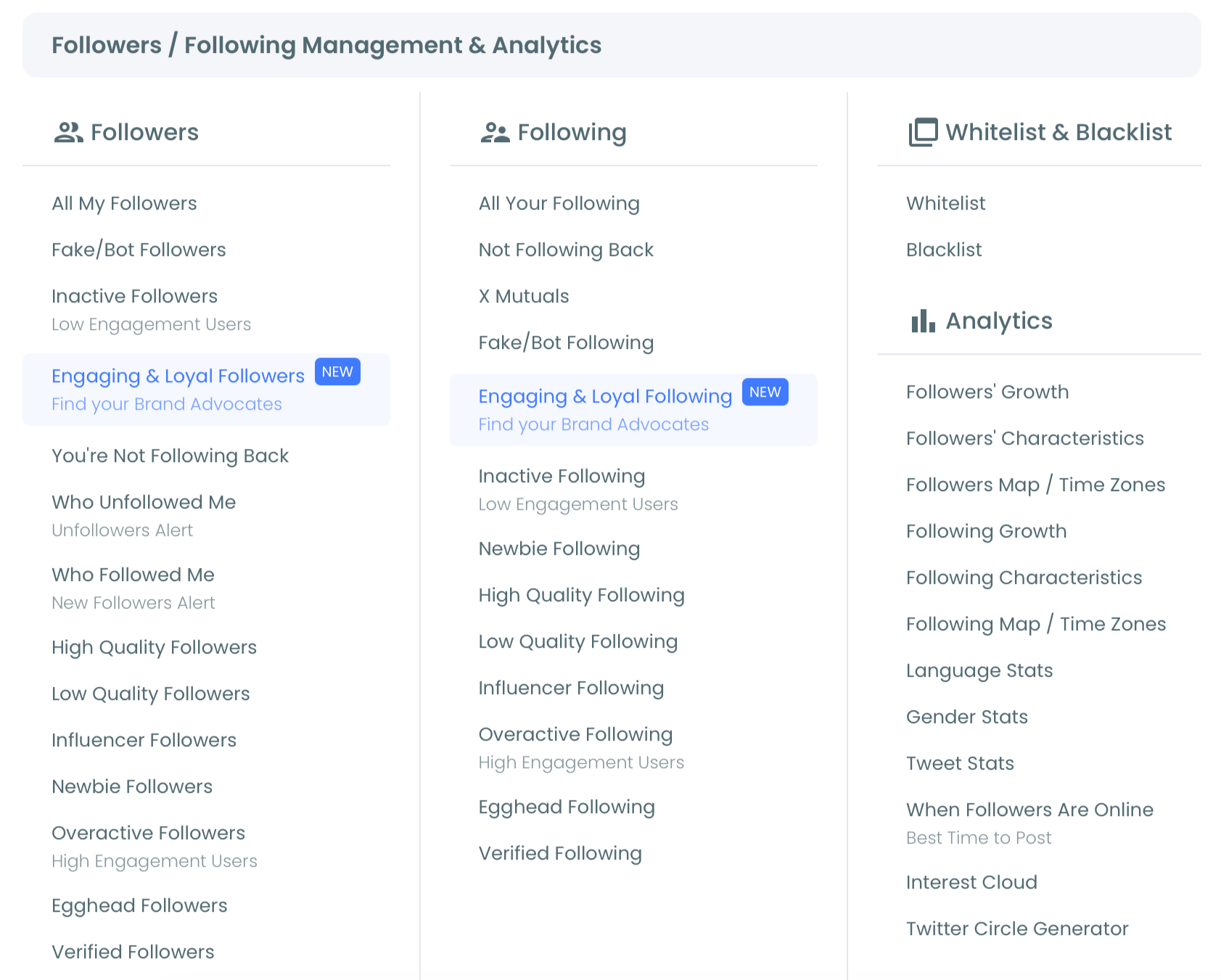
Read and sort your mutuals list
- Open X Mutuals. The header shows how many mutual connections you have out of your total following, and each row lists the account's tweets, join date, following, followers, follow ratio and activity tier.
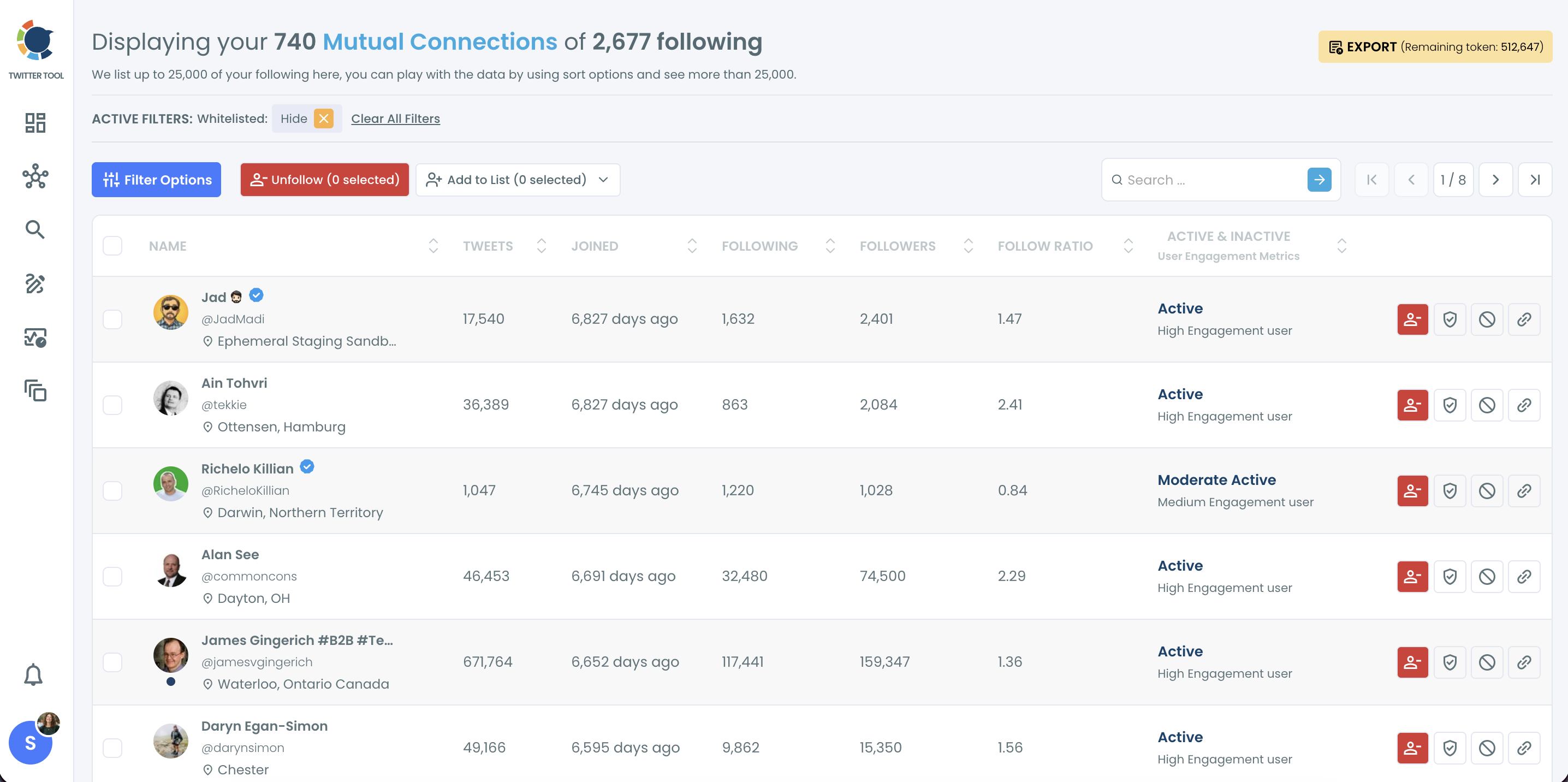
- Sort or filter the list by the Active & Inactive column, follower count or join date, or open Filter Options to narrow it by engagement, language, location or a keyword in the bio.
Sorting before you act is what turns a raw list of mutuals into a ranked one, so the people worth a reply rise to the top instead of sitting on page nine.
Short version: log in, open the Following group, choose X Mutuals, then sort by activity. Every action you take next starts from that sorted list.
Are all your Twitter mutuals worth keeping?
No. A mutual tells you a follow went both ways at some point; it says nothing about whether the account is still active or still relevant to you.
Mutual status has limits. Some mutuals date from a follow-for-follow period that no longer fits your strategy, some accounts have changed focus, and some have gone quiet.
The Active & Inactive column splits them into three tiers, from Active / High Engagement to Inactive / Low Engagement, so the quiet ones are easy to spot.
Rank your mutuals before you engage with them; a two-way follow is a starting point, not a verdict.
The strongest group is mutuals who also interact with your posts. Circleboom's Engaging Followers and Following view shows the accounts you follow that have retweeted you, and the overlap with your mutuals is your real inner circle.
Four filters that rank your X mutuals
The Filter Options panel in X Mutuals is the same one used across Circleboom's follower and following views, and four of its fields do most of the ranking work for mutuals:
- Engagement keeps the accounts that interact, so your reply time goes where it is returned.
- Find in Bio & Name pulls out roles or topics, such as "founder" or "podcast", for a partnership shortlist.
- Filter by Language and Filter by Location isolate the mutuals in a market you serve.
- Follower Count with a minimum value finds the mutuals whose replies carry the furthest.
The filters combine, and the Active Filters bar above the list shows the exact segment you are looking at before you select anyone.
That ranked segment is your warmest outreach pool. A mutual already follows you, you already follow them, and any message you send starts from a connection both sides chose, which is a very different opening from a cold DM to a stranger.
A 3-minute look at what a mutual is on X and how the X Mutuals list reads, filters and becomes a Twitter List.
I treat an inactive mutual differently from an inactive one-way follow. The mutual still follows me, so unfollowing it breaks a connection both of us made, while the one-way follow costs nothing to drop.
Protect your X mutuals before any unfollow cleanup
Before any bulk unfollow anywhere in Circleboom, select all of your mutuals and whitelist them. A whitelisted account is excluded from every bulk action on the platform, so no later filter can catch a two-way connection by mistake.
This step matters most when the cleanup is aimed at people who never returned your follow. Its trade-offs are in is it a good idea to unfollow those who don't follow back on Twitter.
The safe order is always protect first, prune second.
One detail is easy to miss. Whitelisted accounts are hidden by default in X Mutuals, so after you whitelist, your mutuals seem to vanish from the grid.
They are still there: open Filter Options and use the Whitelisted & Blacklisted dropdown to confirm the protected group before you start the cleanup.
When the unfollow itself runs, Circleboom paces it at 50 accounts every 15 minutes, up to 800 a day, and continues the rest of the queue automatically the next day. You confirm the selection before anything is sent.
Keeping the mutuals you chose to protect within reach is the other half of the job. Adding them to a dedicated list through the Twitter List Manager gives you a feed of only two-way connections, separate from the noise of your full timeline.
Which X list to open next
To see who followed you back on Twitter, read the overlap of two lists; notifications will never show you that overlap. Pick the next step by what you found:
- If your mutual share is high, protect it: whitelist every mutual and build a list from the active ones.
- If it is low, open Not Following Back and decide which one-way follows still earn their place.
- If many mutuals sit in the Inactive tier, review them by hand before any unfollow, because each one still follows you.
- If you followed people recently and expected more returns, wait for the next sync and check again before judging.
Whichever branch you take, start from the same table, read through X's approved Enterprise access for Circleboom rather than by opening profiles one at a time.
→ Open your X Mutuals list and rank your follow-backs
Follow-back questions on X, answered
Why is someone who just followed me back missing from my mutuals list?
The mutuals list compares your two lists as of the last sync, so a follow-back from the last few hours may not appear yet. It shows up after the next sync, with no action needed from you.
Should I follow back everyone who follows me on X?
No. Review new followers first in Circleboom's Who Followed Me view, which shows each account's activity, tweet count and join date, then follow back the relevant ones. Bulk follow-backs are paced at 50 every 15 minutes and 400 a day, with the remainder continuing the next day.
Can I export my mutuals as a spreadsheet?
Yes. The Export button in X Mutuals downloads the list as a CSV file, and it uses export tokens, with your remaining balance shown on the button. Apply any filters first so the file contains only the segment you need.