A blog post that nobody shares is a post that only search engines know about, and a new post rarely ranks in its first weeks. If promotion is left to whoever remembers on publish day, most posts get one rushed share, or none.
The fix is a blog planning template that plans the promotion in the same row as the post, before a single word is written.
What this blog planning template covers.
• The fields that plan the post itself, from reader to call to action.
• The promotion row most blog planners leave out.
• A check that your blog already has an RSS feed.
• The setup that turns the promotion row into automatic shares.
Circleboom Publish shares each new post from your blog's RSS feed to LinkedIn, X, Facebook, Google Business Profile, Bluesky and Threads. Plan the post in the template, then share every new blog post to your social accounts automatically.
What it costs to plan the post but not the promotion
A blog plan that ends at "publish date" leaves the most repetitive work to memory. Somebody has to copy the title, paste the link and post it on every account, for every article, every week.
The math gets heavy quickly. A blog that publishes 20 articles a month and shares each one to 6 accounts needs 120 manual posts a month just to tell people the articles exist.
That is 120 chances a month for a share to be forgotten.
The posts that get skipped are rarely the weak ones. They are the ones published on a busy day, which is often the day a launch or a deadline also lands.
Open almost any content plan and check whether distribution has its own fields. It usually does not. The topic, the keyword and the deadline are all there, and the promotion is a single word, "social," in a status column.
That word is where the plan stops being a plan. You can automate the social half of your blog plan so the shares no longer depend on a person remembering them.
What a blog planning template should include for the post
A blog planning template is a reusable row of fields you fill in for every post before writing starts. The first half of the row plans the article, and the second half plans how people will find it.
The article half is familiar, but each field should force a decision rather than collect a label:
| Field | What to decide | Example |
|---|---|---|
| Reader | Who it is for | Small-shop owner |
| Question | What they searched | How to price a service |
| Angle | What only you can add | Your own pricing table |
| Goal | What the post should do | Newsletter sign-up |
| Call to action | The one next step | Download the price sheet |
The reader and question fields matter most. Google's guidance on creating helpful content describes people-first content as content created primarily for people, and a template that starts with the reader keeps that order.
The goal field connects the post to the rest of your marketing. The ideas in content marketing strategies that boost blog traffic fit here, because each strategy needs a post with a clear job.
I would keep the article half short. Five fields you actually fill in beat fifteen you skip.
Two working fields that keep the plan moving
Add two working fields beside them: an owner and a publish date. The owner is the one person who moves the post from draft to live, and the publish date is the day the promotion row starts working.
Without an owner, a post sits at "almost done" for weeks.
Reuse the same blog planning template for every post by copying the row, not by starting a new document. One sheet with one row per article shows the whole quarter at a glance, and gaps in the publishing rhythm become obvious before they happen.
The template row most blog planners leave out
The second half of a blog planning template is the promotion row. It answers where the post goes, how it is framed, and how fast it goes out, and you fill it in once rather than per post.
The five promotion fields
These are the fields, and each one maps to a setting you will use later:
- Accounts: the social accounts every new post should reach, such as a LinkedIn Company Page, an X account and a Facebook Page.
- Opening line: a short frame before the title, such as "New on the blog:".
- Closing line: a sign-off, a hashtag block or a call to action after the link.
- Check frequency: how often your feed is checked for new posts.
- Daily cap: the most posts that may go out per day from this feed.
Why the daily cap matters
The daily cap answers a question most people only ask after the first busy week: what happens when you publish four posts on one day? In Circleboom Publish, Max posts per update is a cap on output, separate from how often the feed is checked.
Checking five times a day with a cap of 1 still publishes 1 post that day, so a batch of new articles spreads out instead of flooding your followers.
Filled once, this row covers every future post. That is the difference between 120 shares a month and one setup of about ten minutes.
If LinkedIn is your main channel, the platform-specific route for RSS to LinkedIn covers the profile and Company Page side of this row.
A filled-in blog planning template example
Here is one complete row for a single post, so you can see both halves working together. The values are an illustration, not a recommendation for your niche.
| Field | Example entry |
|---|---|
| Reader | Freelance designers |
| Question | How to price a logo project |
| Goal | Sign-ups for a pricing checklist |
| Accounts | LinkedIn Company Page, X, Facebook Page |
| Opening line | New on the blog: |
| Closing line | Free checklist inside. #freelance |
| Check frequency | Every hour |
| Daily cap | 1 post |
Notice what the promotion half does not contain: a date or a caption per post. Those fields stay the same for every article, which is exactly why they can be filled in once and copied into one automated rule.
The closing line deserves the most thought. It is the only text that appears on every share, so it should carry the call to action from the article half, not a generic "read more."
Does sharing a blog post on social media help the post itself?
Yes, it can. Sharing a post brings readers to it on the day it is published, long before search traffic arrives, and posts that earn real engagement send signals that can strengthen the page they link to.
That is why the promotion row is not an extra. The same habit that grows your social accounts also supports the articles behind the links.
The argument is laid out in full in do Facebook likes help SEO, and the logic holds for LinkedIn and X shares as well.
There is a quieter benefit too. An account that shares a new post every week never looks abandoned, which matters to the people who check your profile before they click through to your site.
Does your blog already have an RSS feed?
Probably yes. Most blog platforms publish an RSS feed for their posts by default, and the promotion row of your blog planning template runs on that feed.
WordPress is the common case. Its documentation on WordPress feeds notes that WordPress comes with various feeds by default, including RSS 2.0 and Atom, so a WordPress blog is ready on day one. Blogger publishes one as well.
If your site has no feed, you do not need to code one. The guide to create your website's RSS feed uses a generator: choose "Webpage to RSS Feed," paste the site's link, and the tool returns a feed URL in minutes.
WordPress readers who only need X can also follow the shorter path to auto post from WordPress to Twitter. The setup below covers X and five other networks in one rule.
How to use a blog planning template with automatic social sharing
Circleboom is an official X Enterprise developer, and its RSS connection posts to your X account through access X has approved. The same connection can send new blog posts from your feed to six platforms: X, LinkedIn, Facebook, Google Business Profile, Bluesky and Threads.
Circleboom Publish watches your blog's feed and posts each new article with the opening and closing lines from your promotion row. Circleboom runs its own blog this way, with every new article shared automatically.
For the broader idea, see how to automate blog sharing across channels.
Blog to Facebook, hands off: a new Blogger post showing up on a Facebook Page by itself once the feed is connected.
The steps run in two phases, with the promotion row of your blog planning template open beside you.
Connect your blog feed to the right accounts
- Log in to Circleboom Publish and connect the social accounts from your promotion row.
- Open Connect RSS Feeds from the dashboard's Content Discovery and Automation row, or Connect a new RSS feed in the sidebar.
- Choose the accounts and paste your feed URL. One connection can cover several accounts across platforms, such as a LinkedIn profile, a Facebook Page and an X account.
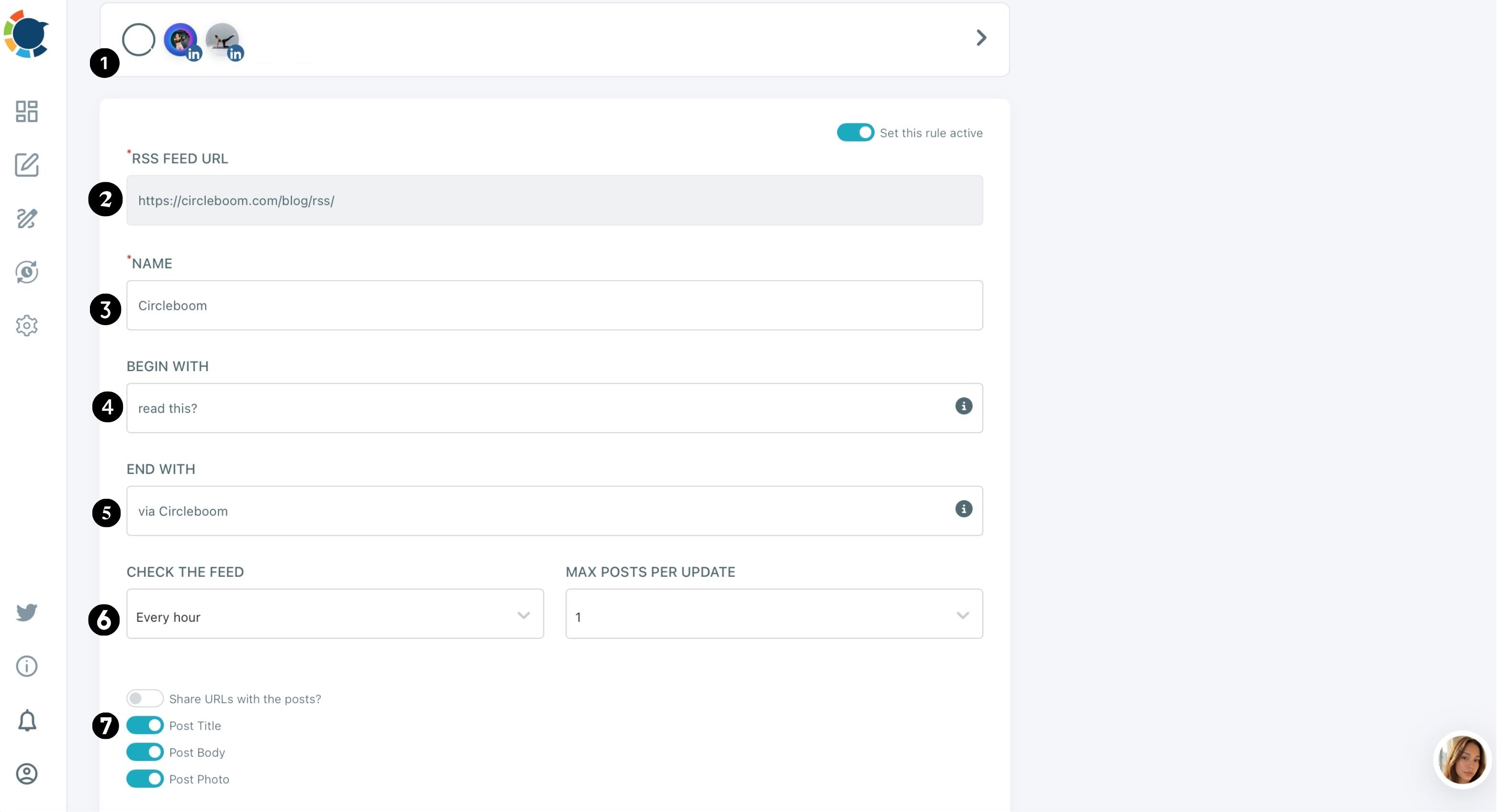
- Name the feed so it stays easy to find if you connect more feeds later.
Copy the promotion row into the rule
- Fill in Begin with and End with using the opening and closing lines from your template.
- Set Check the feed and Max posts per update to match the check frequency and daily cap in your row, then toggle Share URLs, Post title, Post body and Post photo.
- Turn on Set this rule active and click ADD RSS FEED.
This order mirrors the template on purpose. The accounts come first because they decide everything else, the wording comes next so every share sounds like you, and the cap comes last so a busy publishing week never floods anyone's feed.
What to check after the first automatic shares
Look at the Outbox after the first week. The automated posts land in your queue, so check that they go out at sensible times and that the opening and closing lines read well on each network.
Use the feed as the baseline, not the whole strategy. The RSS rule keeps every new post shared, while launch posts, carousels and campaign pieces still deserve a hand-written version in the composer at each account's best time to post.
On weeks when the blog is quiet, article curation fills the gaps with relevant outside articles, so the accounts stay active between your own posts.
Your blog planning checklist for the next post
Before the next article goes into the plan, run through these five checks:
- Fill in reader, question, angle, goal and call to action before writing.
- Confirm your blog's RSS feed URL works.
- Write the promotion row once: accounts, opening line, closing line, check frequency and daily cap.
- Copy that row into one RSS rule in Circleboom Publish.
- Check the Outbox after the first week and adjust the cap or wording.
With that row in place, your blog planning template stops ending at the publish date. Every planned post reaches LinkedIn, X and the rest of your accounts on publish day, without a single manual share.
→ Auto-share each planned blog post on social media
Blog planning questions
What if one post should not go out automatically?
Turn off Set this rule active before publishing that post, then turn it back on afterwards. Mark the post in your blog planning template so the pause is not forgotten.
Automated items are not reviewed by a person before posting, so pausing the rule is the way to hold one back without deleting the connection.
Can one blog feed post to several accounts at once?
Yes. The same feed can connect to as many accounts as you need, across platforms, and one account can have several feeds. The help page to connect an RSS feed shows the form.
Can I send new blog posts to Instagram with RSS?
No. The RSS connection posts to X, Facebook, LinkedIn, Google Business Profile, Bluesky and Threads only. For Instagram, TikTok, YouTube or Pinterest, write the share in the Circleboom Publish composer instead.