The best auto poster for social media I have set up is the one that posts less than it could. That sounds backwards, since the point of automation is to keep content flowing without you.
But automated accounts tend to go stale in the same way: they let the feed do all the talking. Set up with care, one RSS connection keeps an account active for months.
Set up carelessly, it turns a brand into a headline ticker nobody reads.
What does an auto poster for social media do?
Circleboom Publish watches your blog's RSS feed, or a trusted site's, and posts each new item to your X, Facebook, LinkedIn, Bluesky, Threads or Google Business Profile accounts on the schedule you set.
→ Set up an auto poster for social media from your own RSS feed
Why auto posting goes wrong when the feed does all the talking
Most people come to auto posting for the same reason: an account that should post every day and a calendar that says it will not. A company blog publishes, nobody shares the new article, and the X profile sits quiet for a week.
The fix seems obvious. Connect the blog's feed and let the software carry it.
A feed is a simple thing. The RSS 2.0 specification describes it as a web content syndication format: a file your site updates every time it publishes, listing the newest items with their titles, text and links. Anything that can read that file can share what is new.
If the format is new to you, the guide on how to use RSS feeds for social media walks through putting one to work on your accounts.
The reason to bother is consistency. A follower who sees an account every day starts to expect it, that habit shows up as engagement, and the platform reads engagement as a sign the account deserves more reach.
Skip a stretch of days and the chain runs the other way.
The first setup most people make treats the feed as the whole strategy. Every new item goes out, as-is, on every account, with nothing around it. The account looks busy for a week.
Then the replies stop.
The posts are accurate, but they read like a stranger's notifications. There is no opinion in them, no reason to stop scrolling and nothing that sounds like the person or brand behind the profile.
The content is rarely the problem.
The packaging is.
Automation solves the consistency problem and quietly creates a voice problem.
You can auto post to social media from any RSS feed and still sound like yourself. It takes three decisions most people skip on the first setup: how much the feed may post, what words frame each item, and which posts you keep for your own hands.
How an RSS auto poster keeps every account active
Circleboom Publish turns any RSS feed into an auto poster for social media: it checks the source on a schedule and publishes each new item to the accounts you choose, with no manual selection step after setup. It supports six destinations, X, Facebook, LinkedIn, Google Business Profile, Bluesky and Threads, and one connection can post to several accounts across those platforms at once.
There are two ways to use it, and they serve different people. The first is your own site: connect your blog's feed and every new article goes out to your social accounts automatically, which is how Circleboom shares its own blog posts.
The second is trusted outside sources: pick a few reliable sites in your niche and let them keep your accounts active on the days you have nothing new to say.
The fields that keep the feed sounding like you
The setup is one form. The fields that decide whether the account still sounds human are these:
- Begin with / End with: your own words placed before or after every item.
- Check the feed: how often Circleboom looks for new items.
- Max posts per update: how many items may actually be published per day.
- Share URLs, Post title, Post body, Post photo: what each post carries over.
- Set this rule active: pauses the feed without deleting it.
Begin with and End with are the fields I would never leave empty. A line such as "Worth reading:" before a headline, or a short call to action after it, tells followers a person picked this.
It also answers a concern Google raises in its spam policies, where republishing other sites' content without adding any original value is a named problem.
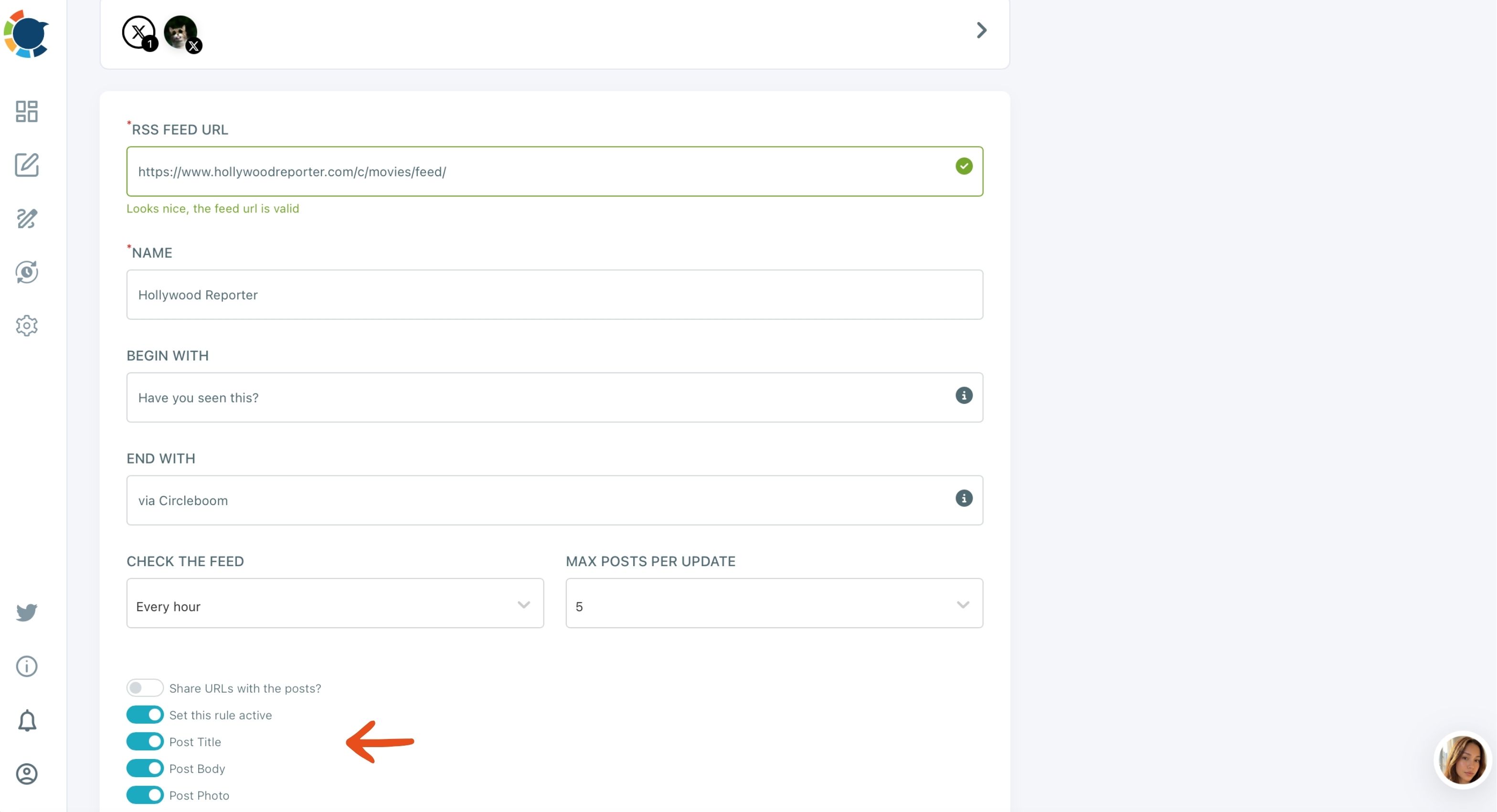
The screen above is the whole decision in one view: a Begin With line, a check every hour and a cap of five posts. The steps for that setup are covered in the guide to auto post RSS to social media, and the form itself takes a couple of minutes.
The result of that small setup can last a long time. One Circleboom team member connected RSS feeds to five accounts and has not touched them in a month, and all five still post every day.
A quick look at the Outbox now and then is still worth it, because no human reviews an auto-posted item before it goes out.
Watch one feed connection turn into steady posts across several accounts, with nobody opening a composer:
Posting to X from a feed without the risk
For X, safety matters as much as volume. Circleboom is an official X Enterprise Developer, so every automated post to X goes out through approved access instead of a workaround that could put your account at risk.
If that is the setup you need, you can connect a feed to Circleboom's social media auto poster in one form.

Once the form is saved, the connection runs on its own from the first check onward.
Why checking the feed often doesn't mean posting often
The two dials on the form do different jobs, and confusing them is the most common setup mistake. Check the feed sets how often Circleboom looks for new items. Max posts per update sets how many items may go out that day. The second one controls what your followers actually see.
Here is how the two dials combine for a busy source:
| Check the feed | Max posts per update | What followers see |
|---|---|---|
| Every hour | 1 | One post that day |
| Every hour | 5 | Up to five, spread across the day |
| Once a day | 3 | Up to three per day |
| Every 15 minutes | 1 | One post, picked up fast |
Checking five times a day with a cap of 1 still publishes one post that day. So a fast check is not a flood. It only means a new article gets picked up soon after it goes live, while the cap keeps the account calm.
Check often, post little.
That is the setting I now start with on any outside source: a frequent check, a low cap, and a Begin with line that adds a reason to read. For your own blog, a higher cap makes sense, because every article you publish deserves to go out the day it appears.
The math also explains why this beats doing it by hand. As an illustrative calculation, a blog that publishes 20 articles a month and shares each one to six accounts needs 120 manual posts.
One connection to those six accounts takes a few minutes, and the 120 posts go out on their own.
Will auto posting make my account look like a bot?
No, not if the feed is chosen well and framed in your words. An automated account and a bot account are different things: automation publishes content you chose on a schedule you set, while a bot imitates human activity it does not have.
The explainer on the difference between bots and automated accounts on X draws that line clearly.
The risk is real only when the automation stops looking chosen. Low-quality sources, raw headlines with no framing and the same item pushed to every account in the same minute all read as machine output.
Pick sources that publish reliably and match what your audience follows you for, because weak automated content hurts credibility faster than posting less.
X adds one more guardrail of its own. Circleboom blocks the same tweet from going out again on X within one week, because X penalizes duplicate content with lower reach and, in serious cases, restrictions.
The rules that keep automation on the right side of the platform are collected in the dos and don'ts of Twitter automation.
Not sure which outside sources are worth connecting? Article curation in Circleboom Publish suggests fresh articles based on the interests you choose. It is a low-risk way to test a site by hand before you hand it a feed.
A feed you would read yourself is a feed your followers will accept from you.
Give your best X posts a second chance with Auto Repost
A tweet lives for roughly 12 minutes before newer posts bury it in a follower's timeline. That is why a steady RSS baseline helps X so much, and also why your best hand-written tweets deserve more than one window.
Auto Repost handles that in the X composer. You set it on a post before it is sent:
- RePost after: the delay before Circleboom reposts it, such as a few hours.
- Un-RePost after: the delay before that repost is removed again.
- Repeat this cycle: how many times the pair repeats.
Each cycle puts the same tweet in front of followers in another 12-minute window, including people in time zones where you would never be awake to retweet it. It can only be switched on while the post is being created, and in a thread it applies to the first post.
The auto retweeter page shows the feature on its own.
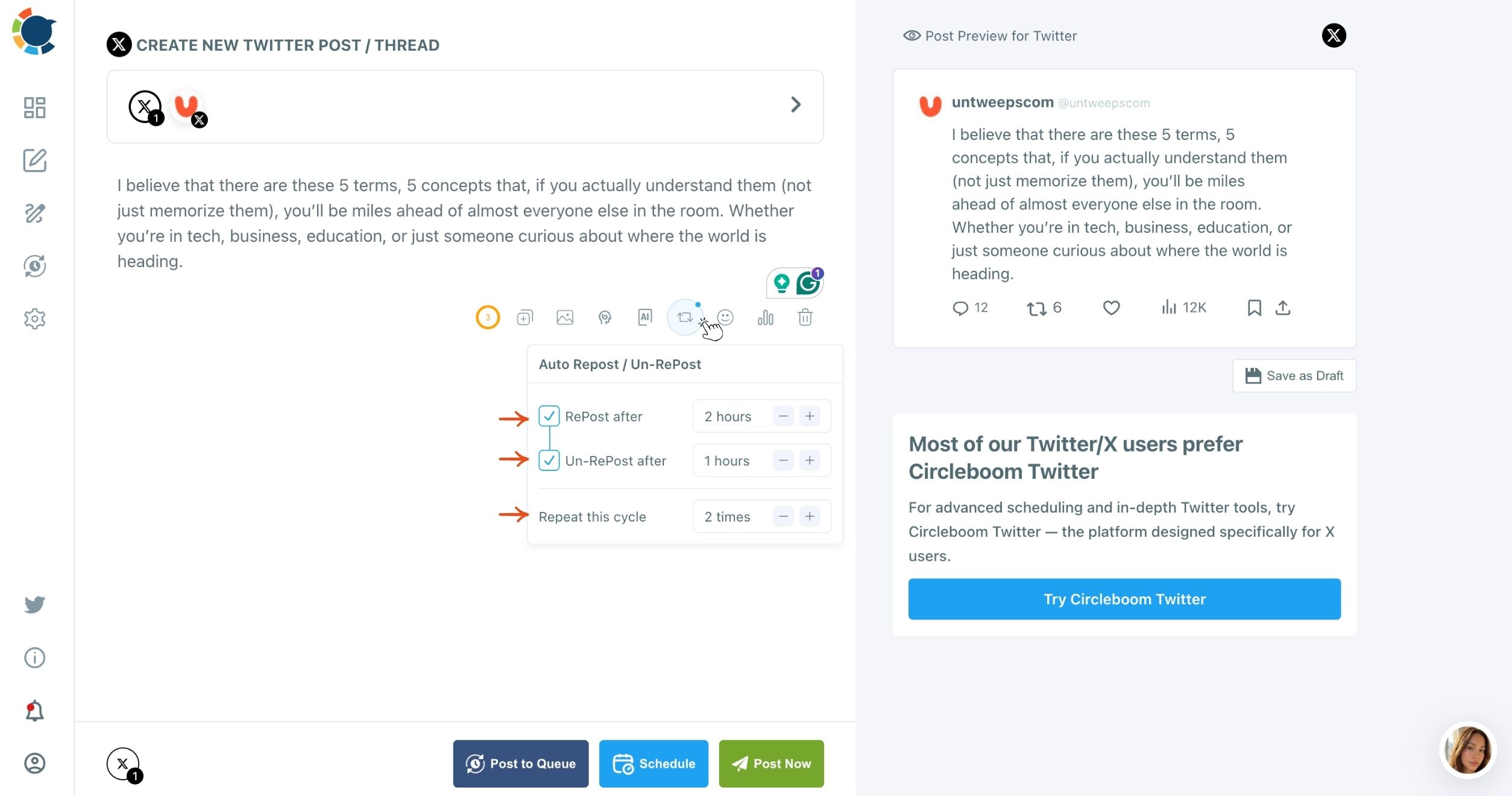
I keep Auto Repost for evergreen posts: a blog link, a product feature, a tip that will still be true next month.
Together with the feed, it gives an X account two layers of automation, one for new content and one for the posts already worth seeing twice. If you want the full picture of what that setup covers, the guide on how to make your X account automated lays out each layer.
Keep the human posts in your own hands
The feed is the baseline, not the whole strategy. This is the part that changed how I think about auto posting on social media: automation covers consistency, and the composer covers quality.
So the split I use is simple. The feed keeps every account showing up daily.
The posts that need me, an opinion on an industry change, a product launch, a reply to something my audience is arguing about, go through the composer and get scheduled at that account's best time.
For the posts you prepare yourself, you can automate social media posts through the Queue. Even the hand-made ones then go out in pre-set slots, without you picking a time for each.
That split also answers the old choice between an auto poster and scheduling every post by hand. You do not have to choose. The feed handles the volume you could never keep up with, and your own posts handle the voice nobody else can supply.
What the first month of auto posting looks like
Over the next 30 days, the change is quiet and then obvious. In the first week, the account stops going silent between your own posts.
By the second, the Begin with line has made the automated posts read like recommendations instead of notifications. By the end of the month, you have a baseline that runs without you and more time for the handful of posts that only you can write.
Set the cap low, frame every item, check the Outbox once in a while, and keep the opinions for the composer. That is a social media auto poster that still sounds like a person.
→ Start auto posting your feed to social media
Still wondering about auto posting?
What if my website doesn't have an RSS feed?
You can still use it. Many website platforms, WordPress and Blogger among them, already publish a feed for their posts.
For a site that has none, a feed can be generated in minutes with a tool such as RSS.app, then connected in Circleboom Publish like any other.
Can I pause an RSS feed without deleting it?
Yes. Turn off "Set this rule active" on the connection and Circleboom Publish stops posting from that feed until you switch it back on, with every setting kept.
Does the auto poster work for Instagram or TikTok?
No. RSS Feed in Circleboom Publish posts to X, Facebook, LinkedIn, Google Business Profile, Bluesky and Threads; Instagram, YouTube and TikTok are not supported, so those accounts need posts scheduled through the composer.