Why was I added to a list on Twitter, and does it matter? Every List that includes you is another user's label for your account, and the type of List tells you whether to engage, adjust, ignore or block.
Why was I added to a list on Twitter?
Someone added your public account to a List they own, usually because they see you as relevant to a topic, a peer group or a reading list, and sometimes because a spam account added you in bulk. Circleboom reveals every public X List that includes your Twitter account, with each List's member and follower counts, through official X Enterprise APIs.
→ Why was I added to a list on Twitter
What a Twitter list placement means
A Twitter List placement is an outside label: another X user has filed your account into a named group they want to read as one feed. You do not have to agree, follow them back or even know them. X lets anyone add a public account to a List they own.
That makes the answer to why you were added to a list on Twitter more useful than it first looks. The List name tells you which topic, role or community someone associates with you. The creator tells you who holds that view.
Together they are a small piece of market research that nobody asked you to commission.
Who tends to build the lists you land on
Most Lists are built by people who read your space closely. Circleboom's product notes describe List creators as typically peers, researchers, journalists or curators in the same field, which is why the creator matters as much as the name.
A List from a journalist who covers your industry is a different signal from a List built by a fellow founder, and both differ from a List built by an account that adds thousands of strangers at once.
That is also why the answer to why you were added to a list on X is rarely about a single post. People file accounts by what they see repeatedly, so a placement reflects the pattern of your timeline, not your best tweet.
If the mechanics are new to you, start with how lists work on Twitter and come back for the reading guide below.
The trouble is that placements arrive one at a time and are easy to misread in isolation.
One odd List looks like noise. Ten Lists with the same label look like positioning.
To tell the two apart you need the whole set, which is what a single view of why you were added to a list on Twitter gives you.
Where to see every X list you've been added to
If your question is why you were added to a list on Twitter, start by seeing all of your placements together. The fastest place to see every public X List that includes your account is Circleboom's Lists You're On page, which sits under X List Manager in the Essential Toolbox menu. It loads one card per List, so the full set is visible on a single screen.
Each card carries:
- The List name, plus the creator's short description when the List has one.
- The member count, meaning how many accounts are on that List.
- The follower count, meaning how many X users follow that List.
- A color-coded icon that makes the grid easy to scan.
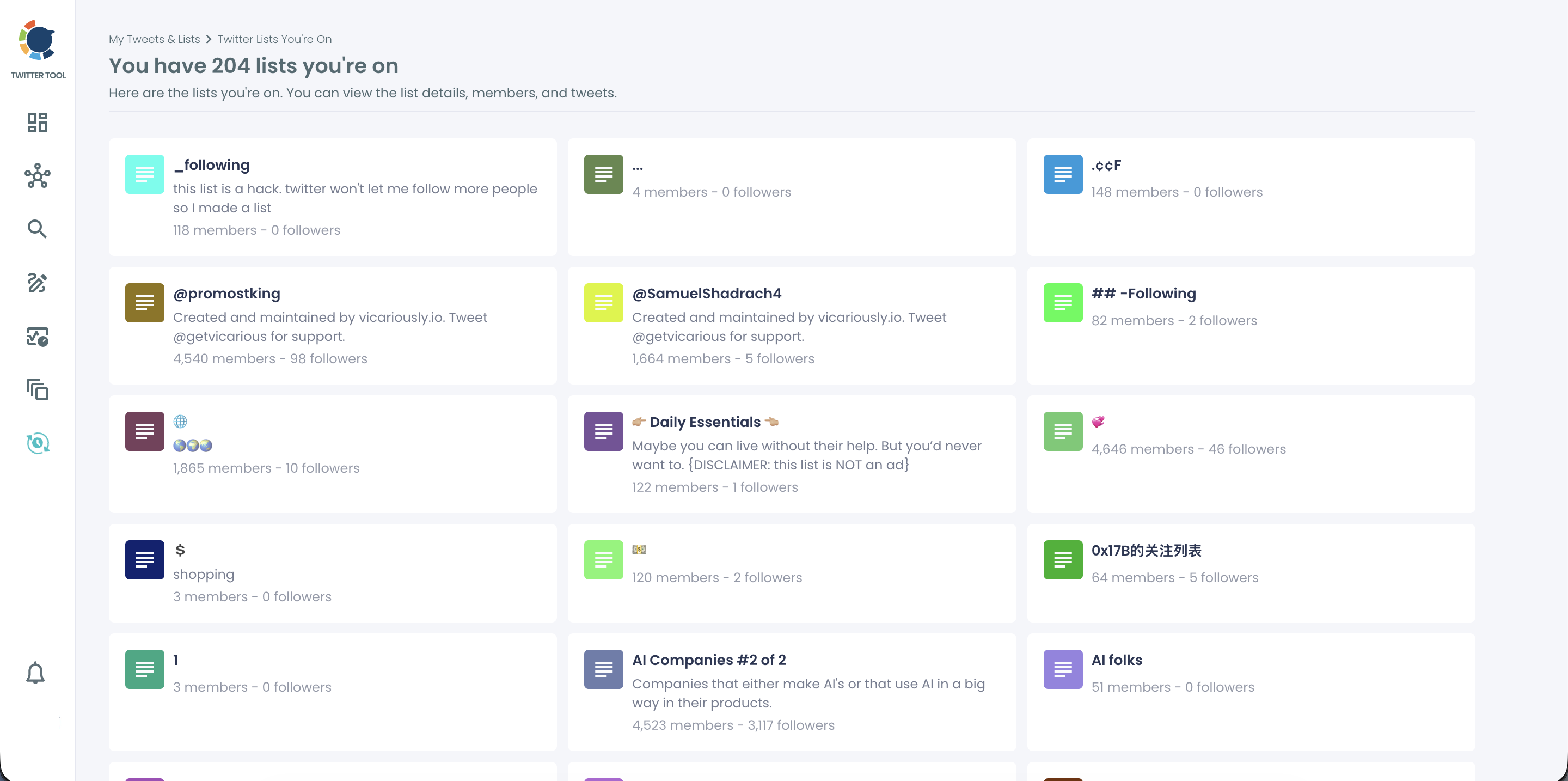
Clicking a card opens that List on X. There you can browse every member, read the List feed and open the creator's profile, which is how you find out who added you. The page itself is read-only, so nothing on your account changes while you look.
Other routes exist, including X's own Lists screens, and we have a separate walkthrough on how to check what lists you are on Twitter.
The one-screen grid matters because comparison is the whole point: you cannot spot a repeated label across Lists you only ever see one by one.
What the list view in Circleboom cannot show
The page is honest about its edges, and knowing them saves you from false conclusions:
- Private Lists never appear, whoever created them.
- The creator's identity shows only after you open the List on X from its card.
- A List created or changed very recently can take a short while to appear.
- An account on a very large number of Lists may not see every one at the same time.
None of these limits change the reading. They only mean the grid is a current snapshot of your public placements, which is exactly what you need to judge why someone added you to a list on Twitter today.
Why the data is safe to pull
List membership is part of X's official developer platform, and X documents it in its List members API reference. Circleboom reads Lists You're On from that same official layer, as a company listed on X's Enterprise customer directory. Nothing is scraped, and the page takes no action on your account.
Circleboom gathers your public X List placements into one grid, so you can judge the pattern before you react to any single List. When you want that view for your own account, X List Manager is where it lives.

What each type of Twitter list signals, and what to do
Five List types cover almost every placement, and each one calls for a different move. The table below sorts them by what the List name and creator tell you, using the response playbook Circleboom documents for this view.
| List type | What it signals | What to do |
|---|---|---|
| Niche or industry List | Someone files you under a topic, which is soft proof of relevance there | Review the creator; follow or engage if they matter to your space |
| Peer or competitor List | You are grouped with accounts the market sees as similar | Compare yourself with those accounts and watch the ones that matter |
| Curator or press List | A journalist, analyst or known curator treats you as a source | Follow the creator, read the rest of the List and engage where you add something |
| Spam, scam, abuse or harassment List | A bulk or hostile account labelled you | Review carefully; if harmful, block the creator or report the List |
| Irrelevant but harmless List | One person's odd filing system | Treat it as noise and move on |
The table reads one List at a time. Three patterns change how you should read the whole set, and they are where people most often get the reading wrong.
Repeated labels outrank single lists
A single List tells you how one person files you. When creators who do not know each other reach for the same label, you are looking at how a slice of the market files you.
When most of your placements share a theme, the community has already decided what you are known for, and posting more on that theme converts an existing perception into followers instead of fighting it.
I weigh a repeated label above any single row in the table. It is the only signal that tells you something about your positioning rather than about one creator, so it is the clearest answer to why you were added to a list on Twitter by so many different people.
Follower count changes the value of a niche list
Follower count is the part of the card that measures reach. People who follow a List see its members' tweets whenever they open its feed, so a niche List with a real following carries your posts to readers you never pitched.
A niche List nobody follows still shows how its creator sees you, but your posts travel no further than that one reader.
Curator and press lists deserve a reply
A List built by a journalist, an analyst or a well-known curator is the placement most people underrate. The creator has publicly said you are worth watching on a topic, and the other members of that List are often the exact peers you would want to be seen with.
Reading the full member list on X is the quickest way to learn who else that curator respects, and replying thoughtfully to the creator's own posts is a low-effort way to turn a silent placement into a relationship.
Does X notify you when you're added to a list?
Being added to a public List can show up in your X Notifications. Being added to a private List never does, and a private List is visible only to the person who owns it.
That second fact explains a common puzzle. If someone tells you they added you to a List and it is missing from your view, the List is most likely private, or it was created moments ago and has not come through yet.
X's Help with Lists page confirms that only the owner can view a private List. Circleboom works from the same rule, since Lists You're On returns public Lists only.
A List you cannot find is a List you were never meant to see.
The visibility runs the other way too. Public Lists are public, so anyone checking your profile on X can see which public Lists include you. If you want the longer answer to whether Twitter lists are public, we wrote it up separately.
The practical takeaway: review your public placements before a job search, a pitch or a partnership call. The people evaluating you can read those List names as easily as you can.
Do the lists you're on match what your followers care about?
They should, and when they do not, that gap is worth investigating.
Lists You're On shows how outsiders categorize you. Interest Cloud shows the topics your actual followers care about. Comparing the two tells you whether the label people give you matches the audience that has formed around your content.
Reading the gap between labels and followers
There are three outcomes:
- The labels and the follower interests match, so your positioning is consistent and you can keep building on it.
- The labels are narrower than your audience, which usually means one topic has become your public identity while your followers still follow you for several.
- The labels sit outside your audience, which suggests your content is reaching people who are not the ones following you.
The second outcome is the one I think needs the most care, because it is not a problem to fix so much as a choice to make.
Either you accept the narrower label and lean into it, or you publish more on the other topics until the people building Lists start to notice them. The comparison tells you which of those two you are currently drifting toward, and it explains why someone added you to a list on X better than any guess based on one notification.
Your starting point is learning how to check interests on Twitter, then holding that result up against your List labels. When you want to reach more people who care about those topics, interest targeting on Twitter is the next stop.
How to read your followers' interests step by step, so you have a baseline to hold your List labels against.
What to do with the people who listed you on X
The creator of a relevant List has already done half of an introduction. Someone who filed you under a "best SaaS marketers" label has decided you are worth reading, so following them and replying to their posts opens a conversation that starts from agreement.
For creators who matter strategically, there is one more step. You can track someone's X followers and followings to see whether a curator's own audience is growing. That tells you which List creators are becoming more valuable connections over time.
For the hostile end of the table, blocking the List creator removes your account from their Lists. X offers no button to remove yourself from someone else's List, and Circleboom cannot do it for you either.
When several spam accounts are involved, mass block Twitter accounts handles them in one reviewed batch.
Mass Block runs through the Circleboom Chrome extension because X's API does not support it, and nothing is blocked until you confirm the selection.
Which move fits your Twitter lists
Start from the pattern, then pick the branch that matches it:
- If most of your Lists repeat one niche label, post more on that topic and engage the creators behind the biggest Lists.
- If you keep appearing beside the same peers or competitors, compare those accounts and watch how their audiences move.
- If the labels drift away from what your followers care about, check your Interest Cloud and adjust what you publish.
- If a List is spam, abuse or a scam, review it on X, then block the creator or report the List.
- If a List is odd but harmless, leave it alone.
Whatever the reason you were added to a list on Twitter, each branch starts with the same read-only view of every public List that includes your account. Check it again after your next campaign or press mention, because the mix of Lists moves as your content does.
→ See every Twitter list you were added to
Twitter list placement FAQ
Can a spam list hurt my Twitter account?
Being listed changes nothing about your account by itself, so a spam List is mostly a cosmetic problem. The risk is reputational: public Lists are visible to anyone checking your profile, so review spam, scam or harassment Lists and block the creator or report the List if the placement is harmful.
Does being on more Twitter lists over time matter?
Yes. A growing List count means more people are curating your account as a relevant source. Note which labels the new Lists carry, because a rising count under one theme shows where that recognition is coming from.
Can I export the lists I'm on from Circleboom?
No. Lists You're On is strictly read-only for Lists created by other users, with no add, remove, edit or export actions. You can open each List on X from its card to see the full membership.
Will Circleboom show lists I used to be on?
No. The page shows the public Lists that include your account at the moment you open it, and a List you were removed from simply drops out with no history kept. If a List you remember is gone, its owner removed you, deleted the List or switched it to private.