
How do you find who tweeted about something first on X, and how do you show that the post you found is the original? You search the exact wording inside a closed date window, sort the matches oldest first, then run four checks before you name anyone.
To find who tweeted about something first, search the claim's exact wording in a historical tweet search, close the date range at the day it went viral and sort matches oldest first. Circleboom runs that search across public X history and lists each match with its author and timestamp through the official Enterprise API access X grants its listed developers.
→ Who tweeted about something first
The oldest match is a candidate, and the sections below turn it into proof.
What counts as the first tweet on X?
On X, the first tweet about something is the earliest public post that can still be retrieved and that uses the wording, claim or news in question. That definition is narrower than "the first time anyone said it," and the gap matters for anyone who publishes a credit or a correction.
Three things sit outside any search. Deleted posts, private posts and protected posts cannot be returned, so a search proves who posted early among what remains.
Circleboom's Historical Tweet Search is built for that job: it finds public tweets by what they say rather than by who said them, then shows both the tweets and the accounts behind them.
The wording drives everything that follows. Searching the exact phrase, plus the shortened and misspelled versions the claim picked up as it spread, is what keeps an early variant from slipping past you.
Why does the narrow definition matter? Because the answer rarely stays private. It ends up in a byline, a credit line under a repost or a dated research note, and each of those is a public claim about time. A claim about time needs a timestamp behind it, not a guess based on which post got the most likes.
When you are ready to find the first tweet about a topic, that wording list is the input, and the date window is the frame.
Can X's own search show the oldest tweet first?
No. X's search shows the most recent results, and its Latest tab runs newest first. You can narrow it with dates, but the results come one screen at a time, with no column to sort by creation time and no way to export what you find.
There is also a structural reason native tools struggle with origins. X's developer platform separates two kinds of search. As the X API search documentation lays out, recent search covers posts from the last 7 days, while full-archive search reaches back to March 2006. X offers full-archive access to pay-per-use and Enterprise customers. Origin questions almost always live outside a seven-day window.
An origin hunt needs every match lined up by age, and X's own search never lines them up that way.
That is why the method below moves the search into a table. Once every match has a Created At value next to it, the oldest post is one click away instead of an afternoon of scrolling.
I still use X's own search, just at the other end of the job. It is the right place to open the candidate you found, read the replies in context and see whether the post carries an edit label.
Native search answers what people are saying now. A sorted historical table answers who said it first, and the two questions need different tools.
How to find who tweeted about something first on X
Circleboom is a verified Enterprise partner of X, and its Historical Tweet Search reads public X history from X's official records instead of scraping pages. A scraper can miss posts, and in origin work a missing post hands the credit to the wrong account.
This is how I check who tweeted something first on X when the answer is going into print.
The workflow has four steps. It starts with the wording and closes a date window around the moment the topic took off. Then it collects the matching tweets and sorts them by creation time, so the earliest public post rises to the top.
- Open Circleboom Twitter and sign in with your X account, which keeps your saved searches and results tied to one workspace.
- Go to the Advanced X Search menu and choose Historical Tweet Search from the tweet search tools.

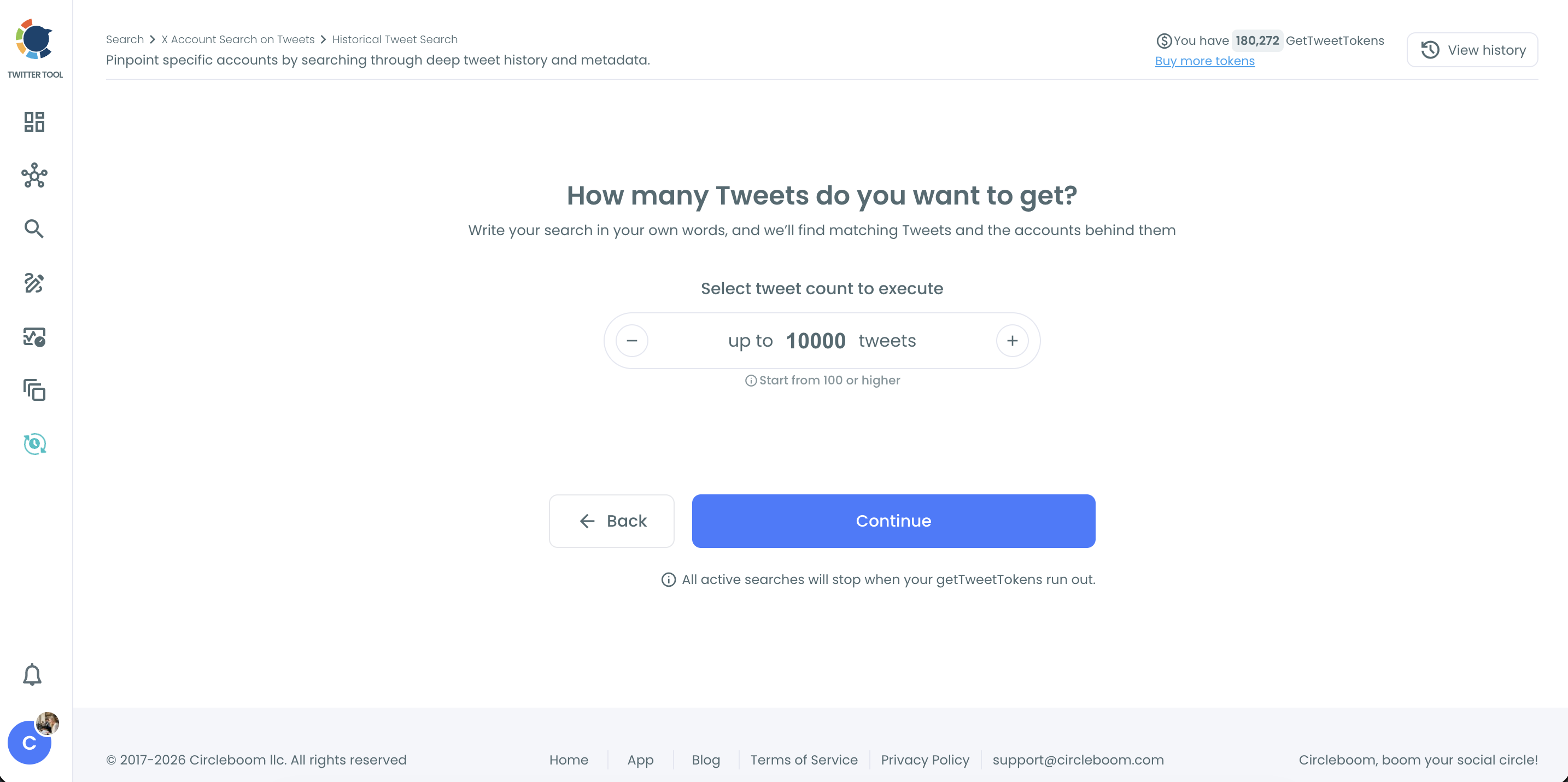
- Describe the tweets in your own words, open Filters to set the keyword match type and exclusions, select a custom date range that ends near the viral day, and choose how many tweets to collect.
- Sort the tweets view by the Created At column, open the oldest match on X through its link icon, then switch to the profiles view to see the account behind it.
The wording keeps early variants in, the closed window keeps the later echo out, and the sort replaces judgment with a timestamp. That is why the top row of the sorted table is a fair place to start your checks.
4 checks before you call a tweet the first on X
A sorted list gives you a candidate. Before a journalist, researcher or brand puts a name on it, the candidate should pass four checks, and each one maps to a known limit of the public record on X.
The post is public and still retrievable
The oldest match should open on X today, from an account that is still public. Historical results can include accounts that went private, were deactivated or were suspended after they posted, and their current state may differ from what the search retrieved.
Read the replies and quotes under your candidate as well. If they point at an earlier post that no longer loads, an older version existed, and your write-up should say so.
The text was not edited into the famous version
Compare the wording you collected with what X shows now, and look for an edit label on the post. An edit can turn an ordinary early tweet into the famous line after the fact, which changes who said the famous version first.
The author predates the topic
The account behind the candidate should have existed before the claim, phrase or news did. An account opened shortly before the rumor, with a timeline about little else, looks more like an amplifier than a source.
Circleboom's profiles view shows the JOINED date for every author in the result set at once, so you can compare the earliest few candidates side by side instead of opening each profile on X.
The spread is traced
You should be able to name who carried the post to a wider audience. Without that step, it is easy to credit the account that made a line famous instead of the one that wrote it.
The retweeter export covered below lists each amplifier with its own account creation date, so a burst of brand-new accounts pushing the post stands out quickly.
A tweet that passes all four is the first public post you can defend. One that fails any of them is a lead, not an answer.
The fact-check sits next to these checks rather than inside them: knowing who tweeted about something first does not make the claim true, so confirm it against an independent source before you share it.
Was the earliest Twitter post edited after it spread?
It can be, and a historical search may show either version. In Historical Tweet Search, an edited tweet can appear in its original or edited form depending on when X's records indexed it. The text in your results is not automatically the text the first readers saw.
X allows edits only for a short window after posting and labels edited posts with their edit history, as X's editing rules explain. Open the oldest candidate on X and check that label. If an edit exists, quote the earliest version in the history, not the current one.
The rules and limits behind editing are covered in this guide to edit tweets, which helps you read the label correctly when you find one. For attribution, the practical rule is simple: the claim belongs to the version that existed first, and an edit can move a viral phrase onto an older post.
How to keep proof of the original post on X
Save the evidence the moment you find it, because the first post is the one most likely to vanish. A record that shows the text, the author and the timestamp is what lets you defend a credit later.
Circleboom gives you two layers. The tweets view of Historical Tweet Search exports to CSV, with the tweet text, author, engagement counts and creation time for every match.
Each search is also stored under your search log, so you can reopen it later without spending GetTweetTokens again. Export draws on tokens separately from the search, so check your balance first.
A spreadsheet proves the data, while a picture proves what the reader saw.
The tweet screenshot generator turns a post into an image you can drop into a report. This walkthrough shows how to screenshot tweets on Twitter cleanly.
I keep both for anything I publish: the CSV row for the timestamp and the image for the context. A short evidence note next to them makes the record usable months later:
- The exact wording you searched and the match type you used.
- The date window of the search that found the post.
- The post's link on X and its Created At time.
- Whether the post showed an edit label when you checked it.
A credit you can reconstruct is a credit you can defend.
Tracing who spread the first tweet on Twitter
The originator and the account that spread a post are often different, and confusing them is the most common attribution error. Once you have the earliest post, the next question is who carried it to the audience that made it viral.
X shows only part of the list of accounts that retweeted a post, and that list cannot be filtered or exported.
Circleboom's Export Accounts Who Retweeted action retrieves the retweeters of a specified public tweet into one CSV with profile data for each account, plus the tweet it came from. You can run it from the export retweeters page.
Export in practice: pulling the full retweeter list of a single post into a file you can sort and compare.
Comparing the first post's audience with the famous post's
Need only the names? Here is how to view every retweet of someone else's tweet before you decide on an export.
Larger work compares two lists: who reposted the first post, and who reposted the famous one. A Twitter retweet list extractor turns each list into data you can join and sort. Accounts that appear on both lists are worth a close look, because they may be the bridge between the origin and the crowd.
When early noise crowds the results, Twitter advanced search filters help separate the first real post from the clutter:
- Language, for a claim that started outside English.
- Replies, kept on, because early versions often sit inside threads.
- Engagement minimums, when you want the earliest post that people saw.
The short version for X researchers
Searching tells you who posted early, while the four checks tell you who you can credit.
Picture the earliest public post, opened on X and quoted at its first version. Its author is older than the topic, its spread is traced and a saved record sits behind it. That answer holds up when someone challenges it.
The first tweet is the oldest public post that survives your checks.
→ Trace who tweeted about something first
First-tweet FAQ for journalists and researchers
Can you see deleted tweets when you search for the first post?
No. Historical Tweet Search returns only public tweets that can still be retrieved, so deleted, private and protected posts are left out, and a tweet deleted soon after posting may leave a gap. When replies or quotes point at a missing post, report the earliest public version and note that an earlier one may have existed.
How can I tell whether the account that tweeted first is real?
Switch to the profiles view and read the JOINED date, tweet count, follow ratio and the active or inactive classification for that account. Those classifications are Circleboom's computed signals rather than verdicts from X, so read a very young account that follows far more people than follow it as a reason to dig further, not as proof.
What if the first version of the phrase was posted as a reply?
Historical Tweet Search has a Replies filter that includes or excludes replies, so keep replies included when you hunt for an origin. Early versions of a claim often appear as a reply in someone else's thread before anyone posts it as a standalone tweet on X.
Will the like and retweet counts in my results match X today?
Not always. The engagement metrics in Circleboom reflect the counts at the time the tweets were retrieved, so a post that kept spreading after your search will show higher numbers on X now.
Can I search for the first tweet in another language?
Yes. The Language filter limits results to posts in one language, which helps when a claim started in one language on X and only went viral after a translation.