
Rival accounts on X reach whichever time zones their followers cluster in, and that mix differs from one account to the next. Circleboom's benchmark report shows it in one panel: each compared account's followers stacked into four time-zone bands, side by side.
What this answer gives you.Where each rival's time-zone mix sits in the report.What a time-zone band can and cannot say about posting hours.What to do when a rival reaches a band you never post into.
Circleboom compares follower time zones for up to 5 accounts on X through official X Enterprise APIs. Start with Twitter audience time zones.
Does a follower's time zone tell you when they are on X?
No. A follower's time zone tells you where that person is, and it does not establish when they read X.
That one distinction decides how useful a time-zone chart is. A band is geography. Attention is a separate measurement, and it lives in a different panel.
Most advice on this topic skips the difference. It hands out one global chart, or a list of busy zones, and leaves you to assume that a zone equals a set of waking hours on the platform.
X's own documentation treats location as a reading of signals. Its help page on geo, gender, language and age targeting describes a person's location as determined from recent location signals. Nothing in a location says which hours that person spends in the timeline.
So the useful question has two halves. Which bands does each rival's audience sit in? And when is that audience around?
Twitter audience time zones answer the first half only. That is still worth a lot, because it is the half nobody can read from a profile page.
The first half is where a side-by-side view of rival audience time zones on Twitter helps. The second half needs the hour panels that sit next to it.
Four timing panels and what each one cannot say
Circleboom's competitor report carries four panels that touch timing. Each one answers a different question, and each one has a blind spot.
| Panel | The question it answers | What it cannot say |
|---|---|---|
| Time-zone distribution | Which of four time-zone bands each account's followers cluster in | When those followers read X |
| Audience active-times heatmap | When each account's audience tweets, hour by hour and day by day | Whether a post in that hour will be seen |
| Posting time-of-day pattern | When each account publishes | Whether its audience was around at that hour |
| Posting-vs-audience timing alignment | How far posting times overlap with the hours users are online | A number, or the reason one account performs better |
Read as a set, the four panels separate geography from attention.
The first row is the only one about place. The second and third rows are about hours, one for the audience and one for the publisher. The fourth row lays those two hour curves on top of each other.
I read them in that order when someone asks me where a rival's reach comes from. The bands frame the question, and the hour panels answer it.
One rule holds the set together. The two hour maps have to be compared in the same time-zone context, and the time-zone distribution is the cross-check that tells you which band you are reading in.
For your own account, the companion check is to find when your followers are online. The report compares accounts with each other, and your own audience deserves that closer look before a slot moves.
Where the time-zone mix appears in Circleboom's Twitter competitor report
The time-zone mix appears in the Time-zone distribution panel, inside the audience demographics and geography part of the X Competitor Analysis & Benchmark Report. It is drawn as a 100% stacked bar across four time-zone bands, with one bar per compared account.
With Circleboom, you can compare up to 5 accounts on X in one report. That is your own account plus up to 4 competitors, or up to 5 other accounts with yours left out.
The same panel renders for every account in the set. Nobody gets a special column, so the Twitter audience time zones of a rival and your own are measured the same way in a single pull.
The source of those records matters when the chart ends up in a deck. Circleboom is listed on X's Enterprise customer directory, and the follower data behind each bar is retrieved through the official X API. A reviewer who asks where the figures came from gets a documented answer.
Scraping-based collection can miss records or return incomplete fields. A time-zone split built on a partial follower list would shift the bands without telling you.
What a run looks like before the bars appear
A run starts from the Monitoring menu after you log in to Circleboom Twitter. X Competitor Benchmark Report is the title you will see on the entry page.
You enter handles under Account Handles, where a counter shows how many of the 5 slots are filled. Start Competitor Analysis begins the run, and a short choice follows: one report today, or one today plus an automatic report every month.
The finished report is dated and saved under Your saved analysis. That date is what lets you compare the time-zone mix of X audiences now with the same mix a few months later.

How to read Twitter audience time zones across rival accounts
Read each bar as a whole audience split into four bands, then compare the same band across accounts. Every bar totals 100%, so a tall segment means a large share of that account's followers, whatever the account's size.
Three readings are worth taking from the panel:
- The band that dominates each account's bar.
- A band that is thick on a rival's bar and thin on yours.
- A band that looks alike across every account in the set.
The first reading tells you which part of the day each account is built around. The second is the one most teams come for: an audience a competitor holds and you barely touch.
These readings matter most to whoever owns the posting calendar. That person can recite the account's own hours from memory, and has never seen the Twitter audience time zones of a single competitor.
The third reading is easy to skip, and it is useful. When every bar looks alike, time zones are not what separates you from your rivals. The answer is somewhere else in the report, and you have saved yourself a calendar rebuild.
Why timing work stays on the follower side
The panel has a Followers and Following toggle, and timing work belongs on the Followers side. The Followers view clusters the people who follow each account. The Following view clusters the accounts each brand chose to follow.
Those are different populations. A following list is curated by the brand, so its bands describe the brand's choices and say little about who sees its posts.
There is one case for flipping the toggle. If you want to know where a competitor's partners, media contacts and reference accounts sit, the Following view of the same panel shows it.
The toggle covers the audience panels only. Posting-hour panels describe an account's own posts, so they look the same in both views.
How the bands differ from the country chart
Time-zone bands and the country chart are separate panels that answer separate questions. The geographic distribution panel plots the four largest countries for each account set plus an Other bucket, while the time-zone panel groups followers into bands that can span several countries.
For posting hours, the band is the more direct reading. For a map of your own account, the Twitter followers and friends map shows where your followers and the accounts you follow are located.
Whichever panel you read, treat Twitter audience time zones as a description of representation. A rival's concentration in a band marks an audience worth investigating. It does not prove demand there.
Is there a timing score to quote for each X account?
No. The posting-vs-audience timing alignment panel prints no numeric score, even though its subtitle uses the word.
The panel draws two shapes for each account. A filled area, labeled Posting Time, shows when the account publishes. A dotted line, labeled When Users are Online, shows when its users are active.
Its output is the visual overlap between those two shapes. Closer curves mean more of the account's posts land while its users are online. Wider gaps mean the account is publishing into quieter hours.
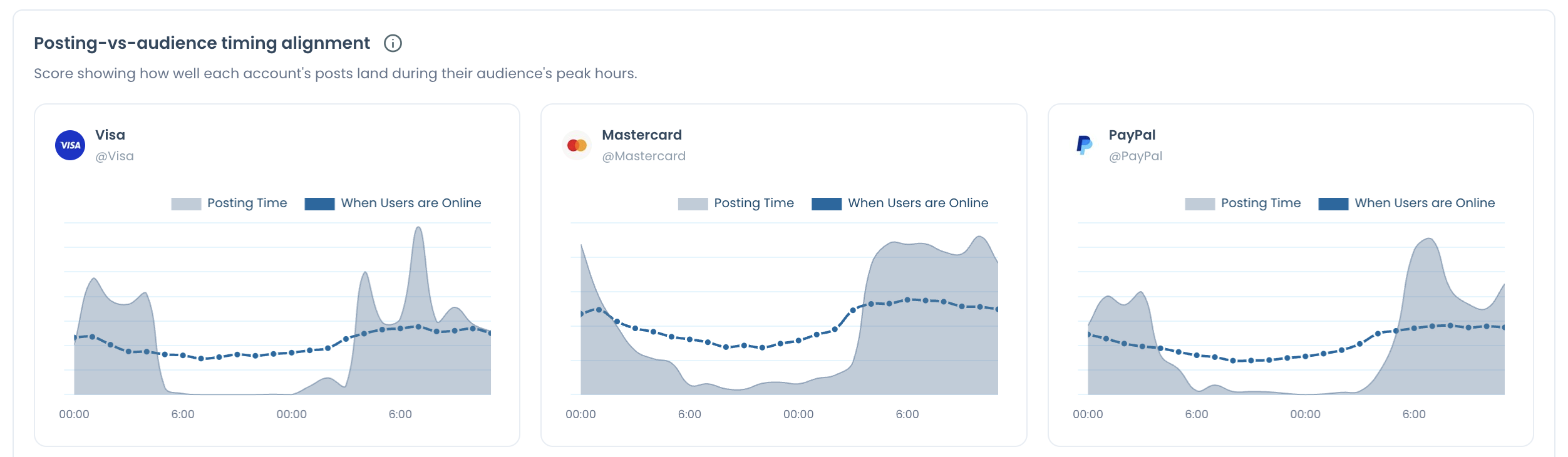
So the honest way to report it is in words. "Their posting curve sits close to their audience line" is a fair sentence. "They score 80 on timing" is not, because the report displays no such figure.
An illustration shows how to use the overlap. Suppose your posting curve peaks at 08:00 while the dotted audience line peaks at 20:00. That gap is a scheduling signal: your posts go out twelve hours from the point where your audience is most active.
That reading comes with two cautions. Activity is not attention, so overlap improves the odds of being seen and does not guarantee it. And a timing gap does not explain a performance gap on its own, because format and content are still in play.
Why both curves need one reference zone
Both curves need the same reference zone before a gap means anything. X's ads product works on the same principle. According to its time zones on X Ads FAQ, an ads account has a time zone chosen when the account is created, and reporting uses it.
A fixed reference is what makes two hour charts comparable. Without one, an 08:00 peak on one chart and a 20:00 peak on another could be the same moment.
What to do when a rival reaches a time zone you never post into on Twitter
Keep your core posting slots for your own audience, and add posts in the rival's active hours if you want part of their audience. Each account should schedule for the people who already follow it.
That means adding, not relocating. Moving a whole calendar into a rival's window gives up the hours your current followers are active, in exchange for a band where nobody knows you yet.
I treat the extra window as a test. It gets a small, fixed number of posts, and the verdict waits for the next dated report.
Deciding whether a local posting window is needed
A local posting window is worth adding when a band holds a real share of an audience and that audience is active at hours you never cover. Pair the time-zone split with the audience active-times heatmap to check both conditions.
Expansion teams use the same pairing before entering a market. Audience presence in a band is not the same as demand in that market, so the window stays a test until the next report says otherwise.
Before any slot is added, confirm your own side. Circleboom's page for the best posting time on Twitter is built for the owner's account. It is the right place to check when your current followers are active.
Getting posts out while your team is offline
Posts for a second band have to go out at hours when your team may be asleep. X has a native route for that, and you can schedule tweets using the Twitter web app one post at a time.
For anyone setting up that second window: scheduling a tweet for a later hour, shown from start to finish.
A second window multiplies the number of posts to place, and one-at-a-time scheduling gets slow. A free Twitter scheduler is a reasonable way to try the routine before committing to a larger setup.
Whatever you use, write the post for the people in that band. The same wording sent twice at two hours reads as repetition to anyone who sees both.
Which next move fits your X time-zone result
Your next move depends on what the bars and the hour panels showed together. Four outcomes cover most comparisons:
- If your bands match your rivals' bands, time zones are not the gap. Open the posting-hour map and look for an hour your audience is active and your rivals are quiet.
- If a rival holds a band you barely have, keep your core slots and add a few posts in that band's active hours.
- If your posting curve sits far from your own audience line, fix that first. It costs less than chasing anyone else's audience.
- If the picture looks stable today, put the set on the monthly option and read the bands again on the next dated run.
None of these needs a guess about where a competitor's followers live. Twitter audience time zones stop being a hunch once every account's bar sits on the same page. The report shows the mix for every account on one date, and the hour panels say whether the mix matters.
A time zone is where an audience is. The hour panels show when it is around. Read both, and you know which hours a rival reaches.
→ See which Twitter time zones your rivals reach
Time zone FAQ: generic charts, repeat runs and cost
Is a generic best-time-to-post chart enough instead?
A generic chart is a starting point, and it cannot describe one account. A guide to the best time to post on Twitter gives platform-wide patterns. The report shows the time-zone mix and active hours of the specific accounts you compete with, and your calendar should follow your own followers.
Can the report re-run itself, and what does a repeat run cost?
Yes. Choose Keep it up to date every month when you start, and a new dated report arrives automatically until the months run out or you press End Scheduling. Competitor Tokens are charged per competitor per report, so 5 competitors once is 5 tokens, and your own account never consumes one. Between runs, you can track someone's X followers and followings for a single rival.
Which accounts cannot be added to the comparison?
Two kinds of account cannot be analyzed: private ones and those with more than 3,000,000 followers. Every other public X account can fill a slot, up to 5 accounts in one comparison.