

Replies are one of the most underrated ways to use Twitter (X).
They’re usually the first step into a conversation. A simple reply can turn into a discussion, a connection, or even a long-term relationship on the platform. Many meaningful interactions on Twitter don’t start with a tweet, they start with a reply.
That’s why I began replying more often. Not just to big accounts, but to people I genuinely wanted to engage with.
Then one question came up:
When I reply to a tweet, can all my followers see it?
The short answer is yes.
 Altug Altug
Are Replies Visible to Other People?
When you reply to a tweet, that reply is public by default. Your followers can see it, and not only your followers. In most cases, anyone on Twitter can see your reply.
Replies can appear in several places:
- Under the original tweet’s thread
- On your profile, in the Replies tab
- In timelines or recommendations, depending on engagement and relevance
So when you reply, you’re not whispering to one person. You’re joining a public conversation.
Can You Hide Your Replies?
This is where things often get confusing.
There is no setting that lets you make your replies private while keeping your account public.
🟩 You can control who can reply to your tweets, but that’s a different feature, it doesn’t affect replies you leave under someone else’s tweet.
Tweet authors can choose to hide replies under their own tweets, but even that doesn’t fully erase them. Hidden replies are still accessible and visible in certain contexts.
In short: if your account is public, your replies are public too.
What If Your Account Is Protected?
Protecting your account does change visibility, but not in the way many people expect.
When your account is protected:
- Only approved followers can see your tweets and replies
- Your replies are still visible to your followers
- They don’t become invisible or private within your audience
So even with a protected account, replies are still part of how followers experience your profile.
 Arif Akdogan
Why This Isn’t Actually a Bad Thing
At first, this might sound uncomfortable. But it’s not a flaw, it’s how Twitter is designed.
Replies are public because Twitter is built around open conversation. A thoughtful reply can reach more people than a regular tweet, especially when it adds value to an ongoing discussion.
Good replies can:
➡️ Increase profile visits
➡️ Attract new followers
➡️ Position you as knowledgeable or approachable
➡️ Start conversations that wouldn’t happen otherwise
In many cases, replies are more powerful than tweets.
The Real Issue: Old or Low-Quality Replies
The real problem isn’t that replies are visible.
The problem starts when your reply history no longer represents you.
Many people (including me) have:
🔴 Replied too much in the past
🔴 Jumped into low-quality or irrelevant threads
🔴 Left one-liners that didn’t add value
🔴 Engaged in conversations they wouldn’t want highlighted today
And here’s the key detail:
When someone checks your profile, the Replies tab is often the first thing they look at.
If that section is cluttered with low-quality replies, it can quietly hurt how your account is perceived.
Cleaning Up Replies with Circleboom Twitter
This is where Circleboom Twitter becomes useful.

Circleboom Twitter is an official X (Twitter) developer, and it lets you manage your tweets and replies in a way Twitter itself doesn’t make easy.
Instead of scrolling endlessly, Circleboom:
🟢 Displays all your replies in one place
🟢 Lets you review them as a list
🟢 Allows you to delete replies in bulk or with one click
This makes it possible to clean up old replies that no longer match your current tone, quality, or goals, without spending hours doing it manually.
Step-by-Step: How to Find and Delete Your Replies with Circleboom Twitter
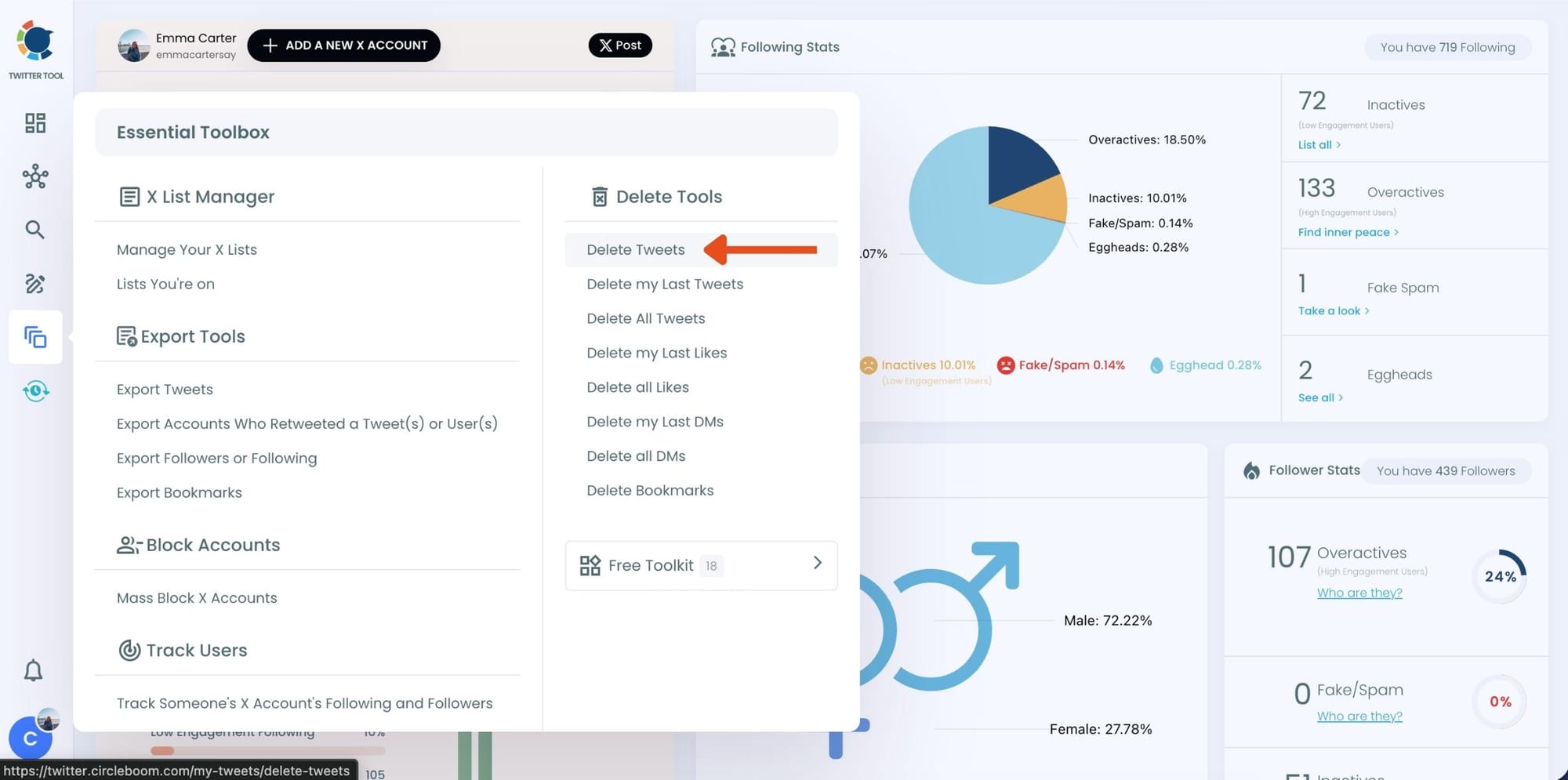
Step #1: Go to the Delete Tweets Tool
From your Circleboom dashboard, look at the left-hand menu. Under Essential Toolbox > Delete Tools, click on “Delete Tweets”.
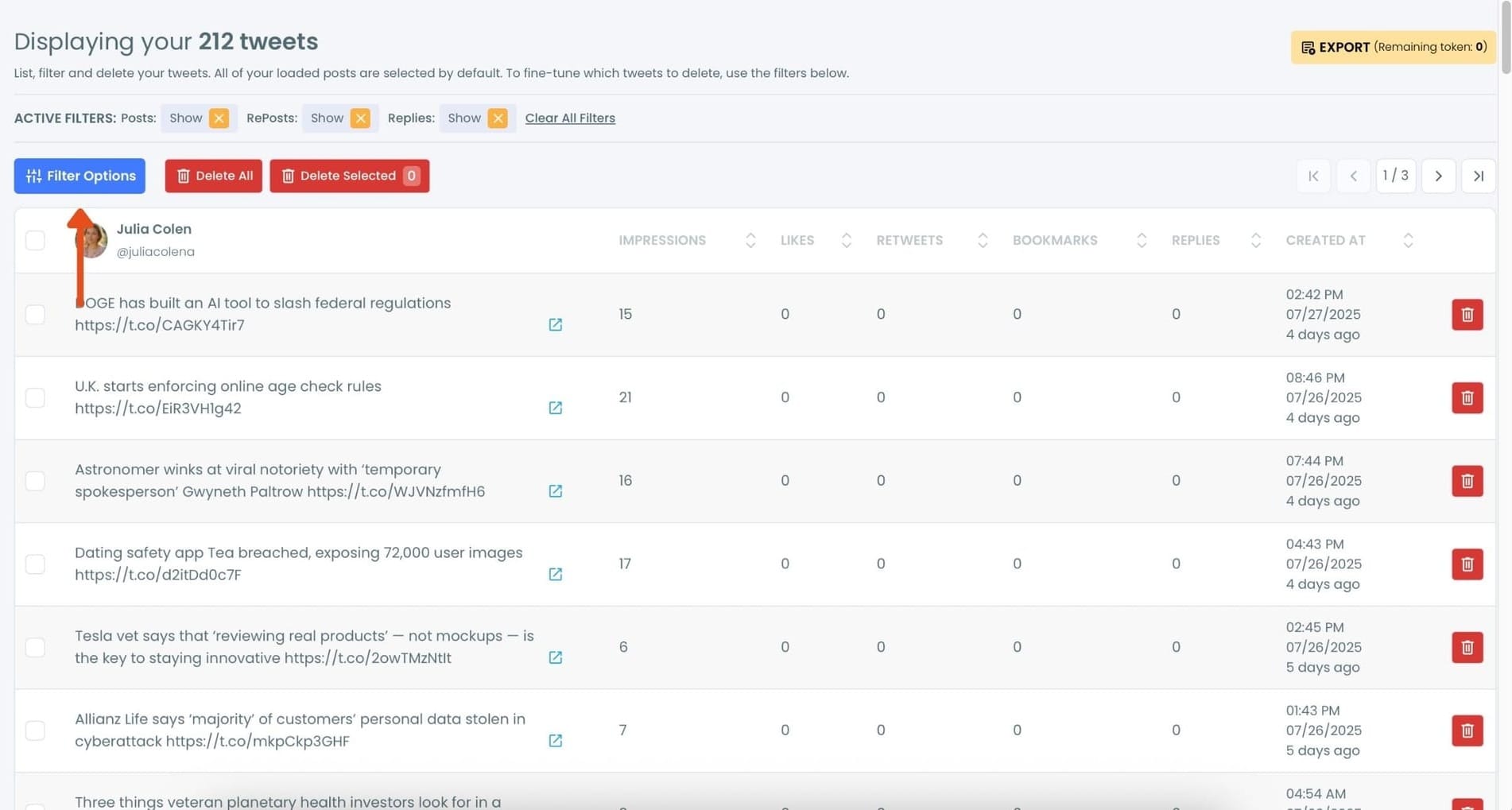
Step #2: Open Filter Options
Once your tweets load, click the “Filter Options” button above your tweet list.
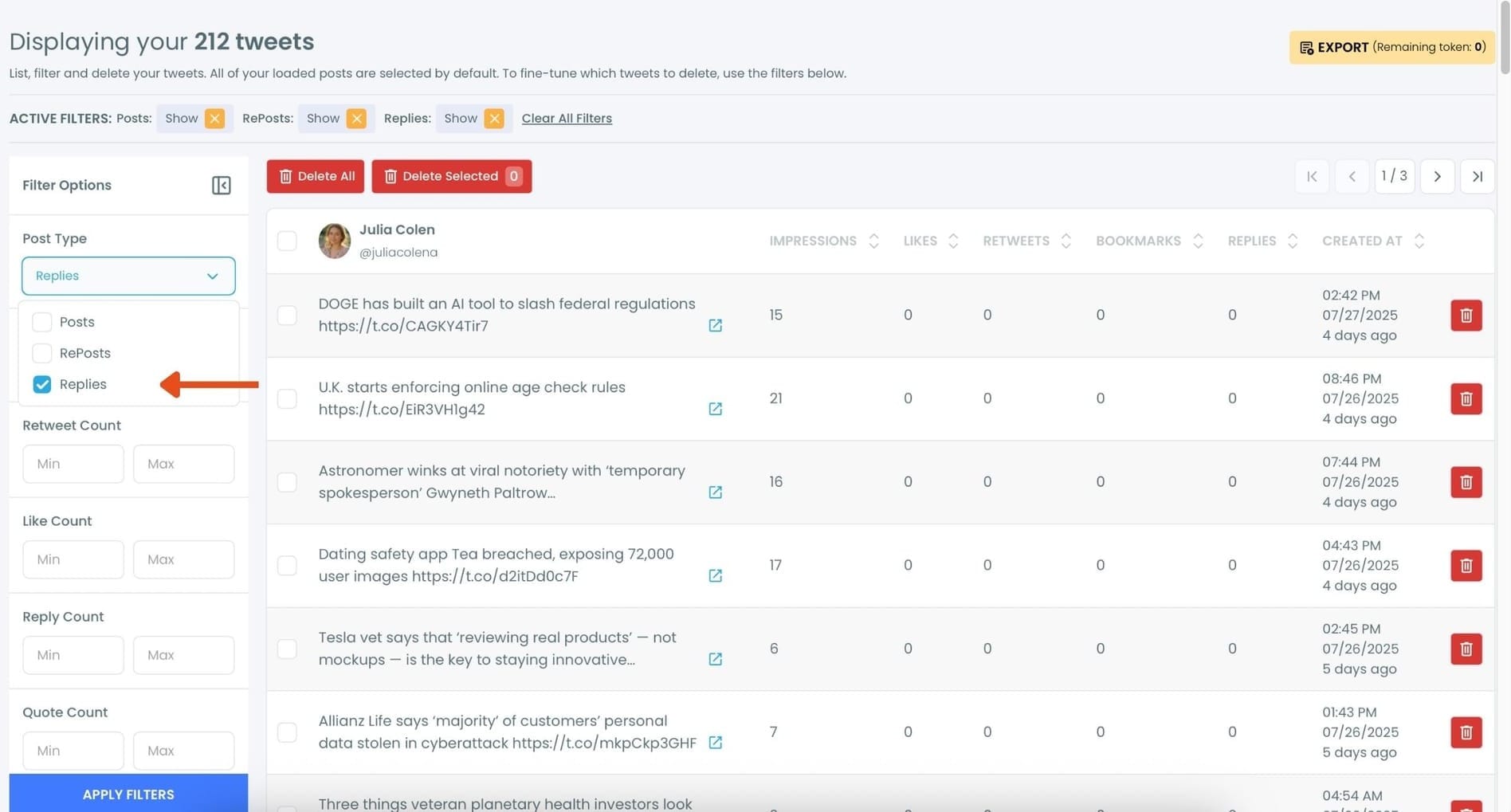
Step #3: Choose “Replies” as Post Type
In the filtering panel, under Post Type, check the “Replies” option and uncheck others. Then, click “Apply Filters.”
This will display only your reply tweets.
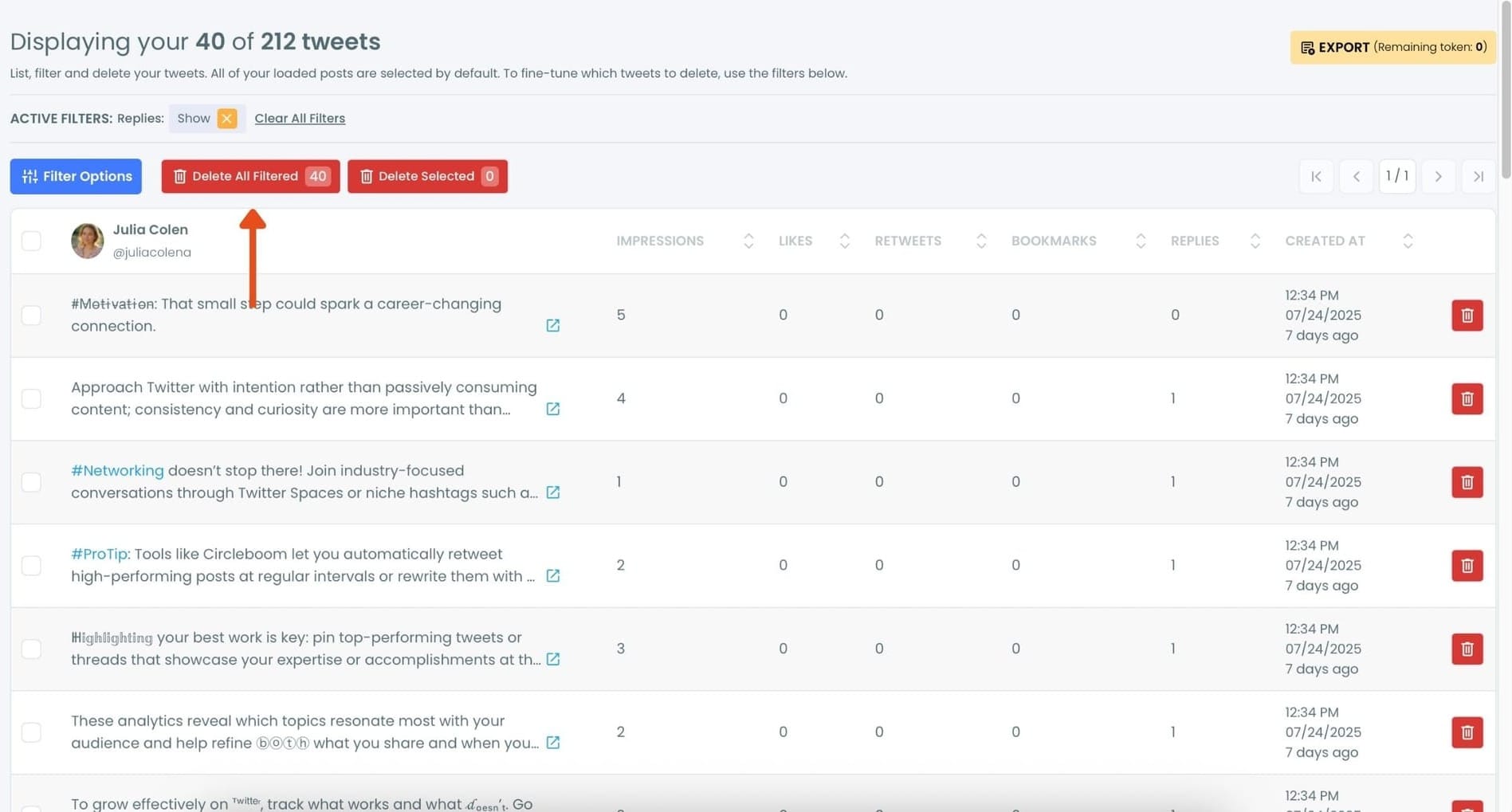
Step #4: Review the Filtered Replies and Click “Delete All Filtered”
Now you’ll see only your replies listed, nothing else. You can scroll through and review if needed.
Once you’re sure you want to delete all replies, click the red “Delete All Filtered” button at the top.
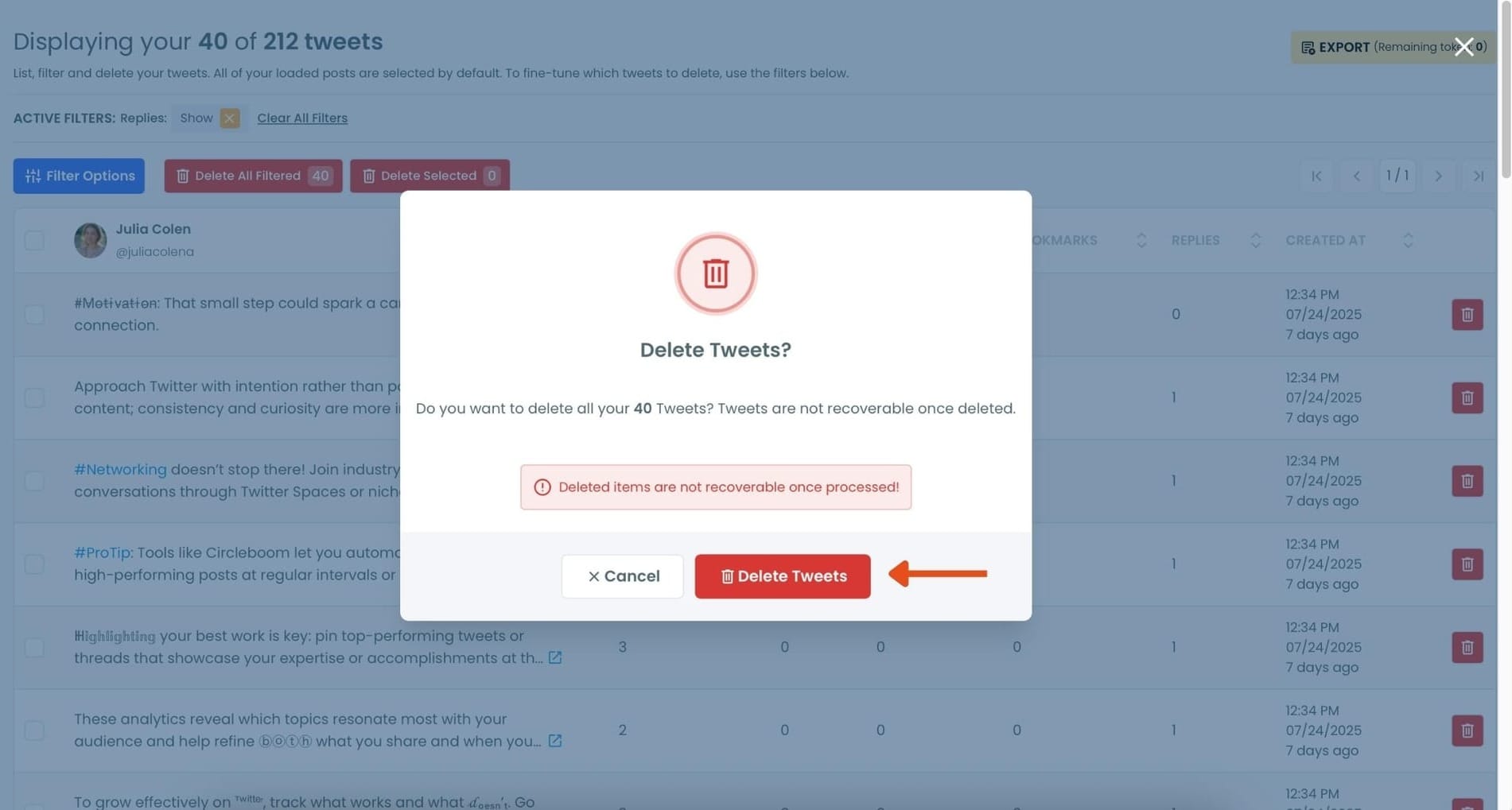
Step #5: Confirm the Action
A pop-up will appear asking if you’re sure. Click “Delete Tweets” to permanently remove all selected replies.
Final Thoughts
Yes, when you reply to a tweet, your followers can see it. And in most cases, so can anyone else on Twitter.
That visibility isn’t a problem. It’s what makes replies such a powerful way to connect and engage. But over time, old replies can pile up and stop reflecting who you are or how you want your account to look.
Being able to review and clean up those replies helps protect your account’s quality, without giving up on conversation altogether.
Replies should work for your profile, not against it.



)