

What percentage of your competitors' followers are bots? No single figure applies to every account, so the useful answer is a measurement you take per competitor, on one date.
How many of a competitor's followers on X are bots?
The percentage differs for every account, so it is measured account by account. Circleboom classifies the followers of up to 5 public accounts on X as human or suspected fake/bot from records retrieved through official X Enterprise APIs, and shows each share with its raw count.
→ competitor bot followers
Why there is no typical bot percentage for a Twitter account
A table of "typical" bot percentages is the wrong benchmark for a competitor, because the figure depends on who measured it and how. Two detectors with two definitions of a bot return two different numbers for the same follower list.
Researchers say the same thing about the platform as a whole. A survey of spam and false account research on Twitter describes prevalence figures that vary with the definition and the detection method behind them.
Why account size and age do not predict the share
Account history changes the share as much as the method does. A follower count is cumulative and never corrects itself, so an account that has existed for many years still carries the followers that went dormant, were abandoned or were never human.
That is why the share of competitor bot followers cannot be guessed from a profile page. Two rivals of the same size can have built their audiences in different years and in different ways.
A rule of thumb by account size has a further weakness. It gives one number for every account in a size band, and accounts in the same band can sit far apart.
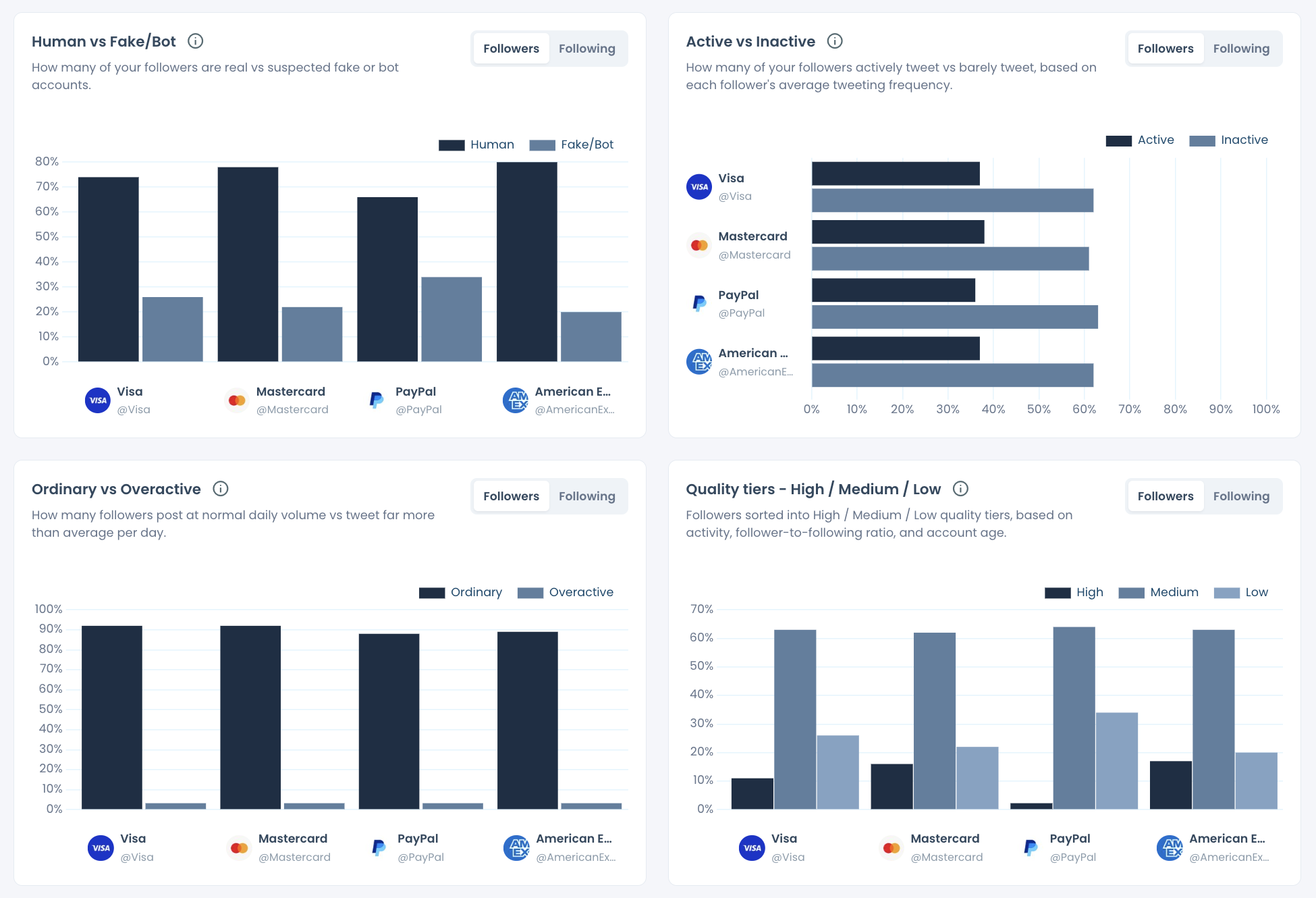
The documented sample report for this feature shows that spread. In that comparison of four large public accounts from one category, the suspected bot share differed widely from account to account, while the verified share was almost flat across the same four.
The only fair comparison is the same classification, run across the whole peer set, on one date.
"Same classification" means the same account signals applied to every follower list. "One date" means every list was retrieved in the same run, so no account is judged on older data than another.
That is the standard I hold any figure about competitor bot followers to before it goes into a deck. A number borrowed from a table fails it. A number that comes from measuring your competitors' bot followers in a single run passes.
What a percentage hides without its count
A bot percentage read alone says nothing about how many accounts stand behind it. Read it with the number of accounts it stands for.
An illustrative case, with invented round figures: a competitor holds a 10% suspected bot share in two reports, while its follower list grows from 100,000 to 150,000 between them.
The percentage has not moved. The flagged group has grown from 10,000 accounts to 15,000.
Neither reading is wrong. The percentage answers how diluted an audience is, and the count answers how large the flagged group is. A statement about competitor bot followers that gives only one of the two is half a finding.
Podcast episode: whether fake followers can get a Twitter account suspended, the risk question that sits behind every bot percentage.
Where Circleboom shows each competitor's bot share on X
Circleboom shows the bot share of each competitor in the Audience Quality section of its X Competitor Analysis & Benchmark Report tool. With it, you can compare up to 5 X accounts in total: your own account plus up to 4 competitors, or up to 5 other accounts.
Three places in the report carry the answer, and each one adds a layer.
The Human vs Fake/Bot chart gives the percentage
The Human vs Fake/Bot chart draws two bars for every compared account: the share of followers classified as human and the share classified as suspected fake or bot. The chart's own subtitle describes it as real versus suspected fake or bot accounts.
It sits beside three related charts. Active vs Inactive, Ordinary vs Overactive and the High, Medium and Low quality tiers describe other sides of the same audience, and each one deserves its own reading.
The Fake/Bot tab gives the count and the list
The Fake/Bot tab of The Accounts Behind the Numbers shows how many accounts each percentage represents. Every compared account has a row with its share, its number of flagged accounts and a View all button that opens the list.
That list is what makes the figure checkable. Anyone who doubts the percentage can open the accounts it was built from.
The Percentage / Values toggle switches the charts
The Percentage / Values toggle changes applicable charts between a percentage display and raw values. Use Percentage to compare accounts of different sizes, and Values when the question is how many accounts are involved.
What the source of the data means for the figure
Every figure in the report is calculated from official X API records. Circleboom retrieves them as a verified Enterprise partner of X, and that matters here for a practical reason. A scraped follower list can miss records, and a share calculated from an incomplete list is a share of something else.
The bot share describes the audience as it was retrieved on the run date. Read it as a dated snapshot of that follower list, and quote the date whenever you quote the figure.
Not every account qualifies. A private account cannot be analyzed at all, and the report does not accept an account that has passed 3,000,000 followers.
You can check each rival's bot percentage from the page below.
How to measure the bot followers of several Twitter competitors in one run
To measure competitor bot followers, enter the accounts as one comparison set, start the analysis and read the Audience Quality section of the finished report.
The set is pulled at once, so every account is classified from data of the same date. The flow has three parts.
Add up to 5 account handles
After you log in to Circleboom Twitter, open the Monitoring menu and choose X Competitor Analysis & Benchmark Report. The Account Handles panel gives each account its own @ field, a + button for another slot and a counter that reads "N of 5 competitors added".
Pick direct peers. Accounts that share your market, language and scale produce a bot share you can compare with your own.
Start the analysis and decide on a schedule
Start Competitor Analysis begins the run, and the next screen asks whether you want one report or a report every month. Just this once produces a single report with today's data. Keep it up to date every month adds an automatic dated report each month.
The cost is shown before you confirm: Competitor Tokens are counted for each competitor in each report, so 5 competitors in a single run cost 5 tokens.
Read Audience Quality before the follower count
Open Audience Quality first, then the Fake/Bot tab, and look at the headline follower count last. In that order, the count is read after its composition is known.
The cross-check that decides the answer is percentage against raw count. The quality tiers then confirm it, because they combine activity, follower-to-following ratio and account age and can catch what a single share misses.
The common mistake is to stop at the Essentials row at the top of the report. Its columns are:
- Followers and following
- Active followers
- Account age
- Engagement rate
- Average impressions
None of those columns states a bot share.
A monthly schedule has a specific benefit for this metric. Each run is a dated snapshot, so a series of them shows whether a competitor's suspected bot share is rising, falling or flat. Earlier runs for the same set stay available under Past Analyses, and a schedule can be stopped at any time with End Scheduling.
Is a suspected bot label on Twitter proof that an account is a bot?
No. A suspected fake/bot status in Circleboom is an analytical signal for review, and it does not verify who operates an account.
The classification reads account signals such as follow ratio, activity, account age and profile completeness. It is Circleboom's analysis of official X records, and X itself has issued no verdict on those accounts.
Automation is also a wider category than rule-breaking. X's automation rules permit some automated activity, so an automated or high-volume account is not automatically one that violates the platform's rules.
I treat the label the way I treat a flagged row in a spreadsheet: a reason to look, never a conclusion. In practice that means three habits:
- Write "suspected" every time the figure appears.
- Open the drill-down list and inspect a sample of the flagged accounts.
- Confirm the reading against the quality tiers, which combine activity, ratio and account age.
A flag tells you where to look. The list tells you what you are looking at.
Can you audit someone else's followers on X without the full comparison?
Yes. Any public X account's followers can be examined, because the records come from X's official API and no scraping is involved.
Two routes exist, and they answer different needs.
You want the share across several accounts. The benchmark report is the route, because it classifies every account in the set on the same basis. Your own account does not have to be in it.
You want one account's follower list itself. Circleboom's Followers / Following Search retrieves the follower list of any public X account with enriched data. That route gives you the accounts to look through, and no side-by-side percentage.
A third, lighter case is a reader who wants a fast first look before committing to either. A Twitter bot follower check covers that quick pass.
Private accounts are outside all three routes.
How to show a bot-share comparison on X to a client or a manager
Show the comparison as a short calculation, with the source and the date stated. Create Branded Presentation builds a logo-carrying export from the current report, which suits a client review or a monthly deck.
The slide that works is the effective-audience calculation. Take each account's follower count, subtract its suspected bot share and put the result next to the original number.
A presentation of this finding holds up when it states four things:
- The account set that was compared.
- The run date of the report.
- The percentage and the raw count for each account.
- The word "suspected" on every bot figure.
If your audience has never seen the output, the sample competitor analysis report for Twitter is a ready reference to share before your own run.
The same slide serves due diligence. A team weighing an account purchase, a question close to buying aged Twitter accounts, needs the composition of the audience more than its size.
Agencies get the most from this on a recurring basis. With a monthly schedule on a fixed peer set, each client review opens with what moved in competitor bot followers since the last dated run.
Keep the peer set fixed from one report to the next. A different group of accounts is a different comparison, and a changed bot share then proves nothing about any single competitor.
Which next step on X fits the bot percentage you find
The right move depends on which account the percentage belongs to and what you planned to do with it.
If a competitor's share is far above the rest of the set, stop treating its follower count as the target. Compare your active, human audience with theirs before you plan around the gap.
If the shares are close across the set, the follower gap is real. Move the discussion to content, cadence and engagement, where the difference lies.
If your own column shows the highest share, start at home. Review your flagged followers, protect the real contacts and remove the X followers you have decided are unwanted. Removal runs gradually through Circleboom's Chrome extension.
If you were hoping to escape the problem by starting over, pause first. Read whether a new Twitter (X) account eliminates bots before you abandon an audience you built.
If you only need a verdict on one suspicious account, the comparison is more than you need. Circleboom's free bot checker for Twitter accounts reads a single username for bot-like characteristics.
If you have no figure yet, take the measurement before the next meeting where a follower count is quoted. Competitor bot followers are a number you can bring with you, with a source and a date attached.
→ See what share of your competitors' followers are bots
What to know about bot percentages on X
Does a creator's bot share change a deal we are about to pay for?
It should change how you price and review the deal, and on its own it settles nothing.
Put the candidate creators into the comparison slots, read the suspected fake/bot share with the flagged list, and check geography and language to confirm the audience is in your market. The result is evidence for a partnership review, and no report predicts campaign results.
What happens to an account when a large share of its followers are fake?
Its posts can struggle to spread.
The report's Audience Quality page explains that X shows a new post to a small test group of followers first, and bot followers in that group never engage, so reach can slow even for good content. That mechanism is a large part of the answer to is buying Twitter followers worthwhile.
Can I see the bot share of the accounts a competitor follows?
Yes. The Followers / Following toggle switches the audience panels to the Following view, where the chart reports how many of the accounts a competitor follows are suspected fake or bot. The toggle affects the audience block only.
Do I have to include my own account in the comparison?
No. Including your own account is optional, and every slot can hold any public X account. I usually include mine anyway, because my own column costs no token and gives the competitors' figures something to be read against.

