

Who you follow on Twitter shapes everything about your experience on the platform. Every bot account, every inactive profile, every fake user, every account that posts 80 times a day sits in your following list and affects what your feed looks like and how your account is perceived.
The problem is that X gives you no real way to detect these accounts at scale. You can scroll through your following list manually, but with hundreds or thousands of accounts that's not a workable solution. There's no filter for inactivity. No flag for suspicious behavior. No way to sort by account quality.
With Circleboom Twitter, you can identify every category of low-quality account in your following list and unfollow them in bulk from a single dashboard. That's what cleaning your following list on Twitter actually looks like in practice.
What are the best ways to clean who you follow on Twitter?
The best ways to clean who you follow on Twitter involve identifying and removing four types of low-quality accounts:
- inactive accounts that no longer post,
- fake and bot accounts with suspicious signals,
- overactive accounts that flood your feed, and
- low-quality accounts with weak credibility indicators.
X has no built-in tool to detect any of these at scale. With Circleboom Twitter, you can surface all four account types in a structured dashboard, manage your following lists, and unfollow them in bulk without going through your following list manually one account at a time.
 infocircleboom.com
What Is Circleboom Twitter?
Circleboom is an Official X Enterprise Developer, which means it works directly with X's official APIs.
No scraping, no workarounds, no credential sharing. Every action it performs is fully compliant with X's platform rules.

Here's what Circleboom Twitter gives you specifically for cleaning your following list:
🟢 Detect inactive accounts in your following list by activity patterns
🟢 Identify fake and bot accounts using behavioral and profile signals
🟢 Surface overactive accounts that dominate your feed with excessive posting
🟢 Find low-quality accounts with weak credibility signals
🟢 Unfollow any combination of these account types in bulk from one dashboard
If your following list has accumulated noise over time and X isn't giving you any way to see it, Circleboom Twitter is where you go to actually clean who you follow on Twitter.
How to Clean Who You Follow on Twitter with Circleboom Twitter
Step #1: Log in to your Circleboom Twitter dashboard.
From the left-side menu, go to Followers / Following Management & Analytics, then click on All Your Following.
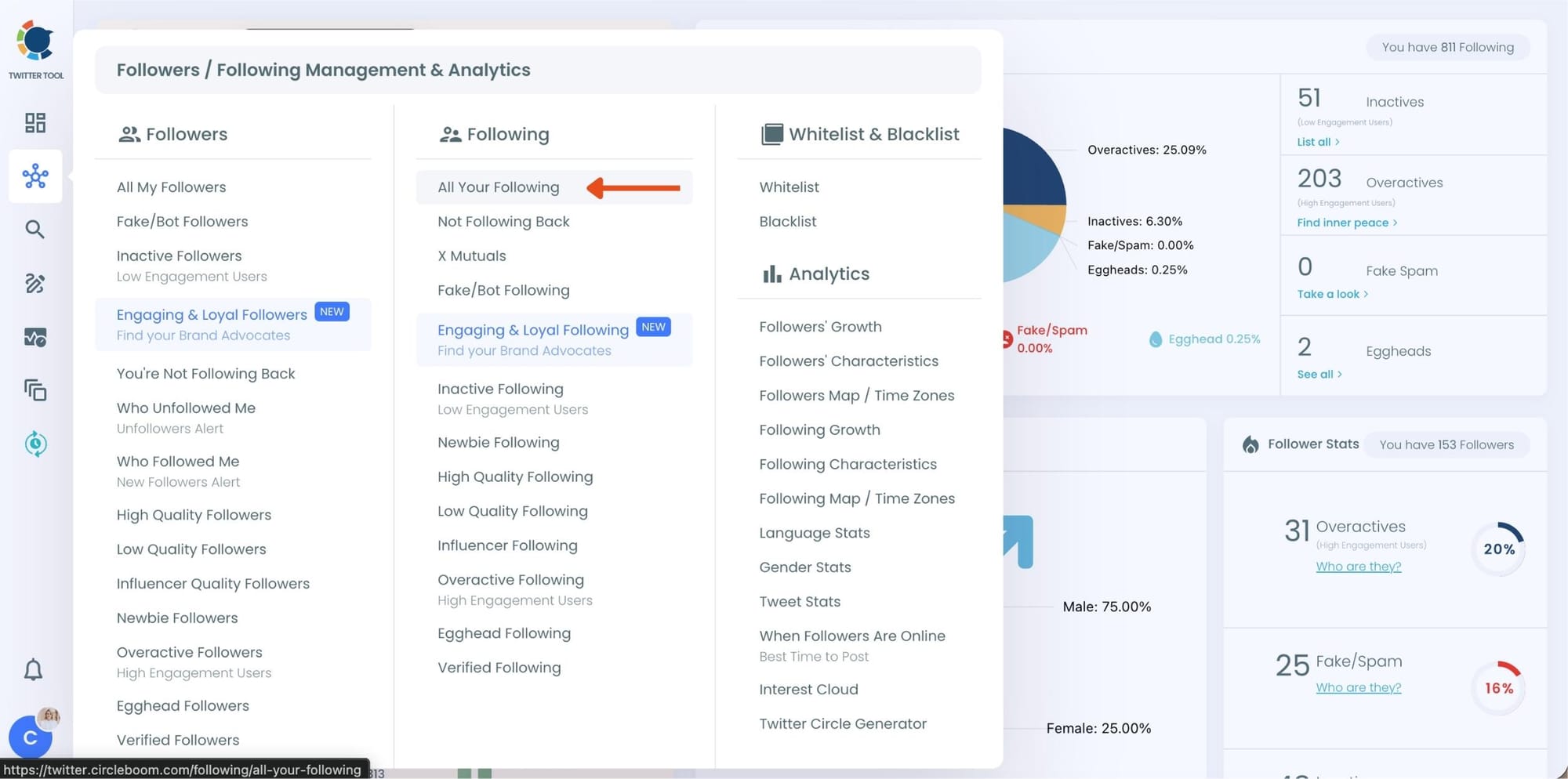
At this point, Circleboom loads your entire following list and displays each account with detailed metrics such as tweet count, join date, follower and following numbers, follow ratio, and activity level.
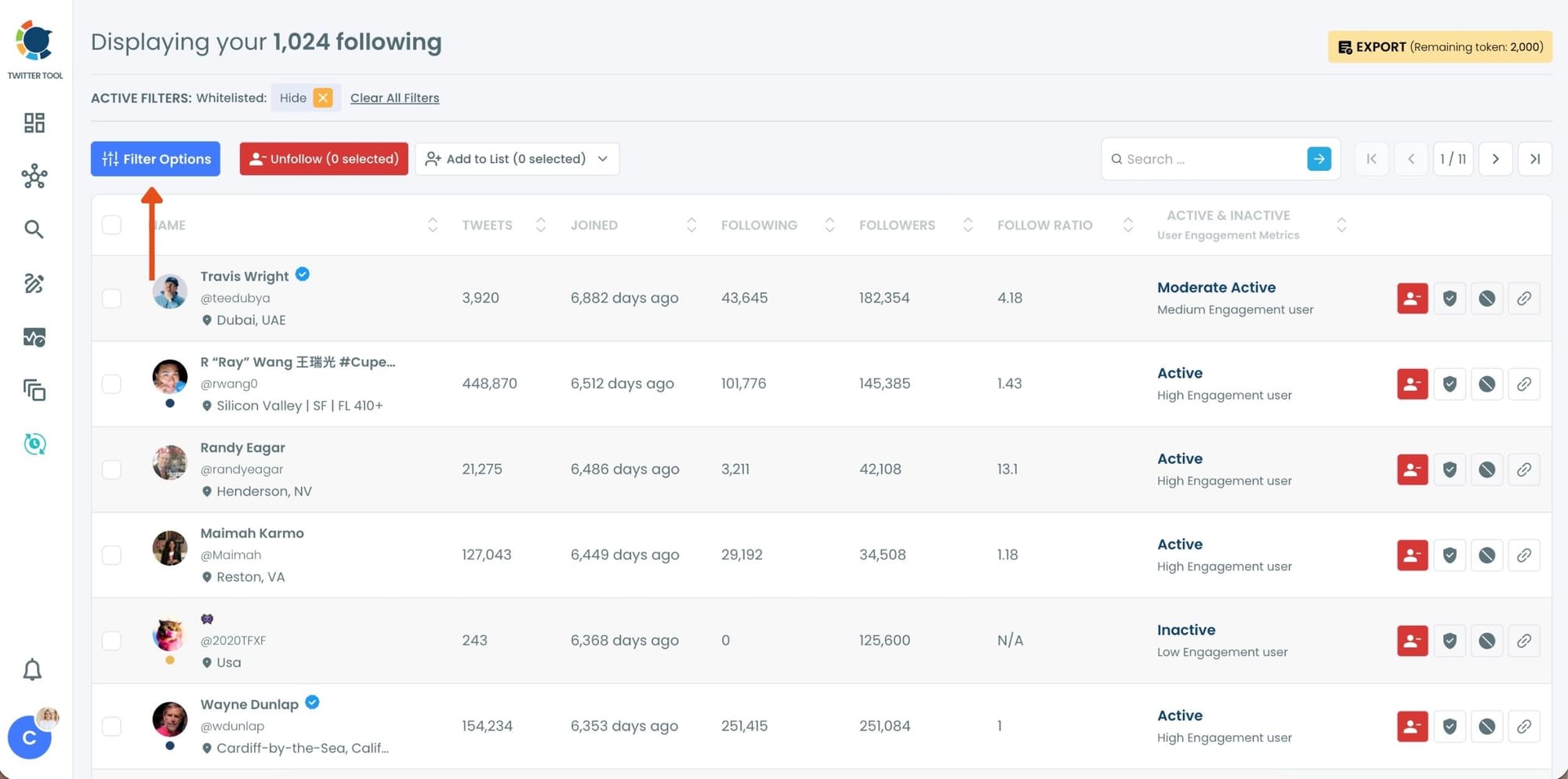
Step #2: Once your following list is visible, click on Filter Options at the top of the page.
Inside the filter panel, use the Follower Quality section to define what you want to see.
Select Fake/Spam and enable Show only. You can also adjust additional quality filters depending on how strict you want the cleanup to be.
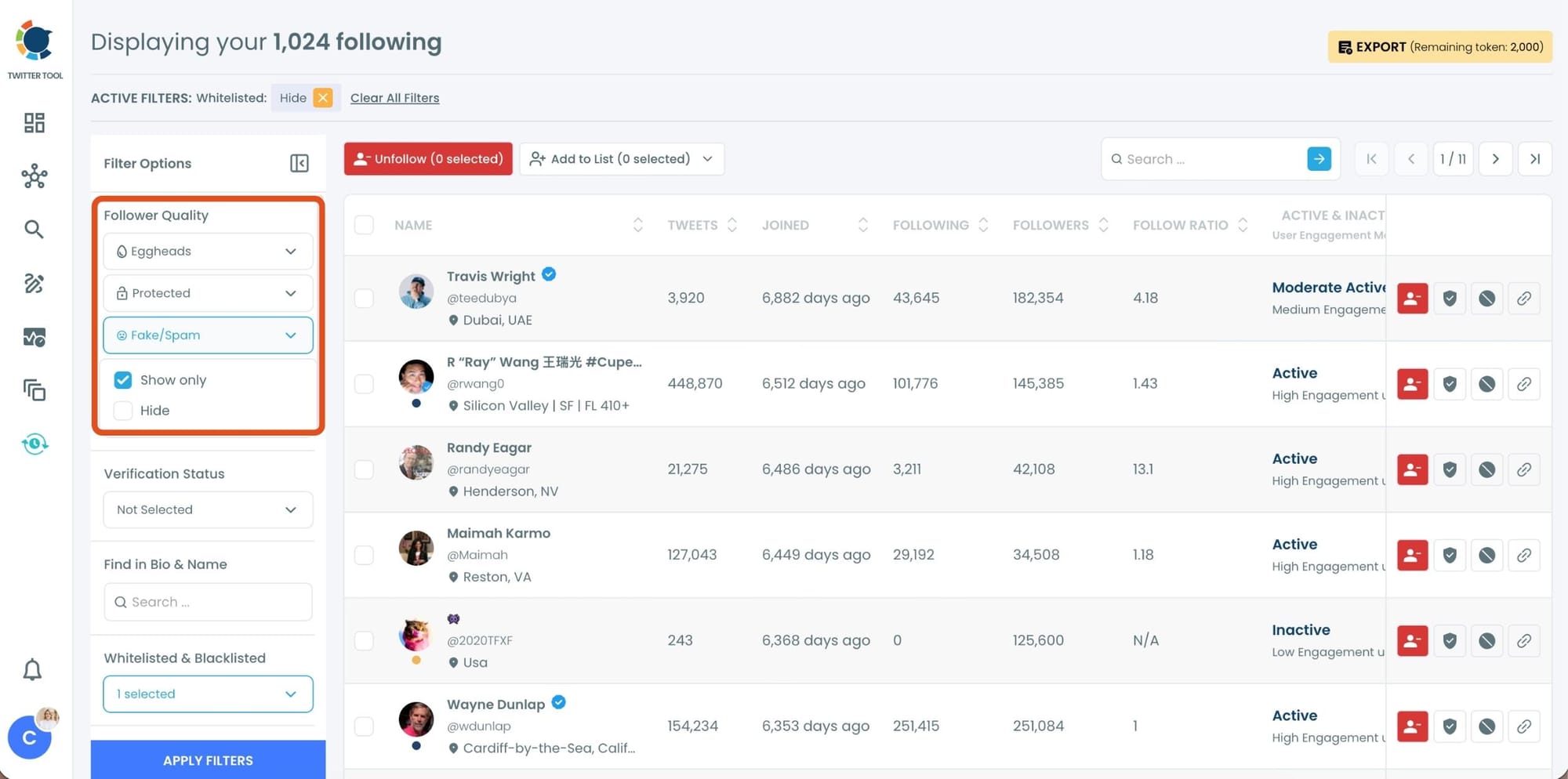
After setting your filters, apply them. Circleboom now lists only fake and low-quality following accounts.
Step #3: Circleboom now shows only low-quality or fake following accounts, each clearly labeled with engagement and activity indicators.
Select the accounts you want to remove by using the checkboxes on the left. You can select multiple accounts at once.
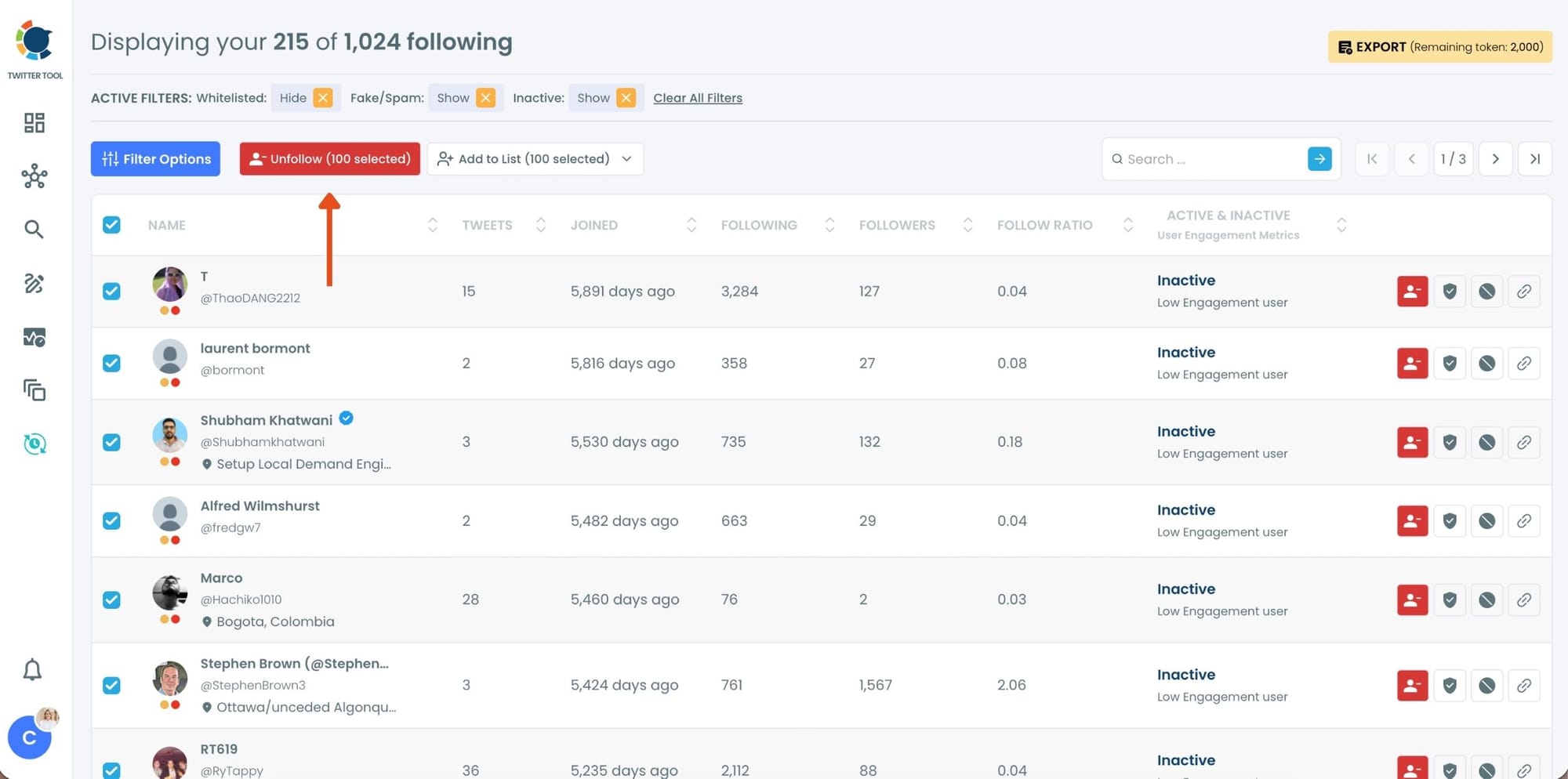
Click the red Unfollow button at the top of the list after making your selection.
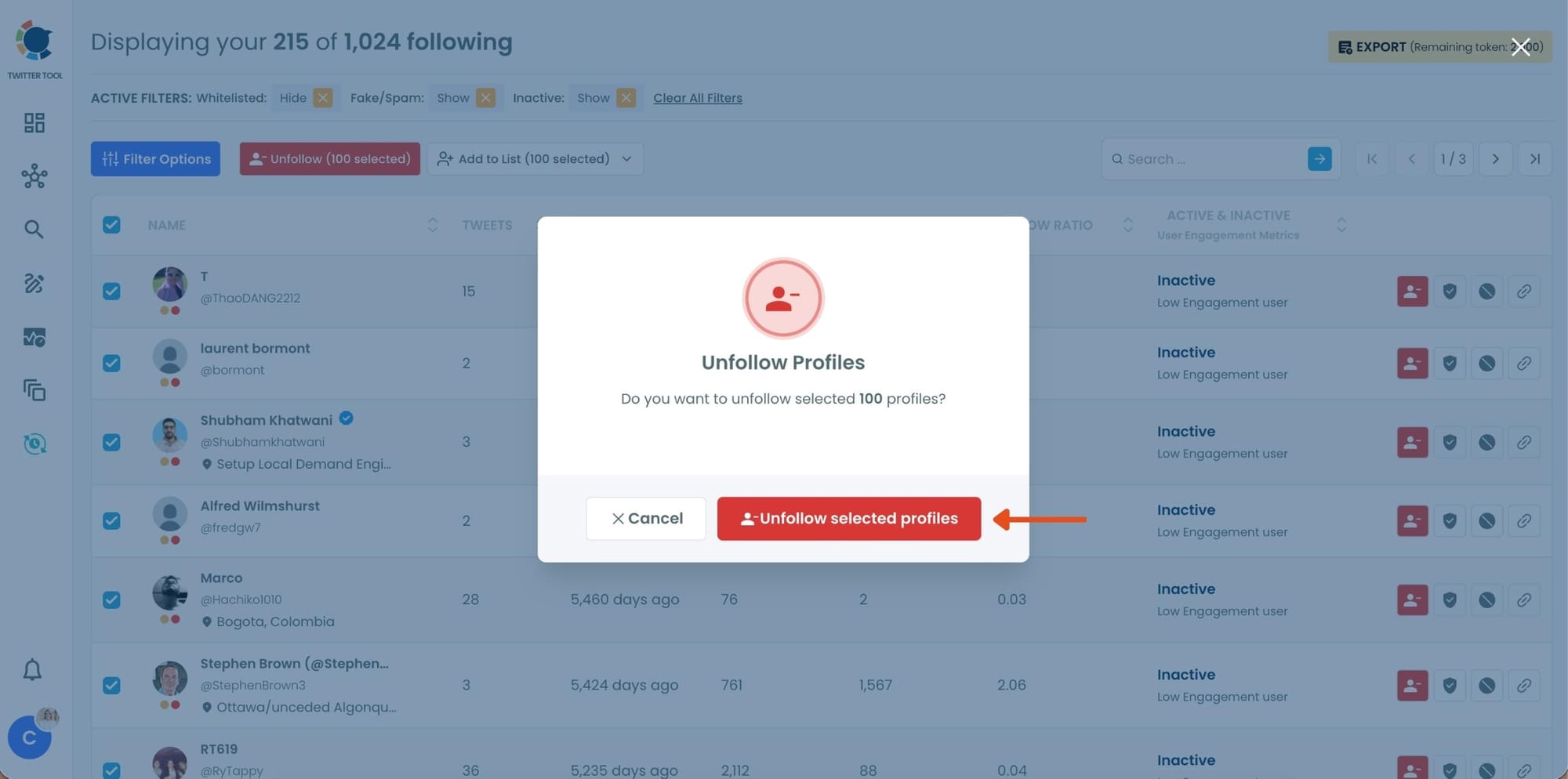
Step #4: Circleboom will show a confirmation pop-up to prevent accidental unfollow actions.
Confirm the action by clicking Unfollow selected profiles.
Why Your Following List Gets Dirty Over Time
Following lists don't become low-quality overnight. They accumulate bad accounts gradually, in ways that are easy to miss.
You followed someone six months ago when their content was relevant to something you were working on. Now they post once a year or they've stopped entirely. You followed an account that looked credible at the time and it turned out to be a bot. You followed a news account that was useful when you needed it and now it posts 60 times a day about things you don't care about anymore.
None of this is obvious from the outside. X doesn't surface it. Your following list just grows noisier over time while the feed gets harder to use.
📌 The problem isn't always who you follow today. It's who you followed months ago and never went back to review. Cleaning your following list on Twitter is not a one-time task. It's something accounts that care about feed quality do regularly.
The other reason it matters is practical. X applies a follower-to-following ratio check once you hit 5,000 followings. If your list is full of accounts that will never follow you back because they're inactive or fake, that ratio stays unfavorable and your ability to follow new accounts gets capped. Cleaning out dead weight is the most direct way to fix that.
The Account Types That Clutter Your Following List
Once you look at a following list with the right filters, four categories of low-quality accounts show up consistently.
Inactive accounts are followed profiles that haven't posted in months or years. They're not contributing anything to your feed, they're not going to engage with your content, and they're occupying following slots that could go to active accounts you'd actually want to hear from.
These are often the largest category in a following list that hasn't been reviewed in a while.
infocircleboom.com
Fake and bot accounts carry identifiable signals: unusually high tweet counts relative to account age, near-zero real engagement, default profile images, suspicious follower-to-following ratios, and bios that look generated rather than written. Following these accounts doesn't just clutter your feed.
It affects how your account looks to anyone who checks who you follow, and it means you're directing attention toward accounts that provide no real signal.
infocircleboom.com
Overactive accounts are real accounts that post so frequently they effectively drown out everything else in your timeline. An account that posts 50 to 100 times a day isn't providing signal. It's creating noise. Even if the content itself is legitimate, the volume makes it impossible to see anything else.
These accounts are easy to miss because they look active and credible, but they're quietly making your feed unusable.
infocircleboom.com
Low quality accounts sit in a broader category: weak follower counts, no bio, erratic posting behavior, very low follower-to-following ratios. Not definitively fake but not adding value either.
Over time these accounts accumulate naturally as you follow back, explore new connections, or follow accounts that were recommended by someone else.
infocircleboom.com
⚠️ X has no built-in tool to filter your following list by any of these signals. There is no native way to sort by account activity, detect suspicious behavior at scale, or identify which of your followings are contributing nothing. Circleboom Twitter is specifically built to surface all of it.
Why a Clean Following List Matters Beyond Your Feed
Your feed becomes usable again. When inactive, bot, and overactive accounts are removed, the accounts you actually want to hear from have room to surface. The signal-to-noise ratio improves immediately.
Your follower-to-following ratio improves. Every inactive account and bot in your following list is a slot that will never convert into a reciprocal follow. Removing them brings your ratio closer to balance, which matters directly once you approach X's 5,000 following limit.
Your account looks more credible to others. People check who you follow. A following list full of inactive profiles, default-avatar accounts, and bots signals poor account hygiene. A clean list signals intention and credibility, which matters for partnerships, collaborations, and anyone evaluating whether to follow you back.
Your engagement data gets more accurate. When you follow accounts that actually post relevant content, the interactions you see and respond to are real. A polluted following list distorts your sense of what's happening in your space.
If you want to go further and understand which accounts in your following list are genuinely engaging with your content, Circleboom Twitter's Engaging and Loyal Following tool surfaces the accounts you follow that actually interact with you. That's the other side of a clean list: not just removing the bad accounts but identifying the ones worth keeping.
Frequently Asked Questions
Why should I clean who I follow on Twitter?
Following low-quality accounts affects your Twitter experience in multiple ways. Inactive accounts take up following slots and contribute nothing to your feed. Fake and bot accounts make your account look less credible to anyone who checks your following list. Overactive accounts drown out everyone else in your timeline. And a following list full of accounts that will never follow you back makes your follower-to-following ratio unfavorable, which can block you from following new accounts once you hit 5,000 followings.
Can Twitter detect and remove low-quality accounts from my following list automatically?
No. X does not provide any native tool to audit the quality of your following list. There is no built-in filter for inactivity, no bot detection for accounts you follow, and no way to sort your following list by quality signals. To clean who you follow on Twitter at scale, you need a third-party tool. Circleboom Twitter surfaces inactive, fake, bot, overactive, and low-quality accounts across your full following list and lets you unfollow them in bulk.
How do I find inactive accounts I follow on Twitter?
Twitter's native interface doesn't show you which accounts in your following list are inactive. With Circleboom Twitter's Inactive Following feature, you can view all the accounts you follow that show long-term low activity or have stopped posting. The list is sortable and filterable, so you can review the accounts and unfollow the ones that aren't contributing anything without checking each profile individually.
What is the difference between fake accounts and inactive accounts?
Inactive accounts are real users who have simply stopped posting or post very rarely. They were real at some point but are no longer active on the platform. Fake and bot accounts were never real in the meaningful sense: they show behavioral signals like abnormally high tweet counts, suspicious follower ratios, default profile images, and near-zero genuine engagement. Both types clutter your following list, but they represent different problems. Circleboom Twitter has separate detection tools for each.
How often should I clean my following list on Twitter?
A quarterly review is a reasonable baseline for most accounts. If you follow a lot of new accounts regularly or have noticed your feed getting noisier, monthly cleanup works better. The goal isn't to do it once and forget it. Following lists accumulate low-quality accounts gradually over time, so periodic cleanup keeps the list reflective of your actual interests and keeps your follower-to-following ratio healthy.
Will unfollowing many accounts at once get my account flagged?
Bulk unfollowing can trigger X's rate limits if done too aggressively. Circleboom Twitter handles unfollow actions through X's official API and automatically paces them to stay within platform limits. You don't need to manually time or batch your unfollows. Circleboom manages that layer so the cleanup happens safely without risking a flag on your account.
Final Thoughts
The accounts you follow define what Twitter looks like for you and how your account looks to everyone else. A following list full of bots, inactive profiles, overactive noise accounts, and low-quality connections is not a neutral thing. It affects your feed, your ratio, and your credibility.
X won't clean that list for you. There's no native tool, no automatic filter, no built-in audit. Circleboom Twitter gives you all of it in one place, with the ability to identify every category of low-quality following and remove them in bulk without spending hours going through accounts one by one.
Clean who you follow on Twitter with Circleboom Twitter's following management tools and build a list that actually reflects who you want to hear from.
infocircleboom.com




)