Most people blame the model when an AI-written post sounds like a bot. I think the model is the smallest part of the problem.
A post sounds robotic because it was written for nobody: no goal, no tone, no audience, just "write a post about our new feature." Give a person that brief and they would write the same beige paragraph.
Social media AI sounds human when you choose what the post should do, how it should sound and who it is for before it writes a word. Circleboom Publish drafts posts for X, LinkedIn, Facebook, Instagram, Bluesky and Pinterest from your own link or notes, with a goal, a tone and a language you pick for each request. The draft then opens in the composer, where you edit it before anything is scheduled.
→ Draft social media posts with AI in the tone you choose
The rest is the brief, the edit pass and the one reuse mistake that costs reach.
How readers spot a bot-voiced post on X and every other feed
You can spot a bot-voiced post from the first line. It opens with a question nobody asked, it uses three adjectives where one would do, and it ends with a call to "share your thoughts below." The words are fine.
The post just has no reason to exist.
That pattern is now common enough that people go looking for it. Our piece on LLM-run Twitter accounts and how to find them shows how readers recognize accounts that post machine text on a schedule.
Once a reader decides your account is one of them, they stop reading your posts at all.
The fix most people try first is adding "make it sound human" to the prompt.
The drafts get more exclamation marks and a joke in the second line, and they sound like a bot trying to sound human, which is worse.
The next move is usually a different chatbot. The wording changes, the voice does not. That is the point to stop blaming social media AI and start looking at what you are handing it.
A better adjective in the prompt never fixes it. A real brief does.
The platforms are also paying attention. Meta's approach to labeling AI-generated content adds an "AI info" label when it detects industry-standard AI indicators.
It also adds one when people disclose that a post was made with AI. A label is not a penalty, but it does make readers look twice at a post that already reads flat.
So the useful question is how to use social media AI that takes a goal and a tone instead of a one-line request.
Why AI posts sound like a bot, and the three settings that change it
A generic AI tool starts every request from zero. It has no idea whether the post should sell, inform or start a conversation, so it averages all three, and the average of everything is the voice people call "AI."
Circleboom Publish's AI Social Media Post Generator asks for that missing brief on every request. Three settings do most of the work:
- Main goal: Engagement, Awareness, Promotion, Website Traffic or Informative, so the draft knows what to ask the reader to do.
- Tone and style: Informative, Motivational, Encouraging, Conversational, Technical or Humorous, chosen per post and per platform.
- Language: English by default, with Spanish, Korean, Japanese, Chinese, French, German, Russian, Portuguese, Italian and Polish among the options.
A fourth choice, the target platform, shapes the draft to X, Bluesky, LinkedIn, Facebook, Instagram or Pinterest conventions. A tone that works on LinkedIn rarely fits X, so I set tone and platform together, never one without the other.
The language setting is the one people underrate. An account whose real audience reads Japanese or Russian does not have to post in its owner's language, because the same source can become a native post for the audience that is there.
You can generate social media posts with AI from your own notes in whichever language that audience reads.

What a good social media AI brief looks like
A brief for social media AI fits in one line, and it still changes everything. Say a bakery wants to announce a new sourdough on Instagram. The weak request is "write a post about our new bread."
The strong one is a pasted note with the baker's own words about the 36-hour proof, the goal set to Promotion, the tone set to Conversational and the platform set to Instagram. Same tool, same minute of effort, and the draft now has a detail no other bakery could claim.
The input matters as much as the settings. Generate Post from URL rewrites an article or news link into a new post, and Generate Post from Text does the same with anything you paste: meeting notes, a rough idea, a paragraph from a customer email.
The source is yours, so the facts in the draft are yours too.
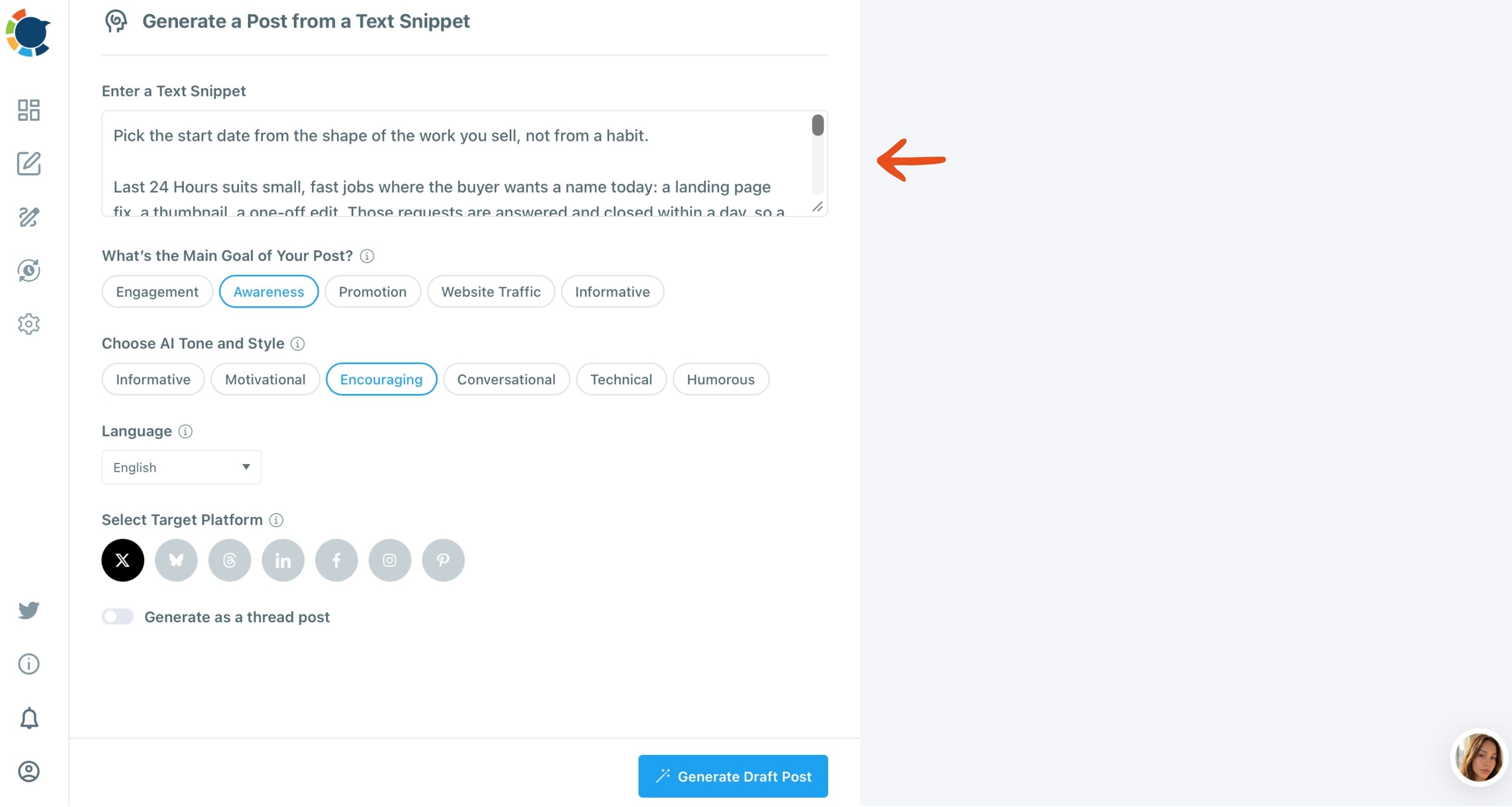
When I paste my own notes, the draft keeps my examples and my point of view, and the AI only reshapes them for the platform. That is the difference between a post that sounds like a summary and a post that sounds like someone who was there.
On Instagram, the caption carries the voice under the image. The AI Instagram caption generator works the same way. You choose the goal and the tone, and you get a caption to edit instead of a blank box.
Can you train the AI on your account's voice?
Yes, for X accounts. AI Preferences in Circleboom Publish stores a profile for each connected X account, so the AI in the X Specific Post composer starts from that account's voice instead of a blank brief.
The profile has five parts:
- Posting frequency: how often the account plans to post, which gives the AI context and never posts anything on its own.
- Language: the language the account writes in, set for its audience, not its owner.
- Content interests: the topics the AI should draw on, added as chips.
- Tone and style: the words that describe how the account sounds, such as Encouraging or Positive.
- Primary goal: Engagement, Awareness, Promotion, Traffic to a web site or Information, with more than one allowed.
Each X account gets its own profile, which matters if you run a brand account and a personal one with very different voices. Circleboom is an official X Enterprise Developer, so the account you train sits on an approved connection to X rather than a workaround.
The profile does not reach other platforms. LinkedIn, Instagram and Facebook drafts take their voice from the goal and tone you pick on each request, which is one more reason to set those two every time.
Listen in: a short podcast on using AI for tweets without the robot voice, and the habits that keep an X account sounding like a person.
If X is the only platform you post to, Circleboom's sister product goes deeper. The X Post Planner in Circleboom Twitter adds X-only tools such as the AI Tweet Generator, a poll generator and Auto Retweet on top of the drafting.
The edit pass that makes an AI draft sound like you
A social media AI draft is a first version, never the post. Every generated post opens in the composer, and that is where the voice gets put back in.
My edit pass takes a few minutes and has four moves:
- Cut the opener if it is a question or a warm-up, and start with the point.
- Add one detail only you know: a number from your own work, a customer's exact words, the name of the thing.
- Read it out loud and rewrite any line you would never say to a person.
- Use the composer's AI shortcuts on the parts that still drag: More Punchier for a slow first line, Condense for padding, Rephrase for Clarity for a tangled sentence.
The second move does the most. A draft becomes yours the moment it holds a fact a chatbot could not have guessed, and that is why I paste my own notes instead of asking for a post "about" a topic.
Writers who use AI daily describe the same routine. One account of writing stories with AI began as a test. It lands on the same split: the AI does the structure, the person does the specifics.
LinkedIn is where a robotic tone costs most, because the post is tied to a real name and a real employer. A milestone post shows the problem clearly.
The advice on how to post a work anniversary on LinkedIn without sounding robotic is a good test of any draft.
One source can also serve every network. Paste the same article link and switch the platform and the tone.
The AI LinkedIn post generator gives you the professional version, while the X version stays short.
Why the same AI post on five accounts backfires
Posting identical text on several accounts of one platform reads as duplicate content, and it can limit the reach of every copy. It is the mistake I see most often once a team gets comfortable with AI, because a good draft feels like it should go everywhere.
The risk is not limited to X. Posting the same text again and again, or the same post to several accounts on one platform, can get an account's reach limited and, in serious cases, restricted.
On X, Circleboom already blocks the same tweet from going out again within a week.
The guide on how to avoid duplicate content ghosting on Twitter explains what that limited reach looks like from the outside.
The fix is the AI itself. Paste the post into Generate Post from Text, pick a different tone or goal, and edit the result: same message, new post. When five accounts need the same announcement, each one gets its own wording.
Social media AI is best at the one job people skip: making the second version.
A ChatGPT subscription or the writer already in your composer?
For social posts, the writer in the composer is usually enough, and it costs nothing extra. The gold AI button in every Circleboom Publish composer comes with a Circleboom membership, so there is no separate ChatGPT or Gemini subscription to pay for just to write captions.
It works two ways. Type a request into "Ask the AI anything..." for a new draft, or open it on text you have already written to get one-click edits such as More Punchier, Condense, Fix Grammar, Add Hashtags and Continue Writing. A follow-up box, "Improve this response...", lets you keep refining without leaving the post.
The bigger gain is where it sits. A chatbot in another tab means copying, pasting and reformatting for every network, while the composer's writer edits the post in the place it will be scheduled from.
You are allowed to use AI and still sound like yourself
Using AI does not make a post less yours, as long as the thinking in it is yours. The question of whether it is still my work if I use AI tools comes up with every new writing tool.
The answer has held each time: the work is in the judgment, not the typing.
Google says much the same about content in general. Its guide to creating helpful, people-first content asks whether content is made for people, and says to explain how automation was used where readers might wonder.
So give yourself permission. Social media AI is a drafting partner, and you stay the editor.
Let the AI write the first version, keep the brief honest, add the detail only you know, and post it under your name without apology. Readers do not mind help.
They mind posts that have nothing to say.
→ Write your next social media AI draft with the tone set first
Questions people ask about AI-written posts
Will the AI keep my post under X's character limit?
Not on its own. The composer's AI writes general text unless you tell it the limit, so ask for "max 280 characters" when an X account is in the post, and check the per-platform preview before sending.
Does setting a posting frequency make the AI post for me?
No. Posting Frequency in AI Preferences only tells the AI how often the X account plans to post; every post is still written, reviewed and scheduled by you.
Can the AI write posts in a language I don't speak?
Yes. Both AI Preferences and the Generate Post tools have a Language setting that is separate from your own, so you can write for a Japanese or Spanish audience. Have a native reader check the first few posts before you rely on it.