If you see “Unlock more posts by subscribing” on X , it almost always means you’ve hit a post-viewing / content-loading limit. It’s a rate limit, not a permanent ban. X temporarily restricts how many posts your account can load within a time window, and the UI suggests Premium as the easiest way to raise that allowance.
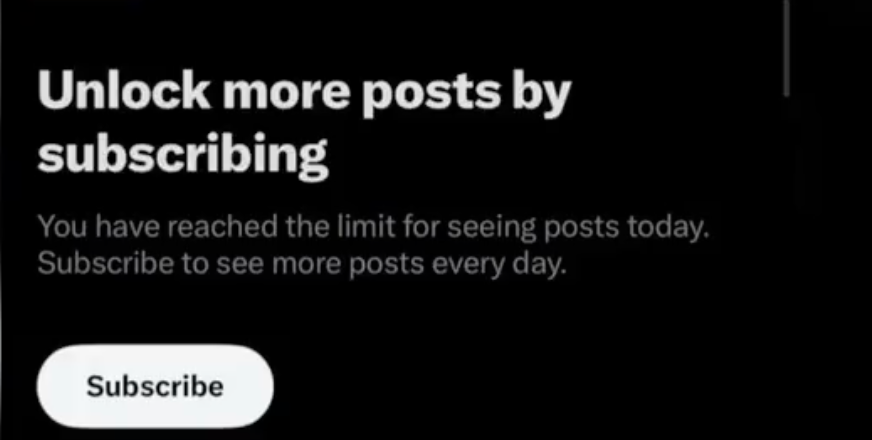
What this message actually is
This banner is X’s way of saying:
- “You’ve reached your current viewing threshold for now.”
- “Come back after the limit resets, or subscribe to increase your limits.”
You’ll sometimes see related phrasing like “You have reached the limit for seeing posts today,” which is consistent with rate-limit behavior described across X’s ecosystem (limits enforced by time windows that reset).
Why it happens
X applies rate limits to protect the platform and reduce abuse (like aggressive automation and scraping). On the technical side, X documents rate limiting as a normal mechanism where exceeding limits results in temporary restriction until a reset window.
In practice, the “Unlock more posts…” banner is commonly triggered by high-volume consumption patterns, for example:
- Long continuous scrolling through Home/Following/Lists
- Rapid refreshes (especially repeated “pull to refresh”)
- Opening many profiles/threads quickly (a lot of content loads in a short span)
- Using multiple clients at once (app + web + dashboards)
- Behavior that looks automated or “scraper-like”
Important nuance: X does not consistently publish exact “reading/viewing” caps in its help documentation the way it publishes caps for actions like posting or following. The limits can change and vary by account type, platform, and current system load. (X does publish other usage limits, like posting and following caps, which shows the broader limits framework exists.)
Is it a shadowban or account punishment?
Usually, no. ( Am I Shadowbanned > Twitter Shadowban Test )
- A shadowban/reach limitation is about distribution (who sees your posts).
- This banner is about consumption (how much content you can load/view).
That said, if X thinks your behavior is bot-like, it may apply stricter throttles, and repeated limit-hits can keep you in a “restricted” loop longer than usual.
The safest ways to fix it
Wait for the limit to reset
This is the most common resolution. Depending on what threshold you hit, resets can be tied to shorter rolling windows or daily windows (X rate limits are typically enforced by time windows like 15 minutes or 24 hours in many contexts).
Reduce high-frequency actions for a while
For the next 30–60 minutes:
- stop refreshing repeatedly
- stop rapid profile hopping
- stop opening lots of threads in a short span
Switch where you’re using X (app ↔ browser)
Some users report different behavior between mobile app and web. This isn’t guaranteed, but it’s a low-risk troubleshooting step.
Export Tweets
Instead of manually digging through timelines, you can export tweets from any public X user with Circleboom, an official X Enterprise partner. That turns posts into a searchable dataset (CSV/Excel), so you can filter by date, keyword, or engagement and do real research without burning time, or triggering viewing limits.

Subscribing to Premium
Premium is the official “raise limits” option. Whether that’s worth it depends on how much your workflow truly requires heavy browsing.
The important truth: there is no reliable “bypass” that’s safe
You’ll find posts and tools claiming they can “bypass view limits.” Be careful. Many of those rely on brittle tricks or scraping-like behavior. Even if they work briefly, they can create account risk or simply stop working when X changes enforcement.
Where Circleboom fits (without pretending it “fixes” the limit)
Circleboom doesn’t magically remove X’s viewing caps, and it shouldn’t be positioned that way.
What Circleboom does help with is the real reason people keep hitting this banner: they’re using the X timeline as a search engine and database.
If you’re hitting the limit because you’re constantly scrolling to:
- find old tweets
- pull examples for a blog/client deck
- research competitor messaging
- audit your content performance
…then the best move is to stop relying on endless browsing and switch to export + analyze.
That’s why I recommend using Unlock more posts by subscribing Circleboom as a workflow upgrade: you can export tweets/posts and work with them in CSV/Excel so you’re searching your content like data instead of burning view limits on scrolling.
Trust note (important): Circleboom is listed as an official X Enterprise developer, meaning it’s built around official X Enterprise APIs rather than scraping-style workarounds, which is exactly what you want when you care about account safety and compliance.
Practical “Circleboom angle” you can include in your blog
Use language like this:
- “If you keep hitting this limit while researching, don’t scroll more, export smarter.”
- “Export your tweets (or a public account’s posts) so you can filter by keyword/date/engagement without loading the feed over and over.”
- “Turn your timeline into a searchable dataset, then come back to X only to publish and engage.
How to prevent it long-term (best practices)
- Batch research: do short focused sessions, not endless feed browsing
- Use Lists + bookmarks: reduce random hopping
- Stop “checking” constantly: schedule content in batches instead
- Export your own content periodically: so you can search offline and reuse winners
- Avoid unofficial “bypass” tools: they’re the fastest path to instability or risk
Bottom line
“Unlock more posts by subscribing” is a rate-limit wall. You can often resolve it by waiting, reducing high-frequency viewing, or switching app/web. But if it keeps happening, the sustainable fix is to change your workflow.