
X has no job title filter. Its search and its Advanced Search both filter posts, so a Twitter search by job title only works when the search reads account bios instead of tweets.
What this answer covers.X search and Advanced Search match words in posts, not the job titles people write in their bios.A bio search matches the title against profiles and returns a list of accounts, not a feed.Filters, a current-role check and an export turn that list into something a team can use.
Circleboom's Deep X Account Search matches a job title against X bios and past tweets and lists the accounts through official Enterprise access to the X API. Begin a Twitter search by job title in X bios.
Can you search X by job title?
Not with X's own tools. X search is organised around posts, and the People tab is a lookup by name or username. X's help center page on searching for people on X describes a lookup that ranks matching accounts by relevance.
It has no field for a job title.
Three kinds of reader hit this wall most often:
- B2B marketers and salespeople building a prospect list by role.
- Recruiters and event teams looking for people with a specific title.
- Researchers who need every account that describes itself a certain way.
That design works when you already know who you want.
It breaks down when you know the role and not the name, which is the normal situation for anyone building a prospect, expert or research list.
The question "who are the product managers in fintech on X?" has no native answer.
You can search posts that mention product management and open profiles one by one, but nothing on X turns a role into a list of the people who hold it.
Every method to find people on Twitter without their usernames comes back to one idea. Search what people say about themselves.
On X, that place is the bio, and a tool that reads bios can pull up X accounts by job title directly.
X Advanced Search vs a bio search for job titles
X Advanced Search narrows posts, and a bio search narrows people. That is the whole difference, and it decides which tool can answer a job title question.
According to X's page on how to use advanced search, the feature works only when you are logged in. Its people fields narrow posts by account (posts from, replies to or mentioning an account), alongside date and location fields.
Every field filters posts. None reads what an account wrote in its bio.
| Question | X Advanced Search | Bio search in Circleboom |
|---|---|---|
| What does it match? | Words and accounts in posts | The title in bios and past tweets |
| What comes back? | A feed of posts | A table of accounts |
| Can it filter by role? | No | Yes, Find in Bio & Name |
| What can you do next? | Read and reply | Follow, list or export |
The table explains a common frustration. A query like "head of sales" in Advanced Search returns posts that contain the phrase: hiring threads, quotes and opinions.
Some authors hold the role. Many do not, and the ones who hold it but never tweet the phrase are missing entirely.
When X Advanced Search is still the right tool
Advanced Search is still the right tool for finding conversations, and the walkthrough on how to use Twitter Advanced Search covers its operators in full. For people by role, the search has to start from profiles.
The two tools also work well in sequence. Once a bio search gives you a list of names, the account fields in Advanced Search become useful: you can read the posts from one of those accounts, or the replies sent to it, before deciding whether to reach out.
Circleboom also offers its own Twitter advanced search for tweets with filters, which pairs with a bio search when you want both the people and what they said.
Why a Twitter job title match can be out of date
A job title search that reads past tweets as well as bios can return people who no longer hold the role. The match is real, but it may describe the account as it was, not as it is.
Circleboom's documentation for Deep X Account Search is explicit about three limits:
- Profile data reflects the account at retrieval time and may have changed since the matching tweet was posted.
- An account that discussed a topic years ago may have shifted focus entirely, so a keyword match is not proof of current relevance.
- The Active, Moderate Active and Inactive label describes current posting, not activity at the time of the match.
A title match tells you who once fit the role; the current bio tells you who still does.
This caveat is the trade-off for reach. The same historical index that finds a quiet expert also turns up someone who left the role and now writes about something else, and only a person reading the profile can tell them apart.
The fix is a short review before any account is followed or exported. Open the profile, read today's bio and check the activity label. When current activity is the deciding factor, cross-check the title in Live X Account Search, which is anchored to recent posts.
It is the one step I never skip, because no filter can read a career change.
Rejected accounts can be marked with Blacklist, which keeps them hidden in later searches when the Whitelisted & Blacklisted filter is set to hide them. The review then only has to happen once per account.
How Circleboom finds X accounts by job title
Circleboom's Deep X Account Search matches a keyword, such as a job title, against X bios and historical tweets and returns the matching accounts as a sortable table. One query lists up to 5,000 accounts across 50 pages.
Each row carries the profile data that lets you judge fit before opening a profile:
- Name, @username and location.
- Tweet count and join date.
- Following, followers and follow ratio.
- An activity label with an engagement level.
What the historical index adds to a role search
Some of the strongest people for a role list post selectively, and a live-activity search never shows them. Reading past tweets brings them back: an account that wrote about leading a sales team in an old thread can match even when this month's posts are about something else. That reach is also why the current-role review above matters.
Where the data comes from
Circleboom is listed on X's Enterprise customer directory, so the accounts come from X's own records.
Scraping-based tools can miss rows when collection is interrupted, and a role list with silent gaps is worse than a short one, because nobody knows what is missing.
The Filter Options drawer then narrows the result with AND logic:
- Bio and name text.
- Follower and following ranges.
- Tweet count and follow ratio.
- Join date and location.
- Verification and quality flags such as fake or bot accounts.
The Twitter search filters page describes each one.
A role list built this way starts with people, not posts. To try it on your own target role, try a job title search across Twitter bios and read the first page of results.
One job, many titles: covering the variants on X
People write the same job in different words, so one search per spelling is the reliable way to catch them all. "VP Sales", "Head of Sales", "sales lead" and "revenue lead" can describe one role, and each finds a different slice of accounts.
Circleboom's product notes recommend running separate keyword searches and cross-referencing the results. Accounts that appear in two or more result sets are the strongest matches, because they describe the role more than one way.
A variant list for one role might look like this:
- CFO and chief financial officer.
- Finance director and director of finance.
- VP finance.
- Head of finance.
For multi-word titles, put the phrase in quotes so the words are searched together rather than as separate terms.
The variant method matters most for research. A researcher counting how many people in a field describe themselves a certain way needs every phrasing, not the most common one. The article on research ideas for Twitter data shows what such datasets can feed.
Role search on screen: a keyword search for X accounts, with the matching profiles listed and ready to filter by role.
How to run a Twitter search by job title in Circleboom
To run a Twitter search by job title, search X bios for the title in quotes, then filter the account list and review it before saving. Circleboom's Deep X Account Search does this in five steps across two phases: reach the search, then search and narrow. The steps below assume your X account is already connected.
Reach the bio search
- Open Circleboom Twitter and sign in with the X account that will own the follows and lists.

- Go to Advanced X Search, open X Account Search and select Deep X Account Search.

Search the title and narrow the list
- Enter the job title in the keyword box, in quotes for a multi-word title, and start the search.
- Review the result table under the "Listing N profiles who are interested in" heading, sorting by followers or tweets to read the established accounts first.
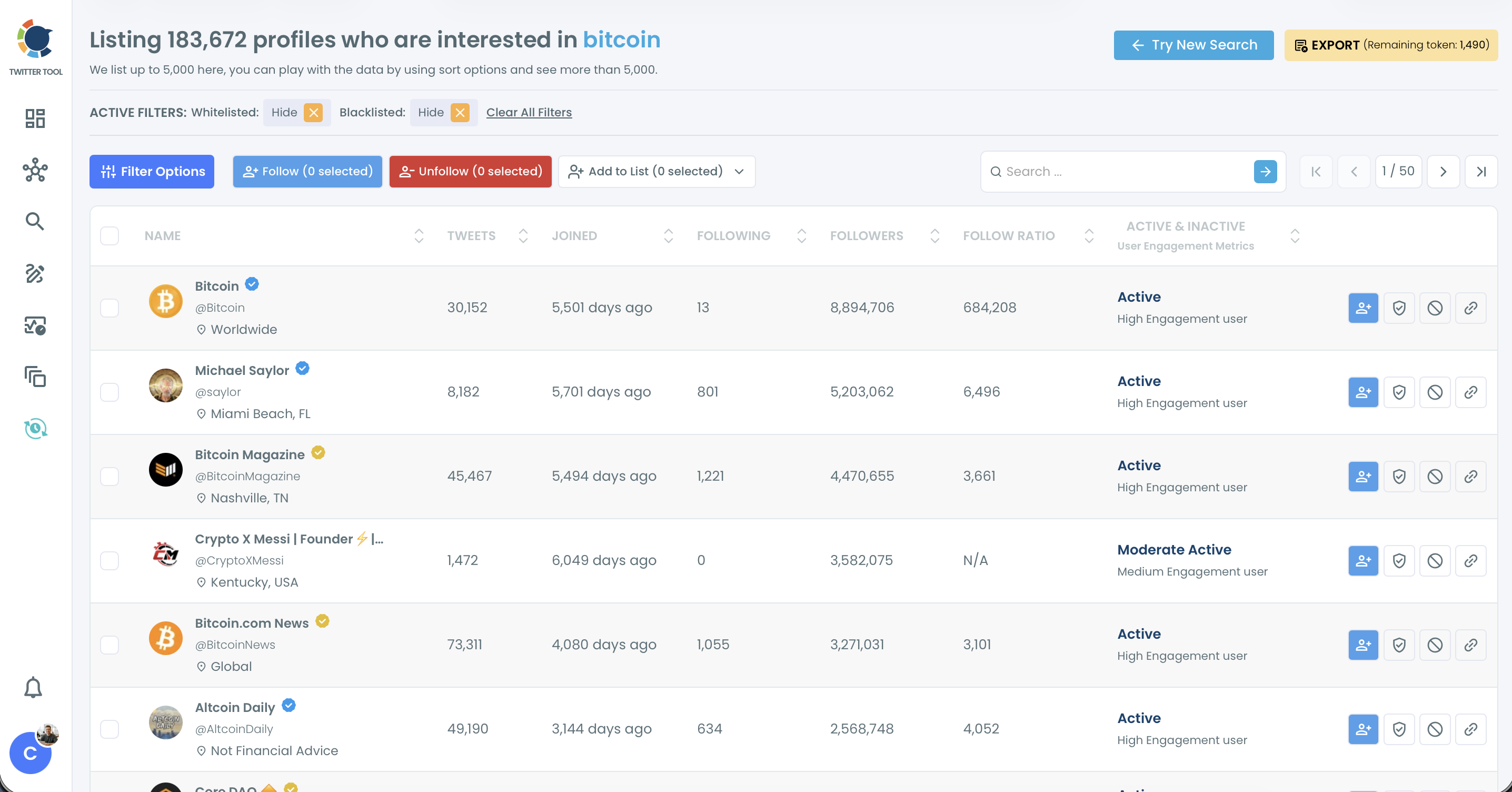
- Apply Filter Options for bio text, location and follower range, then select the accounts that pass review for Add to List or Export.
Searching wide and filtering after keeps good accounts in view until you have seen them, and the review step catches roles that changed since the match.
Built this way, the list is made of people, not keyword hits.
In short: search the title, sort, filter, review, then save.
Exporting X job title results for a CRM or campaign
Export turns the reviewed accounts into a CSV file for a CRM, a spreadsheet or an ad audience. Circleboom's documentation names CRM import, lead scoring, partner identification and research documentation as uses of the export.
Exporting the reviewed subset rather than the raw result keeps the file clean. A confirmation pop-up shows the profile count before anything is exported.
The same export system lets you export Twitter accounts to CSV from follower lists and other sources. That helps when a role list is combined with a competitor's audience.
Treat the file as a snapshot.
It holds the public profile data Circleboom retrieved at search time, and bios and follower counts keep changing after you save it, so rerun the search before a new campaign rather than reusing an old export.
What happens to the file next is a campaign decision. The piece on B2B lead generation campaigns covers how a role-based list feeds outreach and paid targeting.
Bio, location and activity filters can also define an ad audience by who people are. Circleboom's own example pairs a role keyword in the bio with a target city and recent activity, with bots and new accounts removed: a custom audience that fits a niche far better than broad interest categories.
Job title search checklist for X
A Twitter search by job title on X takes five moves:
- Write every spelling of the role before you search, and quote multi-word titles.
- Search bios with a tool that returns accounts, since X's own search returns posts.
- Filter by bio text, location and follower range together.
- Open each shortlisted profile and confirm the current role.
- Export only the reviewed subset, and note the query used.
Each step removes a different kind of noise, and skipping the role check is the one that costs most later.
→ Build a Twitter search by job title from X bios
What people ask about job title search on X
Can I limit a job title search to one city?
Yes. Use the Filter by Location field in Filter Options, which is free text, so typing "London" or a country keeps only accounts whose profile location includes it. People write locations in different ways, so try the common spellings of the place.
Is there a token cost to searching and exporting role lists?
Yes, on both. Each Deep X Account Search query draws from your search token balance, and a bigger export uses more tokens because the cost follows the number of profiles in the file, so filter before you export.