

You want to watch every tweet posting under one hashtag as it goes live, sorted and readable, not buried in X's scrolling stream. A Twitter hashtag viewer gives you exactly that: one tag, one feed, every matching tweet in a structured view you can sort, click, and act on.
The problem with X's own hashtag page is that it shows you a vertical scroll with no sort, no export, and no way to see the accounts behind the posts. You read the top few tweets, then the feed moves and you lose the thread. A real hashtag viewer fixes the structure, not just the speed.
What is the fastest way to view live tweets under a specific hashtag?
The fastest way is to run a hashtag viewer that collects matching tweets from a start date forward and lays them out in a sortable table. Circleboom collects live tweets under any hashtag on X and shows both the tweets and the accounts posting them through official, policy-compliant access.
→ Open the Twitter hashtag viewer
That structure is the whole point. You are not just speeding up reading; you are converting an unsorted stream into a dataset you can work with.
Why X's Native Hashtag Feed Falls Short
X's native hashtag page was built for casual browsing, not monitoring. Click a trending tag and you get a reverse-chronological scroll that refreshes constantly, with no column sorting, no engagement comparison, and no record you can revisit later.
For a quick glance, that is fine. For tracking a campaign tag, an event hashtag, or a product conversation, it falls apart fast. You cannot tell which tweet under the tag is pulling the most engagement, you cannot save the feed, and you cannot find the accounts worth following without manually clicking each profile.
Anyone who has tried a manual Twitter hashtag search to find relevant accounts knows how quickly the scroll outruns you.
A Twitter hashtag viewer closes those gaps. It treats the hashtag as a query, collects matching tweets from a date you choose, and presents them as rows. Each row carries the tweet text, a link back to the original post on X, and the full engagement count, so the loudest posts surface instantly instead of getting lost.
The deeper miss in native X is the account layer. When you watch a hashtag, you usually care about two things at once: what is being said, and who is saying it. X shows you the first and hides the second behind individual profile clicks. Even a careful pass through Twitter advanced search leaves you reading posts one by one rather than working a list.
How a Hashtag Viewer Reads the Live Stream
A hashtag viewer collects tweets matching your tag from a start date forward and builds an accumulating feed as new posts appear. It is reading the live stream, not querying a frozen archive.
Circleboom retrieves these public tweets through its access as an official X Enterprise Developer company. The data stays complete and the collection stays policy-compliant, with no scraping and no workarounds. You set the tag, pick a start window, and the feed fills with every public tweet carrying that hashtag.
Live keyword walkthrough: how the live tweet stream for one keyword renders as a sortable, account-linked feed in Circleboom.
Here is how the viewer works, end to end.
Connect your X account to Circleboom
Log in to Circleboom Twitter and connect your X account with official OAuth. Connection takes a few seconds and keeps every later action inside X's compliant access boundary.
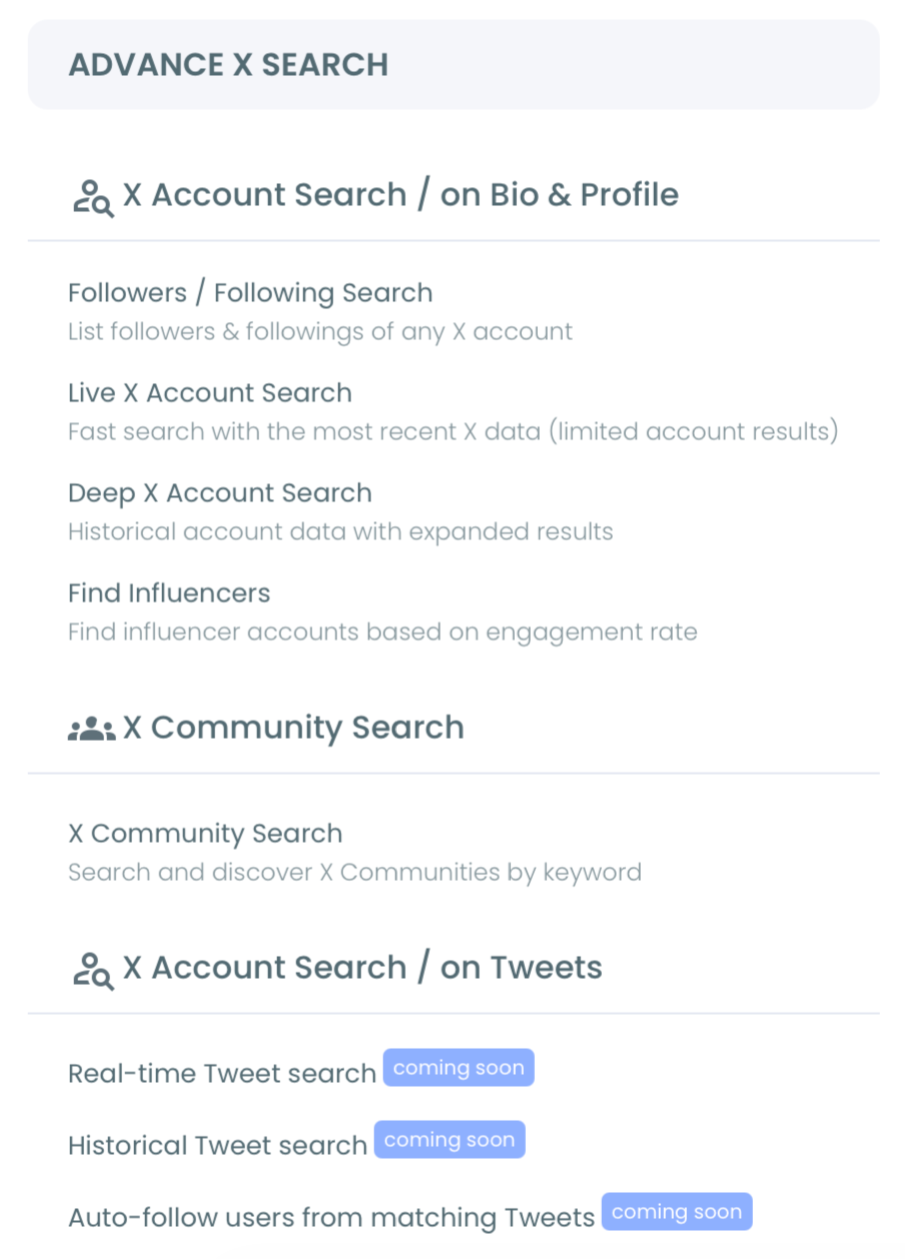
Open the Advanced X Search menu
Navigate to the Advanced X Search menu, where the live tweet search and hashtag tracking tools live.
Enter your hashtag and set a start date
Type the hashtag you want to watch and pick a start window: Last 24 Hours, Last 7 Days, Last 30 Days, or a custom date. The start date anchors the feed to live activity from that moment forward.
Read the feed and pivot to accounts
Sort the tweet table by impressions, likes, retweets, or recency to find the strongest posts. Then click "Display Profiles of this search" to see the deduplicated list of accounts behind those tweets, ready to follow, list, or export.
That sequence is what makes the viewer useful rather than just fast. The login keeps access official, the start date scopes the feed to current activity, and the profile pivot turns reading into action while the conversation is still alive.
What You Get Beyond a Plain Feed
The viewer's real value shows up when you sort and pivot. A sortable hashtag feed answers questions the native scroll cannot.
- Which tweet under this tag earned the most impressions today.
- Which accounts are driving the conversation, not just joining it.
- Which posts are worth a reply while the moment is still warm.
A hashtag viewer is most powerful when you stop reading it as a feed and start reading it as a list of accounts.
Every tweet under the tag was authored by someone. The profile view collapses those authors into a unique list, each row showing follower count, follow ratio, join date, and activity classification. From there you can follow the most relevant accounts, add them to a Twitter List Manager board for ongoing monitoring, or export the set for outreach.
If you are tracking an event or a competitor's product launch, that account list is the payoff. You came to read the hashtag; you leave with a targeted list of the people behind it.
How to Track Tweets Under a Specific Hashtag the Right Way
To track a hashtag well, scope it to live activity, filter out noise, and act on the accounts before the conversation cools. The viewer handles the collection; your filters handle the signal.
Set engagement minimums to drop low-quality posts, exclude reply spam, and limit by language when the tag spans regions. A broad tag during a busy moment returns large, noisy result sets, so narrowing the live stream is what separates a useful feed from a wall of repeats.
The same care applies to the query itself: a sharper Twitter hashtag and trend search returns a cleaner feed from the start. You can also compare a live hashtag window against Twitter historical data to see whether the spike is new or a recurring pattern.
Once the feed is clean, the action layer matters more than the reading. Capture strong findings quickly, because live tweets get deleted or edited within minutes and engagement numbers shift continuously. Export or list the accounts you care about so a one-time view becomes a repeatable workflow.
That ordering holds up because each step protects the next: the start date keeps the feed current, the filters keep it relevant, and the export keeps your findings before the moment passes.
What Tracking a Hashtag This Way Changes
Reading a hashtag through a structured viewer changes what you walk away with. Instead of a vague sense of "this tag is busy," you get a ranked feed and a clean list of the accounts driving it.
For an event team, that means a ready list of attendees posting the conference tag. For a brand, it means seeing who is talking about a launch from the first hour. For a creator, it means finding the accounts active in a niche conversation while the topic is still live.
Watching the best trending hashtags on Twitter this way tells you not just what is rising, but who is carrying it. The data is current by definition, because every tweet in the feed posted after your chosen start date.
The shift is from monitoring to action. A native feed lets you watch; a hashtag viewer lets you respond. It pulls public hashtag data safely as a verified Enterprise partner of X, rather than a scraper that risks your account.
Want a fast count of how often a tag has been used? The Twitter Hashtag Counter pairs naturally with the live viewer for volume context.
Frequently Asked Questions
Can I see who is posting under a hashtag, not just the tweets?
Yes. The viewer extracts the account behind every matching tweet and shows them as a deduplicated profile list, so you can follow, list, or export the people driving the hashtag, not only read their posts.
Does a hashtag viewer show live tweets or old ones?
It shows live tweets from a start date you choose forward, accumulating new posts as they appear. If you want past coverage instead, a historical search queries the archive within a date window.
Is it safe to track hashtags with a third-party tool?
It is safe when the tool uses official access. Circleboom pulls public hashtag data through sanctioned X channels, so your account stays compliant and you avoid the suspension risk that comes with scraping tools.
How do I cut spam out of a busy hashtag feed?
Apply engagement minimums, exclude reply-only posts, and filter by language. Broad tags during peak moments return noisy sets, so these filters narrow the live stream to the accounts and posts actually worth your time.
The Bottom Line
A Twitter hashtag viewer takes the one thing X's native feed gets wrong, structure, and fixes it: every tweet under your tag becomes a sortable row, and every author becomes an account you can act on. You read the conversation and capture the people driving it in the same pass, from a start date you control, on data pulled through official X access.
The native scroll lets you glance. A structured viewer lets you work. Set your tag, scope the window, and turn a passing hashtag moment into a feed you can sort, save, and act on.

