

Yes, there is a live tweet tracker for Twitter, and it does more than show you a feed scrolling past. A real live tracker pins a start date, then collects every public tweet matching your keyword or hashtag from that moment forward, building one accumulating stream you can act on while the conversation is still hot.
The part most people miss is what sits behind those tweets. Each live tweet has an account attached, and those accounts are the reason tracking a moment in real time is worth your attention at all.
Is there a live tweet tracker for Twitter, and what does it actually do?
Yes. Circleboom's live tweet tracker collects public tweets matching your keyword or hashtag from a start date you choose and forward, then extracts and deduplicates the accounts posting them, all through official, policy-safe data access.
→ Try the live tweet tracker
X's native search can surface live tweets, but it stops at the feed. You see posts, you scroll, and the moment moves on before you have done anything with it. That gap, between watching a live conversation and acting on it, is exactly what a structured tracker closes.
What a Live Tweet Tracker Really Is
A live tweet tracker is a tool that monitors public tweets matching a query as they are posted, starting from a date you set. The distinction that matters is direction. A historical search reaches backward into a static archive; a live tracker collects forward, gathering new matching tweets as the conversation develops.
Circleboom's real-time tracker anchors on that start date and accumulates from there. Set the start to your launch hour, a competitor's outage, or the first minute of an event, and the tool keeps pulling every public tweet that fits your keyword, hashtag, or filter set.
The start date itself has four presets, Last 24 Hours, Last 7 Days, Last 30 Days, and a custom point. You also pick a tweet count, which controls how much the run collects from your token balance. Those two settings together define the size and freshness of the stream before a single result lands.
The keyword is only half of it. The tracker reads the metadata on each tweet too, so you see impression count, likes, retweets, quotes, bookmarks, and reply counts next to the post itself. That lets you separate a viral spike from background noise without sorting by hand.
A quick worked example
Say you set the keyword to a product category like "crm recommendation," start date to the last 24 hours, and an engagement minimum of five likes. A broad run might pull two thousand tweets, but the filtered run hands back a few hundred posts from accounts that actually got traction. Click through to profiles and that few hundred collapses to maybe sixty unique accounts, deduplicated, each one a person publicly weighing a buying decision this week.
Why a Live Feed Alone Isn't Enough
Most "live tracker" tools stop at a volume curve and a sentiment score. That tells you a conversation is happening, not who is in it.
The accounts are the actionable layer. When you find out who is tweeting about a topic right now, you can decide who to follow, who to add to a list, and who to reach while the shared context still exists. A sentiment dashboard cannot do that for you.
This is where Circleboom's tracker pulls ahead of a plain feed:
- It deduplicates authors, so one account that posted ten matching tweets appears once.
- It shows account-level data, including follower count, follow ratio, join date, and an active-or-inactive signal.
- It lets you act on those accounts in place, with follow, list, and export controls.
A live feed shows you the moment; a real tracker hands you the people inside it.
How to Use a Live Tweet Tracker on Twitter
To track live tweets, you log in, set your keyword and start date, choose how many tweets to collect, then switch from the tweet view to the account view and act on the profiles. The flow below runs the whole loop through official, policy-safe API access.
Connect your X account to Circleboom
- Log in to Circleboom Twitter and connect your X account with official OAuth.
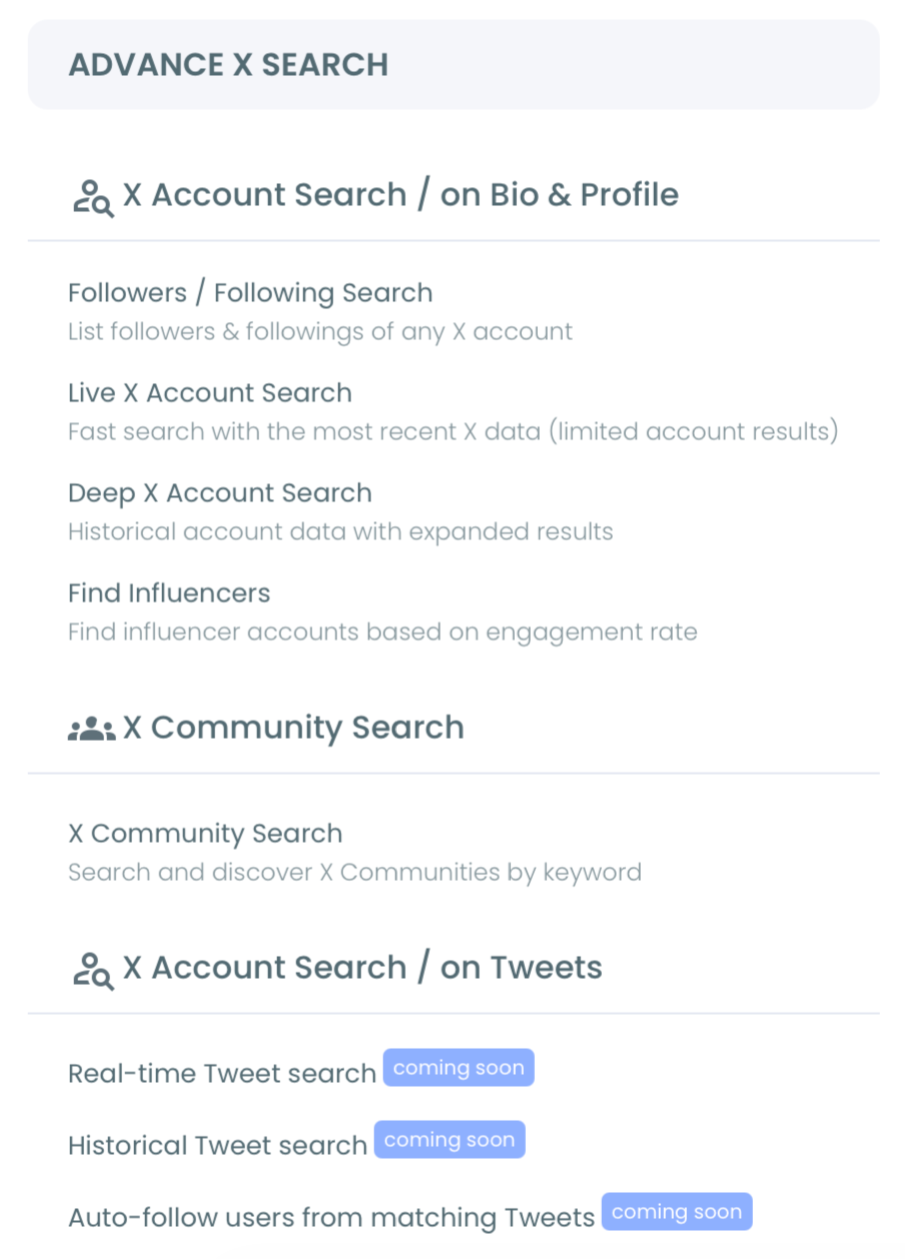
- Open the Advanced X Search menu from the dashboard.
Set the keyword, start date, and collection size
- Select Real-time Tweet Search and describe what you want to track in plain language.
- Set your start date from Last 24 Hours, Last 7 Days, Last 30 Days, or a custom date, then choose how many tweets to collect.
- Apply filters for language, replies, links, verified-only, media type, or minimum engagement to cut noise before collection runs.
Pivot to the accounts and act
- Review the collected tweets, then click Display Profiles to switch to the account view.
- Follow, add to a Twitter List, or export the accounts that matter while the conversation is still live.
That ordering is what makes the tracker useful rather than just interesting. The login earns official API access first, the start date anchors the stream so you collect current activity instead of a stale archive, and the account pivot turns a feed you watch into a list you act on. Skip the pivot and you are back to scrolling.
Watch it live: how a keyword stream turns into a deduplicated, exportable account list inside one tracker view.
What You Get After Tracking a Moment Live
You walk away with two linked outputs from the same run. The tweet view captures what was said, with full engagement metrics and a direct link to each original post. The account view captures who said it, deduplicated and ready for action.
The account view is not a flat username dump either. Each row carries follower count, following count, follow ratio, tweet count, account join date, and an active-or-inactive classification. That is enough to triage a list at a glance. A high follow ratio and a recent join date read differently from an established account with a balanced graph, and you can sort any column to surface the rows that matter.
Because Circleboom runs on official Enterprise data access, every account in that view came through a verified Enterprise partner of X, not a scraper. Your account stays compliant while you collect, and the data reflects full public results rather than a thinned-out, unauthorized sample.
Turning the run into next steps
The profile view exports as CSV for a live outreach list or a campaign-targeting file. Want to know whether a live spike is new or recurring? Run Twitter Advanced Search on the same terms to compare against the past. For ongoing tag coverage, the keyword and hashtag tracker keeps watching after the first burst fades.
A practical note most guides skip: a start date set too far back behaves like a historical query and returns a less current set than you intended. Keep the window tight to the moment you actually care about.
There is a second common mistake worth naming. People assume a high tweet count guarantees a long account list, but the count controls collection size, not the number of unique people posting. A small conversation will not invent extra accounts no matter how high you set the number, so spend the tokens on filter precision instead of raw volume.
Two reads worth bookmarking sit alongside this. Our Twitter advanced search complete guide walks through the query operators. Weighing which app fits? This breakdown of the best app to monitor Twitter activity is a good next step.
If your real goal is steady Twitter engagement, a live account list beats a passive volume chart every time.
The Bottom Line
A live tweet tracker exists, and the good ones do not just stream a feed. They anchor on a start date, collect matching public tweets forward, and pull the accounts behind them into a list you can follow, save, or export while the moment still matters.
That account layer is the difference between watching a conversation and joining it. If you have ever followed a hashtag manually and lost the people in the scroll, this is the fix.
Our older note on how to follow a hashtag on Twitter shows how far that workflow has come. Want trend context first? See whether you can view Twitter trends without an account.
→ Start tracking live tweets with Circleboom
Frequently Asked Questions
Is there a free live tweet tracker for Twitter?
X's native search shows live tweets for free but does not structure them into an account list you can act on. Circleboom's live tweet tracker adds that layer, with token-based collection so you control how many tweets each run pulls.
How far back can a live tweet tracker start?
You can set the start date to the last 24 hours, 7 days, 30 days, or a custom point. Set it too far back and the run behaves more like a historical search than a live one, so keep the window tight to the moment you care about.
Can I find the accounts behind live tweets, not just the tweets?
Yes. After the run, click Display Profiles to switch to the account view, where the authors are deduplicated and shown with follower count, follow ratio, and activity signals you can act on.
Will live tweets always still exist when I act on them?
Not always. Live tweets can be deleted, edited, or made private within minutes, so export or list strong findings quickly rather than treating the result as a stable dataset.
Is using a live tweet tracker safe for my X account?
Yes. Circleboom holds verified Enterprise data access with X, so collection and any follow or list actions stay within the platform's rules with no scraping involved.

