What should you post with another account so both audiences notice? The strongest Instagram collab ideas give each side's followers a reason to care about the other account.
They also come with a plan for the days before and after the post, because one post seen once is easy to miss.
What are the best Instagram collab ideas for growing two audiences?
Pick a format where both accounts bring something, like a joint giveaway, a tutorial or a takeover, and publish it as a Collab so it shows on both profiles. Circleboom Publish then schedules the Instagram teasers, Stories and follow-up Reel around it from one calendar.
→ Plan the Instagram posts around every collab in one calendar
How an Instagram collab post works
An Instagram Collab is one post that appears on two profiles at once. You invite the other account as a collaborator before you publish, and if they accept, the post is shared with their followers too.
Instagram's own guide to Collabs on Instagram explains the flow. While creating the post in the Instagram app, you tap Tag people, then Invite collaborator, and choose the account.
Once the invite is accepted, their username is added to the post, it shows on their profile, and either side can remove the collaboration later.
That is the whole mechanic, and it explains why most collabs underperform. The post goes live once, sits on two grids, and then nothing else points to it. Both audiences see it a single time, if the feed shows it to them at all.
The fix is to treat the collab as the center of a short campaign. A few teasers before it, a few Stories around it and a follow-up after it give each audience three or four chances to meet the partner account.
That is easier when you plan your Instagram collab content before launch week instead of the night before.
Agree on a short brief before the invite
Before the invite goes out, agree on a short brief with your partner. Decide who films or designs the post, who writes the caption and which account creates it and sends the invite.
Settle the launch date and time, and whether the post stays on both grids for good or comes down after a campaign.
Five minutes on these details saves an awkward message later.
I think of it this way: the Collab post earns the reach, and the posts around it turn that reach into follows.
How to choose the right partner for an Instagram collab
Choose a partner whose followers would want what you offer, but who does not sell the same thing. A bakery and a coffee roaster share an audience without competing; two bakeries in the same town mostly fight over it.
Size matters less than fit. Smaller accounts often have closer, more engaged communities, and they are more likely to say yes to a small brand.
The guide on where to find micro-influencers covers how to spot them in your niche.
Bigger partners bring reach but usually need a clearer offer and, often, a budget. If you are weighing that step, the overview of macro-influencers explains what changes when the partner's audience runs into the hundreds of thousands.
Three quick checks before you send the invite:
- Their recent posts get comments, not only likes.
- Their followers look like your customers.
- Their tone would not feel strange on your own grid.
When you reach out, keep the first message short and specific. Name the collab idea, say what each side would post and suggest a week for it.
A partner can say yes to a clear plan in one reply, while an open "want to collab sometime?" usually gets no answer at all.
10 Instagram collab ideas that grow both audiences
These Instagram collab ideas work for small brands and creators alike. Each one gives both accounts a role, so neither side is only lending its audience.
Collab ideas for brands and shops
Product partners do best when the collab shows the two products working together. A Reel is the natural format for most of these, and the tips on how to get more views on Instagram Reels apply to collab Reels as well.
- The joint giveaway: one prize bundle from both brands, with simple entry (like, tag a friend, follow both).
- The co-created drop: a limited product you make together, announced on both profiles at once.
- The pairing tutorial: your product used with the partner's, such as a recipe with their coffee.
- The before-and-after: a service partner shows the result your product helped create.
- The event promo: a venue and a vendor announce the same pop-up or workshop together.
Which of these Instagram collab ideas to start with depends on the goal. A joint giveaway brings the fastest burst of new followers, but some of them come only for the prize.
A co-created drop is the strongest for sales, because the product itself is the reason to follow both accounts. A pairing tutorial earns saves, and saved posts keep sending visitors long after launch day.
Collab ideas for creators and communities
Creator collabs work when both people bring a point of view. Stories carry a lot of the build-up here, and the list of creative Instagram Story ideas has formats for countdowns and takeovers.
- Two takes on one question: each creator answers the same question in one Reel.
- The takeover: one account hands its Stories to the partner for a day, then both share a recap post.
- The interview carousel: a short Q&A with the partner, one answer per slide.
- The cause spotlight: a creator and a local nonprofit explain one project together.
- The side-by-side challenge: same budget or same brief, two results.
For creators, the takeover and the interview carousel are the lowest-effort starts, since each side mostly talks about what it already knows. The challenge format takes more planning, but it invites replies, because followers pick a side.
After the collab goes live, you can also reshare the partner's own Reel to your Stories. The steps to repost a Reel on Instagram show the options.
Every idea on this list works better when both audiences see it more than once.
What you schedule and what you post live in a collab week
In a collab week built on any of these Instagram collab ideas, only the Collab post itself is published live from the Instagram app, because the collaborator invite happens there. Every post around it can be prepared and scheduled ahead in Circleboom Publish. Circleboom is an official X (Twitter) Enterprise API partner, so the accounts you schedule from connect through approved access, not scraping.
That split is the part most collab guides skip. A scheduler cannot add a collaborator for you, so the Collab post needs a few minutes in the app on the day.
Everything else, the teasers, the countdown and the follow-ups, can be written in one sitting.
| Day | Post | Where it is made | Account |
|---|---|---|---|
| 3 days before | Teaser feed post | Circleboom Publish | Yours |
| 2 days before to launch | Countdown Stories | Circleboom Publish | Yours |
| Launch day | The Collab post | Instagram app | Both |
| 1 day after | Follow-up Reel | Circleboom Publish | Yours |
| 3 days after | Recap or winner post | Circleboom Publish | Yours |
Why the posts around the collab matter
The posts around the Collab matter because of where the partner's followers go next. After they see the Collab post, the curious ones tap through to your profile.
If your latest posts are fresh and point back to the collab, they have a reason to follow. If your grid last moved weeks ago, they leave.
Your partner can run the same plan from their side, so each audience gets its own teasers. The countdown is the easiest part to automate, since you can schedule Instagram Stories days ahead, with music, from the Story Post tab.
Stories stay on Instagram, so plan them as Instagram-only posts. The follow-up Reel is different, and it can travel further, which the section after the steps covers.
Watch the Instagram Post Planner lay out a week of scheduled posts, the same view you use to plan a collab week.
How to plan Instagram collab ideas into a scheduled week
The process runs in three phases: setup, the build-up before launch and the follow-ups after it.
Connect your account and open the Instagram composer
- Log in to Circleboom and connect your Instagram business account.

- Open the Instagram composer and pick the tab for the first piece: Instagram Post for the teaser, Story Post for the countdown or Reels for the follow-up.
Schedule the build-up before the collab goes live
- Write the teaser post with a hint about the partner, then click Schedule and choose a slot from "Pick your best post time," which is based on your own followers' activity.
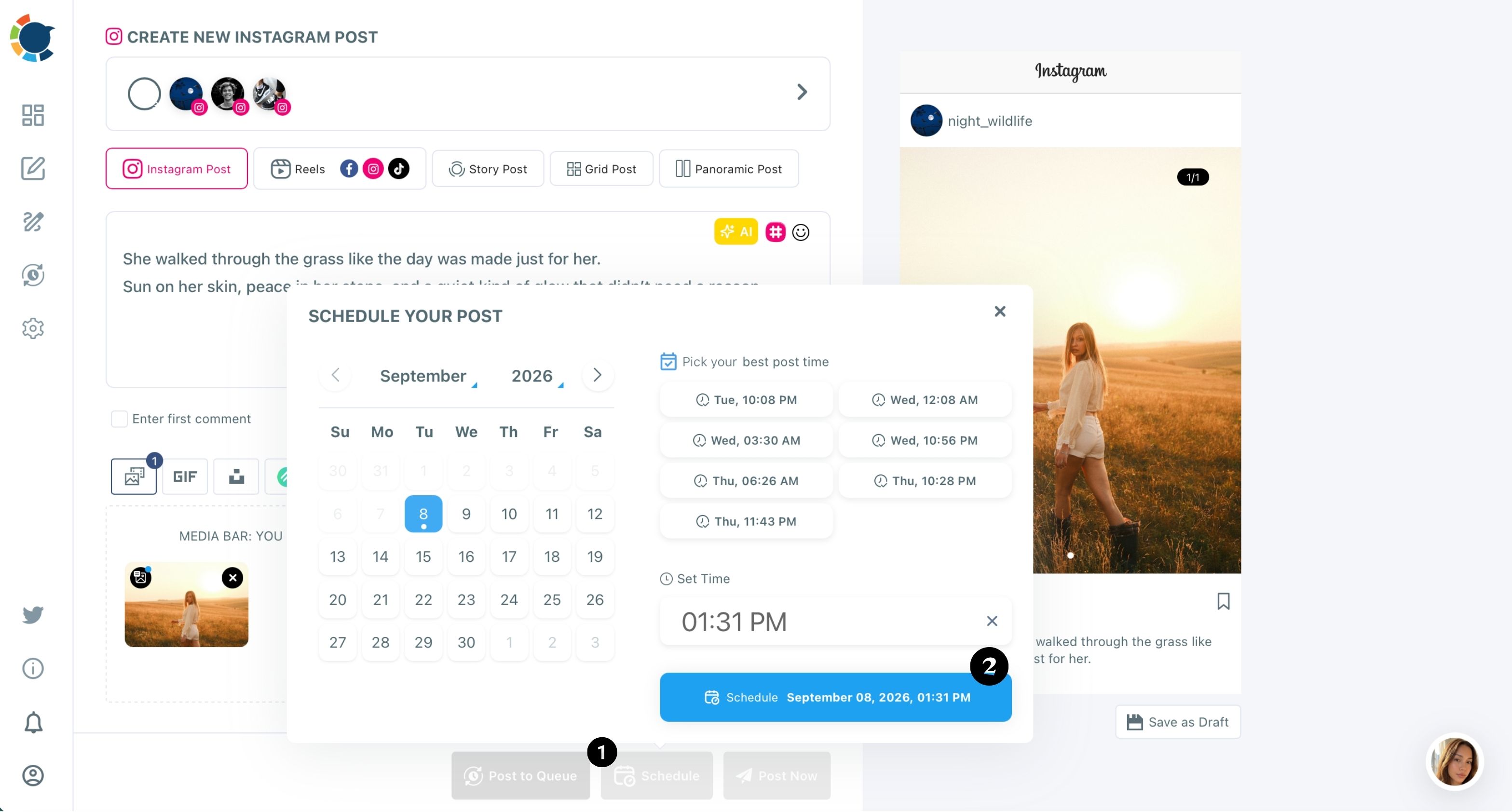
- Add the countdown Stories in the Story Post tab, one per day up to launch, each scheduled for its own date.
I would keep the countdown to two or three Stories. More than that starts to read like pressure, and the teaser post already carries most of the build-up.
Plan the follow-ups after the collab
- Upload the follow-up Reel in the Reels tab, add a first comment that credits the partner and schedule it for the day after launch.
- Schedule the recap post, such as the giveaway winner or the best customer replies, for a few days later.
This order works because the build-up is ready before launch day, so the only live task left is the Collab post itself. The follow-ups then keep the partner's new visitors seeing your account after the collab has scrolled out of their feed.
Once the week sits on the calendar, you can schedule the teasers and follow-ups for each Instagram collab the same way next time. Reuse the pattern instead of planning from scratch.
Can the collab Reel go to TikTok and YouTube too?
Yes, the follow-up Reel can go out to Facebook, TikTok and YouTube in the same action. Video-based Instagram collab ideas, like the pairing tutorial or two takes on one question, travel best.
In the Reels tab, you add those accounts next to your Instagram account, and one click publishes or schedules the video on all four.
There is one limit to keep in mind. The copies on other platforms are posted from your own accounts, so the Instagram Collab tag stays on Instagram.
On TikTok or YouTube, credit the partner in the caption instead, and tag their account there if they have one, so the second audience can still find them.
Circleboom's Instagram Reels scheduler also adds music from a built-in library, which helps when the collab clip was filmed without sound.
The wider tool to cross-post videos covers the same one-upload, four-platform flow from the other composers, which suits a partner who is bigger on TikTok than on Instagram.
Running both sides of an Instagram collab from one login
Some teams run both sides of a collab, such as two brands under one owner or two clients at the same agency. In that case, the setup to manage multiple Instagram accounts lets you schedule each side's teasers from one login.
Give each account its own caption, because identical posts across accounts count as duplicate content and can limit reach.
Your Instagram collab checklist
The best Instagram collab ideas pay off when the plan around them is as solid as the post itself. Before you send the invite, run through this list:
- Pick a partner whose followers want what you offer, without selling the same thing.
- Choose one of the ten collab ideas and agree who makes what.
- Schedule the teaser and countdown Stories before launch day.
- Publish the Collab post in the Instagram app and invite the collaborator there.
- Schedule the follow-up Reel and the recap post for the days after.
Work through those five and the collab reaches both audiences several times, not just once.
→ Map your next Instagram collab week in the post planner
Collab post questions
Do I have to disclose a paid Instagram collab?
Yes, if money, free products or another benefit is involved, the partnership needs a clear disclosure. The FTC's Endorsement Guides questions and answers say a disclosure should be clear and conspicuous.
One buried in the comments is easy to miss, so keep it in the caption itself.
Can I schedule a collab post with Circleboom Publish?
No, the collaborator invite happens in the Instagram app before you publish, so the Collab post itself goes out from there. Circleboom Publish schedules the teasers, Stories, follow-up Reel and recap posts around it.
What time should the collab go live?
Pick a time when your own followers are active, and ask your partner to check theirs. Circleboom Publish suggests best times from your account's follower activity in the Schedule window, which helps you agree on a slot that suits both sides.