Every week I record one short clip: a single coaching idea, under a minute, filmed in one take. For months the recording was the easy part and the second upload was the part I skipped.
Instagram got the clip. Threads got it when I remembered, which was about half the time, and the half I missed was the half where people actually talk back.
Once I learned to cross post Instagram to Threads properly, the fix turned out to be smaller than I expected. It starts with one upload instead of two.
One clip, both apps, one sitting.
• One upload in Circleboom Publish that serves both Instagram and Threads.
• A caption length that fits both apps without a rewrite.
• A schedule that puts the clip live on both apps at the same moment, from a laptop.
Circleboom Publish sends one video and one caption to an Instagram account and a Threads account in a single scheduled post. Cross post Instagram clips to Threads on one schedule.
Why the second upload kept losing on Threads
The trouble sat in my routine. I filmed on Sunday, edited on my phone, posted to Instagram, and then told myself I would put it on Threads later that evening.
Later meant this:
- Find the exported file again in my camera roll.
- Open Threads, attach the video, paste the caption.
- Notice the caption ran past Threads' 500 characters and cut it down on a phone keyboard.
Ten minutes, maybe less.
But ten minutes at the end of a coaching day is exactly the kind of task that slides to tomorrow, and tomorrow the clip already felt old.
I kept telling myself the Instagram audience was the one that mattered. It has more followers. It is where clients find me.
Threads was where people answered.
A clip on Instagram gets views and a few hearts. The same idea on Threads, posted with a question at the end, gets replies from people describing their own version of the problem. Those replies are the closest thing I have to a free discovery call.
So the skipped upload cost me conversations that never started.
I wanted to cross post Instagram to Threads every single week, without the second session that kept failing. The first thing I needed was to cross post Instagram to Threads on a schedule rather than from memory.
The shortcut inside Instagram, and where it stopped working for me
My first attempt to cross post Instagram to Threads used the shortcut built into the Instagram app. Instagram's help page on how to share your Instagram posts to Threads describes an "Also share on" option. Before you share a photo or video, you toggle your Threads account on, for this post or for every future post.
It works, and for a lot of people it is enough. Three details made it a poor fit for how I work:
- It lives in the phone app. Instagram says the feature is only available in the Android and iPhone apps, and you choose it at the moment you share.
- My Threads profile has to be associated with my Instagram account. Mine is, but a coach who signed up to Threads separately is out of luck.
- Deleting is double work. If I delete the Instagram post, I have to go to Threads and delete it there too.
The first point was the one that hurt. I batch my content on Sunday at a desk, and I want the clip to go live on Tuesday morning when my audience is awake, not at the moment I finish editing.
The roundup of ways to share Instagram posts on Threads lays out the native options side by side. For anyone who posts live from a phone, that toggle is the right answer.
For anyone who plans the week ahead, the toggle fires at the wrong moment.
What changed when both accounts sat in one composer
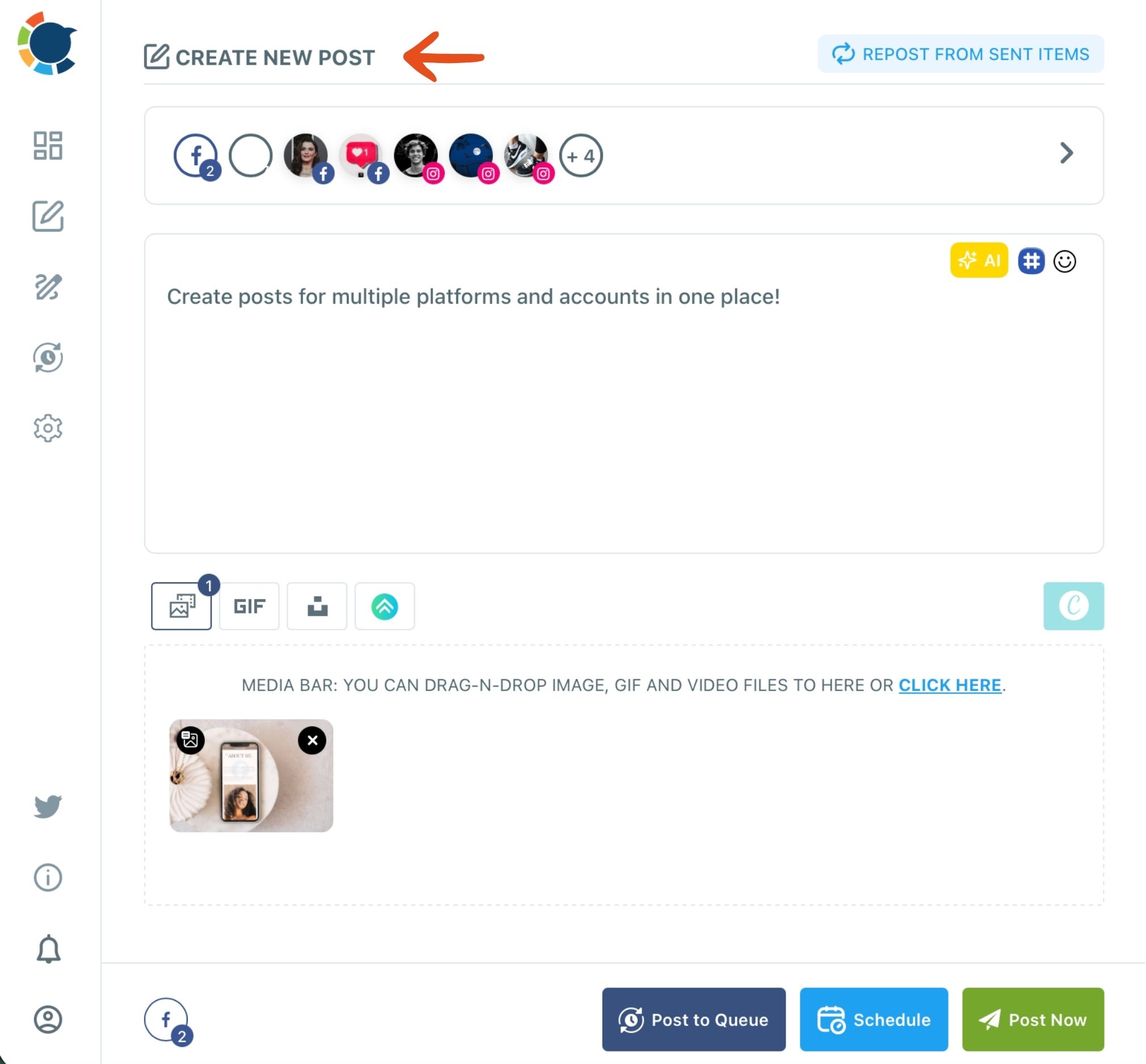
To cross post Instagram to Threads, Circleboom Publish lets me pick my Instagram account and my Threads account in one universal composer, upload the clip once, write one caption and schedule it to both. The composer is called Create New Post on All Platforms, and it sends the same content to every account I select in one pass.
That sentence is the whole trick. There is no second upload, because the second app is just another ticked account.
I was careful about where my accounts go. Circleboom is one of the companies on X's official Enterprise developers list, and for me that status meant the tool connects accounts through approved access rather than workarounds.
Before I schedule, the per-platform preview shows the clip and caption on the Instagram tab and the Threads tab.
It also answered a question I had been asking myself for months: can you schedule Instagram Threads posts at all? Yes, and in the same send as Instagram.
You can schedule one clip for Instagram and Threads together and pick the time from suggestions based on each account's own followers.
Three-minute walkthrough of the Create New Post composer: accounts picked across several platforms, one image built in Canva and scheduled to all of them in one send.
The recording uses an image rather than a clip, and it picks more platforms than I do, but the composer, the account picker and the Schedule modal are the same ones I use for Instagram and Threads.
How I cross post Instagram to Threads with one upload
The process I settled on to cross post Instagram to Threads takes six steps and about five minutes once the accounts are connected.
Open one composer for both apps
- Open Circleboom Publish and click the "Create New Post on All Platforms" card on the dashboard.

- Select both accounts in the Select Accounts panel: my Instagram account and my Threads account. I saved the pair as a Share Group, so it is one click now.
Upload once and write for the stricter app
- Upload the clip once in the media bar. Instagram's limits are the tighter ones for video in Circleboom: up to 300 MB, 3 to 900 seconds, MP4. Threads takes up to 1 GB.
- Write the caption under 500 characters, because that is Threads' limit and Instagram's 2,200 leaves room. I end with one specific question.
- Check the Post Preview tabs for Instagram and Threads to see that the clip and caption read well on both.
Schedule both posts for the same moment
- Click Schedule, pick the day and choose a slot from "Pick your best post time", then confirm. Post Now and Post to Queue sit next to it when I need them.
Choosing both accounts before writing means I write for the stricter app from the first word, and uploading once in a shared composer means the second app never needs its own session.
The one limit I had to accept: one caption for both apps
The universal composer sends the same content to every selected account. When you cross post Instagram to Threads from it, both apps get the same words.
At first that bothered me. Instagram is visual, so the caption supports the clip. Threads is conversation-first, so the words carry the post.
Then I noticed something about my best-performing posts. The captions that worked on Threads were short, ended with a real question and still read well under a video on Instagram. A question like "What is the one decision you keep postponing until Monday?" works in both places.
So I stopped writing two captions. I write one Threads-shaped caption and let it serve both apps.
When an idea genuinely needs different words on Threads, a longer story or a thread of several posts, I write that one in the Threads composer instead, where the "Add another post" button builds a proper thread. It is a different send, so it gets its own upload, and that is a fair trade for a different post.
The Threads hashtag generator helps with the last line of the caption. On a feed that matches posts to people's interests, a relevant topic tag gives the post one more signal about who it is for.
Why the Reels cross-posting option did not cover Threads
Circleboom has a second sharing feature that confused me at first. Its video cross-posting starts from a Reels or Shorts flow and sends one short video to Instagram, Facebook, YouTube and TikTok together.
That engine covers those four video platforms. Threads is not one of them.
So the way I cross post Instagram to Threads differs from how I cross-post a Reel, and the two routes answer different questions:
- Instagram plus Threads: the universal Create New Post composer, with both accounts ticked.
- Instagram plus Facebook, YouTube Shorts and TikTok: the cross post videos flow from the Reels tab.
When I want the clip on all five, I run both: the video cross-post for the four video platforms and one universal send for Threads.
Two sends in one sitting is still a long way from five separate apps.
The Instagram post scheduler is the third tool in the mix, for weeks when a post is Instagram-only, such as a carousel with a first comment.
What the weekly routine looks like now
Sunday is still filming day. The difference is what happens after the edit.
I upload the week's clip once, write one caption with a question at the end, tick my Instagram and Threads pair and schedule it for Tuesday morning. If there is a second clip, I queue it for Thursday.
There are no evening reminders left on my list. The posts go live together, so the Threads replies and the Instagram comments arrive on the same day and I answer them in one block.
Being able to cross post Instagram to Threads on a schedule also changed what I post there. Replies are the strongest signal the Threads feed reads, and the question at the end of every caption now does that job.
The guide on how to grow on Threads covers what else the feed rewards.
For days without a new clip, I go the other direction. A good Threads conversation can become an Instagram Story, and the walkthrough on how to share Threads on Instagram covers that reverse route.
Prefer Instagram posts to flow to Threads on their own? The explainer on how to auto post from Instagram to Threads sets out the automatic options.
One clip, one upload, one caption, two conversations.
You do not need a content team to be on both apps
If you have been treating Threads as the platform you will get to when there is time, that is the habit to drop. You do not need a second editing session, a second caption or a social media manager.
To cross post Instagram to Threads, you need both accounts in one composer and a caption short enough for the stricter app. The clip you already film for Instagram is enough for Threads.
Start with one clip this week. Tick both accounts, write a question at the end of the caption and schedule it for the hour your followers are awake.
→ Schedule your next clip on Instagram and Threads in one send
Questions about sharing one clip on Instagram and Threads
Does Circleboom need my Threads profile linked to Instagram to cross post Instagram to Threads?
No. In Circleboom Publish, each account is connected on its own under Settings → Manage Social Accounts, so the Instagram account and the Threads account only need to be connected there to appear in the same composer.
What happens to the Threads post if I delete the Instagram one?
The two are separate posts. Deleting one does not delete the other, so remove the Threads post on its own if you want both gone.
Can I add my Threads account to the same send as Facebook or LinkedIn?
Yes. The universal composer takes any mix of connected accounts across all ten supported platforms, so Threads can sit in the same send as Facebook or LinkedIn. The caption and the video still have to fit each platform's limits.