

Clearing your search history and your app cache is the reset tip you'll meet first.
Neither one appears among the inputs X's own ranking code says it reads about you, so the feed you get back is the one you had.
How do you reset the Twitter algorithm?
You retrain it, because X has no reset button: unfollow accounts you've outgrown, tap "Not interested in this post" on unwanted recommendations, mute accounts and words, and drop Topics and interests that no longer fit. X's recommendations help says For You draws on the accounts and Topics you follow and what you engage with, so changing those changes the feed.
Below: the steps in order, two popular fixes that never reach the algorithm, and why your follow list is the input that lasts.
How to reset your Twitter algorithm, step by step
To reset your Twitter algorithm, change what X's For You ranking learns from: the feedback you give on posts, the accounts and Topics that feed it, and the posts you choose to engage with. X documents a control for each, and none of them needs a paid plan.
The seven steps below run from the quickest fix to the one that lasts longest.
Stop the posts you don't want today
Start on the For You tab. Posts there carry a more icon, the three dots at the top right of each one, and that menu is where X takes your feedback.
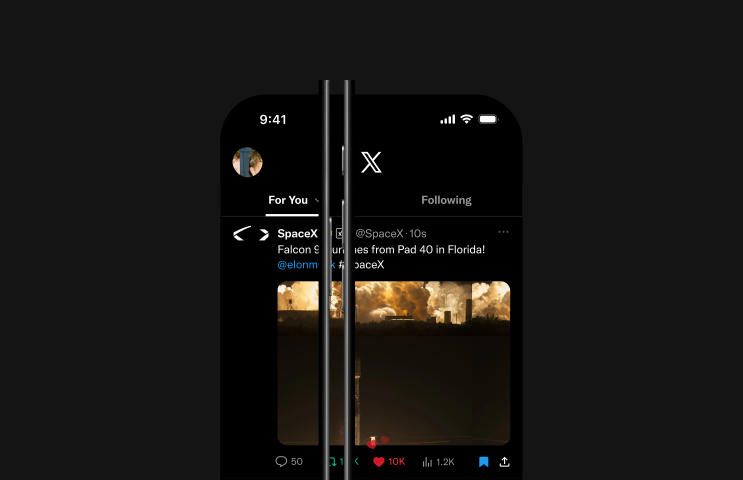
- Tap the more icon on an unwanted recommended post and choose Not interested in this post. X says it uses that choice "as a signal to recommend less of that type of content to you."
- Mute an account you want to keep following but stop seeing. Tap the more icon on its profile or on one of its posts, then tap Mute. Per X's mute help, muted accounts aren't notified, and you can reverse a mute from their profile whenever you like.
- Mute the words and hashtags that keep dragging a subject back. On x.com, open Settings and privacy, then Privacy and safety, Mute and block, and Muted words. Add the word, tick Home timeline, and choose Forever, 24 hours, 7 days or 30 days.
Remove the sources that keep sending them
- Unfollow the Topics you've outgrown. On mobile, tap Topics in your profile icon menu; on the web, open the more menu and choose Topics. Then tap the button beside each Topic you want to drop.
- Untick the interests X has assigned you. On x.com, open Interests from X in Your X data. In the app, go to Settings and privacy, Privacy and safety, Ad preferences and See your X data, confirm your password, then open Interests and ads data and Interests from X.
- Unfollow the accounts that no longer fit. Open Following from your profile and unfollow each one; X doesn't notify the people you unfollow.
Give the ranker something new to learn
- Follow a few active accounts in the subjects you want more of. Like, reply to and repost the posts you'd want again, and scroll straight past the rest.
Each phase covers a gap the others leave:
- Feedback and mutes clean up this week's feed.
- Removing sources stops the same subjects from being fetched again.
- New follows give the ranker better material to choose from.
Does clearing your cache or search history reset the Twitter algorithm?
No. Clearing your app cache or browser data changes what's stored on your device, and wiping recent searches empties the list under the search box.
X ranks For You from data tied to your account.
X open-sourced its For You code in January 2026, and the README lists what the pipeline loads about you before it ranks anything:
- Your recent engagements, which it calls the main input to the model.
- The accounts and the Topics you follow.
- Your blocks, mutes and muted keywords.
- The posts you've already seen.
A device cache isn't on that list, and search history isn't named either.
Your settings travel with the account, too. X's personalization and data help says they apply "whenever you are logged in to that account on any device," not only on the phone where you changed them.
Logging out, reinstalling the app or switching phones brings the same account data straight back.
Neither step will reset your Twitter algorithm. I'd skip both and spend the time on step 1 instead.
Muting a conversation quiets notifications, not the feed
"Mute this conversation" turns up in a lot of reset advice, but it's a notification control. X's advanced muting help says that after you mute a conversation, "you will, however, still see posts from the conversation in your timeline."
Use it for a thread that keeps buzzing your phone. For anything in the feed itself, use Not interested or a mute.
What X's algorithm reads before it ranks your feed
For You is assembled fresh for every request from two pools of posts. In-network posts come from the accounts you follow; out-of-network posts come from accounts you don't follow, picked by retrieval models that match them to your activity.
One model then ranks both pools together.
That split isn't new. This walkthrough of how tweets are ranked covers X's 2023 release of an earlier version, and the diagram from that release starts with the follow graph:
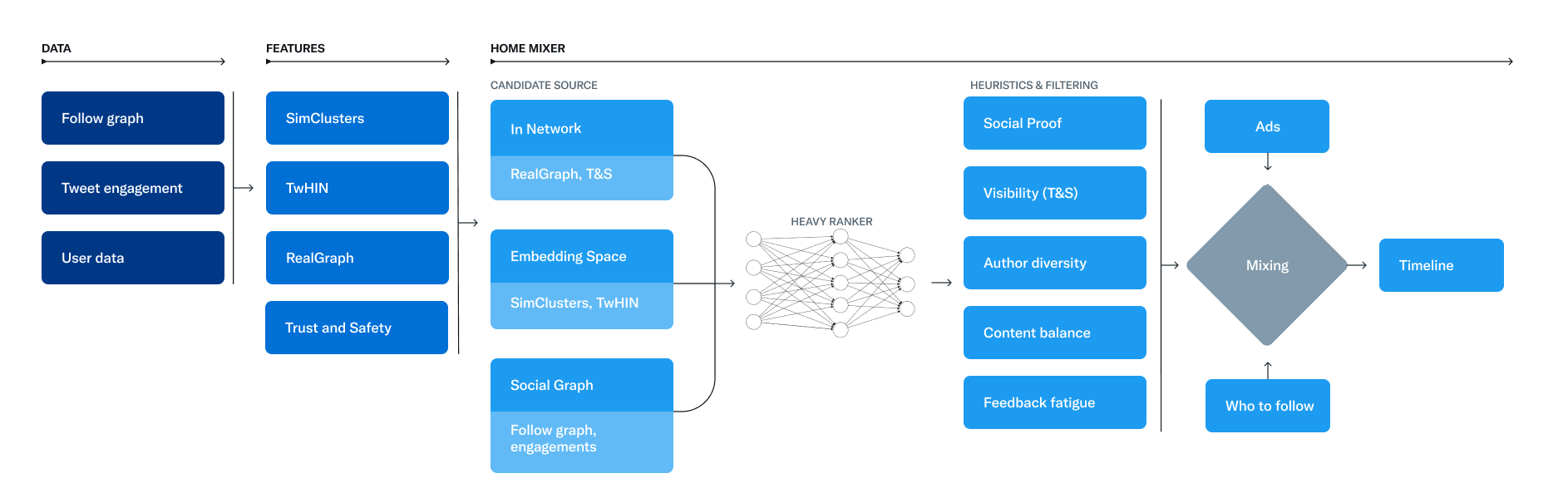
Where your follow list gives posts an edge
The current code adds a detail that diagram doesn't show. Posts from accounts you don't follow are multiplied by a factor below 1, and so are replies and reposts from accounts you do follow. Original posts from people you follow skip that discount.
The same code drops every post older than 48 hours before ranking. The posts themselves turn over constantly.
What carries from one visit to the next is your follow list and your engagement history.
What pushes a post up or down
The ranking model reads your recent engagement history and predicts, for each post, how likely you are to act on it. X's README groups the actions it predicts like this:
- Engagement: like, reply, repost, quote and share.
- Clicks: opening the post, the profile, a link, a photo or a video.
- Attention: dwell time, meaning how long you stay on a post.
- Author: following the person who wrote it.
- Negative: not interested, mute, block, report, and scrolling past without stopping.
The README adds that the weight on each action multiplies your own predicted chance of taking it, which is "substantially driven by your own behavior."
Stopping to read a post you dislike still counts as attention, so the habit to build is scrolling past it or tapping Not interested.
Why your X follow list keeps pulling the old feed back
Your follow list is the one input that doesn't fade on its own, and X's Topics help points straight at it. Even after you opt out of an interest, "you may still see content about a Topic due to other reasons such as following someone who is talking about it."
The pull got stronger in July 2026. X began boosting original posts from mutual follows, the accounts you follow that follow you back, for many users. It logged the change in its notes on the bidirectional follow boost.
Lists count as well. Per X's Lists help, recommendations from the Lists you follow show up in For You too, so open your Lists and stop following any you no longer read.
So an old follow list keeps supplying the subjects you're trying to leave, however many posts you mark Not interested.
Any attempt to reset your Twitter algorithm that skips it tends to fade.
Why pruning follows by hand gets slow on X
The native fix is step 6, and it works one account at a time. X's following help describes a list you can unfollow from, with no documented way to sort it by activity or filter it by subject.
At fifty follows, that's a quick scroll. At a thousand, it means opening profile after profile to guess which accounts still post what you came for.
Finding the Twitter follows behind your old feed
The follows that shape your feed aren't the dead ones. An inactive account posts little or nothing, so it adds little to For You.
The ones worth finding are the active accounts still posting about subjects you've dropped, and the heavy posters that crowd the in-network pool.
X's own list can't separate those from the rest. Circleboom Twitter can.
Its full following-list view lays out every account you follow as a table with post count, join date, follower and following counts, follow ratio and an activity class, and every column sorts. Sorting by post count puts the heaviest posters at the top.
The filter panel then narrows the list by what matters for a feed reset:
- Words in a bio or display name, such as the subject you're leaving behind.
- Profile language, for a feed full of posts you can't read.
- Overactive, inactive, and fake or spam accounts.
- Follower, following and post counts, join date and engagement level.
Say a year of following traders has turned your feed into price charts. Search bios for the coin names, sort the matches by post count, keep the two analysts you still read, and queue the rest.
That keeping step is built in. Before any unfollow runs, you whitelist the accounts you want to keep, and whitelisted accounts stay out of every bulk unfollow.
If you want a record, export the selection as a CSV first, which uses export tokens.
How the unfollows reach X
Nothing is unfollowed until you select the accounts and start the action yourself.
The unfollows then go out gradually, 50 every 15 minutes and up to 800 a day, and Circleboom's own advice is to work in batches of 100 to 150 rather than at that ceiling. When the daily limit is reached, the queue resumes the next day.
An unfollow can't be reversed through Circleboom, so the review step matters. Re-following is done by hand.
Circleboom is on X's official Enterprise developers list, which is why you connect through X's own sign-in. Your password never leaves X, and every unfollow travels through X's API rather than a scraper.
The page to unfollow Twitter accounts you no longer read shows where to start, including the checks for inactive and fake follows.

Which Twitter feed reset fits your situation: a quick decision tree
Match the fix to where the unwanted posts come from:
- If a few subjects keep showing up, mute those words and tap Not interested on the posts.
- If most of it comes from accounts you don't follow, lean on steps 1, 4 and 5.
- If it comes from accounts you follow, mute the ones you want to keep and unfollow the rest, and audit the list first once it runs into the hundreds.
- If you want a clean slate on the same account, the most drastic version is to unfollow nearly everyone, gradually, and rebuild from the accounts you still read.
- If you pay for X Premium and only need a day off from a subject, Snooze Topics hides it on For You for 24 hours.
Whichever branch you're on, the sequence stays the same: feedback first, sources second, new signals last.
The follow list is the slow part, and it's also the part that keeps a Twitter algorithm reset from fading.
→ Unfollow the accounts you've outgrown at the pace X allows, after you've reviewed every one
Twitter algorithm reset questions, answered briefly
How long does it take for the X algorithm to change?
X doesn't publish a timeline. Its ranker reads your recent engagement history and only ranks recent posts, so new habits can show up in the feed quickly.
Interest changes are slower, and X's Topics help warns that they need time to spread through its systems.
Does switching tabs reset the algorithm?
No. X's timeline help says the Following tab displays posts from only the accounts you follow, so it hides recommendations while you're on it.
For You keeps everything it has learned and looks the same when you switch back.
Will deleting my old tweets or likes reset the algorithm?
Not in any way X documents. Its ranker reads your recent engagement history, so what you like this week counts for more than likes from years ago.
Deleting your own posts changes how your account looks to others, a separate question covered in whether deleting tweets affects the algorithm.
Do I need a new account to reset my Twitter algorithm?
Rarely. A new account starts with no follows and no engagement history, but it also starts with no followers, and it learns from your habits the same way the old one did.
Whether you need a new account to reset the algorithm argues for rebuilding the follow graph instead.
)
