

X has no jobs filter in its regular search, so hiring tweets get buried under news, jokes, and replies. For a focused Twitter job search, open Circleboom's Real-time Tweet Search, describe the role you want in plain language (for example "hiring remote product designer"), exclude words like "not hiring," and set a start date. Circleboom collects matching hiring tweets from that date onward, shows who posted them, and lets you follow recruiters, add them to a list, or export the results.
Some of the best job leads never reach a job board. A founder tweets that they need a second engineer. A team lead posts "we're hiring, DM me" with no formal listing. A recruiter shares a role to their followers a day before it goes live anywhere else.
Finding those tweets is the hard part. Type "hiring designer" into X search and you get a mix of hiring posts, people complaining about hiring, memes about job hunting, and replies that mention the word in passing. Change the tab to "Latest" and the stream moves so fast that yesterday's best lead is already gone.
So most people try it once, scroll for ten minutes, and go back to job sites. The tweets were there. They just had no good way to catch them.
With Circleboom Twitter, you can turn a job search into a running search: describe the role, filter out the noise, and let Circleboom collect new hiring tweets from your chosen start date forward. Each result shows the tweet and the account behind it, so recruiters and hiring managers become a list you can follow and contact.
Search phrases that surface real job posts
People do not write hiring tweets the way job boards write listings. They write them like conversations. That is why the wording of your search matters more than any filter. These patterns tend to catch real posts:
- "Hiring" plus the role: "hiring frontend developer," "we're hiring a content writer," "hiring a social media manager"
- Invitation phrases: "join our team," "looking for a," "DM me if you're interested," "know anyone who"
- Role plus work style: "remote data analyst," "hybrid UX designer," "contract video editor"
- Role plus location: "marketing manager Berlin," "nurse hiring Toronto"
- Hashtags people actually use: #hiring, #jobs, #remotejobs, plus a role or industry hashtag
Circleboom's Real-time Tweet Search lets you write any of these in plain language, then refines them into search chips with AI suggestions. Keyword match type, exclude terms, language, and filters for replies, links, and verified accounts help keep the results to actual job posts. If you want more control, Advanced Search lets you build the query yourself.
The data comes from X's official API. Circleboom is an Official X Enterprise Developer, so the search does not depend on scraping pages that can load partially or break when X changes its layout. For a job search, a missed tweet can mean a missed opening.
How to do a Twitter job search with Circleboom
Step 1: Open Real-time Tweet Search and describe the role. Log in to Circleboom Twitter, open Real-time Tweet Search, and type the job you are looking for in your own words, such as "hiring remote product designer."
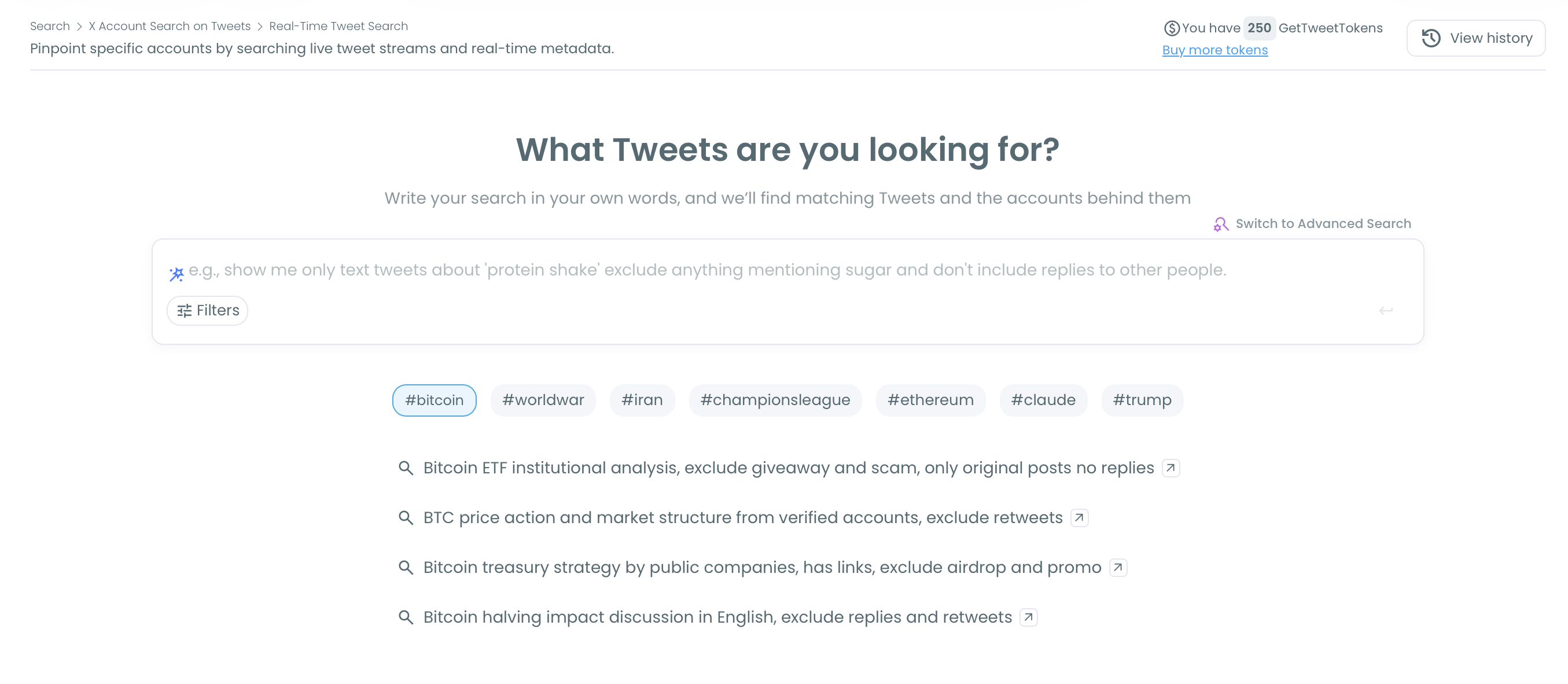
Step 2: Filter out the noise. Pick from the AI suggestions or open Filters. Add exclude terms such as "not hiring," "hiring freeze," or "layoffs," choose a language, and exclude replies so you mostly get original posts. Including tweets with links helps if you want posts that point to an application page.
📌 Run one search per role or location instead of one giant query. "Hiring UX designer remote" and "hiring UX designer London" give cleaner results than both combined.
Step 3: Set the start date. Choose when collection should start. Circleboom gathers matching tweets from that date forward, including new hiring tweets posted after you set up the search, so the list keeps growing as new posts appear.
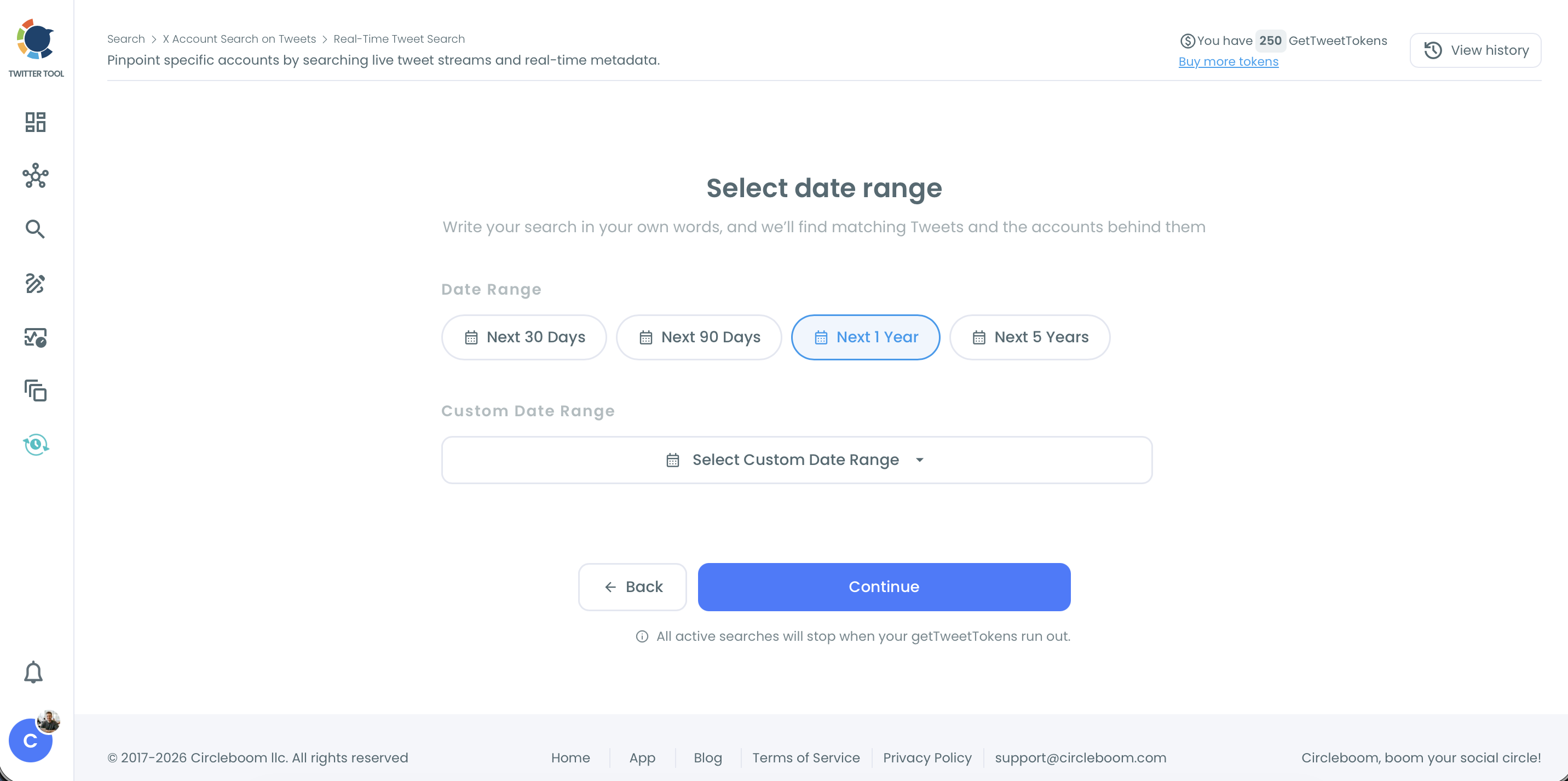
Step 4: Choose how many tweets to collect and review the results. Pick a tweet count and continue. The tweet view lists every matching job post with its text, date, and engagement. Click the link icon to open a post on X and reply or apply while it is fresh. Sort by Created At to see the newest first.
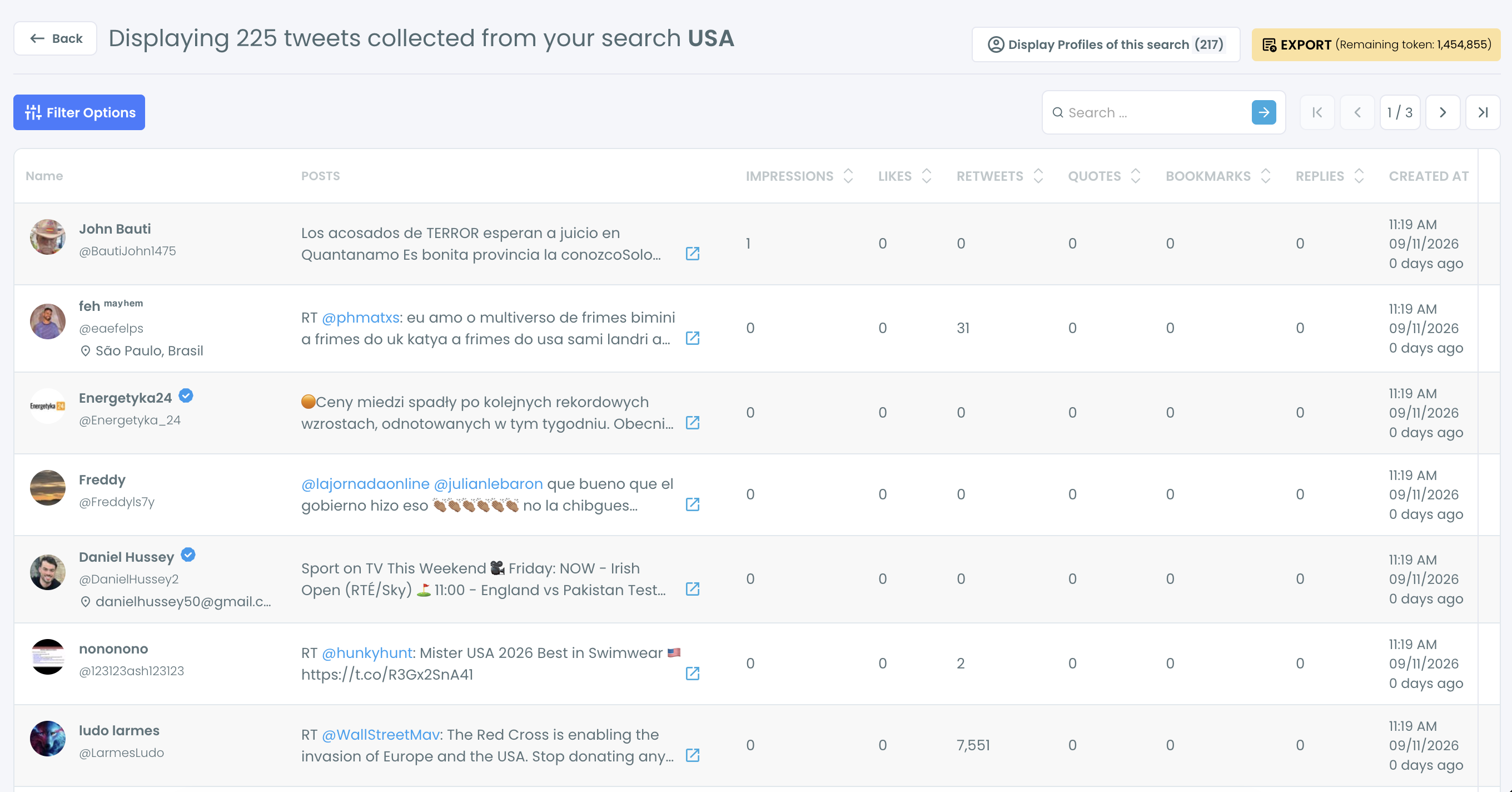
Step 5: Switch to the people behind the posts. Click "Display Profiles of this search" to see each unique account that posted a matching tweet, with followers, tweet count, and join date. Use Filter Options to narrow them down, then follow the recruiters and hiring managers who fit.
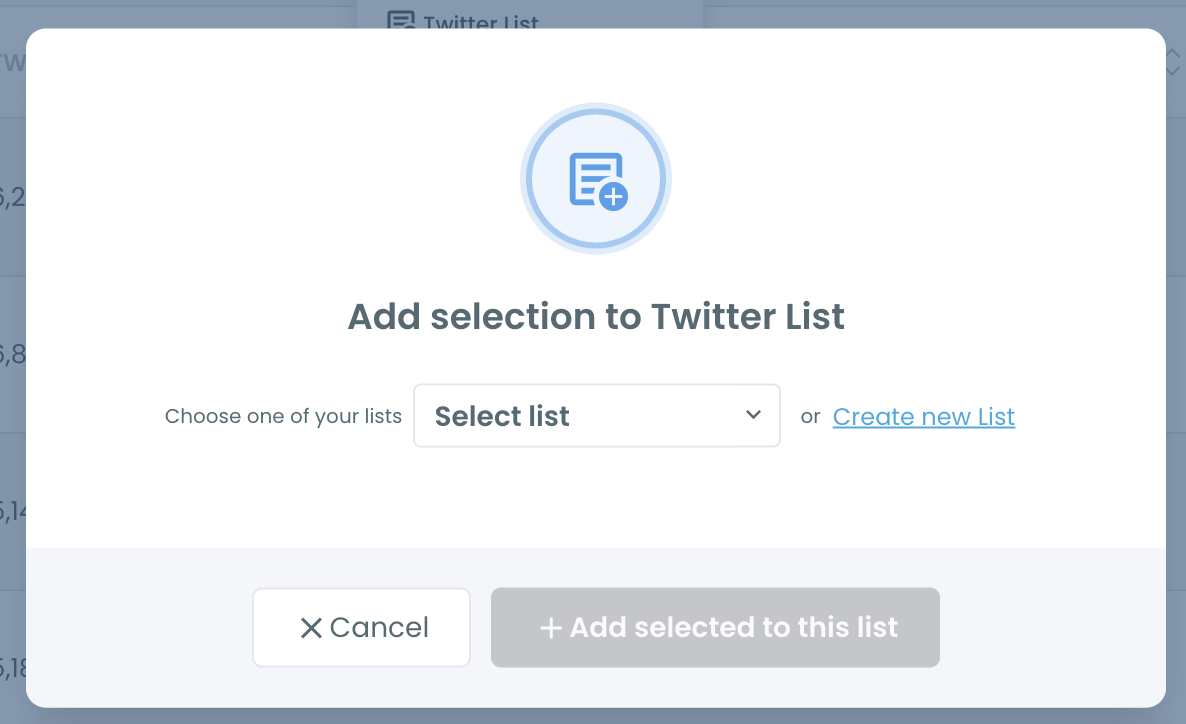
Step 6: Save recruiters to a list and export the leads. Select the accounts you want to keep an eye on, click Add to List, and add them to a private Twitter List of recruiters. Click Export to download the job posts as a CSV and track your applications in a spreadsheet.
Why a Twitter job search on X itself falls short
X search is built around relevance and engagement, not intent. A hiring tweet from a small startup with 300 followers has little chance against a viral joke about job interviews that uses the same words. The "Top" tab rewards engagement, and most real job posts get very little.
The "Latest" tab has the opposite problem. It shows everything in order, but it moves fast and cannot be saved. If you check twice a day, you miss what was posted in between. There is no way to say "show me every new hiring tweet for this role since Monday."
Hiring language is also noisy. "Hiring" shows up in complaints, news about layoffs, hot takes on the job market, and replies. Without exclude terms and filters, the signal gets lost.
📌 Many job posts on X are written by people, not companies. A head of design posting "my team is hiring" will not appear in any company page or job board feed. Searching tweet content rather than company profiles is what surfaces those posts. If you want to search profiles instead, see the best way to search Twitter bios and profiles.
Finally, X has no way to turn a search into a contact list. You can find one recruiter at a time and follow them one at a time. Circleboom's profile view and list actions turn a search into a set of people you can keep track of.
What you gain from searching tweets for jobs
You see openings before they spread. Many roles are tweeted by the hiring manager before they are posted widely. Replying or sending a message early puts you in front of the person making the decision.
You reach the hiring manager directly. A tweet has a name and a face behind it. Instead of submitting into an applicant system, you can reply, follow, and start a conversation with the person who posted the job.
Your feed starts working for you. Following the recruiters and hiring managers you find turns your timeline into a steady stream of relevant openings. Organizing them in a list keeps those posts separate from everything else. Our guide on Twitter lists to follow has ideas for structuring them.
You learn what employers want. Reading a few dozen hiring tweets for the same role shows which skills, tools, and experience keep coming up. That is useful for updating a portfolio or a profile bio.
You can track the market over time. A running search for a role shows how often companies are hiring for it and where. Comparing it with Historical Tweet Search shows whether demand is rising or falling compared to past months.
FAQ
Can you search for jobs on Twitter?
Yes, but X search has no job filter, so results are mixed with unrelated tweets. Circleboom's Real-time Tweet Search lets you search hiring tweets by role, location, and keywords, filter out noise, and collect new job posts from a start date forward.
What should I search to find job posts on X?
Combine "hiring" or "we're hiring" with the role, and add location or work style such as "remote." Hashtags like #hiring and #remotejobs help too. Add exclude terms like "not hiring" to remove off-topic tweets.
Can I find remote jobs on Twitter?
Yes. Add "remote" or #remotejobs to your search along with the role. Running separate searches for each role keeps the results focused.
How do I keep track of new job tweets?
Set a start date in Real-time Tweet Search. Circleboom collects matching tweets from that date onward, including new posts made after the search is set up, so you can come back and see the latest openings.
Can I see who posted the job tweets?
Yes. Click "Display Profiles of this search" to switch to the profile view. It lists every unique account behind the matching tweets, so you can follow recruiters or add them to a Twitter List.
Can I export job posts from Twitter?
Yes. Click Export on the results page to download the job tweets as a CSV, which makes it easy to track where you applied.
Does it include job posts from private accounts?
No. Only public tweets are included. Posts from protected accounts do not appear in the results.
Final thoughts
Job posts on X are real, often early, and often written by the person you would actually work for. The problem has never been whether they exist, but whether you can catch them before they scroll away. Circleboom turns a Twitter job search into a running search that keeps collecting hiring tweets for your role, shows you who posted them, and lets you keep those people close. The openings that never make it to a job board stop slipping past.
Start your Twitter job search with Circleboom's Real-time Tweet Search:

