

A hashtag's past is a dataset, not just a feed you scroll. To find historical data for Twitter hashtags, you query the hashtag inside a chosen date range, pull every public tweet that used it, and then extract the accounts behind those tweets into a structured, exportable list.
Where does the historical data for a Twitter hashtag actually live, and how do you get it?
It lives in X's indexed tweet history, and you reach it through a search built for date-range queries. Circleboom's historical data for Twitter hashtags tool retrieves past public tweets that used a hashtag through official, authorized X access, then deduplicates the authors into an account-level dataset you can filter and export.
→ Pull historical hashtag data with Circleboom
Native X search shows you what is happening now. It does not hand you a clean record of who used a hashtag eight months ago, in what volume, with what engagement. That gap is exactly where most hashtag research stalls, and it is the gap you close when you pull a hashtag's historical data by date range.
Why a Hashtag's History Is Worth Pulling
The reason to dig into the past is that intent and attention leave a dated trail. A hashtag from a product launch, a conference, or a controversy concentrates a specific audience inside a specific window. Reconstruct that window and you can see the conversation as it stood, not as a vague memory.
Most guides on this topic stop at "use `since:` and `until:` in the search box" or "download your own archive." Both miss the point for hashtag research. Your archive only covers your account. The search operators give you a scroll, not a structured dataset, and they will not extract the accounts for you. The accounts are the asset.
That is the shift worth making. The count of mentions tells you a hashtag was busy. The list of accounts behind those mentions tells you who to study, follow, or reach. Circleboom builds that account list from historical hashtag tweets through its Twitter advanced search flow. The research ends with names you can act on, not a number you can only cite.
What You Can Actually Do With Historical Hashtag Data
Pulling the past tense of a hashtag opens a few concrete research moves. Here is where it pays off:
- Reconstruct a past campaign or event to see who participated and how loudly.
- Compare a hashtag's old volume and engagement against its current state.
- Build an account list from everyone who used a niche hashtag in a defined period.
The historical pull is only as useful as the date range you frame it with. A precise window around a known moment beats a broad "last year" sweep every time, because relevance climbs as scope tightens.
The filters do the rest of the narrowing. Beyond the date window, you can set a keyword match type (exact phrase, contains, or partial), add exclude terms to drop noise, pin a language, and set an engagement minimum so low-signal mentions never enter the set. A "From Verified Accounts" toggle and a media-type filter (images, videos, or text-only) tighten it further. Each filter you add before running the search means fewer tokens spent and a cleaner result to read.
This is the kind of retrospective that informs content planning, competitive research, and audience building at once. If you have ever wondered how many people saw a hashtag, the historical view answers the deeper question underneath it: which accounts drove that reach. The same backward-looking method powers deeper studies, like how one analyst exported and analyzed Elon Musk's tweets to find market correlations.
There is a live counterpart to all of this too. A real-time hashtag and keyword tracker watches a hashtag going forward, while the historical pull reconstructs where it has already been.
Used together, they bracket a hashtag's full timeline: where it started, how it moved, and where it stands now. That pairing is what separates a one-time snapshot from a hashtag search and trend analysis you can actually plan around.
How to Find Historical Data for a Twitter Hashtag with Circleboom
To get historical data for Twitter hashtags, you connect your account, open the search built for date-range queries, frame the hashtag and window, and pull the matching tweets plus their authors. The four phases below run this loop through official, compliant API access.
Connect your X account to Circleboom
- Log in to Circleboom Twitter and connect your X account with official OAuth.
Open the Advanced X Search menu
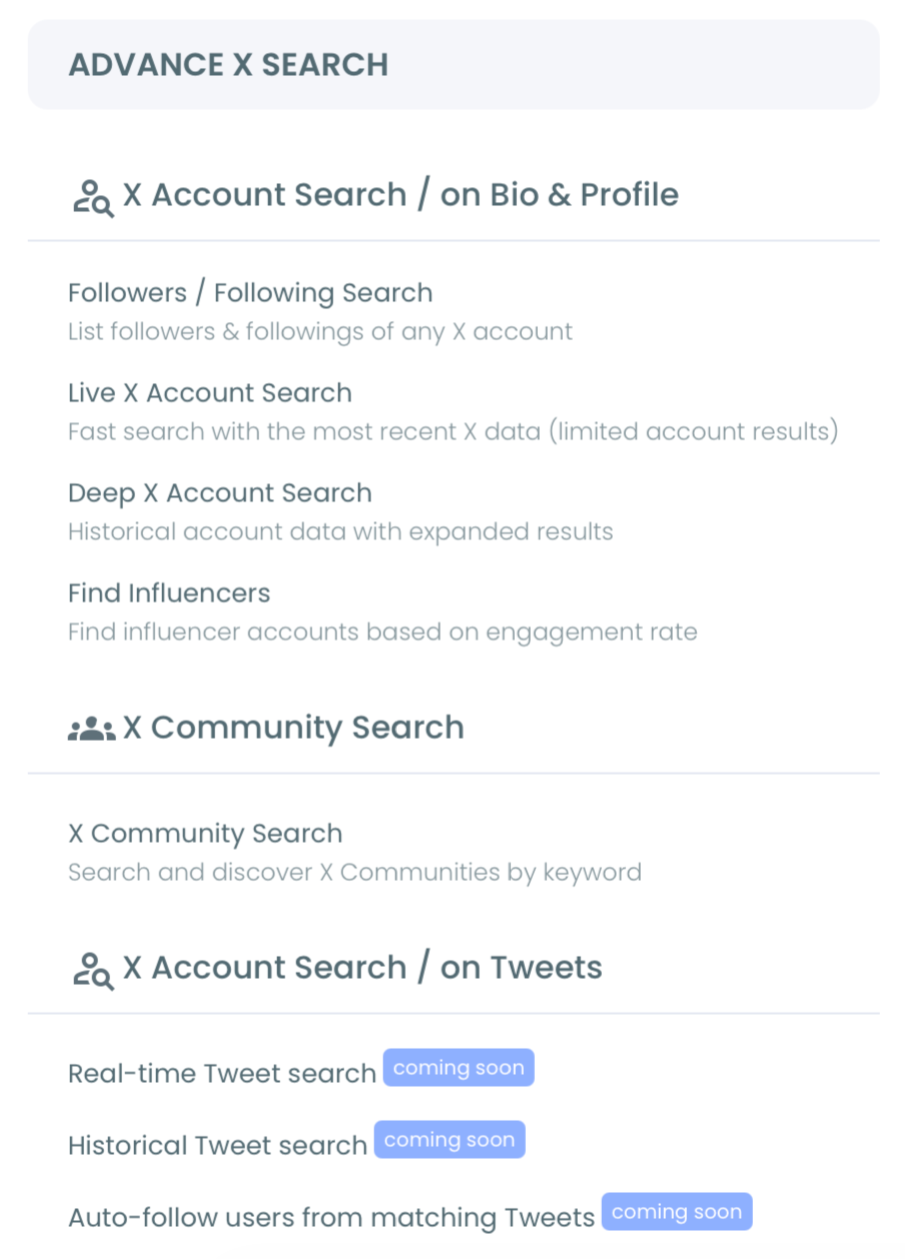
- Open the Advanced X Search menu and select Historical Tweet Search.
Frame the hashtag and the date range
- Write the search in plain language or by hashtag and add filters: keyword match type, exclusions, language, and engagement minimums.
- Select a historical date range from the presets (last 30, 60, 90 days, or one year) or set a custom window around the moment you care about.
Pull the tweets and extract the accounts
- Choose how many tweets to collect and run the search; Circleboom retrieves the matching past tweets.
- Click "Display Profiles of this search" to flip from the tweet list to the deduplicated account view, then filter, follow, or export the results.
That sequence holds up because each phase narrows the next. The login earns official-API access, the date range scopes the dataset before any tokens are spent, and the profile flip converts raw tweets into accounts you can use. Skip the date framing and you drown in noise; skip the profile view and you stop one step short of the real value.
At a glance: connect → open Historical Tweet Search → frame hashtag and window → collect tweets → extract accounts.
Short demo: how a historical hashtag search resolves into a dated tweet set and the accounts behind it.
Why the Data Source Matters Here
Where your historical data comes from decides whether you can trust it. Scraping tools sell partial, unauthorized snapshots that miss tweets and risk your account. Circleboom is an official X Enterprise Developer company and pulls full, safe, official X data through Enterprise APIs, so when you search a hashtag's past tweets the set you receive is both complete and compliant.
That distinction is not a footnote when you are building a dataset you will report on or act against. Incomplete data produces wrong conclusions; unauthorized access produces account risk. The official path avoids both.
It also changes what you can claim afterward. A historical hashtag report drawn from a complete, authorized pull stands up to scrutiny in a way a scraped sample never can. When a stakeholder asks where the numbers came from, "official X access" is an answer; "a scraper that may have missed half the tweets" is not. The data source is part of the deliverable, not just the plumbing.
Every account that lands in the profile view earned its place by something it actually posted, in the window you defined. That is a stronger qualification signal than any bio-based search can give you. And it is only as good as the data pipeline behind it. The full advanced search guide for 2026 walks through the broader query surface this sits inside.
The Mistake That Wastes a Historical Pull
The most common error is collecting tweets, not accounts. A search returns a tweet count, that number looks like the answer, and the pull stops there. It is the wrong stopping point. The tweet count is only the intermediate step; the deduplicated profile view is the deliverable.
Here is why it matters in practice. Suppose you collect 500 tweets for a launch hashtag. Those 500 tweets do not mean 500 people. They might come from 50 accounts that each posted ten times, which means your real participant list is 50 names, not 500. The tweet count inflates a small group into a big-looking number, and only the profile view tells you the truth: who actually showed up.
The fix is one click. After the tweets load, "Display Profiles of this search" collapses every repeat author into a single row carrying follower count, join date, follow ratio, and a quality signal. A second mistake worth naming: treating an old hashtag's accounts as a current audience. Some have since gone quiet, private, or suspended, so review profiles before any bulk follow.
FAQ
Can I get hashtag data from years ago, not just recent tweets?
Yes, within what the X Enterprise API has indexed for the window you choose. You set a custom date range, and Circleboom retrieves the public tweets that used the hashtag inside it. Very old or rapidly deleted content can have gaps, but the past is queryable far beyond the recent feed.
What is the difference between this and downloading my Twitter archive?
Your archive only contains your own account's activity. Historical hashtag search covers every public account that used the hashtag, attaches engagement metadata to each tweet, and extracts the authors into an account list. The archive answers "what did I post"; this answers "who used this hashtag, and when."
Can I turn the historical tweets into a list of accounts?
Yes, and that is the core of it. After the tweets load, the "Display Profiles" view deduplicates every author into a single account list. Each row carries follower counts, join dates, and quality signals, ready to filter, find influencers among, or export.
Does pulling historical data risk my X account?
No. Because Circleboom accesses data through official, authorized X channels rather than scraping, the pull stays inside X's rules. You are reading public data the safe way, which is what this kind of Twitter dataset research depends on.
How many tweets should I collect for one hashtag?
Collect enough to cover the window, not the whole platform. The tweet count you set controls collection size, and collection spends tokens, so a tight date range plus an engagement minimum gets you the meaningful tweets without burning a large balance on low-signal mentions. If the count seems high, narrow the window or raise the engagement floor rather than collecting more.
The Bottom Line
Finding historical data for a Twitter hashtag means more than scrolling old posts. You frame a date range, pull the public tweets that used the hashtag, and extract the accounts behind them into a dataset you can study and act on. Native search and your own archive cannot do that; a date-range search built on official API access can.
The count of mentions is trivia. The accounts behind them are the research.
)
