
On X (Twitter), who follows you matters almost as much as how many people follow you.
Because not every follower is equal.
If you have followers with big follower numbers, your posts can travel way further than you expect. One like. One reply. One repost. Suddenly your tweet lands in thousands of new timelines.
But the problem is simple:
X doesn’t really help you understand who your followers are.
 Fatih Kemal Oksuzoglu
You open your follower list… and you just see usernames.
No follower count.
No “this person has 50K followers.”
No quick way to find the strongest accounts following you.
So if you want to know your most-followed followers, you’re forced to do the worst thing possible:
Check profiles one by one. Manually.
And if you have hundreds (or thousands) of followers, that’s not a strategy. That’s a time trap.
That’s why I started filtering my followers by follower count using Circleboom Twitter, an official X Enterprise developer.

Why Filtering Followers by Follower Count Changes Everything
Follower count isn’t just a vanity metric.
It’s one of the fastest ways to understand:
✅ Who can amplify your content
✅ Who is likely to bring you new reach
✅ Who might be worth engaging with more
✅ Which followers look suspicious or low-quality
When you can sort and filter your followers by follower count, you can instantly find:
- Your top audience
- Your potential partners
- Your hidden influencers
- Your “big accounts” who are already watching you
And that’s powerful.
Because the best followers aren’t always the loudest ones.
Sometimes your most valuable followers are quiet, but they have huge networks.
The Problem: X Doesn’t Show Follower Details in the Follower List
X gives you a follower list, but it’s basically just:
- Names
- Usernames
- A follow button
That’s it.
If you want actual details, you have to click each profile and look for things like:
- Follower count
- Following count
- Activity level
- Tweet frequency
- Account quality
So the moment you ask:
“Who are my most-followed followers?”
 Arif Akdogan
X makes the answer painfully slow.
And here’s the funny part:
Even if you check manually, you’re still guessing.
Because follower count alone doesn’t tell you if the account is real, fake, active, inactive, high quality, or low quality.
You need the full picture.
The Tool I Use: Circleboom Twitter (Official X Enterprise Developer)
To solve this, I use Circleboom Twitter.
It’s a full Twitter/X management tool built for people who take their account seriously, whether you’re a creator, founder, brand, or just someone trying to grow the right audience.
Instead of giving you a basic follower list, Circleboom shows you real follower data that X doesn’t display clearly in one place.
Keep in mind that the API provides a more accurate real-time data stream than the X interface itself. While the platform UI may experience lag, the API captures and reflects new developments instantaneously.
Circleboom has the official Enterpise API, we don't scrape data from X!
With Circleboom Twitter, you can instantly see follower and following details like:
- Follower count + following count
- Follow ratio
- Join date
- Recent tweets
- Account activity
- Fake account signals
- High-quality vs low-quality audience indicators
- Active vs inactive status
So it’s not just “here are your followers.”
It’s:
“Here are your followers, and here’s everything you need to know about them.”
How Circleboom Lets You Sort Followers by Follower Count in Seconds
This is the part I love.
Circleboom doesn’t make you click profiles one-by-one.
It shows your followers in a way that’s actually useful.
You can:
- View your full follower list with detailed stats
- Sort followers by follower count
- Filter them based on quality and activity signals
- Instantly find your top followers
And in seconds, you can see your followers ranked like:
Most-followed → least-followed
Which means you can quickly answer questions like:
- “Who are the biggest accounts following me?”
- “Do I have influencers in my audience?”
- “Which followers can boost my reach?”
- “Are there suspicious accounts in my follower list?”
If you’re trying to grow on X, that type of clarity is gold.
Step-by-Step: Sort Your X Followers by Follower Count in Seconds
Step #1: Log into Circleboom Twitter.
If you don't have a Circleboom account yet, you can create one easily!

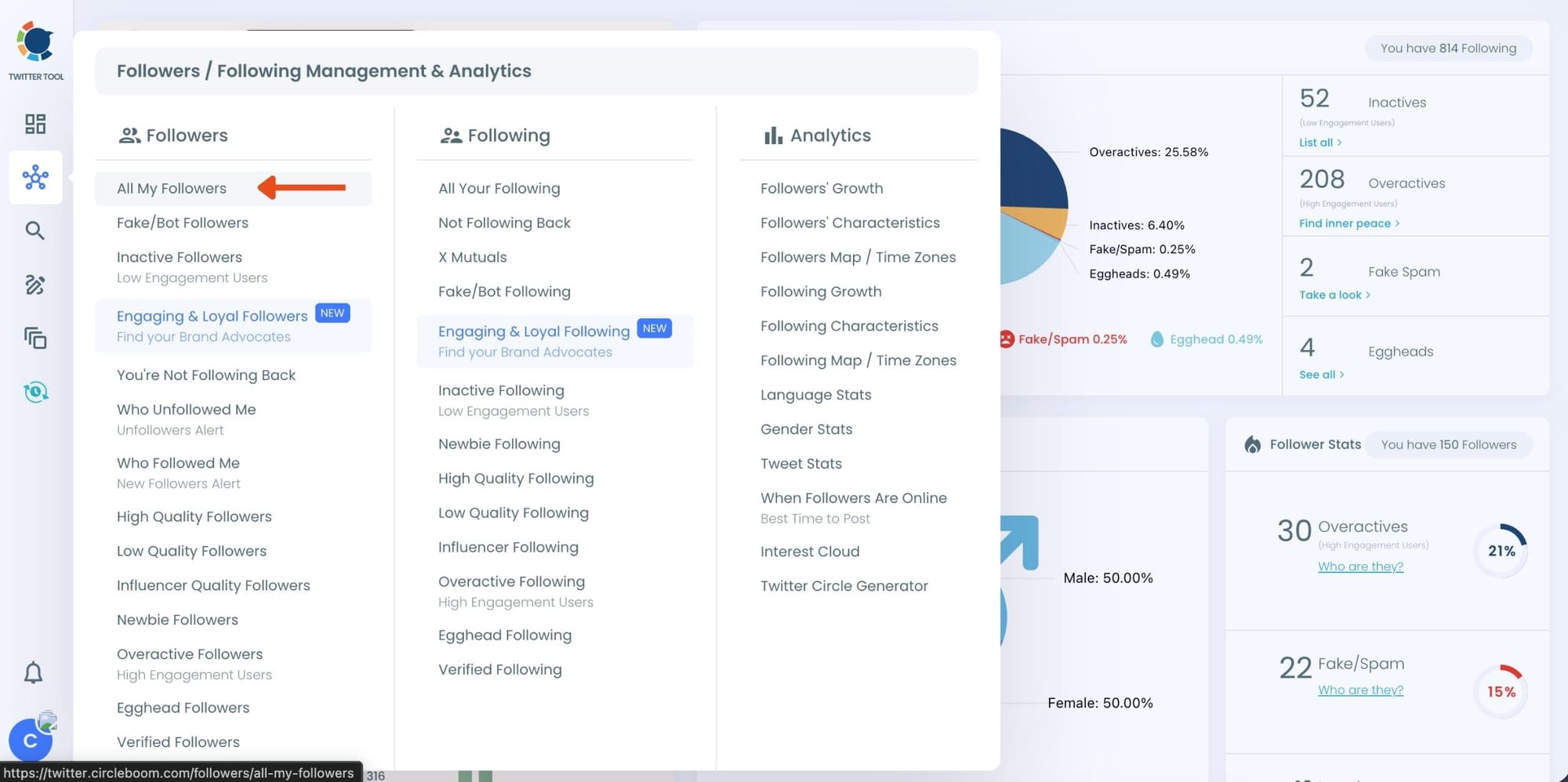
Step #2: Once you are in, go to the left menu and find the "Followers" section.
Then, you should click on "All My Followers" at the top.
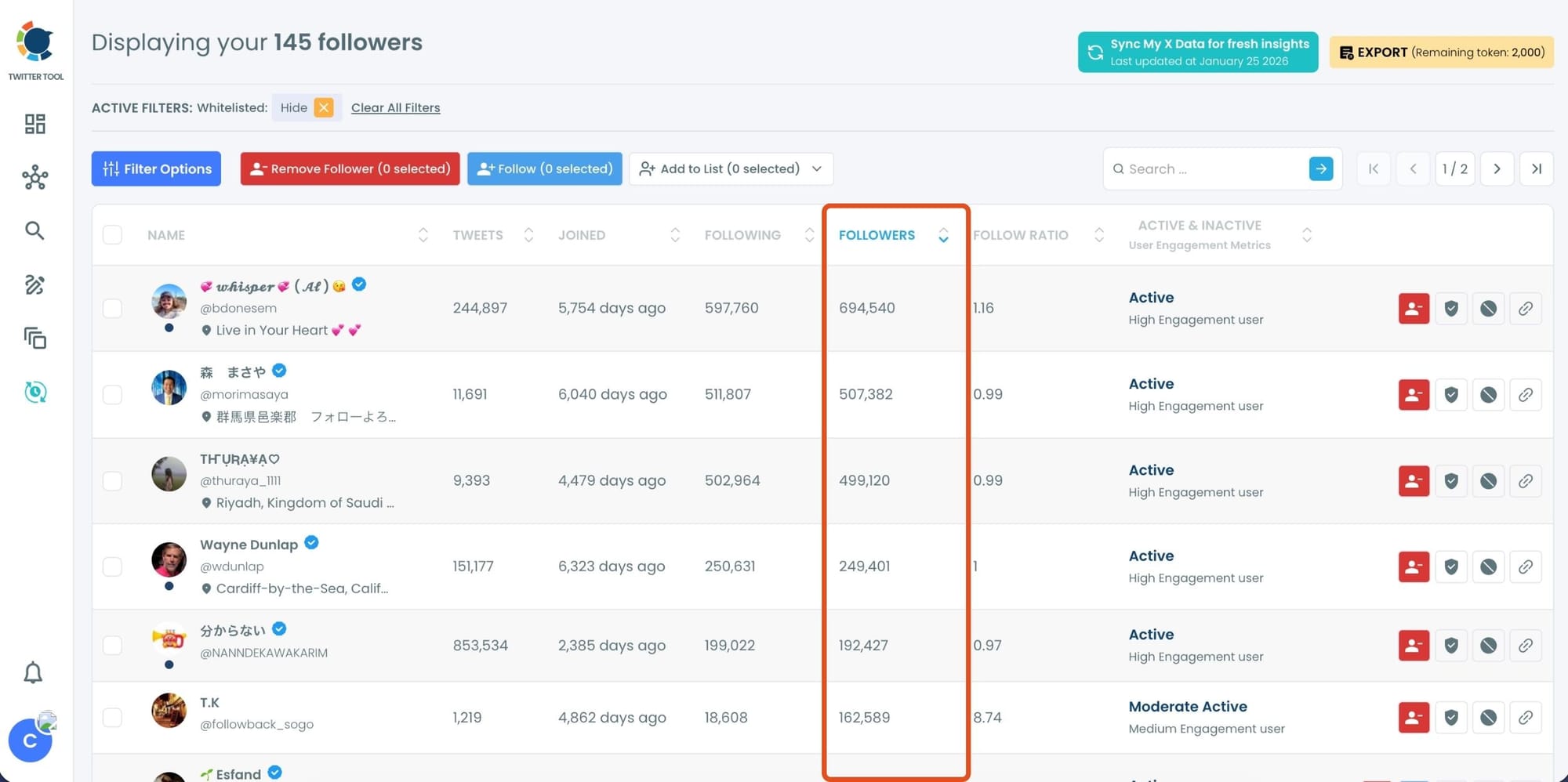
Step #3: You will see all your followers listed here. You can see their tweet numbers, join dates, follower/following numbers, and engagement status.
You can sort them by their follower number.
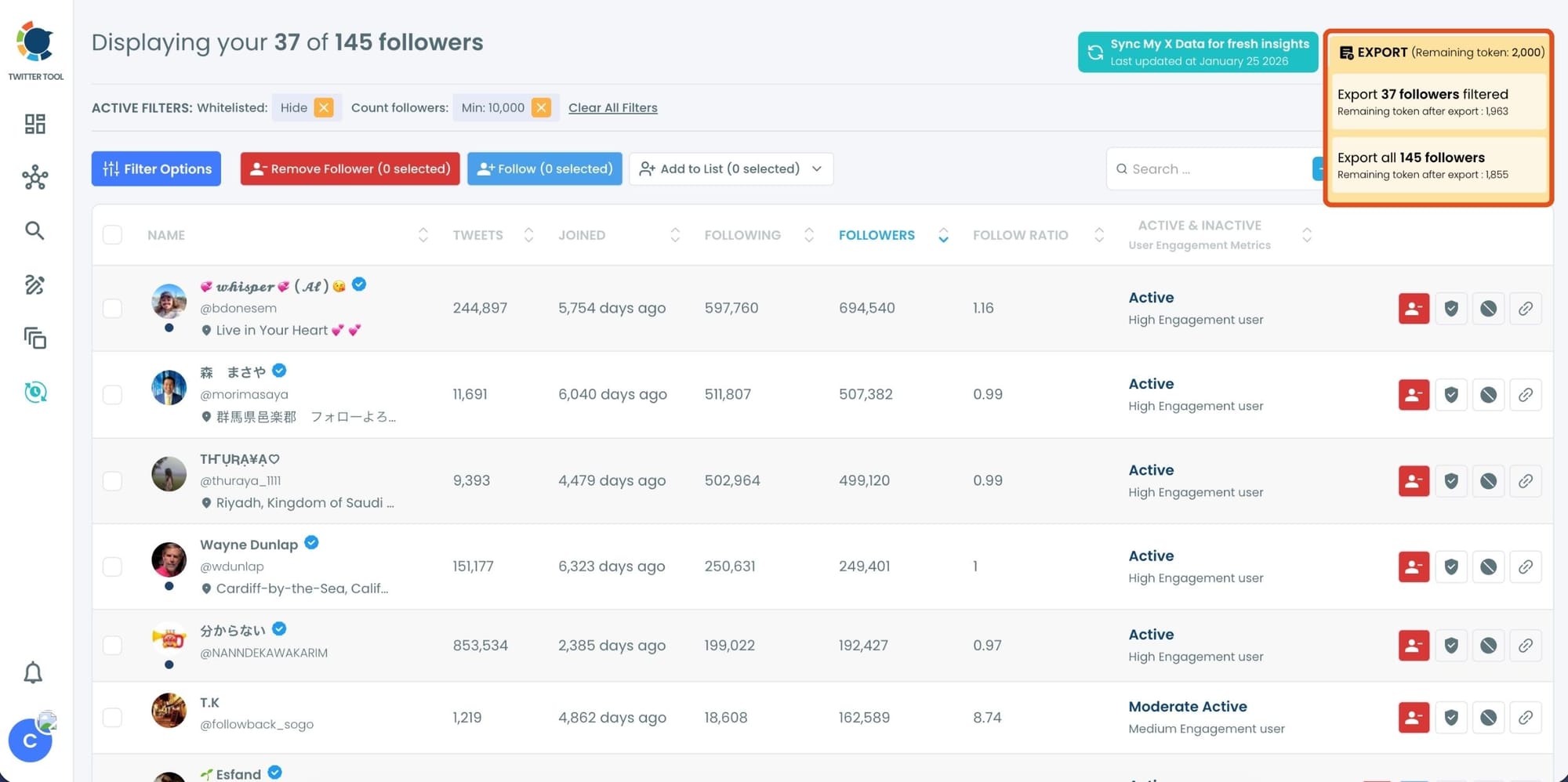
Alternatively, you can use advanced filters on Circleboom and set a minimum follower number to list your followers.
For example, I want to list my followers who have at least 10,000 followers in order.

Step 4: Circleboom will list only followers with at least 10,000 followers, which means your most followed followers on Twitter.
You can check and export your most followed followers to Excel with Circleboom.
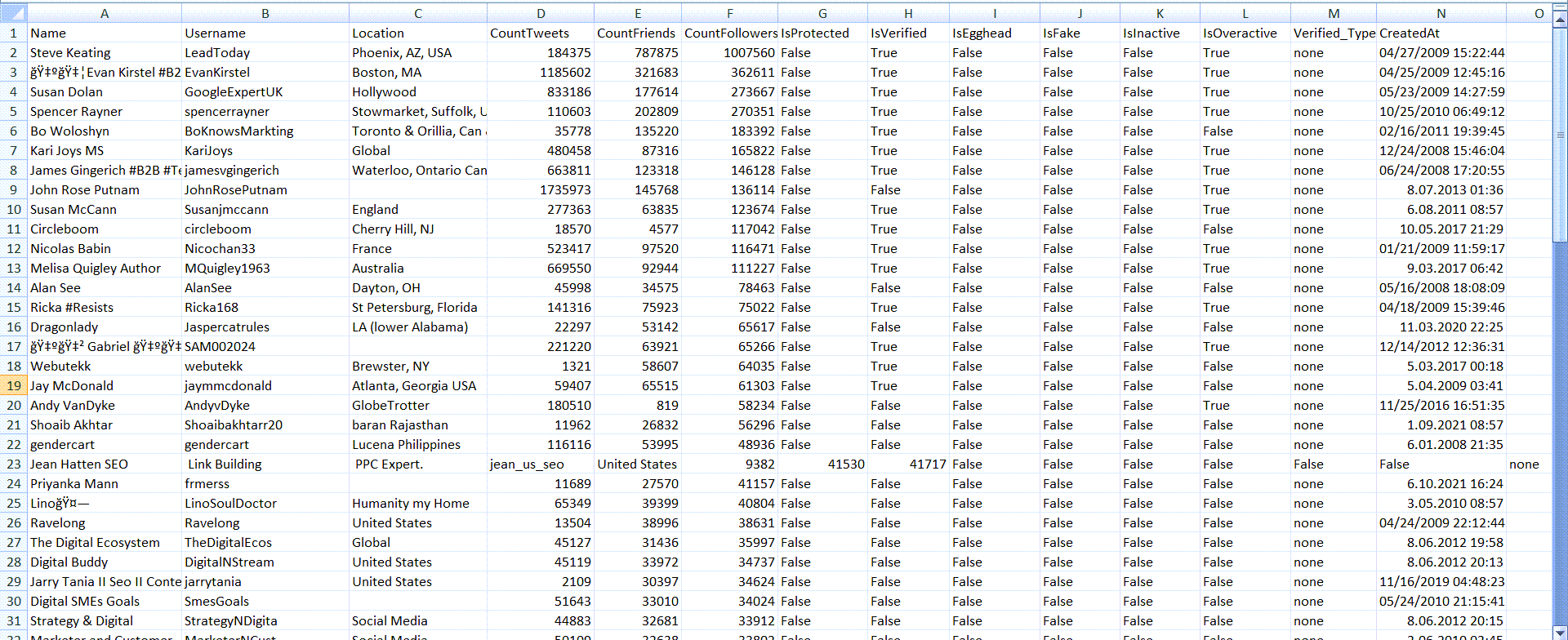
Step #5: My file is sent to my email.
Here is the exported information of my most followed followers on Twitter!
You will find their
- IDs,
- locations,
- follower/friend/list numbers,
- join dates,
- verification dates, etc.
The Real Advantage: You Can Take Action Immediately
Filtering is great, but what makes Circleboom even better is what you can do after you filter.
Because you’re not just looking at a list.
You can actually manage your followers from the same place.
From the follower management screen, you can:
So if you find:
- a low-quality account
- an obvious fake follower
- a spammy profile
- an inactive account that never engages
You don’t need to open new tabs and waste time.
You can handle it right there.
It becomes a complete “audience control center.”
What This Helps You Do on X (Real Use Cases)
Once I started filtering followers by follower count, I noticed how useful it is for different goals.
1) Find high-value followers (your amplifiers)
If someone with 50K+ followers follows you, that’s not random.
Even if they don’t engage every day, they can still:
- boost a post
- open new reach
- attract other followers
- increase your credibility
2) Prioritize the right people
Most people treat every follower equally.
But engagement is easier when you focus on:
- real people
- active accounts
- high-quality profiles
- strong network connections
Filtering helps you stop wasting energy.
3) Spot fake followers faster
A lot of fake accounts have weird patterns:
- strange ratios
- low-quality profiles
- suspicious activity
- no real tweet history
Circleboom flags these signals so you don’t rely on follower count alone and allows you to remove all your fake followers.
 infocircleboom.com
4) Clean up your audience without guessing
If you want a healthier audience, you need to know who’s there.
Filtering is the fastest way to see what kind of crowd you’re building.
Final Thoughts: Your Follower List Is Not Just a Number
Most people on X focus only on growth:
“How do I get more followers?”
But the smarter question is:
“Who are my followers?”
Because if you have followers with big follower numbers, you already have reach sitting inside your audience.
You just need a way to find those people quickly.
And since X doesn’t show follower details directly in the follower list, doing it manually is slow and frustrating.
That’s why Circleboom Twitter is the easiest way to handle it:
It shows you full follower details, helps you filter and sort by follower count, and lets you follow, unfollow, remove, or block accounts from the same dashboard—fast.
Once you try it, you realize:
Follower count isn’t just a metric. It’s a shortcut to understanding your audience.
)