
Presume a tweet was sent years or maybe just months ago; it is no longer in context when you or someone else looks at it. When looking back at somebody’s timeline from years ago, it is impossible to say what topics were common, what the political climate was like, or what everyone was pretending to be outraged about.
Twitter (now X) is an outpouring of emotion in response to a stimulus. On the other hand, the tweets persist after the stimulus has faded; they become jokes no one else understands.
Want to find out how to delete all your tweets at once? If you feel like that and need to clean up your profile or business profile, this article will provide some tactics for deleting all your tweets (posts) at once.
There are several points you need to consider if you consider deleting all your tweets:
- Have you ever sent a tweet that was offensive to someone you know or a group of people? Delete these tweets if you do not want to get in trouble later.
- Has someone else posted from your Twitter account and made a mistake? Maybe it was a coworker or a friend, and now that tweet isn’t enough? That is a good enough excuse to get rid of it.
- Are you spreading misinformation on Twitter? If you have posted it mistakenly, retweeted it, or shared information that you assumed was accurate but then debunked, you need to remove all misinformation.
 Onur Ciddi
Twitter says there is no way in its app to delete tweets in bulk; you can only remove them one by one.
Also, they suggest that if you want to start over with your Twitter account without losing your username, the easiest way is to make a new account with a temporary username.
What about trying Circleboom’s delete tweets feature?
If you want to remove any of your Tweets, such as those containing a particular word or those from prior years, Circleboom's Delete Tweets feature will show the last 3,200 tweets in a single dashboard. And, if you have more, you can delete all your tweets, retweets, likes, on the same dashboard!
Keep in mind that the API provides a more accurate real-time data stream than the X interface itself. While the platform UI may experience lag, the API captures and reflects new developments instantaneously.
Circleboom has the official Enterprise API, we don't scrape data from X!

How to Delete all Tweets at once?
Follow the instructions below to delete your retweets and tweets with Circleboom:
Step 1: Go to Circleboom and connect your account. Visit Circleboom Twitter and log in or create a free account. Connect your Twitter or X account by authorizing Circleboom through Twitter's official OAuth flow.
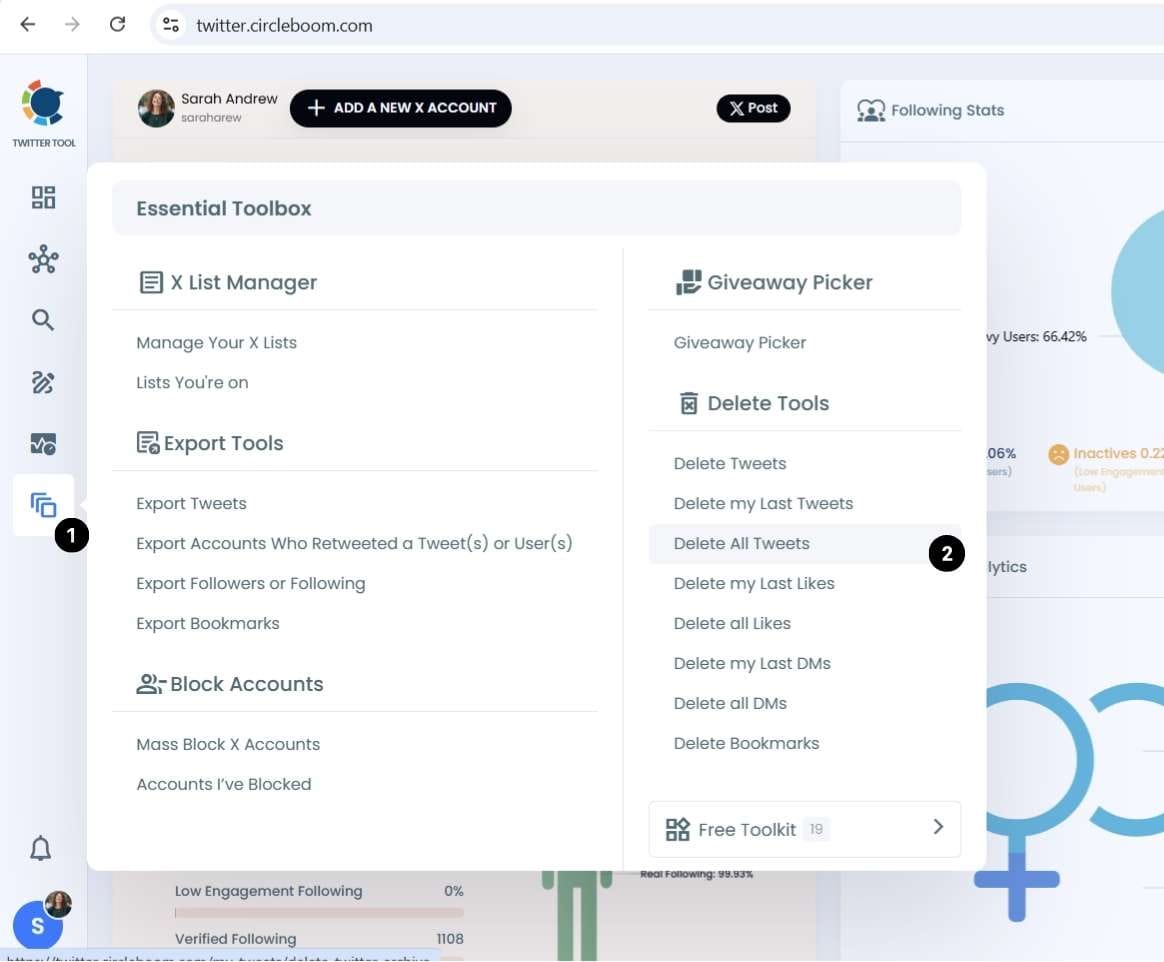
Step 2: Navigate to the Delete Tweets section. From the left-hand menu, find "Essential Tools" and click on "Delete All Tweets."
Step 3: Keep in mind that if you have more than 3200 tweets, you need to upload your tweet.js file (your tweet archive file) and you should download it before from X itself. You can find out here ⬇️ how to download your Twitter (X) Archive
 Kevin Frank
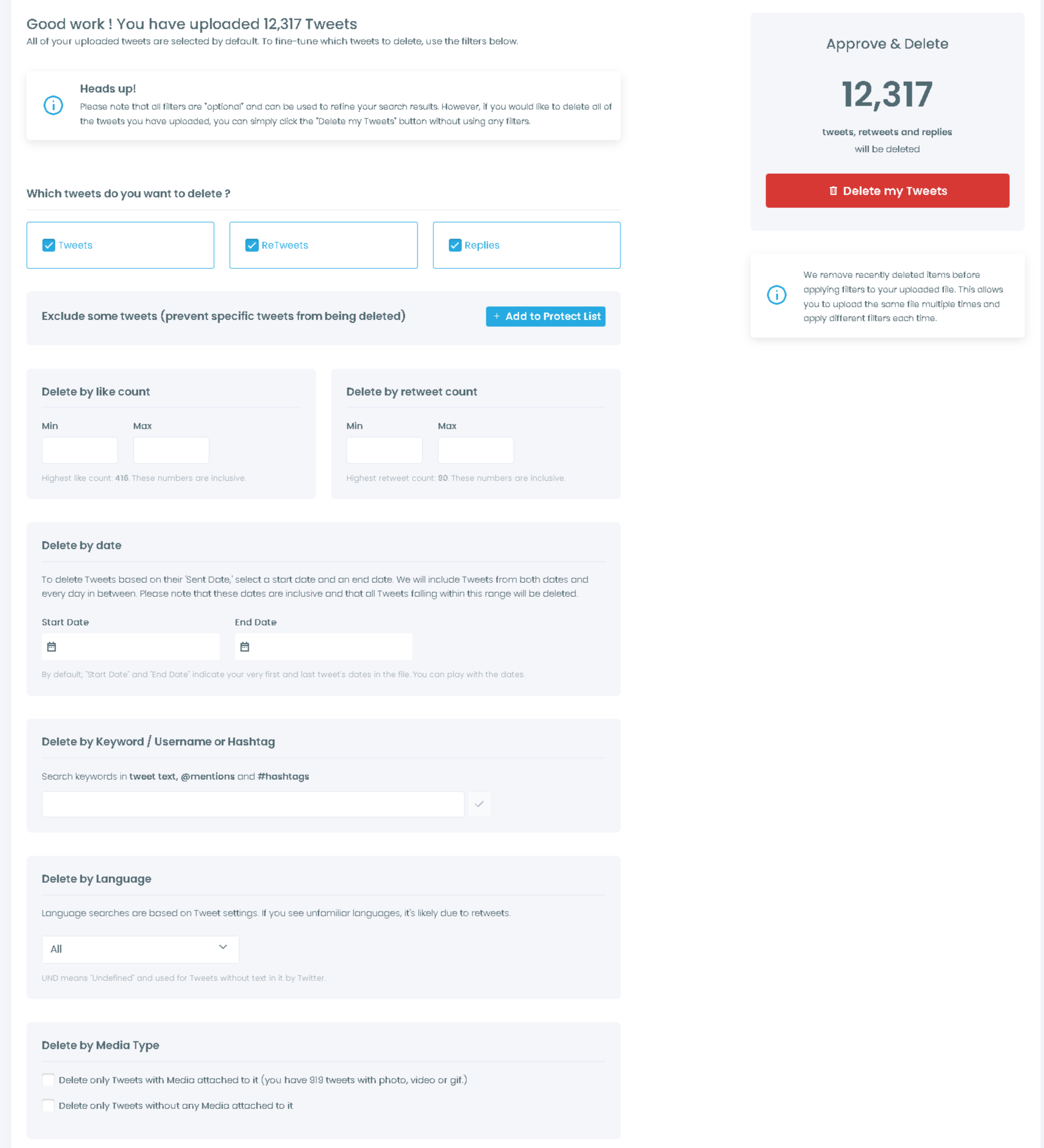
Choose your deletion method. You can delete everything at once using the mass delete option, or apply filters before deleting. Filters include date range, keyword, language, and engagement level. If you want to save specific tweets before deleting, you can mark them as favorites first.
Step 4: Confirm and execute. Once you have set your preferences, confirm the deletion. Circleboom processes your tweets in batches, respecting Twitter's rate limits, so the process runs automatically without any risk of triggering account restrictions.
Step 5: Done. Your selected tweets are permanently removed from your Twitter timeline. This action cannot be undone, so take a moment before confirming if you have any doubts.
How to delete tweets at once by date?
Remove all tweets from a specific day, month, or year with a grid power search.
When you are ready to delete all tweets by date, you should follow the steps below:
- Open the Delete Tweets dashboard from the Essential Tools menu bar again.
- Enter the date in the grid power search on the right to search for tweets from that date.
- Circleboom will show you a list of all your tweets from that date. You can choose the tweets you want to delete by year by clicking “Delete Selected.”
Is there a way to delete all tweets, even for older tweets?
Yes, indeed!
If you need to delete old tweets in one shot or filter and then delete them, you may use Circleboom’s Twitter archive eraser. In this way, you can list older tweets (older than the last 3,200 tweets).
For this, you must have your Twitter archive file downloaded from the Twitter data center beforehand. You can look at our guide on how to download the Twitter archive before following the steps below.
 Kevin Frank
How to delete old tweets via Twitter Archive Eraser?
Step #1: Once you’ve downloaded your Twitter archive, you’ll now have to log in to the Circleboom portal.
It can take a few seconds to link your Twitter account for this.
Step #2: From the Circleboom dashboard, go to the left-hand menu and find "Essential Tools" and then "Delete All Tweets"
After that, you will automatically see the dashboard, where you can uninstall all of your posts, retweets, and Twitter media.
Step #3: You’ll see the Delete your Archive screen, which summarizes the bulk Tweet deletion method.
You can see the guidelines of Circleboom’s Twitter Archive feature as described before starting too.
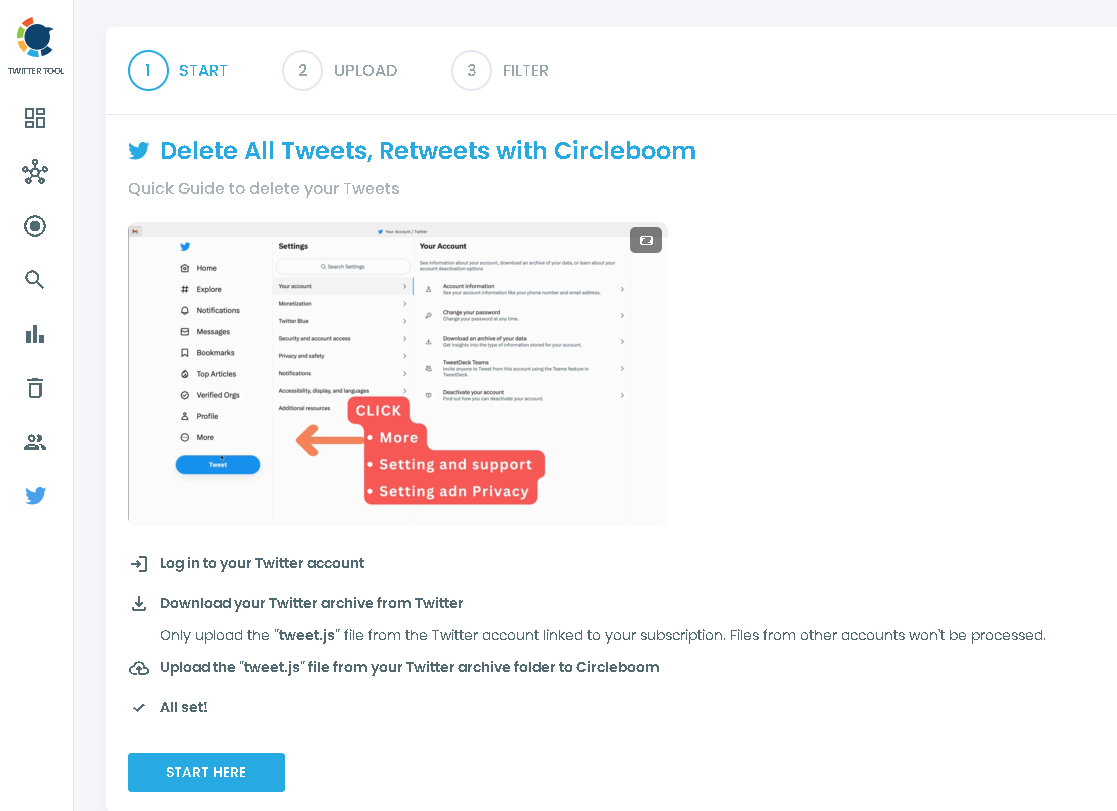
Step #4: Search for the “tweets.js” file in your Twitter Archive file that you received from Twitter.
"After unzipping" the Twitter archive file, search for “tweets.js.”
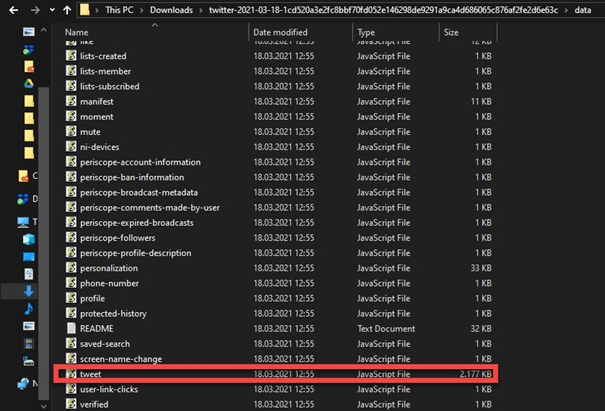
Step #5: Import the “tweets.js” file to the dashboard.
All of your Twitter history will be shown in seconds after the upload is completed.
Tweets, retweets, and replies are examples.
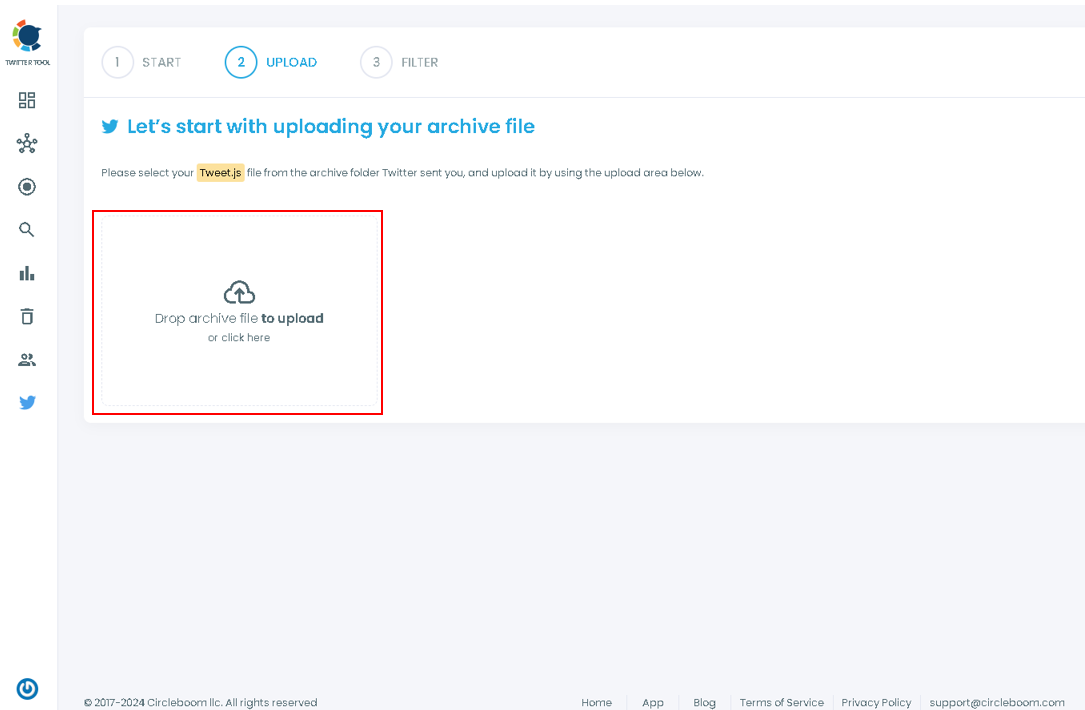
Step #6: Lastly, to remove all tweets, go to the dashboard. You can filter them by date, language, and any keyword.
Also, you can choose to delete tweets, retweets, and replies to delete in bulk at the top of the selections.
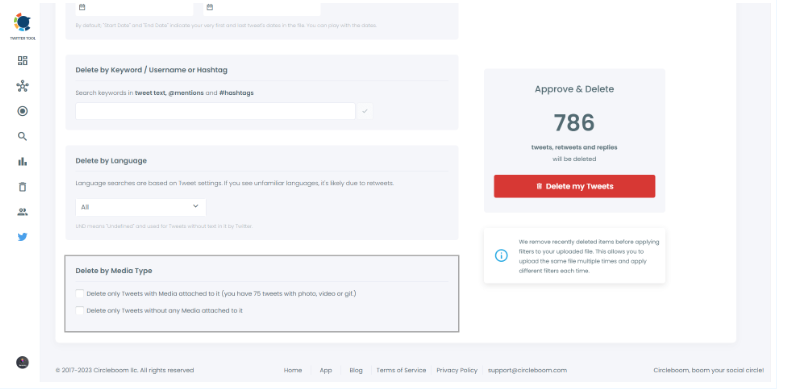
If you want to keep Tweets and Retweets containing any media, choose “Delete Only Tweets Without Any Media Attached” at the bottom of the list or vice versa if you wish to delete tweets with media attached.
Zeynep Morelli
Bonus Feature: Delete Retweets in bulk with Circleboom!
Deleting retweets(reposts) with Circleboom has the same steps as described above.
Also, you can to Delete Retweets page, delete your first 50 retweets for free and then continue to delete more.
You can delete all retweets in bulk up to 3,200 items, filter them by age and language, and then delete selected retweets.
Final Thoughts
Circleboom simplifies a time-consuming process, and if you value your time, it is one of the best options for deleting tweets in bulk. Circleboom also allows you to delete Twitter likes.
When you use the Twitter archive to remove all of your posts from Circleboom, they are permanently deleted. So, before you settle and proceed, please be careful.
All Twitter users on the pro, multi, business, and corporate plans can access the remove Twitter archive feature. To start using Circleboom immediately, learn about the plans and pricing and subscribe.