

A personal brand on Twitter asks for one thing that is hard to keep up: a steady run of posts on one subject, all in the same recognisable voice. Most people have the ideas. What runs out is the time to turn each idea into a post that still sounds like them.
The steps below take you from choosing a topic to publishing a first thread, with the writing bottleneck removed.
By hand: every post starts from an empty box, and the voice drifts as the volume goes up. With Circleboom: AI Writer drafts X posts in your own style on Twitter from your tweet history, over X's official Enterprise APIs, and you approve each one before it goes out.
→ Twitter personal branding
Seven steps, three phases, and one table that tells you which post structure to pick.
Why a personal brand on Twitter stalls after the first few weeks
Twitter personal branding stalls when the effort of writing each post is higher than the reward of publishing it. The plan was sound. The production line was missing.
The pattern I see most often has three stages:
- Week one: a burst of careful posts on the chosen subject.
- Week three: shorter, vaguer posts, written late and in a hurry.
- Week six: reposts of other people's ideas, or silence.
Nothing went wrong with the strategy. The writing cost too much per post.
The usual fix makes it worse. People hand a bare topic to a general-purpose AI tool and publish the first result. The posts are tidy and carry no trace of the person behind the account.
A brand depends on that trace. If a follower cannot tell your post from the next account's, the count of posts does not help you.
So the task has two halves. You need to cut the cost of each post, and you need to keep the voice fixed while you do it.
Circleboom's X Post Planner is where both happen. It is the page to start from if you want to build a personal brand on Twitter without writing every line from scratch.
What does a personal brand on X need before the first post?
A personal brand on X needs three things in place: a narrow subject, a consistent voice and a small set of post formats you can repeat. Everything else is polish.
Here is what each one means in practice:
- Subject: one field, narrow enough that a stranger can say what you post about.
- Voice: the tone, vocabulary and sentence habits that make a post sound like you.
- Formats: the shapes your posts take, such as a one-liner, a list or a thread.
Your profile should state the subject as well. If you post as a professional or a business, X's page on Professional Accounts explains what that account type requires and what it adds to a profile.
The subject comes first, because the other two depend on it. The next section covers how to choose it with evidence.
Which topics should you build your personal brand on Twitter around?
Build on the two or three topics where your knowledge and your followers' existing interests overlap. Your own expertise gives you half of that answer. Your audience holds the other half.
Circleboom's Interest Cloud supplies the audience half. It extracts the topics your followers discuss most often and shows them as a word cloud, so you can see what they care about before you commit to a subject.
The feature is described on the page for interest targeting on Twitter.
Before you move on to writing, have these in hand:
- Two or three topics that appear in the cloud and that you can speak on with authority.
- One topic you will stop posting about, because it appears nowhere in the cloud.
- A sentence for each kept topic that says what your angle on it is.
That third item is the one people skip. A topic is shared by thousands of accounts. An angle is yours.
Circleboom's own analytics workflow treats these topics as content pillars to be tested. The order is Interest Cloud first, then a post idea for each pillar, then a look at which posts earned engagement. A pillar that draws no response after a fair run gets replaced.
Choose topics from the overlap, then let results confirm them. Guessing alone gets you a brand only you are interested in.
How Circleboom's AI Writer matches the post structure to the job
Circleboom's AI Writer generates a complete X post from a short description of your idea, in a writing style you select before generating. It sits inside the X Post Planner and works as a chat, so you can refine a draft with follow-up instructions.
The style you select decides whether a post sounds like you. AI Writer offers five:
- My Style
- Minimalist (One-Liner)
- Listicle
- The Hook & Bridge
- Contrarian Split
My Style is the voice setting. It analyses the connected account's past tweets and writes the new post with the same tone, vocabulary and sentence structure. The other four are structures. Each arranges the idea in a different shape.
Pick the structure by what the post has to do
Most people pick a structure by mood. The better method is to decide what you want the post to do, then pick the structure built for that job.
| What the post should do | Structure to select | Why it fits |
|---|---|---|
| Get saved for later | Listicle | Breaks the idea into discrete points; list posts tend to earn bookmarks. |
| Stop the scroll | The Hook & Bridge | An opening line built for curiosity, then a line or two that pays it off. |
| Invite replies | Contrarian Split | States a common assumption and challenges it, which prompts reactions. |
| Be quoted | Minimalist (One-Liner) | One sentence, with the idea cut to its sharpest form. |
| Sound like you on an ordinary day | My Style | Modelled on what your account has already published. |
Use My Style as the default voice, and switch to a structure only when a post has a specific job to do.
That rule keeps the brand steady. A reader meets the same voice most days, with a list or a contrarian take arriving when the idea calls for one.
Why the tool is safe to connect
Circleboom is an official X Enterprise Developer company. You connect your account through X's own authorization, and the tool works inside the platform's rules, so the account stays compliant while you draft.
The writer is powered by a ChatGPT integration built into Circleboom. Compared with pasting prompts into a separate chatbot, you get style selection, a live preview of the post under your own profile, and a direct path to scheduling.
Where your own editing still matters
No structure replaces judgment. AI Writer's drafts can carry a wrong fact or an off tone, and you are responsible for what goes out under your name.
The craft side of that edit is the part no tool does for you. It is covered in this post on how to be a better writer on Twitter.
With the structure question settled, growing a personal brand on X becomes a short routine you repeat for each post.
Full tutorial on screen: AI Writer generating X posts in an account's own voice, the same flow as the steps below.
How to build a personal brand on Twitter with AI Writer, step by step
Building a personal brand on Twitter with AI Writer takes seven steps in three phases: reach the writer, set the voice and structure, then review and publish. The whole run is short enough to repeat for every post.
Reach AI Writer inside the X Post Planner
- Log in to Circleboom and connect the X account you are building the brand on.
- Go to the X Post Planner menu. Writing, planning and post analytics all sit under it.

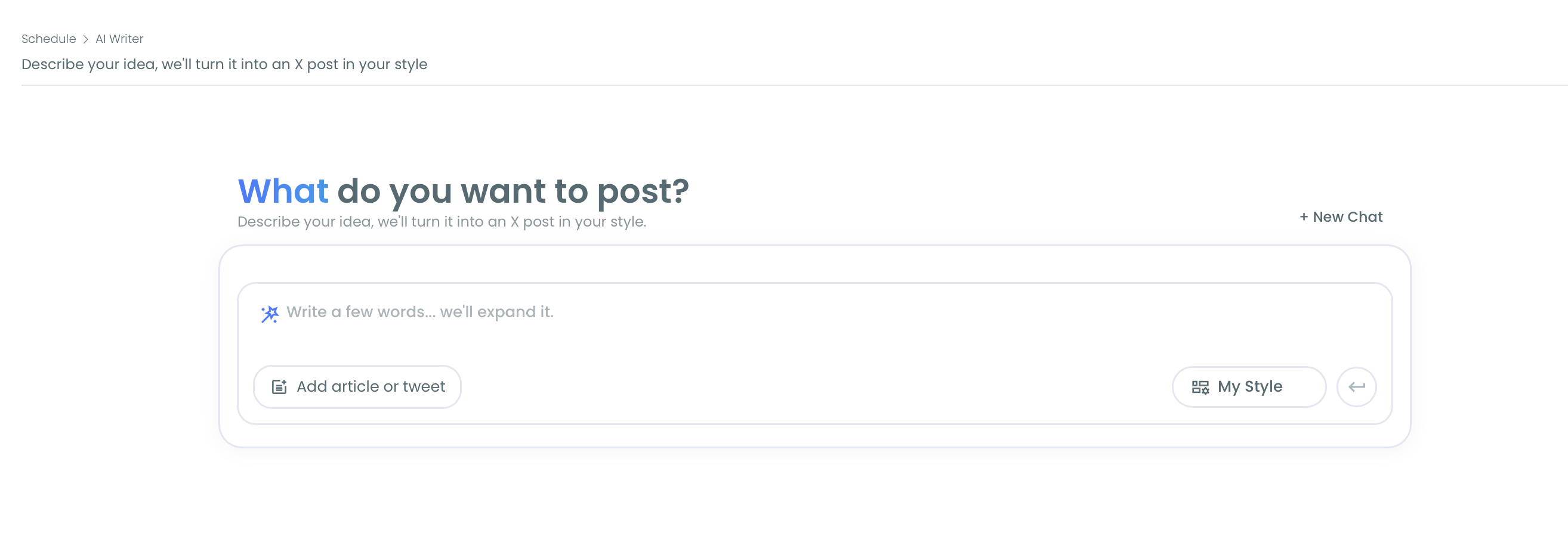
- Open AI Writer from the sidebar. The start screen asks "What do you want to post?" and shows one input box with two buttons under it.
Set the voice and the structure before generating
- Select a style in the My Style dropdown. Leave it on My Style for everyday posts, or pick the structure from the table above. Set it now, because changing style after a draft exists means generating again.
- Describe the post in the input box and submit it with the arrow button. State the intended reader, the point and any fact or example the draft must keep. A direction such as "why to-do lists fail and what to use instead" beats a bare topic.
Review, personalize and publish
- Refine the AI Result, then click Use Post. Type a small instruction into the Improve or give feedback box, such as "make it shorter", or use the regenerate icon for an alternative. Use Post loads the draft into the full planner panel.
- Add a personal detail, check the preview, and choose Queue Up Next, Post Now or Schedule. The preview shows the post as it will render on X. A draft never goes live until you take one of those three actions.
This sequence works for a personal brand because the voice and structure are fixed before the AI writes, and your own detail and approval come after it. The AI fills the middle and never the ends.
The run, compressed:
- Log in and open AI Writer under X Post Planner.
- Pick My Style or a structure.
- Describe the idea with reader, point and facts.
- Refine, then Use Post.
- Add your detail and publish or schedule.
How to turn an article or newsletter into a Twitter thread
To turn an article or newsletter into a thread, add its URL with Add article or tweet in AI Writer and ask for a thread. AI Writer reads the page and restructures it into a sequence of tweets.
Single posts set the voice. Threads show depth, and depth is what earns the "expert" half of a personal brand. Material you have already written is the fastest source.
AI Writer accepts three kinds of source:
- An article or web page URL.
- Pasted text, such as notes, a draft or a newsletter section.
- The URL of one of your own tweets, to be expanded.
You can state the number of tweets in the prompt or let AI Writer choose. As an illustration, a 1,500-word blog post can become a 7-tweet thread with the link in the last tweet.
Circleboom's landing page for this workflow is the Twitter thread maker.
Limits to know before you paste a link
Four limits decide whether the thread comes out complete:
- A thread is capped at 25 tweets.
- The URL must be publicly accessible; paywalled or login-gated pages give little or nothing to work from.
- Pages built mostly from scripts, images or video may produce incomplete output.
- One or two sentences of pasted text are not enough for a real thread.
After Use Post, Auto Numbering can add 1/, 2/ labels. Those labels count toward each tweet's character limit, so leave room for them.
Two checks are yours to make. Read the source first and compare every tweet against it, because a summary can shift emphasis. Then make the first tweet a strong hook, since it is the only part most people see in the timeline.
Threads that teach are the ones that build a name. For the content side, see this post on educational tweets that teach, grow and build authority on X.
A thread also travels further when the right accounts see it. Circleboom's Find Influencers search lists high-reach accounts in a niche by keyword, which tells you whose conversations are worth joining after you publish.
Twitter or LinkedIn for a personal brand, or both?
Use the platform where the people you want to reach already read, and use both when they are split. For many professionals the practical answer is to write once for X and send the same post to LinkedIn.
The decision depends on your situation:
| Your situation | What to do | Next step |
|---|---|---|
| Your readers are mostly on X | Post on X only | Keep My Style as the default and build a thread habit. |
| Your readers are on both | Publish the same post to both | Turn on Cross Posting before you publish. |
| You do not know yet | Run both for a month | Compare responses, then keep the stronger one as primary. |
How to send one post to both platforms
The second and third rows cost almost no extra work.
Once Use Post has loaded a draft into the planner panel, Cross Posting is one of the tools available there. It distributes the post to your other connected platforms at publish time. Circleboom describes it on the page to cross-post from Twitter.
I would still read each post once with the second audience in mind. A one-liner that works on X can look thin on LinkedIn, and a list usually travels well to both.
If you are unsure who uses which network, Pew Research Center's social media fact sheet tracks adoption of each platform across groups of adults in the United States.
For the manual route with a single post, there is a walkthrough on how to post a tweet on LinkedIn.
Building a personal brand on X: the summary
Twitter personal branding needs a narrow subject, one voice and a few repeatable formats. Choose the subject from the overlap between what you know and what your followers discuss. Hold the voice with My Style, and pick a structure only when a post has a job.
The mistake I see most is treating the AI draft as the finished post. The draft is the middle. Your detail and your approval are what make it yours.
Once posts are going out, judge the profile as a whole from time to time. This post covers how strong your Twitter profile is and how to check your score.
Circleboom's AI Writer turns all of this into a routine short enough to keep, which is the part of Twitter personal branding most people never solve.
→ Build your Twitter personal brand with AI Writer
Personal brand FAQ for X
Does My Style work on a brand-new X account?
It works, but the drafts are less personal than they would be on an older account. My Style needs a connected X account with an accessible tweet history, and an account with very few tweets may get less personalized output. Write your first posts by hand and add a detail of your own to each draft until the history grows.
Should I delete old tweets that don't fit, or open a new account?
Keep the account if it has followers you want, and remove the posts that contradict your subject. Circleboom's Delete All Tweets works from your Twitter archive file, reaches past the 3,200-tweet window and can filter by date, keyword or post type.
What should my bio and handle say before I start posting?
They should name the one subject you want to be known for, in words a stranger would search. If your handle no longer fits, Circleboom's Username Generator suggests handles from a single word and shows an availability indicator for each.
Does AI Writer need a separate ChatGPT subscription?
No. AI Writer is powered by a ChatGPT integration built into Circleboom, so generating X posts with it needs no separate ChatGPT subscription and carries no additional cost.
How is AI Writer different from the AI Tweet Generator in the composer?
AI Writer is a dedicated chat that keeps the conversation across refinements and shows a live preview of the post. The AI Tweet Generator is a single-input tool inside the Twitter post editor, suited to a quick rewrite when you are already composing.

