

How do you build a lookalike audience from your X followers when X Ads never asks which followers you mean? You answer that question yourself, before the upload. X can only copy the accounts in your file, so the job is to choose them, clean them, and hand over their IDs in a format X accepts.
What this guide walks you through.Choosing a seed from the followers who retweet you repeatedly, not from the full list.Exporting that seed as X user IDs in a file X Ads accepts.Switching on the expansion that finds new people who resemble the seed.
Circleboom ranks your followers on X by how many of your posts they retweeted, working through X's official Enterprise API. Start your X Ads lookalike audience there.
Why the followers you pick matter more than the upload screen on X
A lookalike audience is a copy, and a copy inherits every flaw of the original.
Most tutorials spend their length on the upload screen. The upload is a few clicks. Deciding who belongs in the file is the part that decides the result.
The usual shortcut is to export every follower and upload the lot. It is the most common setup I come across. It is also a common reason lookalike campaigns bring in people who never reply, because most of any follower list is people who followed once and stopped paying attention.
Exporting is still the right first move. The practice of exporting Twitter followers for hyper-targeted ads works because you control the file. The improvement is to export a narrower group: the followers who have retweeted you more than once.
Circleboom's Engaging & Loyal Followers produces that group, which makes it the place to build a follower seed list for X Ads lookalikes.
One check comes before everything else. Advertiser eligibility is decided by X alone, so make sure the account is cleared to run ads before you prepare an audience for it.
Which X lookalike route are you on: an @handle or your own list?
X offers two different things that both get called a lookalike, and they behave differently. Work out which one you are using before you spend anything.
Route 1: follower look-alikes typed as an @handle. In campaign targeting, you type an account's @handle and X reaches people who resemble that account's followers. You choose the account and nothing else. X works from the whole follower base, passive accounts included.
Your next step on this route is short: type your own handle, launch, and accept that you have no say over which followers X learns from.
Route 2: a lookalike expanded from a list you upload. You create a List Custom Audience from your own file, then switch on reach expansion in campaign setup. X documents this on its Lookalike Audiences page. The feature, it says, "finds people on X who are similar to the people on your List Custom Audience, and targets them in your campaign as well."
Your next step on this route is the rest of this guide, because here every account in the seed is your decision. This is the X Ads lookalike audience the steps below build.
Route 1 copies your follower count. Route 2 copies the followers you chose.
Two details in X's wording deserve a second read. "As well" means the people on your list are served the campaign together with the new lookalikes, so the seed is not set aside. And the same page describes the expansion as optional: it can be toggled on and off inside the campaign.
If you have no engaged followers at all yet, there is a third possible source, a competitor's follower list. It shares the weakness of Route 1, since you cannot see who on it engages.
What Circleboom adds to a plain Twitter follower list
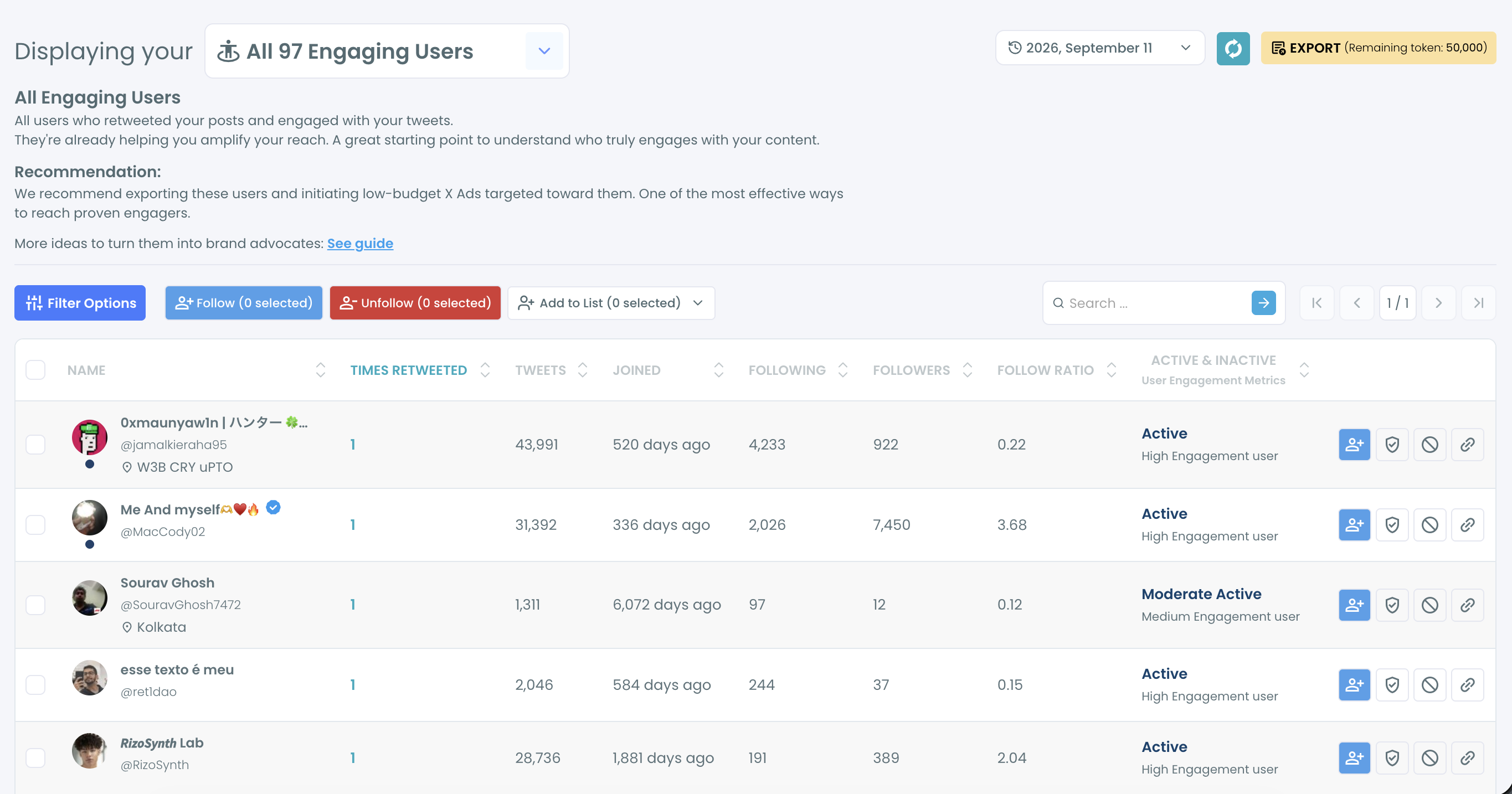
Circleboom finds the followers who retweet you again and again on Twitter and puts a number next to each one. The feature is called Engaging & Loyal Followers, and the number is a column named Times Retweeted.
X has no equivalent view. On X you can open one post and see who retweeted it, but you cannot ask who retweeted ten of your posts. Circleboom answers that by reading up to your last 3,200 tweets, collecting the retweeters of each, and keeping the ones who follow you.
The table carries more than the count. Each row also shows the account's tweets, join date, following, followers, follow ratio and an engagement class, and every column can be sorted.
The data source is the reason to trust the file. Circleboom is an official X Enterprise Developer, so the list is built from records X supplies through its API. Scraping-based exports can miss accounts when a page fails to load, and a seed with holes produces a lookalike with the same holes.
That combination is why I start every X Ads lookalike audience here.
The manual alternative is to open each post's retweeter list on X and compare the names by eye, which stops being practical after a handful of posts. Circleboom returns the same answer as one sortable list.
Where to draw the line between repeat and one-time retweeters
Sort by Times Retweeted and the list splits into two tiers on its own. The top holds followers who retweeted you several times. Below them sit the followers with a single retweet.
Start the seed with the first tier. One retweet can be an accident of timing. Repeated retweets are a habit, and a habit is what you want X to copy.
Bring in the single-retweet tier only when the first tier is too small to stand alone. Loosening one rule at a time gives you a lookalike seed from your engaged X followers that grows on purpose instead of by adding everyone at once.
What IDs does X Ads ask for, and where do you get them?
X Ads accepts either X @handles or X user IDs for a follower-based list, and the Circleboom export already contains both. X's page on List Custom Audiences also lists email addresses and mobile advertising IDs, which do not apply to a follower seed.
The formatting rules on that page are short:
- The file must be a .csv or a .txt.
- Values are separated by new lines or commas.
- Usernames go in without the @ sign, in lowercase.
- User IDs go in as plain integers.
Every Circleboom account export includes a ProfileId column and a Username column. ProfileId is the X user ID, so nothing has to be looked up or converted. You copy one column into a new file and you are done.
I use the ID over the handle. A handle is a label its owner can change, and an ID stays with the account. The fuller walkthrough of how to find and export Twitter IDs is worth a look if IDs are new to you.
For a single account, such as one partner you want to add to the seed by hand, Twitter ID Finder returns the number from a username.
Can you narrow the seed to one country or language on Twitter first?
Yes. The Filter Options panel in Engaging & Loyal Followers has a language filter and a location filter, and both can be applied before you export.
The two filters work differently, which affects how you use them. Filter by Language is a dropdown based on the detected language of the profile. Filter by Location is a free text field that matches what people typed in their own profile, so "New York" finds the accounts that wrote it that way.
Because location is typed by hand, treat it as a rough cut. Language is the more dependable of the two for a campaign that will run in one language.
Narrowing is one form of Twitter follower segmentation, and the same logic applies here: a seed that mixes three markets hands the lookalike audience three patterns at once.
When active filters are in place, a bar above the list shows each one as a removable tag. Read that bar before you select anything. The dedicated page to filter Twitter followers by language shows the same control on a full follower list.
One caution: every filter shrinks the seed, and X has a minimum size for a usable audience. Narrow by language first and add location only if the list is still comfortably large.
How to build a lookalike audience from your X followers, step by step
Building an X Ads lookalike audience from your followers runs in three phases: collect the retweeters, clean the list, then hand the IDs to X Ads.
Collect the followers who retweet you most
- Log in to Circleboom and connect the X account you advertise from.
- Open the Followers / Following Management & Analytics menu and select Engaging & Loyal Followers under Followers.

- Wait for the preparation screen to finish. Circleboom fetches your tweets and their retweeters, which takes 1 to 3 hours, and notifies you when the results are ready.
Clean and narrow the seed inside Circleboom
- Click the Times Retweeted header to sort the table from the highest count down.
- Apply Filter Options. Set the language or location you need, and use the Follower Quality dropdowns to hide Fake/Bot and Inactive accounts.
- Tick the master checkbox and click Export. A confirmation pop-up shows how many profiles you are about to export and how your token balance will change, and the file downloads as a CSV.
Upload the IDs and switch on the expansion in X Ads
- Copy the ProfileId column into a new file. Save it as a .csv or .txt with one ID per line.
- Create the list audience in X Ads. Go to Tools, open the Audiences tab, click to create a new audience and upload the file.
- Add the audience to your campaign and turn on reach expansion once its status changes to Ready.
The sequence front-loads every decision X cannot make for you. By the time the file reaches X Ads, the only work left for the platform is to copy what you chose.
The whole flow in four lines:
- Rank your followers by Times Retweeted.
- Filter out weak accounts and other markets.
- Export, then keep only the ProfileId column.
- Upload the list and switch on reach expansion.
With the audience in place, the campaign itself is ordinary X Ads work: an objective, a budget and a post.
The ad side, in motion: Circleboom's walkthrough of its most cost-effective X Ads strategy for creators and brands.
How to check the new followers your X campaign brings
Check them in Circleboom during the campaign's first week instead of waiting for the end. The lookalike audience is only a prediction, and the new-follower list is where you find out whether the prediction was right.
Circleboom's follower analytics suggest a three-part review:
- Followers' Growth shows whether the count moved when the campaign started.
- Who Followed Me lists the accounts that arrived.
- Fake/Bot Followers reviews any arrivals that look suspicious.
A campaign that adds followers who look nothing like your seed is telling you the seed was too loose.
The dedicated view to check new followers on Twitter gives you the arrivals in order, so campaign days are easy to isolate.
Your seed doubles as the yardstick. Engaging & Loyal Followers shows what real participation looks like on your account, and Circleboom describes that list as a benchmark for judging whether a growth campaign attracted real participants. When you prepare the list again later, new followers who started retweeting will appear in it with their own count.
A jump you did not plan for needs a different explanation. If arrivals spike outside your campaign dates, the reasons behind why you are suddenly getting new followers are a separate investigation from ad performance.
Which seed to start with on X, by account situation
The right starting point depends on what your account already has. Find your row and act on it.
- If your posts get retweeted regularly, use the repeat retweeters as the seed and follow the nine steps as written.
- If filtering leaves the list under X's minimum, remove the location filter first, then include followers with a single retweet. Add passive followers last, if at all.
- If you advertise in more than one language, export one seed per language and upload each as its own audience.
- If nobody retweets you yet, use the @handle route for now and come back when the list has names on it.
An X Ads lookalike audience is decided by its seed, and the usual mistake is treating the upload as the task. The upload is the last step. The seed is the task, and it is finished before you ever open X Ads.
→ Build your lookalike audience from the X followers who retweet you
Lookalike audience FAQ for small accounts
What is the smallest list X will accept?
X requires a Custom Audience to hold at least 100 matched X users before it can be targeted. A list that falls short shows as "Audience too small" in the Audiences tab. The matched number can be lower than the number of rows you uploaded, so leave a margin above 100.
Do I have to remove bots from the seed myself?
Mostly no. While it prepares the list, Circleboom excludes fake accounts and accounts that X has suspended or locked. For anything that remains, the Fake/Bot and Inactive dropdowns in Filter Options hide those account types before you export.
Does the list include people who retweet me but do not follow me?
No. Engaging & Loyal Followers keeps only accounts that follow you. To reach every retweeter of a specific tweet, followers or not, Circleboom has a separate export for accounts who retweeted a tweet.
How long does X take to process the uploaded list?
X says processing can take up to 48 hours, and the audience shows as "Processing" until it finishes. X also advises keeping the browser window open while the file itself uploads.
How often should I rebuild the seed?
Rebuild it before each new campaign. The results stop at the last run, and a follower who became active afterward will not be on it. The date selector on the results page keeps earlier runs, so you can compare the new seed with the old one.

