
Posting a tweet through the X API costs $0.015 per request, and a tweet that contains a link costs $0.200, more than 13 times as much. For a brand or agency that shares links across several X accounts, those cents add up to a real monthly bill, and the API still does not give you a scheduler. With Circleboom, an Official X Enterprise Developer, you can write, schedule and publish the same posts from one dashboard, and for a typical multi-account link schedule that comes out 47 to 64 percent cheaper.
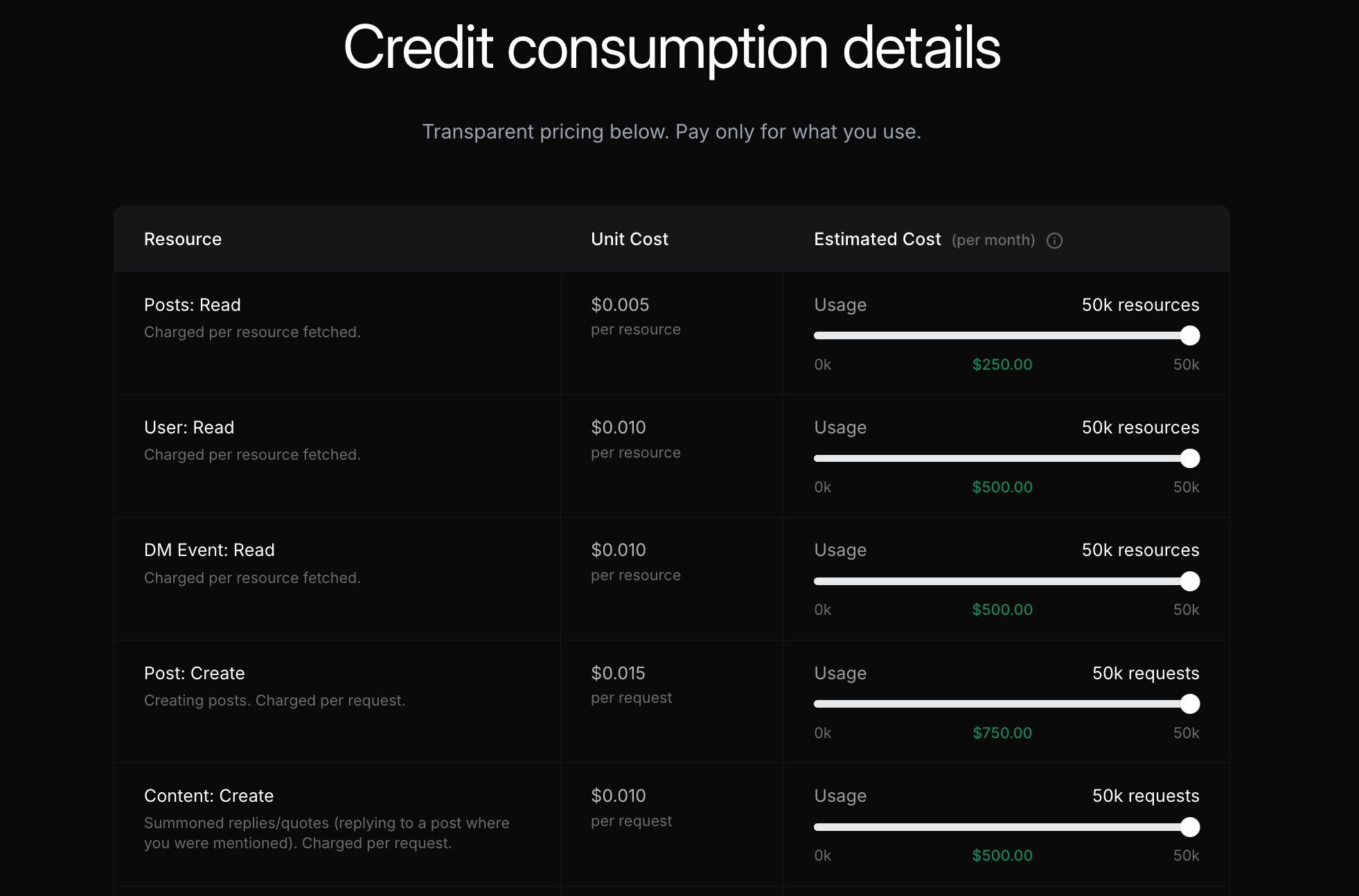
The X API pricing page lists Post: Create at $0.015. One and a half cents a tweet. It is hard to imagine that becoming a budget line.
Then you read the small print. A post with a URL in it is billed at $0.200. Most brand tweets carry a link: to a blog post, a product page, a signup form. Five client accounts posting three links a day is 450 link posts a month, and the “cheap” API is suddenly a $90 line before anyone has built the tool that actually sends them.
And that tool is the bigger cost. The API publishes a post the moment you call it. Scheduling, queues, threads, images and a calendar are all software you write yourself. With Circleboom Twitter, you can schedule posts and threads on X, bulk upload a month of content and manage several accounts from one plan, without paying per post or writing a line of code.
What the X API charges to publish
X’s API runs on pay-per-usage credits. According to the official X API pricing page, publishing is billed per request:
- Post: Create: $0.015 per request
- Post: Create with a URL: $0.200 per request
So the X API post cost formula has two parts:
Monthly X API cost = (text posts × $0.015) + (link posts × $0.200)
A single link turns a $0.015 post into a $0.200 post. For brands that link to their own content, the link rate is the real X API post cost.
The pricing table on X’s developer page shows the base rate on its sliders. The link surcharge is listed on the documentation page, which is why it surprises so many teams.
Same official X publishing with Circleboom
Circleboom is listed in X’s Enterprise customer directory as an Official X Enterprise Developer. Posts you publish through Circleboom go out through official X APIs, the same way a developer’s own integration would send them. No browser automation, no shared passwords.
The difference is how you pay. Circleboom does not bill you per post. Publishing tools are part of your Circleboom plan:
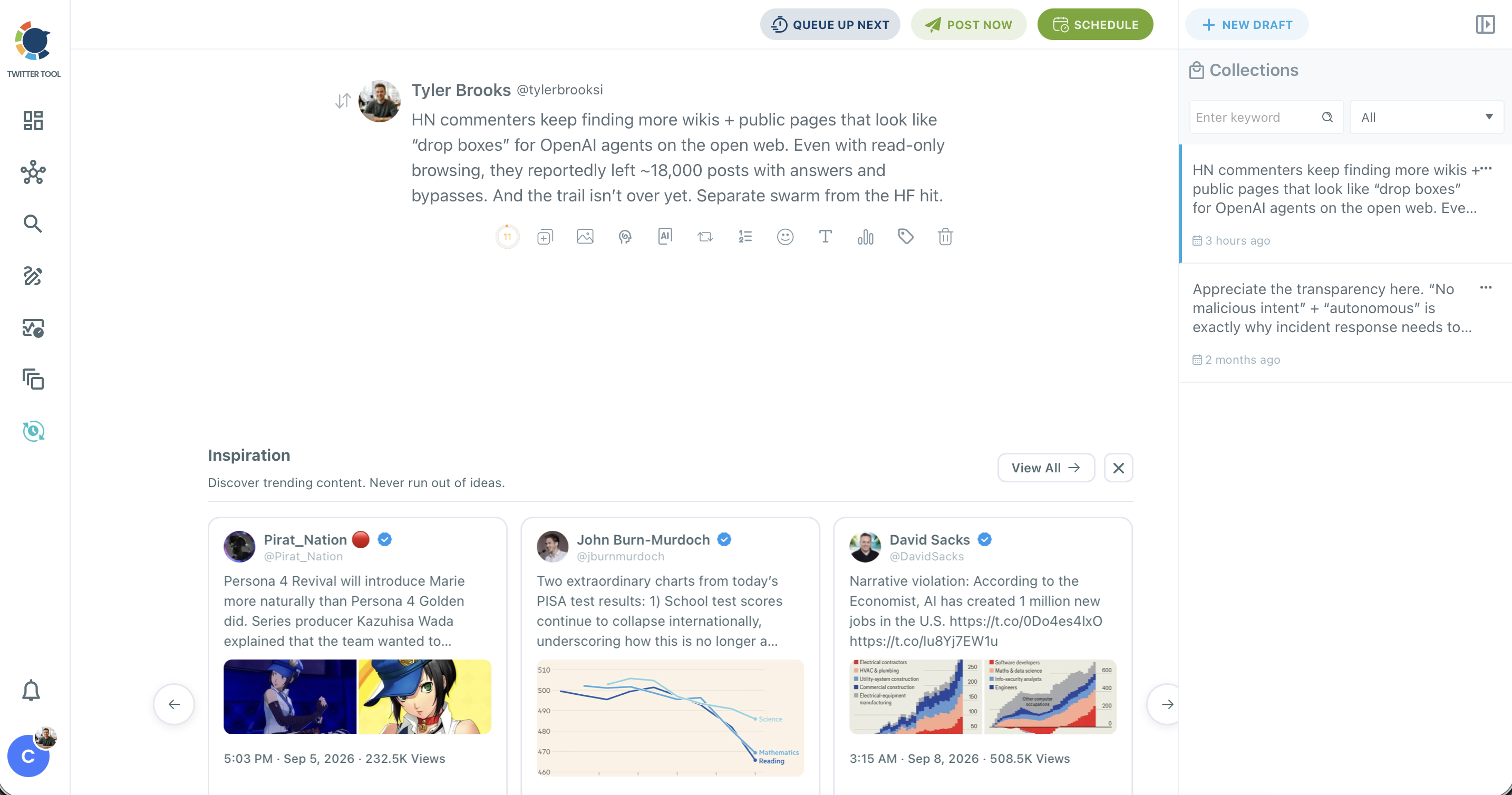
- X Post Planner, the writing and scheduling workspace, with Queue Up Next, Post Now and Schedule
- Bulk Schedule, which schedules a whole CSV of posts with their posting times in one go
- Auto Retweet, threads and Auto Numbering for threads inside the planner
- AI Writer and Inspiration for drafting and rewriting posts
- Several X accounts under one plan, so an agency does not pay per client account
A worked case: an agency posting links for five clients
Here is the full calculation for a common setup.
The case: a small agency manages 5 client X accounts. Each account publishes 3 posts a day, and each post links to the client’s blog or product page.
Volume: 5 accounts × 3 posts × 30 days = 450 link posts a month
On the X API: 450 × $0.200 = $90 a month in credits. Then add the scheduler: a server that stores posts, fires them at the right time, retries failures, handles images and threads, and gives the team a calendar to work in.
On Circleboom: The Pro plan covers up to 5 X accounts and includes X Post Planner, Bulk Schedule and AI writing tools. Current plan prices are on the Circleboom plans and pricing page, and annual billing lowers the monthly cost further.
The savings formula:
Savings % = (X API cost - Circleboom cost) ÷ X API cost × 100
Put the Pro plan’s monthly price into the formula and the result is 46.7% less on monthly billing.
On annual billing the same schedule comes out about 64% less than the X API.
Five client accounts, three links a day: the X API bills $90 a month for the posts alone. Circleboom’s plan costs about half that, and the scheduler is included.
Where the line sits
Because the X API charges per post and Circleboom charges per plan, the saving grows with volume. On the Pro plan, Circleboom costs less than the X API once your accounts publish more than about 240 link posts a month on monthly billing, or about 160 on annual billing. That is roughly 8 or 5 link posts a day across all your accounts, which most brands and every agency pass easily.
Above that line, every extra link post costs another $0.200 on the X API and nothing extra on the same Circleboom plan.
📌 X API rates come from X’s official pricing page and Circleboom prices from its public pricing page at the time of writing. Both can change, so rerun the formula with your own numbers.
How to schedule a month of posts with Circleboom
- Log in to Circleboom Twitter and connect your X accounts through X’s official login.
- Open X Post Planner to write a single post or a thread. Add images, use the AI tools to rewrite, and pick Post Now, Queue Up Next or Schedule.
- For volume, open Bulk Schedule. Download the sample CSV, fill in the text, image URL, labels and posting time for each post, and upload it.
- Check the validation step. Circleboom shows how many posts are valid and flags any that need fixing before they are scheduled.
- Schedule and let it run. The posts go out at their set times through official X APIs. You can turn on cross-posting to publish the same posts to other connected platforms too.
Our guides on how to bulk schedule tweets with images and how to schedule Twitter threads walk through both flows in more detail.
Why the X API post cost is only half the bill
The per-post price is what X charges. Building around it is what you pay.
The X API sends a post when you call it. If you want posts to go out at 9 am in New York while your team sleeps, you need a server running a job that calls the API at that moment. If the call fails, you need retries. If the post has an image, you need media uploads. If it is a thread, you need to chain replies in the right order.
The X API gives you a send button. A scheduler, a queue, a calendar and a team workflow are all things you build yourself.
Then there is analytics. Checking how your posts performed means reading them back through the API: Analytics: Read costs $0.005 per post, on top of reading the posts themselves. Refreshing the numbers for 3,200 posts is about $19 every time at the owned-read rate, and a daily refresh adds up to roughly $576 a month. In Circleboom, Post Analytics shows impressions, likes and reposts for your posts in charts, as part of the same plan.
If you have looked at free Twitter schedulers or tried to schedule tweets in the Twitter web app, you know X’s own options stop at single posts, and most social media scheduling tools are built around exactly that gap. The API removes that limit but bills you for every post and every feature you build. Circleboom sits in between.
What else you get that the API does not include
Publishing on X is rarely just publishing. A plan built for posting also needs:
- Timing: Best Time to Post slots in the planner, based on when your followers are online. Our guide on how to determine your best time to post on Twitter explains the idea, and the best time to tweet and why goes deeper.
- Resurfacing: Auto Retweet gives a post a second visibility window for followers who missed it, and you can auto retweet from bookmarked tweets too.
- AI writing: an AI-powered tweet scheduler that drafts, rewrites and matches your style.
- Trends and ideas: Inspiration shows trending content to rewrite or reply to. On the X API, Trend: Read costs $0.010 per trend and every trending post is another $0.005 read.
- Cross-posting: Cross Posting sends the same post to other connected platforms, and you can cross-post tweets to Instagram Stories.
- Link tracking: see what your links do after they are posted, as covered in tracking link clicks on X.
With Circleboom Twitter, all of this sits in the same planner you use to schedule, instead of five separate projects on top of the X API.
FAQ
How much does it cost to post a tweet with the X API?
On X API pay per use, Post: Create costs $0.015 per request. If the post contains a URL, it is billed at $0.200 per request. Rates are listed on X’s official pricing page.
Why does a tweet with a link cost more on the X API?
X bills posts that contain a URL at a separate, higher rate of $0.200 per request. For brands that link to their own content in most posts, this link rate decides the real monthly cost.
Is Circleboom cheaper than the X API for posting?
For multi-account and link-heavy schedules, yes. An agency posting 3 links a day on 5 accounts pays $90 a month on the X API, while Circleboom’s Pro plan comes out 46.7% less on monthly billing and about 64% less on annual billing.
Does the X API have a built-in scheduler?
No. The X API publishes a post when you call it. To schedule posts you need your own server, queue and retry logic. Circleboom’s X Post Planner and Bulk Schedule handle scheduling for you.
Are posts sent through Circleboom official?
Yes. Circleboom is an Official X Enterprise Developer, and posts are published through official X APIs. You connect your accounts through X’s official login, and Circleboom never asks for your password.
Can I schedule posts for several X accounts with one Circleboom plan?
Yes. Circleboom plans cover several X accounts, so an agency or a brand with multiple accounts can schedule for all of them from one dashboard.
Final thoughts
The X API post cost looks small until the link rate shows up and the scheduler you still need to build comes into view. For a developer shipping a product, paying per request makes sense. For a team that simply wants posts to go out on time across several accounts, it means a growing monthly bill plus a software project.
Circleboom gives you official X publishing with a planner, a bulk scheduler and AI writing tools in one plan, and the more you post, the further it pulls ahead of the X API. Schedule your next month of posts with Circleboom Twitter:
https://circleboom.com/twitter-management-tool/x-post-planner