If you’re asking “How many of my X followers are bots?”, you’re probably not asking out of curiosity.
Most people search that question when their account starts feeling off. The follower count keeps increasing, but engagement doesn’t match. Replies get quieter. Your reach becomes inconsistent. And when you scroll through your followers, you start noticing profiles that don’t look human.
The frustrating part is that X doesn’t make this easy to confirm.
There’s no built-in report that says, “These followers are bots” or “Your account has 32% fake followers.”
You just get a list of accounts, and you’re expected to figure it out manually. That works when you have 50 followers. It doesn’t work when you have 5,000… or 50,000.
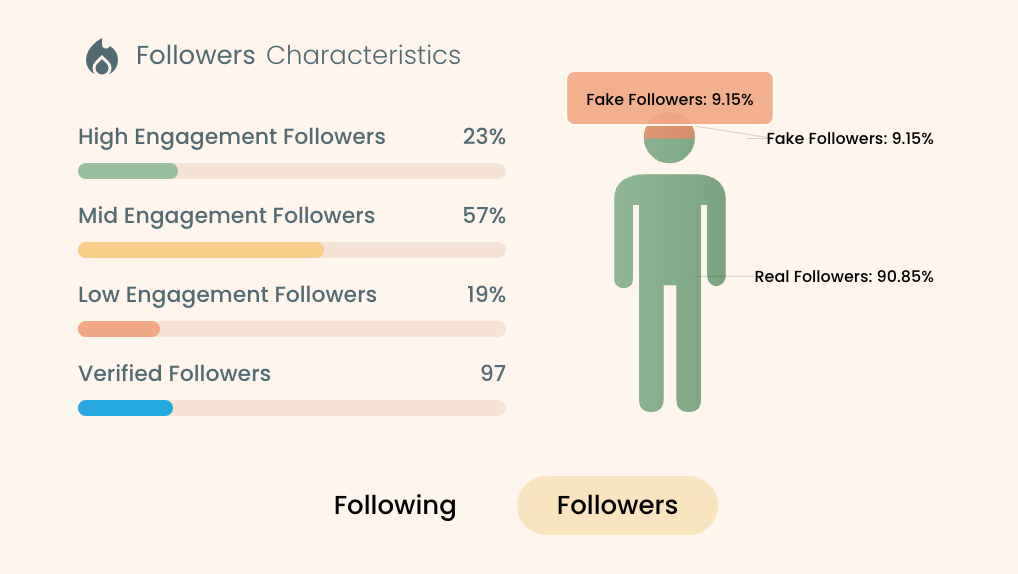
So if you want a real answer, you need a tool that can actually analyze your followers and show you which accounts are likely bots.
X doesn’t provide that, but Circleboom Twitter does. It scans your followers in bulk, highlights fake/bot profiles based on quality signals, and helps you see the exact list, so you’re not guessing anymore.
Let’s get into it.
 Arif Akdogan
What Are Bot Followers on X, Exactly?
Bot followers are accounts that behave like real users on the surface, but they’re automated or semi-automated. Some are fully controlled by scripts. Others are “farm accounts” run by people who manage hundreds of profiles using automation.
They follow accounts at scale, interact in suspicious patterns, and usually exist for one of these reasons:
- to push links or scams
- to fake popularity (follower inflation)
- to spam replies and DMs
- to boost other accounts through artificial engagement
- to scrape data or mimic real user behavior
Not every bot looks obvious, and that’s what makes them dangerous. Some bots are low-effort and easy to spot, but others are designed to look “normal” enough to survive longer.
Why Do Bot Accounts Exist on X?
Bots exist because they work.
That sounds simple, but it explains everything.
If someone wants to promote a shady website, run a crypto scam, or spread spam across thousands of conversations, doing it manually would take forever. Bots make it scalable.
One system can control hundreds or thousands of accounts and run the same actions repeatedly.
Even if you never click anything or reply, bots can still harm you just by being attached to your account, especially when they start filling your follower list.
What Bots Actually Do on X (And How They Affect You)
Bot activity usually shows up in a few predictable ways:
1) Spam replies under tweets
You’ve seen these before: generic comments, suspicious links, copy-pasted messages, or “DM me” type replies. Bots flood replies because replies are a shortcut to visibility.
2) Spam DMs
A lot of bots use DMs to push fake offers, phishing links, “support” scams, and impersonation attempts. The goal is always the same: get you to click something or share information.
 Arif Akdogan
3) Following without engagement
This is the quietest type of bot behavior, but it’s the most damaging for creators. They follow you, inflate your numbers, and then do absolutely nothing. No likes, no replies, no retweets, no saves. They dilute your audience quality and destroy your engagement rate.
That’s why you end up in this weird situation: your follower count is rising, but your account feels weaker.
How to Detect Bot Followers: The Fastest Signs to Look For
You can manually detect bots, but you need a clear checklist. A single signal doesn’t prove an account is fake, but patterns do.
Here are the strongest signs:
Profile signals
- No profile picture or a suspicious “stock-looking” photo
- Random username + numbers (especially long strings)
- Empty bio, or a bio stuffed with unrelated keywords
- Strange links in bio or very aggressive promotional language
Activity signals
- Zero original tweets or only retweets
- Repeated replies across many different accounts
- Very new account with sudden follower activity
- Same posts recycled over and over
Network signals
- Following thousands of accounts but barely any followers
- Weird follower-to-following ratios
- Unnatural spikes in following behavior
The problem is: even if you know the signs, checking followers one by one doesn’t scale. And that’s exactly why people struggle to answer the question honestly.
You don’t need a guessing game. You need a way to scan your followers in bulk and see what’s real.
Why X Doesn’t Tell You How Many of Your Followers Are Bots
This is what makes the issue frustrating.
X gives you follower lists and basic account info, but it doesn’t provide a clear “bot detection” tool for everyday users. You can report accounts, block them, or remove followers manually, but you’re still guessing.
And if you have thousands of followers, the manual method becomes impossible:
- You don’t have time to open every profile
- Bots hide among normal-looking accounts
- You can’t measure “how many” accurately by scrolling
So if you want the real answer to “How many of my X followers are bots?”, you need a tool that can analyze your account at scale.
That’s where Circleboom Twitter becomes the easiest solution.
Keep in mind that the API provides a more accurate real-time data stream than the X interface itself. While the platform UI may experience lag, the API captures and reflects new developments instantaneously.
Circleboom has the official Enterpise API, we don't scrape data from X!
How I Checked My Bot Followers Using Circleboom Twitter
Circleboom Twitter is the tool I use when I want to understand my audience quality properly and clean my account fast.
And the most important part: Circleboom Twitter is an official X developer partner.

That matters because it means Circleboom works through official access and safe systems, instead of risky shortcuts.
But what really makes Circleboom valuable is not just detecting bots. It analyzes both your followers and your followings, and shows them in a clean dashboard with detailed account-level stats.
So instead of looking at followers as just usernames, you can see:
➡️ who is fake / bot
➡️ who is inactive
➡️ who is overactive (usually spam behavior)
➡️ who is low-quality
➡️ who is high-quality (real, engaging profiles)
➡️ who is not following back
➡️ who looks suspicious based on patterns and profile data
This turns your follower list into something you can actually understand.
And once you see the bot list clearly, the question becomes easy to answer:
This is how many bot followers I have.
Not a guess. Not a feeling. A real list.
Step-by-Step: How to See How Many of Your Followers Are Bots and Remove Them with Circleboom
Step #1: Go to the Circleboom Twitter website and log in with your credentials.
If you’re a new user, sign up, it’s quick and easy!

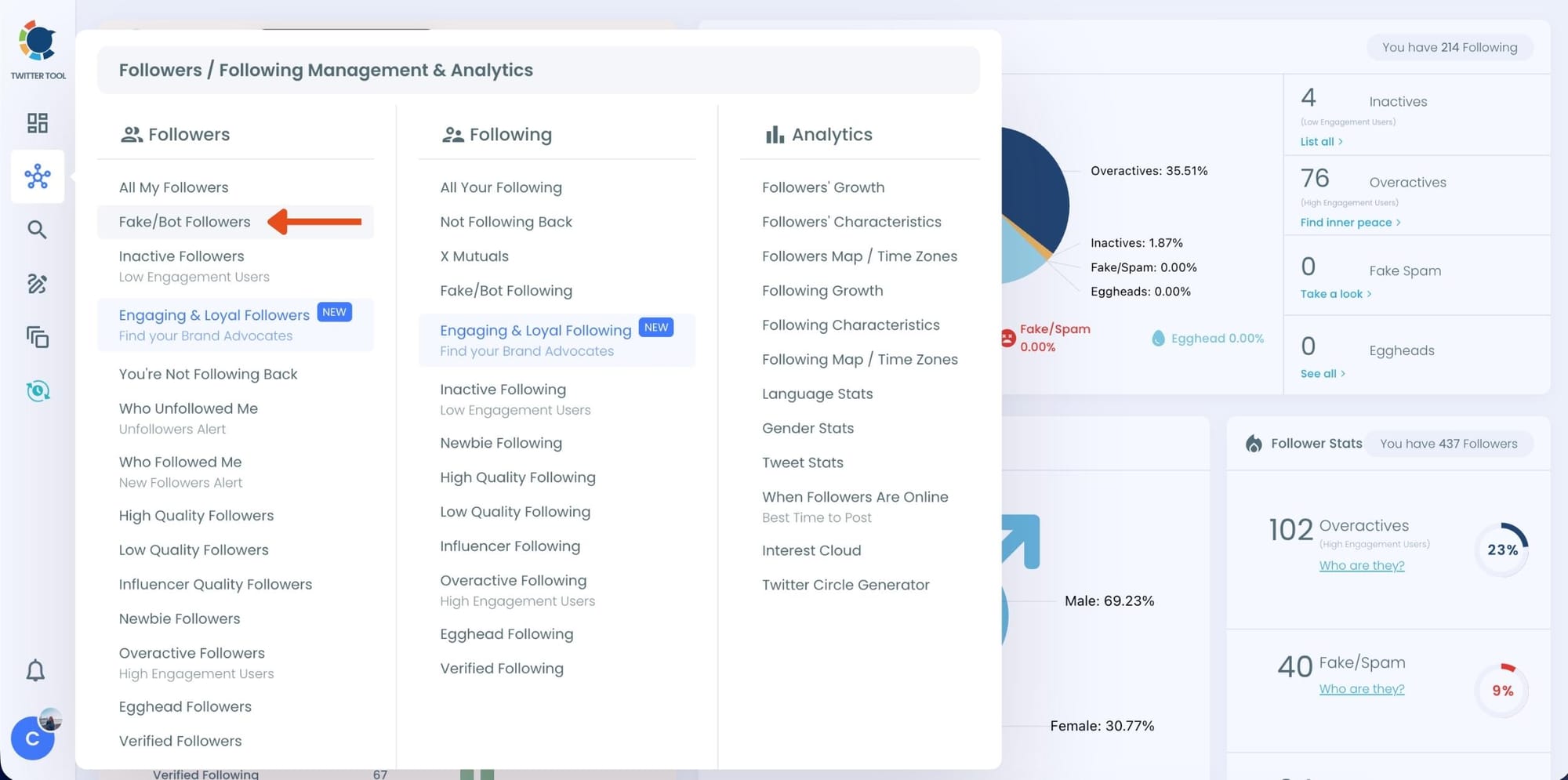
Step #2: On the left-side menu, click on the Followers / Following Management section. A dropdown menu will appear. Select Fake/Bot Followers to see the full list of your followers.
If you want to remove specific accounts, such as inactive users, you can directly select these categories from the dropdown menu instead of viewing all followers.
Step #3: You will see a complete list of your fake/bot followers.
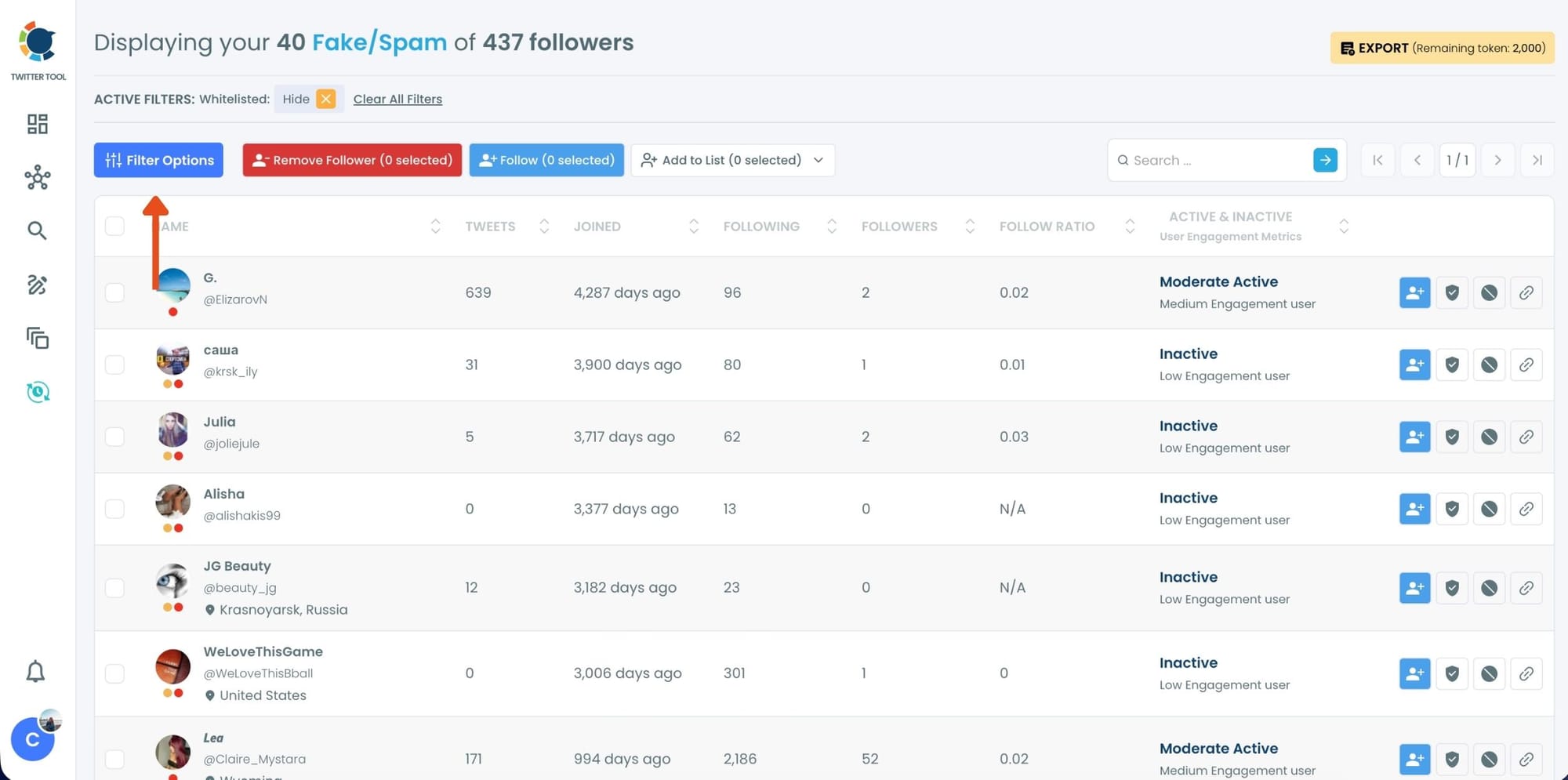
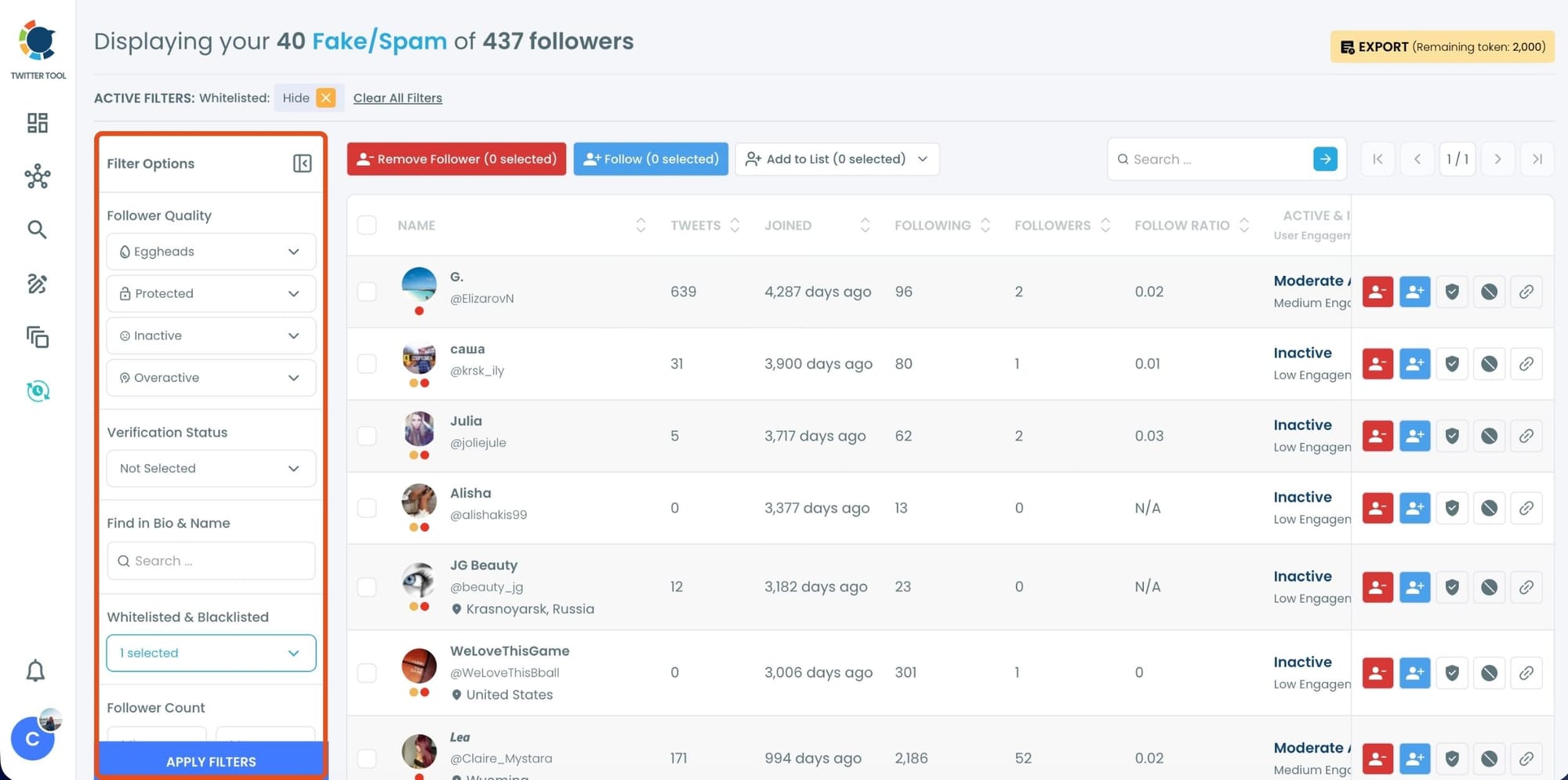
Use the Filter Options on the left side to refine your list.
You can filter followers based on engagement levels, inactivity, verification status, follower/following count, and more.
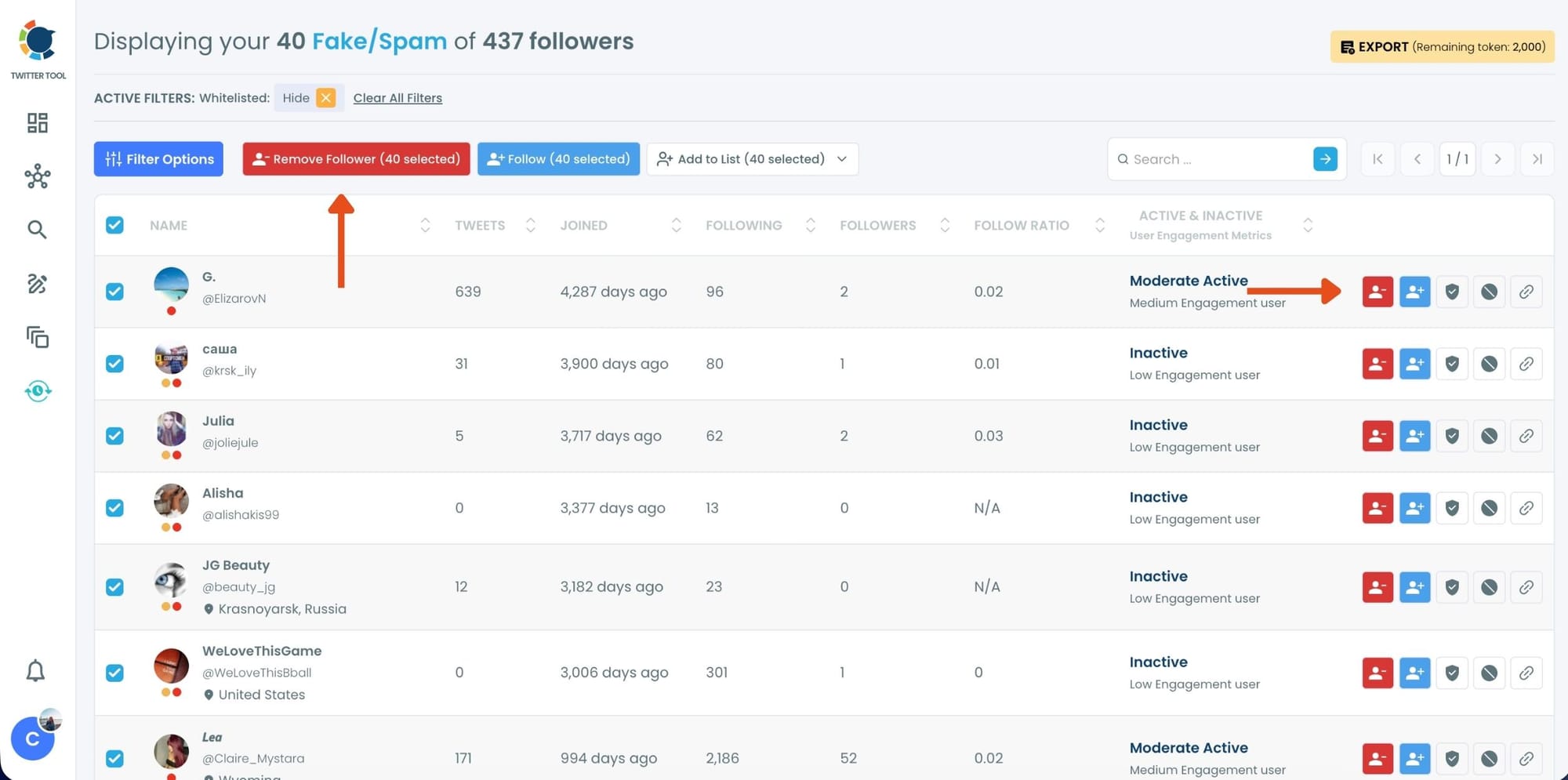
Step #4: Browse through your followers and check the boxes next to the users you want to remove.
You can also select multiple users at once. Once you have selected the users, click on the Remove Followers button at the top.
Alternatively, you can remove individual followers by clicking the red remove icon next to their name on the right side of the list.
A confirmation message will appear asking if you are sure you want to remove the selected followers. Click ''Remove Followers''.
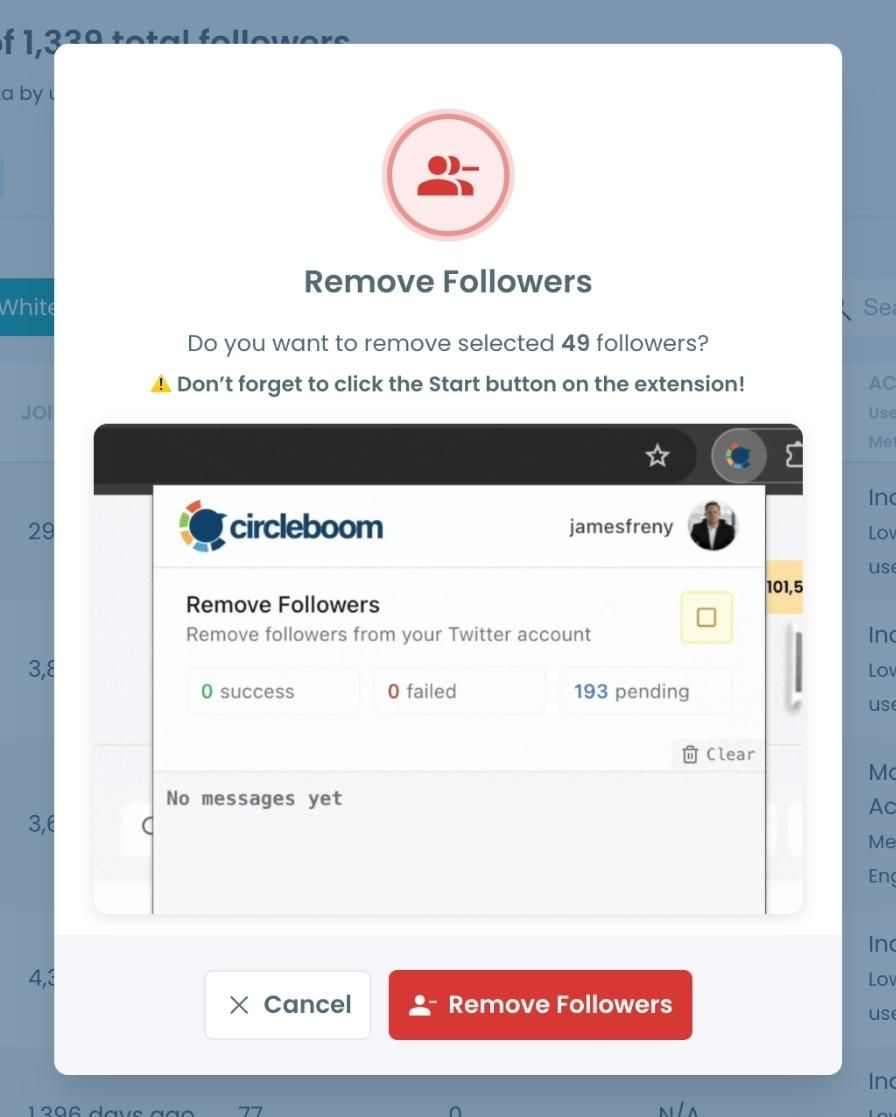
Step #5: Since the removal action is processed via the Circleboom Remove Twitter/X Followers extension, you need to install it to complete the process.
Click on Download the Extension and install it from the Chrome Web Store.
Once installed, you can easily remove followers.

Step #6: After installing the extension, Circleboom will automatically add all your removal requests to the extension queue.
Click on the Start button to begin the removal process.
The extension will process your requests and remove the selected followers.
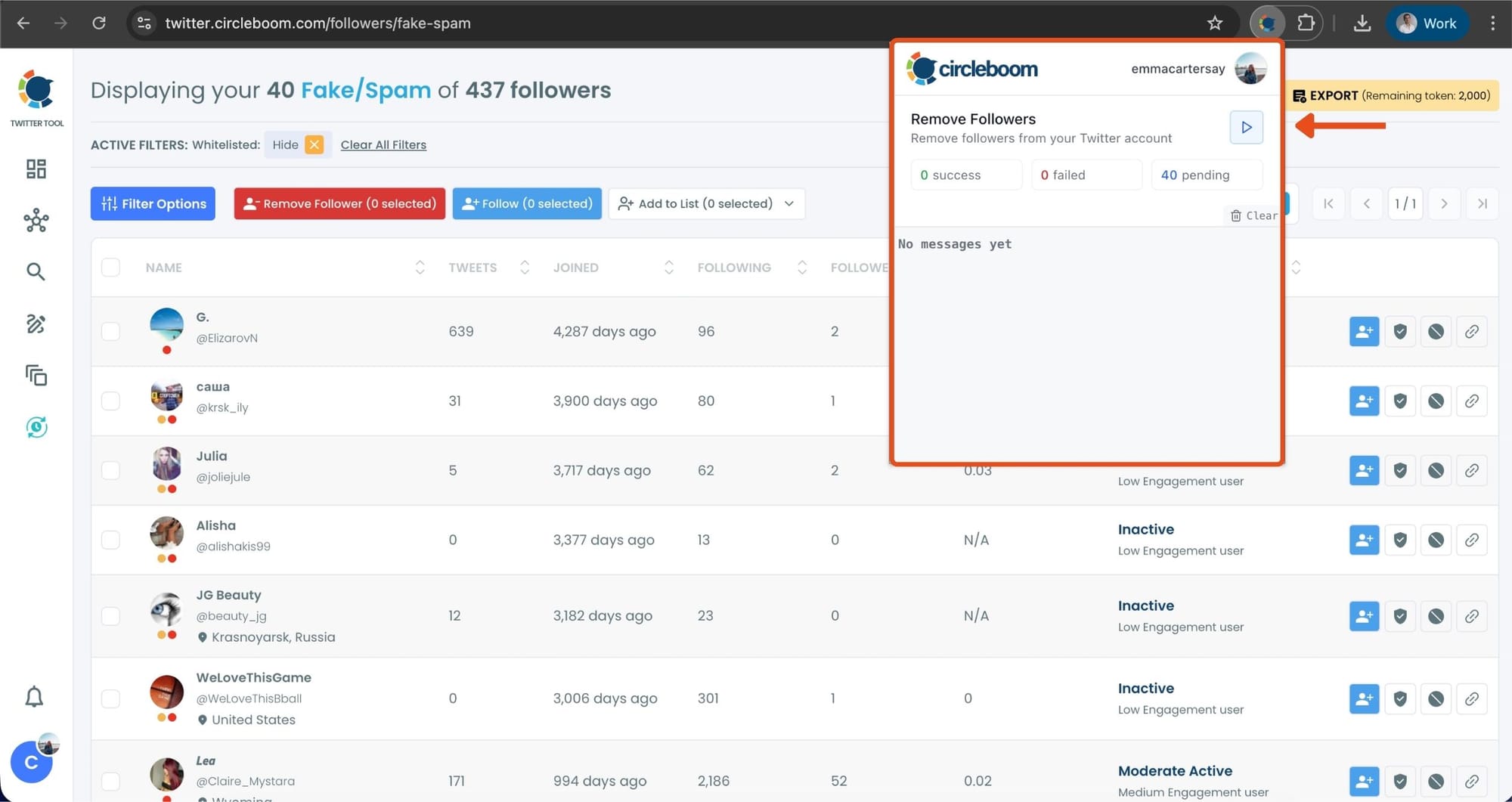
That's it! Your selected followers have been removed automatically.
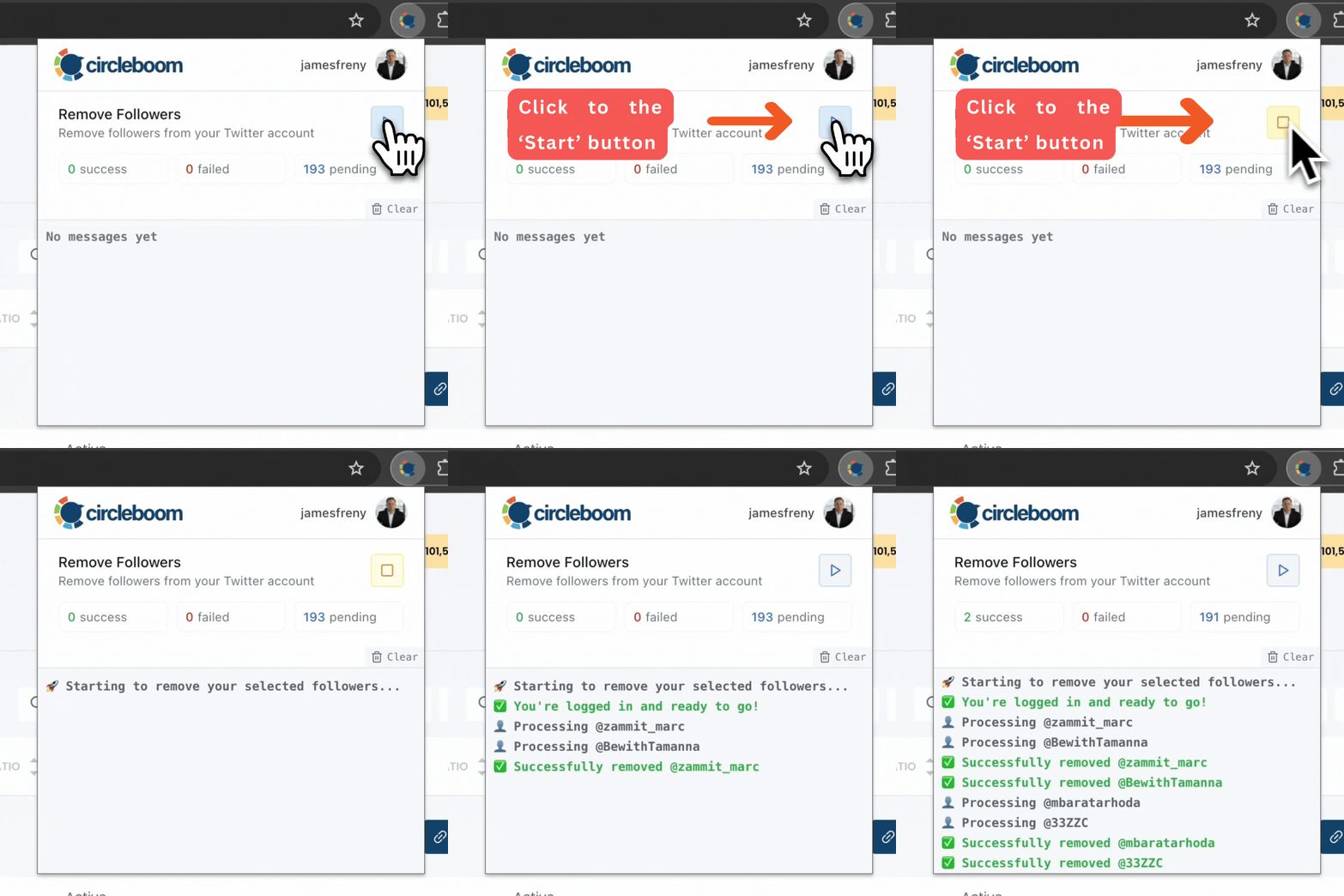
⚠️ Important Warning: Once the removal process begins, do not close your Chrome browser or the Circleboom tab. The tool will automatically remove followers in the background, but if you close the tab or exit Chrome, the process will stop.
If you need a more detailed guide check this video ⬇️
Once you have these accounts before you, you can also choose to add them to your Twitter lists or export them into CSV, both without having to leave the platform.
To prevent unwanted removal, Circleboom also includes a whitelist feature. You can read more about “How to Whitelist My Twitter Followers.”
 Harshita Agrawal
Bonus: Don’t Forget Your Followings (Bots Spread Both Ways)
This is where most people stop too early.
Even if you remove bot followers, your following list also matters. If your account is connected to bot followings, it increases the chance of pulling bots back into your ecosystem.
Circleboom Twitter helps you analyze your followings the same way it analyzes followers.
That means you can detect bot-like accounts, low-quality profiles, and inactive accounts you’re following, and unfollow them up in bulk too.
This is how you break the loop.
 infocircleboom.com
Final Thoughts: The Real Answer Is in Your Follower List
So… how many of your X followers are bots?
X won’t tell you directly, and manual checking doesn’t scale. But once you scan your audience properly, the answer becomes clear.
Bot followers exist everywhere on X. You can’t delete them from the platform.
But you can remove them from your account, protect your engagement rate, and rebuild a real audience again.
If your follower count looks fine but your engagement feels broken, checking for bot followers is not optional anymore.
It’s the first cleanup that fixes everything else.