
You need at least 500,000 Home Timeline impressions from verified users in the last 90 days to apply for payouts on X, and impressions on replies do not count. That figure is one condition among several, and it is narrower than the impression total most analytics screens show.
What this page answers.The bar is 500,000 Home Timeline impressions from verified users in 90 days, replies excluded.The other conditions are 500 verified followers, a paid Premium plan and original content.Your own distance is a 3-month impression total and its trend, read the right way.
Circleboom totals the impressions of your posts on X by period through official X Enterprise APIs. Start with X monetization impressions.
How many impressions does X require before it pays creators?
X requires at least 500,000 Home Timeline impressions from verified users in the last 90 days. The requirement sits in the eligibility list of the Original Content Rewards Program, the programme through which X now pays creators, and X checks it at the time you apply.
Each part of the sentence narrows the count:
- 500,000 is the minimum, counted across your posts.
- Home Timeline means the impression happened in the main feed.
- Verified users means the viewer holds a verified checkmark.
- Last 90 days makes it a rolling window, so the total changes daily.
- Replies are excluded, so impressions on your replies add nothing.
Reaching the number does not admit you on its own. X states that meeting the requirements does not guarantee admission, and that you submit an application which X reviews.
X monetization impressions are therefore a specific slice of your reach. A post seen two million times through search or by viewers without a checkmark can add very little to the count X uses.
The window deserves a second look. Because it covers the last 90 days and no more, a strong month drops out of the count three months later. An account does not bank X monetization impressions; it holds a total that has to be kept up until the day of the application.
Why the 5 million figure is still all over Twitter advice
The 5 million figure belongs to a programme that has closed. X's earlier scheme, Creator Revenue Sharing, is the one older write-ups describe, and many of them have not been updated.
X's help center gives the timeline. New enrollments into Revenue Sharing stopped on August 7, 2026. The programme was retired on September 7, 2026, and access to apply for the new one began rolling out to existing members the next day.
Two things follow for a creator reading advice today:
- A page that says 5 million is describing the retired programme.
- A page that says "organic impressions" without "Home Timeline" and "verified users" is using the old wording.
The rest of the picture has moved as well, so a current overview helps before you plan around one number. The Twitter monetization guide on the Circleboom blog covers the wider question of earning on the platform.
The practical gap is on your side of the screen. X tells you the bar. It does not hand every account a running 90-day total to compare against it, and that is the gap an impression total for X monetization fills.
What counts toward the X bar and what your analytics total includes
Three different numbers get called "impressions" in monetization talk, and they are not interchangeable. One is everything your posts were shown. One decides whether you can apply. One decides what you are paid.
| Number | What it counts | Where it comes from | What it decides |
|---|---|---|---|
| All impressions | Every time your posts were seen in the period | The Impressions card in Circleboom's Post Analytics Overview | Your reach and its trend |
| Eligibility impressions | Home Timeline impressions from verified users in the last 90 days, replies excluded | X, checked when you apply | Whether you can apply |
| Qualified impressions | Unique impressions from Premium users on the Home Timeline, with at least half the post visible | X, counted on your original content | The size of a payout |
The first row is the widest. It includes:
- Views from search and from profiles.
- Views by people with no checkmark.
- Repeat views by the same person.
The second row is a subset of the first. Every eligibility impression is also an impression in your analytics total, but the reverse is not true.
The third row is stricter again. X's page defines qualified impressions as unique, so the same account is counted once per post. It also excludes paid, promoted, artificially generated and fraudulent impressions.
Your analytics total is an upper bound on what X counts, never the qualifying number itself.
Why the three numbers drift apart on X
The gap between the rows depends on who sees your posts and where. An account whose views come mostly from the main feed of paying subscribers will find its eligibility figure close to its analytics total. An account that lives in reply threads, or whose posts travel through search, will find the two far apart.
Reading X monetization impressions this way prevents the most common mistake I see: a creator finds a big impression figure, compares it straight to 500,000 and assumes the job is done. The comparison only works in one direction. A total under the bar settles the question. A total over it does not.
Can you see your impression numbers on Twitter without X Premium?
Yes. Accounts without an X Premium subscription can still view and export their post analytics in Circleboom. X keeps its own period-level analytics for Premium subscribers, so a creator who has not subscribed yet usually has only the view count under each post to go on.
Circleboom's Post Analytics Overview is where it runs content performance analysis for Twitter. It aggregates the metrics of your posts across a time range you pick and shows them as a chart and a row of summary cards.
This matters for the order of spending. A paid Premium plan is one of X's entry conditions, so you will need it before you apply. You do not need it to find out how far away you are.
The same order holds for anyone working out how to make money on Twitter more broadly: measure the account first, then pay for what the numbers justify.
Reading your X monetization impressions first lets you decide when the subscription starts to make sense. An account whose 3-month total sits far under 500,000 gains nothing toward eligibility by subscribing this month.
Analytics with no Premium plan: the Circleboom screens that show your impression totals on a free X account.
Access is safe to grant. Circleboom is an official X Enterprise developer, so the figures come from X's API for the account you connect, and the Overview is read-only. It cannot post, edit or delete anything.
How to check your X monetization impressions against the bar
To check your X monetization impressions against the bar, total the impressions of your posts for the last 3 months and compare that total to 500,000. Circleboom's Post Analytics Overview does the adding and shows the change against the previous 3 months. The four steps below take a few minutes on a connected account.
- Log in to Circleboom Twitter and connect the X account you want to monetize.

- Go to the X Post Planner menu, open Post Analytics and choose X Post Analytics Overview.

- Select the 3M range at the top right. The default is 4W, and the date label on the left of the same row confirms the window you are reading.
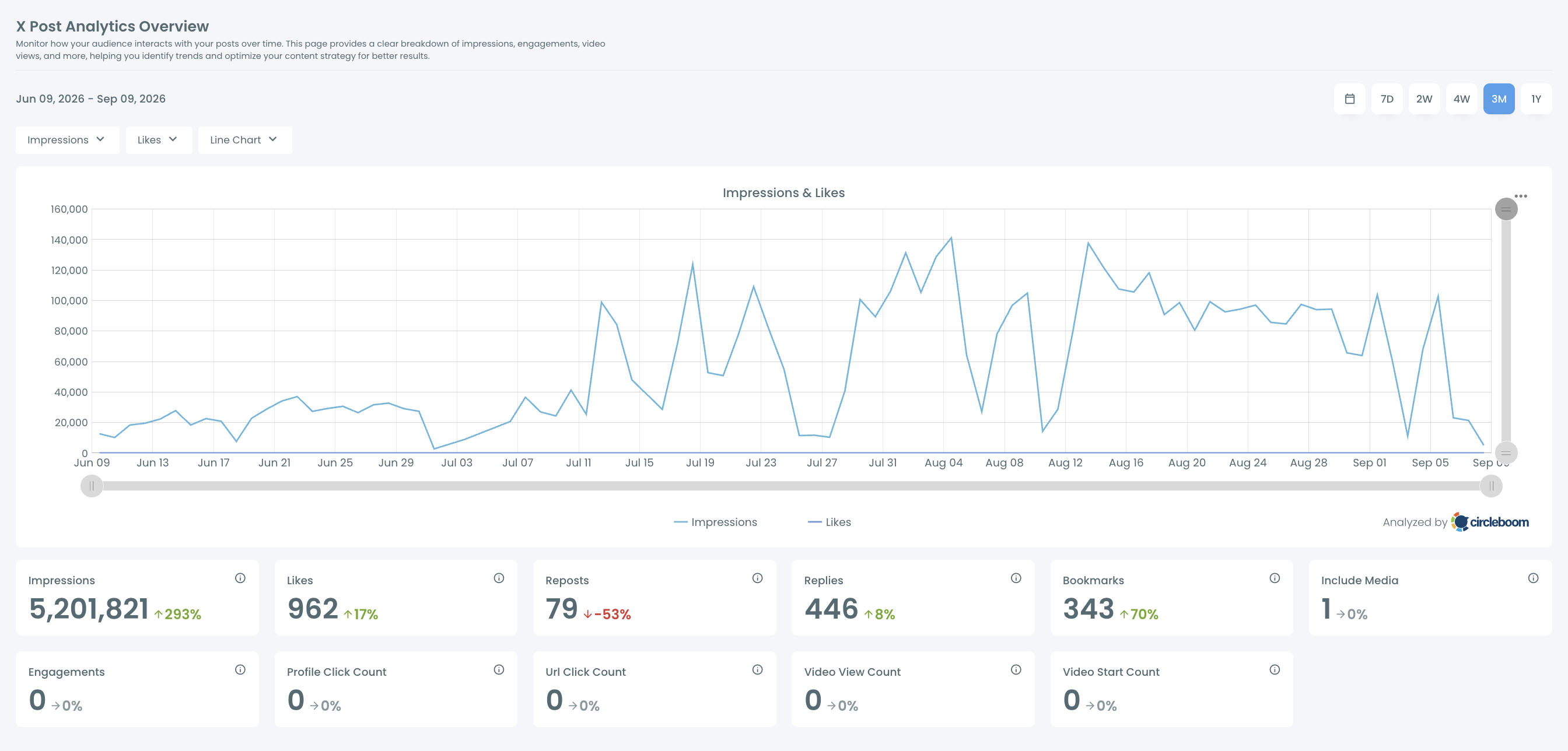
- Read the Impressions card for the total and the arrow. Green with an upward arrow means the 3 months beat the 3 months before; red with a downward arrow means they fell short.
The sequence puts the window before the number on purpose. A total read on the default 4-week range is roughly a third of the period X looks at, and comparing it to 500,000 gives a false alarm.
Four moves, then: connect, open the Overview, switch to 3M, read the card.
If you want the figures outside the dashboard, Circleboom can also export Twitter analytics, which is the simplest way to keep a dated copy.
How to read the 3-month total and its arrow
The card gives two facts about your monetization impressions on X, and each answers a different question.
The total answers "could I be eligible?" Under 500,000, no. Over 500,000, possibly, and X's Creator Studio shows your actual eligibility status under Original Content Rewards.
The percentage answers "am I getting closer?" It always compares against the preceding period of the same length, so on 3M it is this quarter against the last one.
I read the two together. A total of 380,000 with a strong upward arrow is a better position than 520,000 with a falling one, because the first account is approaching the bar and the second may be drifting back under it.
What the chart adds to the card
The chart above the cards shows how the total was built. Two dropdowns pick the metrics to draw, and a third switches between a line chart and a bar chart. With one dropdown set to Impressions, the line shows each day of the 3 months.
Look for the shape. A total made of even weeks will still be there next month. A total made of one spike will fall out of the 90-day window all at once, on a date you can read off the chart.
For anyone tracking X monetization impressions toward an application, that date is worth knowing in advance.
Short ranges need care. On 7D, one strong post can produce a large percentage swing because the earlier week was quiet. The 4W and 3M ranges give steadier comparisons, and 3M is the one that lines up with X's window.
How much does X pay for the impressions that qualify?
X does not publish a rate per impression. Its Original Content Rewards page says eligible creators earn payouts based on the qualified impressions their original content generates, and gives two fixed points about the process:
- Payouts are processed every two weeks.
- The minimum payout is $30.
Any dollar figure per million views that you read elsewhere is an estimate from someone's own payouts, and it reflects their audience, not yours.
The reason one account's result does not transfer is the definition in the table above. Payouts follow unique impressions from Premium users on the Home Timeline. Two creators with the same raw view count can have very different shares of Premium viewers.
A running total of X monetization impressions cannot settle the amount either. Impressions describe how often posts were displayed, and display volume alone does not establish revenue.
For the scale question many creators ask next, the Circleboom blog has a separate post on how much Twitter pays for 10 million views.
One content rule on X's page is worth knowing before you count on a payout. Posts that are copied from another creator, reuploaded from elsewhere or only slightly changed from someone else's work are not treated as original content, so they do not generate qualified impressions even when they are widely seen.
Ways to earn on Twitter before you reach the impression bar
There are routes to income on X that do not depend on the 500,000 bar, and they can run while your 90-day total grows. Rewards for impressions are one programme; they are not the whole of creator income on the platform.
Subscriptions are the main alternative X offers. Followers pay a monthly amount for subscriber-only content, and X sets separate eligibility for that feature. The Circleboom blog covers how to increase your Twitter subscribers once the feature is on.
Income that does not come from X at all is the other branch. Sponsored posts and your own products or services are paid by someone other than the platform, so no impression minimum applies to them.
These routes need a different signal from your analytics. The Overview has cards for Profile Click Count and Url Click Count, which describe visits to your profile and clicks on links in your posts. For a creator selling a subscription or sending readers to an offer, those two cards say more than the impression total does.
If one of those cards shows zero, treat it as a coverage gap to inspect and not as proof that nobody clicked.
Which move fits your X total today
Your next move depends on which side of the bar your 3-month total sits and which way the arrow points.
- If your total is under 500,000 and rising: keep the routine and check monthly. You are on course, and nothing needs fixing.
- If your total is under 500,000 and flat or falling: put proven posts back in front of people with automatic retweets, then compare the 30 days before and after to see whether impressions moved.
- If your total is over 500,000: open Creator Studio on X and check your eligibility status, because only X can say how much of that total counts.
- If the total is fine but you have fewer than 500 verified followers: that condition is the one to work on, since the impression line will not carry you past it.
Whichever branch you are on, the first step is the same and it takes a few minutes: read your impression total for X monetization before you plan around it.
→ Check your monetization impressions on X
FAQ: impressions, verified followers and X payouts
How many verified followers do you need to get paid on X?
You need at least 500 verified followers, according to X's eligibility list. Total follower count is not part of the requirement and neither is it a substitute for X monetization impressions, so an account can be large and still fall short. Circleboom's Verified Followers view filters your Twitter follower list to accounts with an active verification badge, which makes the count easy to read.
Can the impressions total miss recent views?
Yes, if the page has been open for a while. The cards behind your X monetization impressions show data as it was retrieved when the page loaded, so refresh the view to get current values. Very old tweets may also return zero or partial values because of X's own analytics retention window, which is a platform limit.
What happens if X does not approve my application?
You may submit one appeal. If the appeal is unsuccessful, X says you can reapply after 42 days, provided you still meet every eligibility requirement at that point.