
When I first started posting on Twitter (X), I treated every tweet like it had a short lifespan. I would publish it, watch it gather likes and replies for a few hours, and then see it slowly disappear into the endless scroll of the feed.
But over time, I realized something important: some of my best tweets, the ones that resonated most with my audience, were being missed by entire groups of followers.
People in different time zones never saw them, and new followers who joined later had no clue those posts even existed.
That’s when I started experimenting with repeating tweets. A tweet’s visibility window is often short, just a few hours. and the results completely changed the way I approach Twitter.
 Arif Akdogan
Why Should You Repeat a Tweet?
Repeating tweets might sound repetitive, but when done carefully, it’s one of the smartest ways to maximize growth and engagement.
➡️ Reach new audiences. A tweet’s visibility window is often short, just a few hours. Repeating lets you capture people who weren’t online the first time.
➡️ Boost engagement. Tweets that perform well once usually perform well again. In fact, sometimes the repeat does even better.
➡️ Test new variations. Rewriting gives you a way to experiment with different hooks, CTAs, or visuals.
➡️ Reinforce key ideas. Important messages, announcements, or evergreen tips are worth repeating until they stick.
➡️ Make the most of your best work. Don’t let strong content fade away. Extend its life cycle by re-sharing it strategically.
Practices for Repeating Tweets
Here are the most effective methods for repeating tweets without annoying your followers:
- Set Retweets/Reposts
Retweet or repost your own tweet. To keep it fresh, add a quote with extra context, a follow-up update, or new commentary. - Rewrite with AI
Don’t recycle the exact same text. Rewrite the tweet with a different hook, new angle, or alternate phrasing. Adding or swapping visuals also helps. - Schedule It Again
Use a scheduling tool to post your tweet again later, ideally days or weeks apart. Posting at different times of day helps reach new audiences across time zones.
Other options include turning a strong tweet into a short thread, turning insights into visual cards or polls, or bumping the original by replying to it with additional value.
My Experience Repeating Tweets
I focused on my most successful tweets first, the ones that had already proven they could drive engagement. Instead of letting them fade, I began repeating them in smart ways.
The results were clear:
- More impressions,
- More engagement from new followers,
- And better visibility for my strongest ideas.
Repeating tweets helped me grow faster without constantly creating brand-new content. But manually scrolling through my old posts, sorting them by memory, and repeating them was exhausting. That’s when I started using Circleboom Twitter to manage the entire process.
How Circleboom Twitter Helps Repeat Tweets
Circleboom is an official partner of X, which means it’s safe, compliant, and built to work within Twitter’s limits.

What makes it powerful for repeating tweets is that it combines analytics and content management into one easy workflow.
Here’s what I love most about Circleboom:
❇️ Detailed X Post Analytics without X Premium. Even if you don’t subscribe to Premium, Circleboom shows you likes, retweets, replies, and impressions.
❇️ Sort tweets by performance. Instead of endless scrolling, you can instantly find your top-performing tweets by engagement.
❇️ Repeat options in one place:
- Auto Retweets/Reposts on a schedule,
- Rewrite with AI for fresh versions of old tweets,
- Schedule Again for reposting at different times and dates.
With Circleboom, I turned repeating tweets into a safe, automated, and effective process.
Step-by-Step: How I Repeat Tweets with Circleboom
Here’s the exact flow I use:
Step 1: Go to Circleboom Twitter’s X Post Planner
Open Circleboom Twitter and click X Post Planner + AI Writer.
Then select Write & Plan Your Post to start creating your tweet.

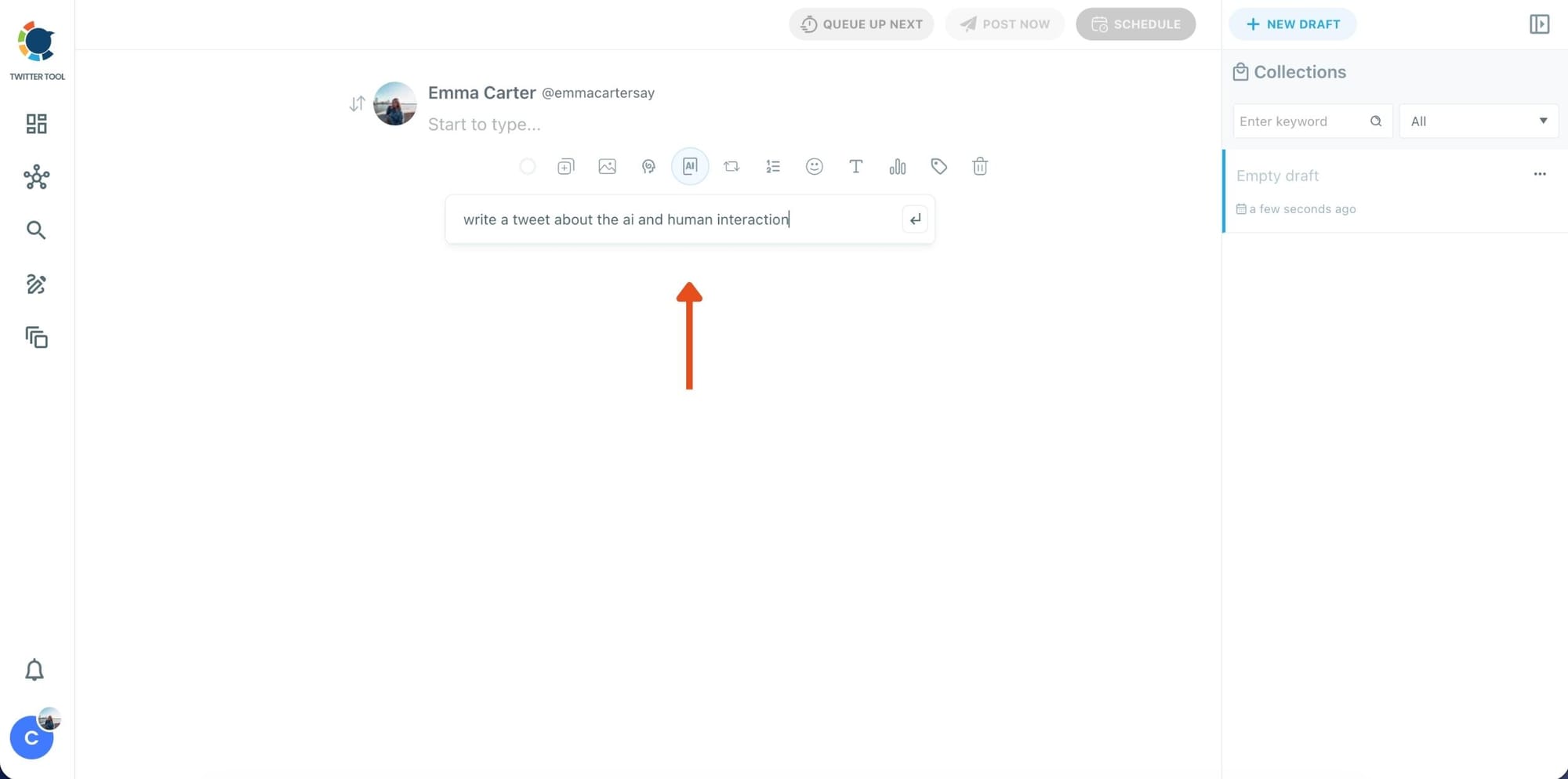
Step 2: Write your tweet (or generate one with AI)
You can type your tweet manually in the editor.
Or, if you want to move faster, click the AI option and let Circleboom generate a tweet idea for you based on your topic.
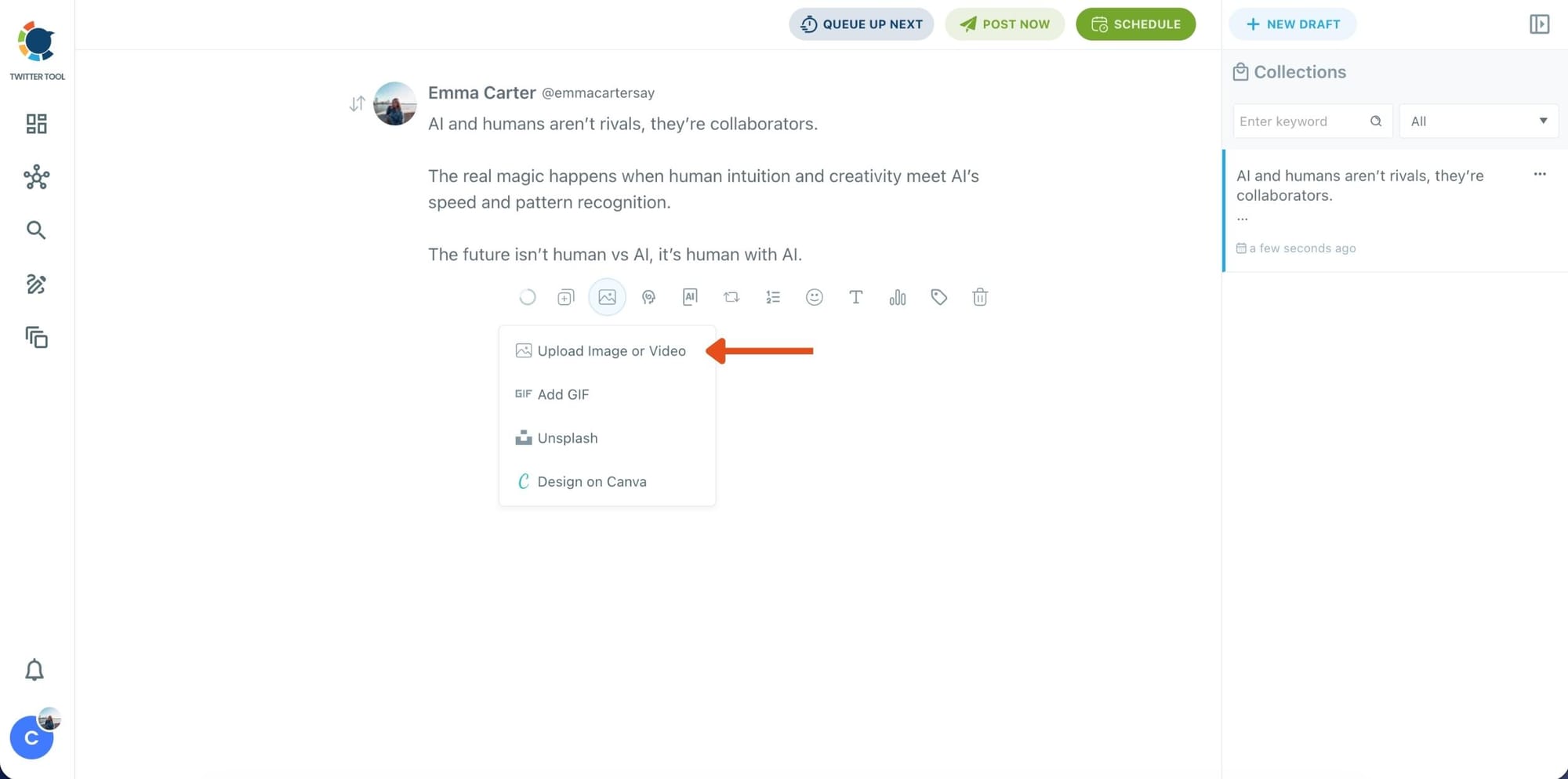
Step 3: Add an image to make the post more engaging
Once your text is ready, attach a visual to your tweet.
You can:
- Upload an image/video from your device
- Pick one from Unsplash
- Or design one instantly using Canva
Step 4: Style your tweet using Circleboom’s Font Generator
Now it’s time to make your tweet stand out visually.
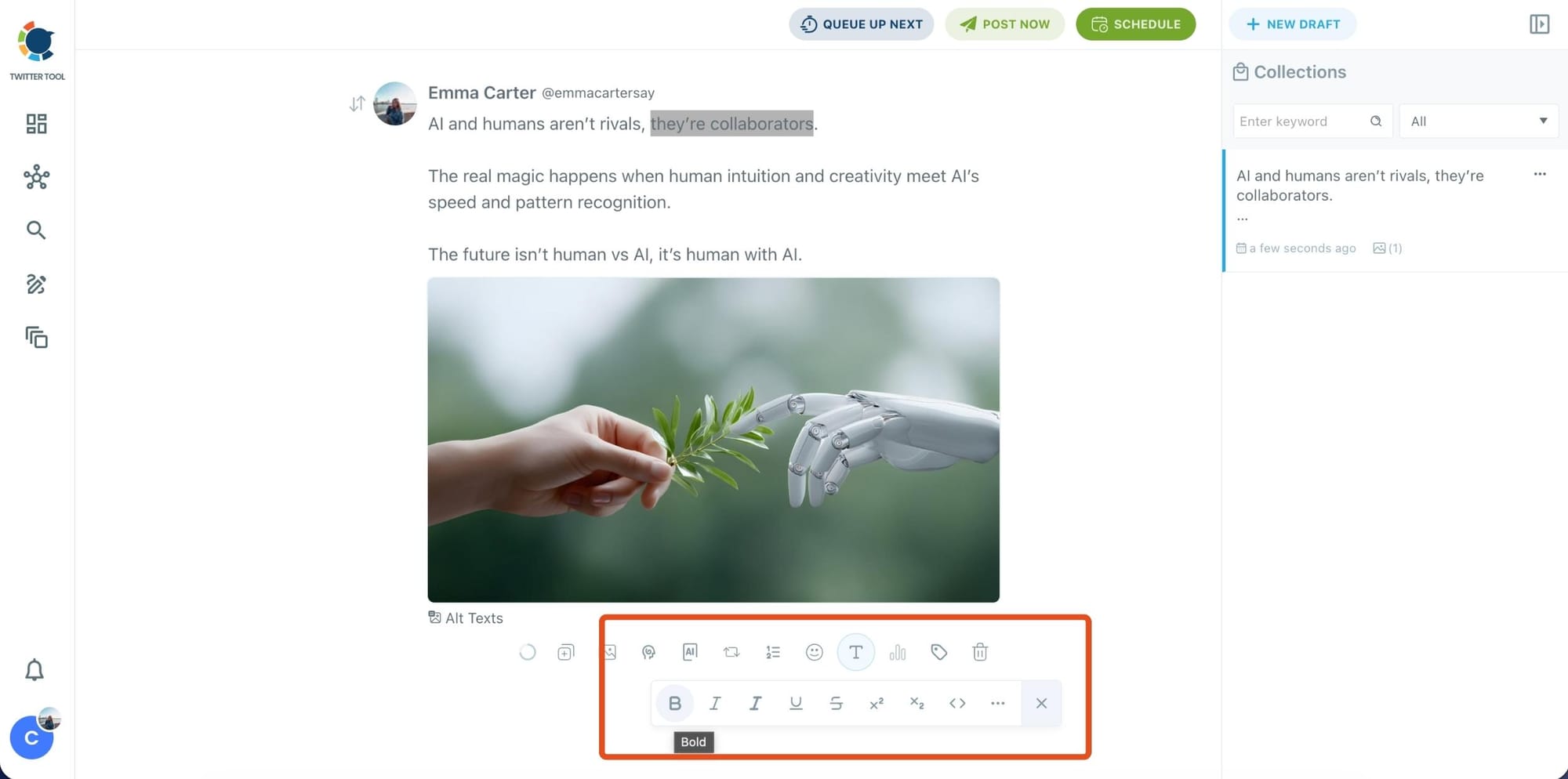
Select the part of your text you want to change, then open the Font Generator toolbar and apply styles like:
- Bold / Italic / Underline
- Different font variations
- Extra formatting options for a more “designed” look
This is perfect when you want key parts of your tweet to grab attention immediately.
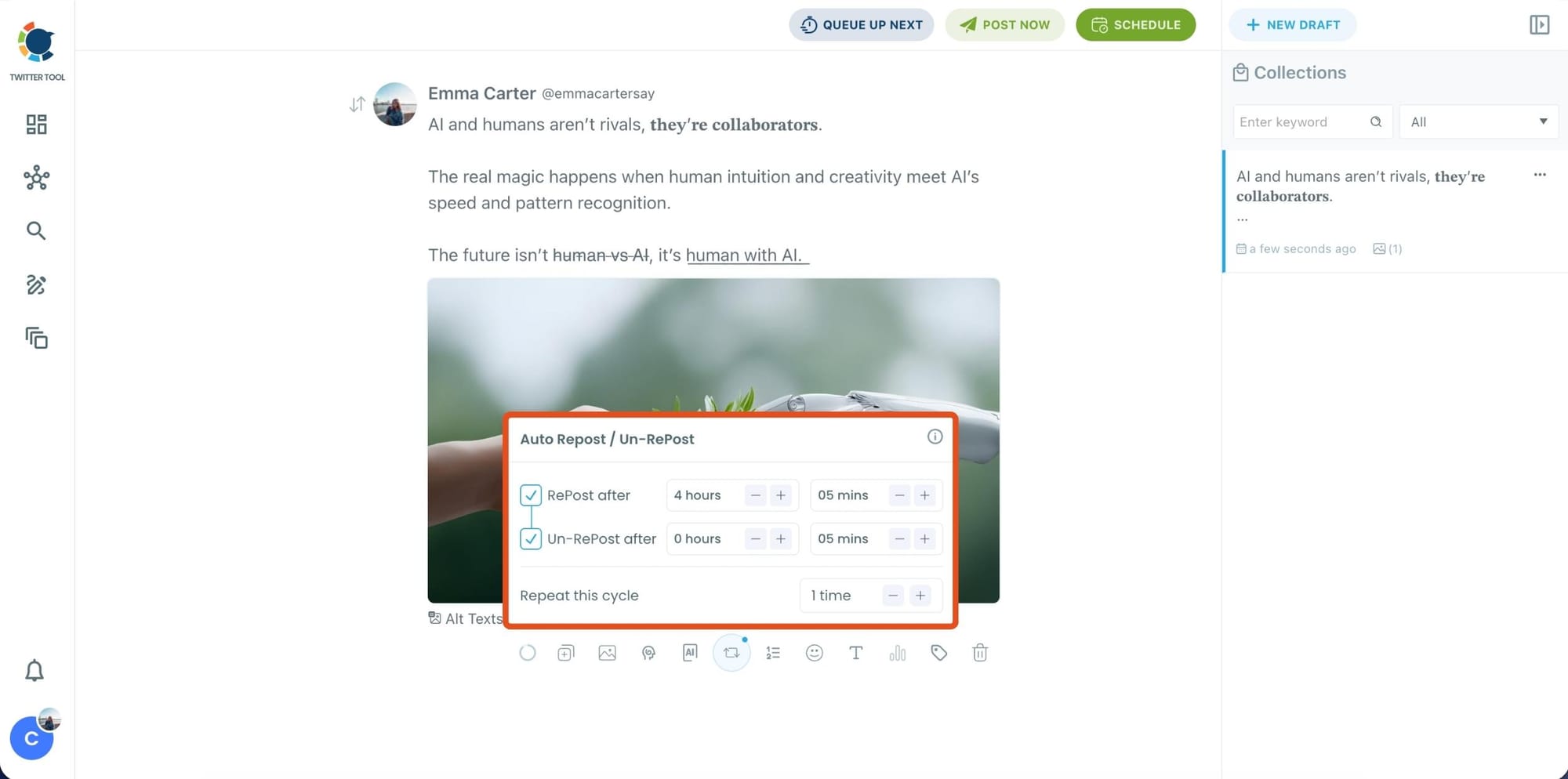
Step 5: Set Auto Retweets to boost visibility
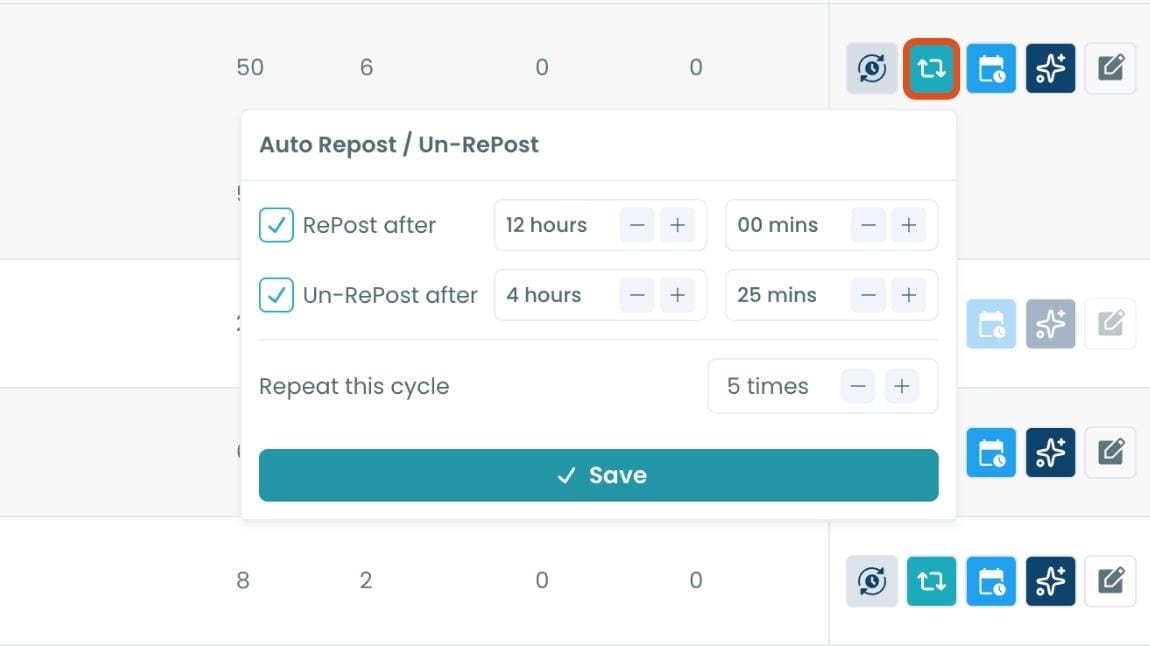
After styling your post, you can increase reach by enabling Auto Repost / Un-RePost settings.
This lets you automatically:
- Repost your tweet after a selected time
- Remove the repost later
- Repeat the cycle if you want more than one repost
It’s a smart way to bring your tweet back into the feed without manually reposting it.
Bonus Tip: Cross-post your tweet to other platforms automatically
Before you publish, you can also enable Cross-Post to share the same tweet across multiple platforms in one go.
Circleboom lets you post your content to Instagram, Facebook, LinkedIn, Bluesky, and Threads automatically, so you don’t have to rewrite, re-upload, or repeat the same work on each platform.

Step 6: Schedule it for the best time to post
Finally, click Schedule and set your date and time.
You can also click Find your best posting time to see Circleboom’s suggested time slots based on follower activity.

Once the tweet is published, Circleboom automatically handles the retweets according to the cycle you set.
You don’t need to remember anything or manually repost later.
How to Set Auto-Retweet Cycles for Existing Tweets
Step #1: Navigate to the Analytics Menu
From the left-hand menu, click on the "Post Management & Analytics" tab, then select "Post Analytics" from the dropdown.
Within Post Analytics, select the "Post Engagement Analytics" option.

Circleboom will display a detailed breakdown of your posts, including metrics like impressions, likes, retweets, replies, and more.

Step #2: Once you’ve found your old tweets, Circleboom offers several tools to make the most of them; choose which you want to use:

🟢 Reschedule Popular Tweets: Found a tweet that’s still relevant or hilarious but didn’t get the engagement it deserved?
With Circleboom, you can reschedule it to repost it at a better time.
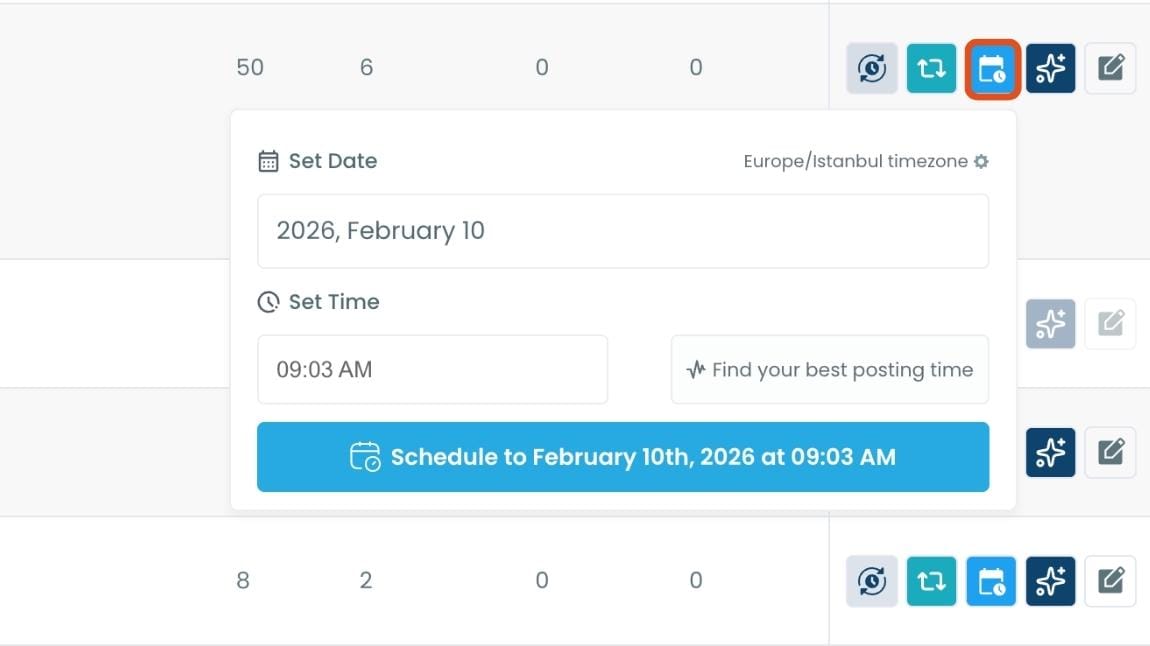
Maybe your audience wasn’t active when you first tweeted it, or perhaps it just got lost in the noise. Rescheduling ensures your best content gets a second chance to shine.
🔵 Refresh Content with AI: Some of your old tweets might feel outdated or could use a fresh twist. Circleboom’s AI-powered tweet generator can help you rewrite or improve them.
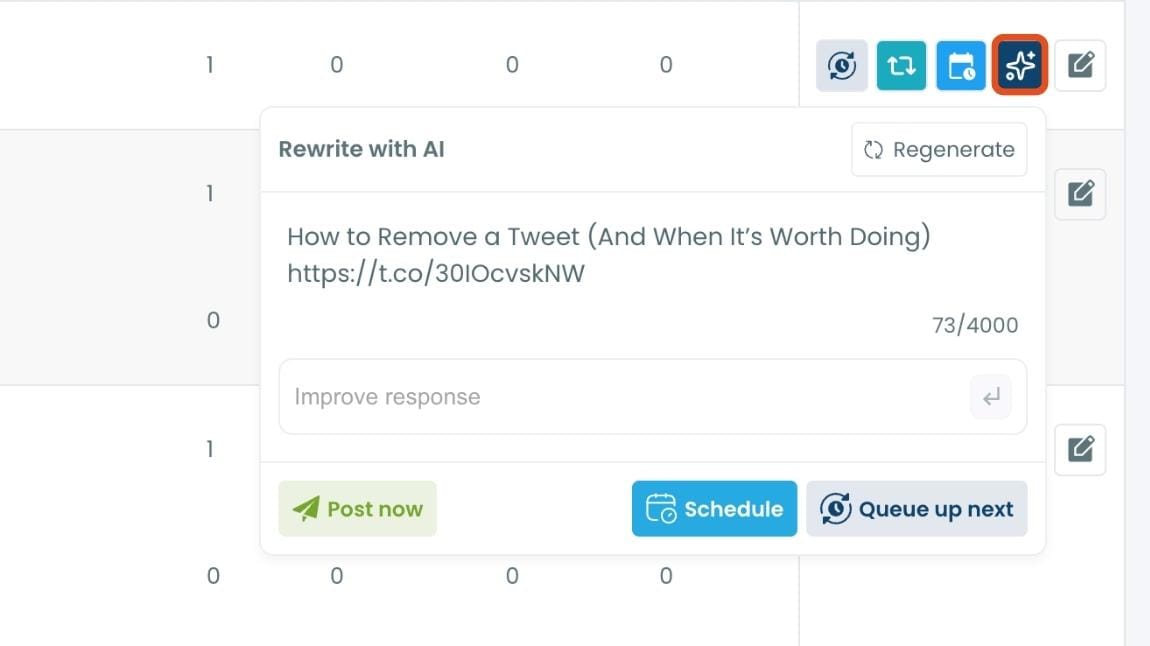
Whether you want to update the language, add a modern twist, or make it more engaging, the AI feature has got you covered.
🟡 Set Auto-Retweets: If you’ve got evergreen tweets that are still relevant, why not let them work for you on autopilot?
Before & After: The Impact of Repeating Tweets
Here’s an example from my own experience:
- The first time I posted a certain tweet, it reached about 950+ impressions and got around 12 likes.

- When I repeated it a week later using Circleboom’s scheduling feature, it reached over 8,500 impressions and received 220 likes.

The difference was dramatic. By repeating at the right time and giving the tweet a second life, I more than doubled its performance and reached a whole new audience who had missed it originally.
Why This Works
Twitter’s algorithm is driven by recency. Even the best tweet in the world loses momentum after a few hours. Repeating tweets gives your top content a new wave of visibility.
And by using Circleboom, you’re not just repeating blindly, you’re repeating intelligently. You know which tweets are worth repeating, you can rewrite them for freshness, and you can schedule them safely so they never feel spammy.
Final Thoughts
So, how do you repeat a tweet? The answer is simple: identify your best-performing posts, reshare them strategically, and use the right tool to make the process safe and effective.
Repeating tweets helps you extend the life of your content, reach new followers, and build stronger engagement without constantly creating from scratch.
For me, the easiest and safest way has been Circleboom Twitter. With powerful analytics, AI rewriting, and scheduling tools, it allowed me to repeat dozens of tweets, boost my engagement, and maximize the reach of my content.
If you’re serious about growth, don’t let your best tweets fade away after a few hours. Repeat them, and let Circleboom handle the process for you.