

If you want to understand what actually works on X, looking at popular tweets is one of the most effective strategies.
Instead of guessing what people might like, you can directly analyze content that has already proven itself.
But there are two different scenarios here:
- You want to discover what is trending across X right now
- You want to find the most popular tweets of a specific account (or your own)
X gives you a basic way to explore trending content. However, when it comes to analyzing tweets deeply and sorting them by performance, you need a more advanced approach.
Let’s go step by step.
 Altug Altug
How to Find Popular Tweets on X (Creator Studio Inspiration)
X has a built-in feature called Inspiration in the Creator Studio, and it’s one of the most underrated tools on the platform.
Instead of randomly scrolling through your feed, this section shows you tweets that are already performing well, based on real engagement data.
What makes this feature powerful is how you can narrow things down.
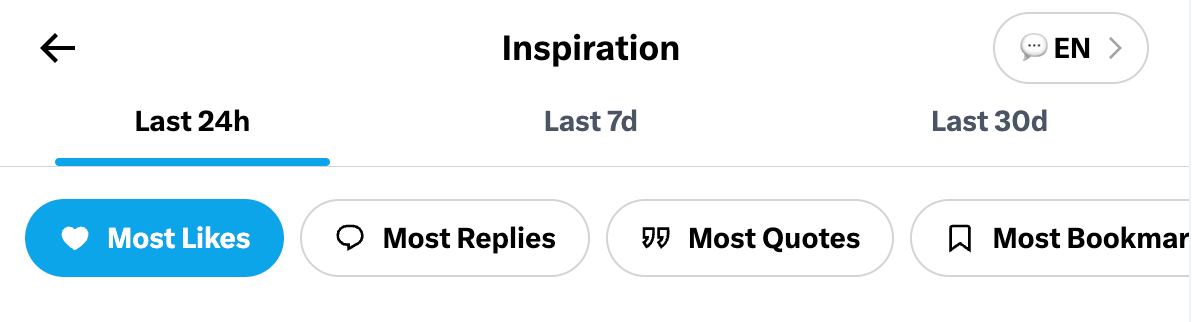
You’re not just seeing global viral tweets. You can explore popular content based on:
- Country → See what performs well in a specific region
- Language → Discover content in your target audience’s language
- Timeframe
- Last 24 hours (fresh trends)
- Last 7 days (short-term patterns)
- Last 30 days (more stable insights)
Instead of creating content blindly, you’re building your strategy based on what is already working right now.
How to Use Creator Studio Inspiration Step by Step
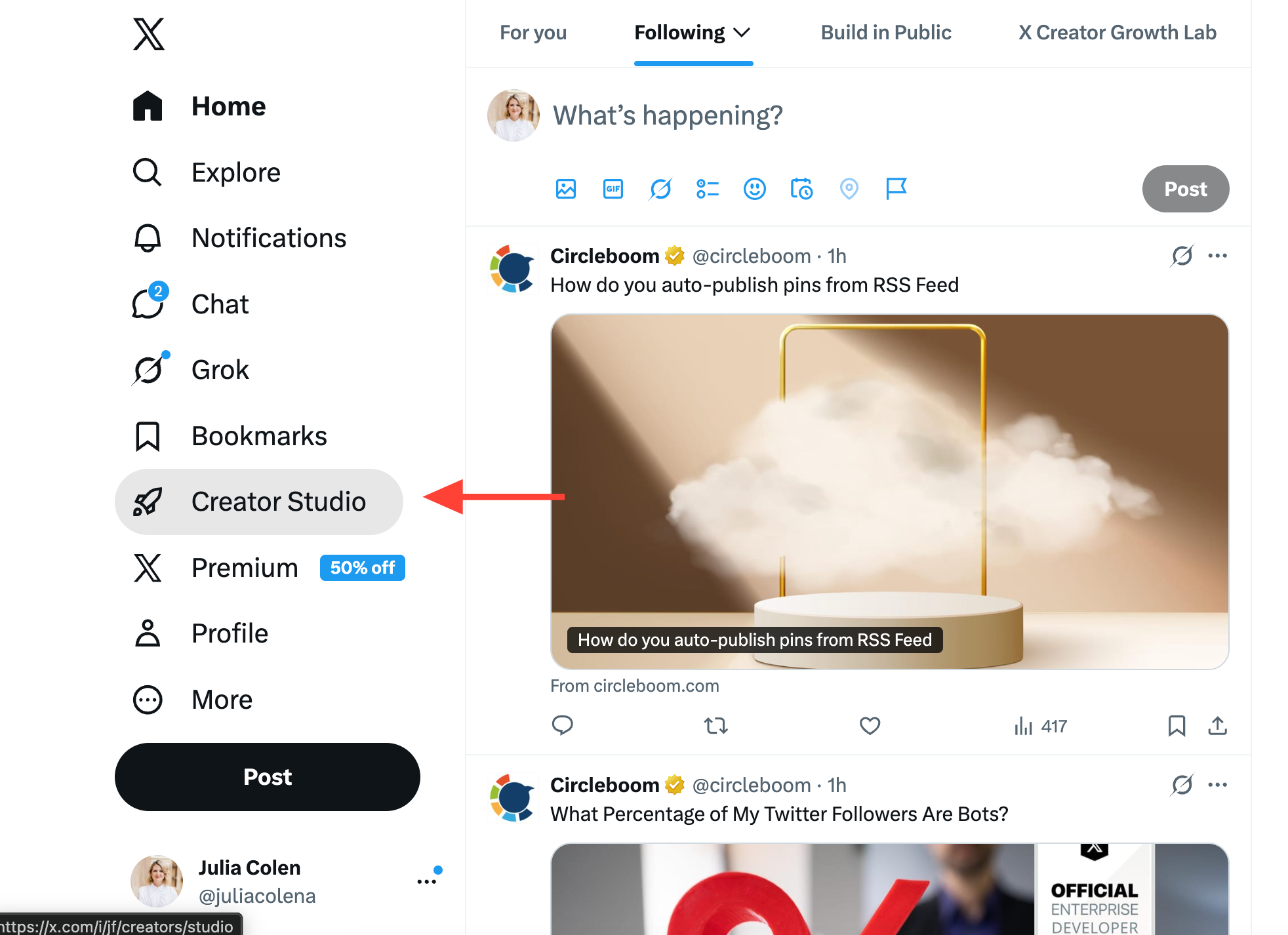
Step #1: On your X homepage, look at the left-hand sidebar and click Creator Studio.
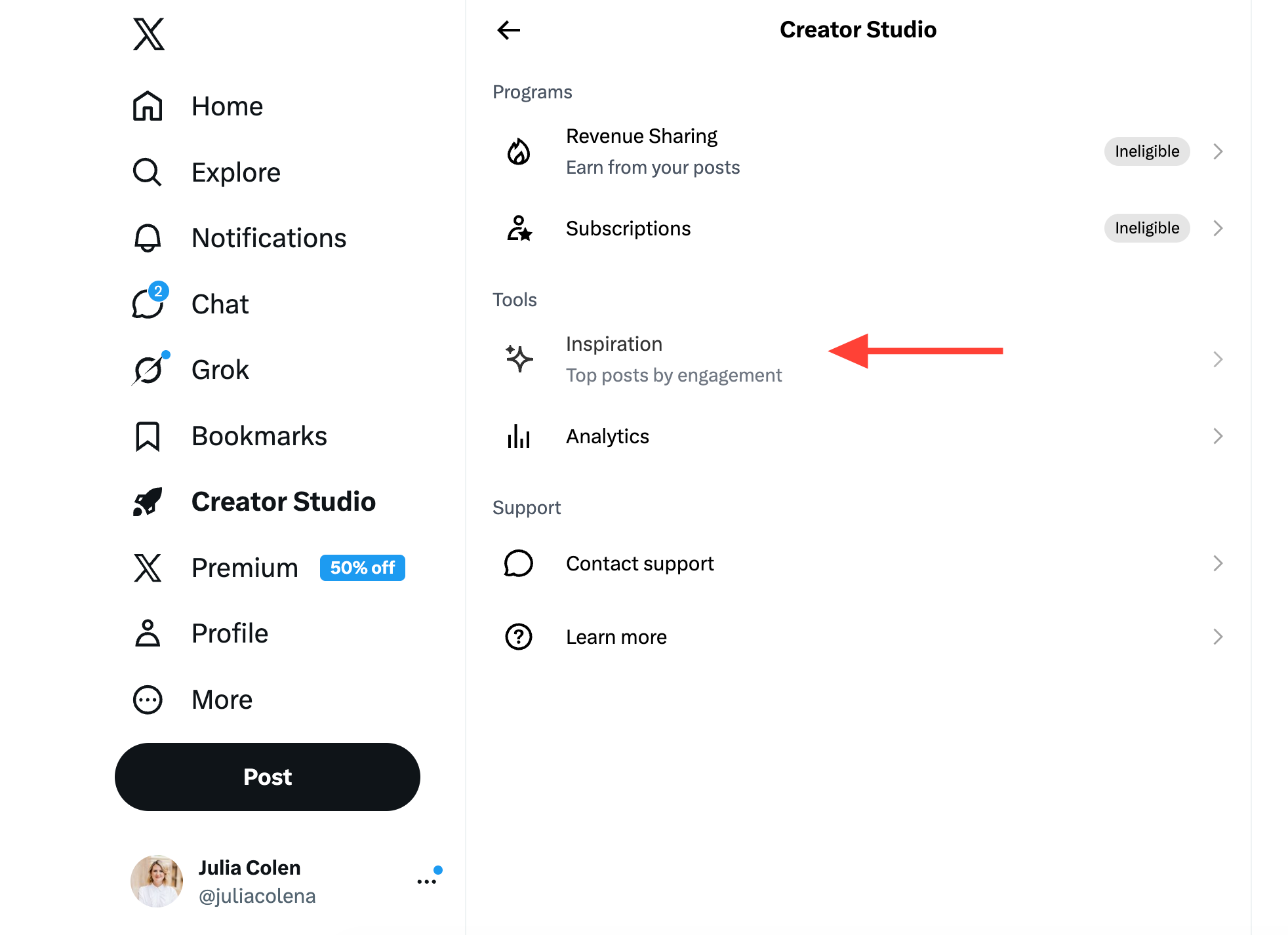
Step #2: Inside Creator Studio, you will see different sections like Revenue Sharing, Subscriptions, Inspiration, and Analytics.
Under the Tools section, click Inspiration.
Step #3: Here, you’ll see the most popular tweets based on the selected timeframe.
You can now refine the results by choosing different filters such as Most Likes, Most Replies, Most Quotes, or Most Bookmarks to explore different types of high-performing content.

What If You Want to See Your Own or Someone’s Most Popular Tweets?
Here’s where things get limited. When you visit a profile on X, you only see tweets in chronological order.
❌ There is no built-in option to sort tweets by likes, retweets, or overall engagement.
But for accounts with hundreds or thousands of tweets, manually scrolling through everything is not just slow, it’s almost impossible to get a clear and accurate result.
So while X helps you discover what’s trending across the platform, it does not provide a practical way to identify the most popular tweets of a specific account, whether it’s yours or someone else’s.
This is where Circleboom Twitter becomes useful. ⤵️
What Is Circleboom Twitter?
Circleboom Twitter is an official X Enterprise Developer, meaning it works directly with X’s official APIs and follows platform rules.
This is important because it ensures the data you get is accurate, reliable, and compliant.

Instead of showing tweets in a simple timeline, Circleboom organizes tweet data in a way that you can actually analyze.
With Circleboom Twitter, you can:
✅ Download tweets from any public account
✅ Access detailed engagement data (likes, retweets, replies, etc.)
✅ View tweets in a structured format instead of a feed
✅ Sort and filter tweets based on performance
This completely changes how you look at content.
Instead of guessing what worked, you can clearly see which tweets performed best and why.
How to Find Someone’s Most Popular Tweets
With Circleboom, you can access and download a user’s tweets with all engagement data included, which makes it easy to sort them and identify the most liked posts without manually scrolling through their profile.
Here’s how you can do it:
Step #1: Enter the Username
On the Circleboom export page, type in the Twitter/X username of the account you want to export tweets from (without the “@” symbol) and click on the blue “Search” button.

Step #2: Confirm the Tweet Count
Circleboom will display the total number of tweets available for export from the selected account. Review this information, then click the “Next” button to proceed with the export process.

Step #3: Enter Your Email Address
Enter the email address where you’d like to receive the exported tweet file. Circleboom also recommends creating an account for easy access to your export file at any time. After entering your email, click the “Next” button to continue.

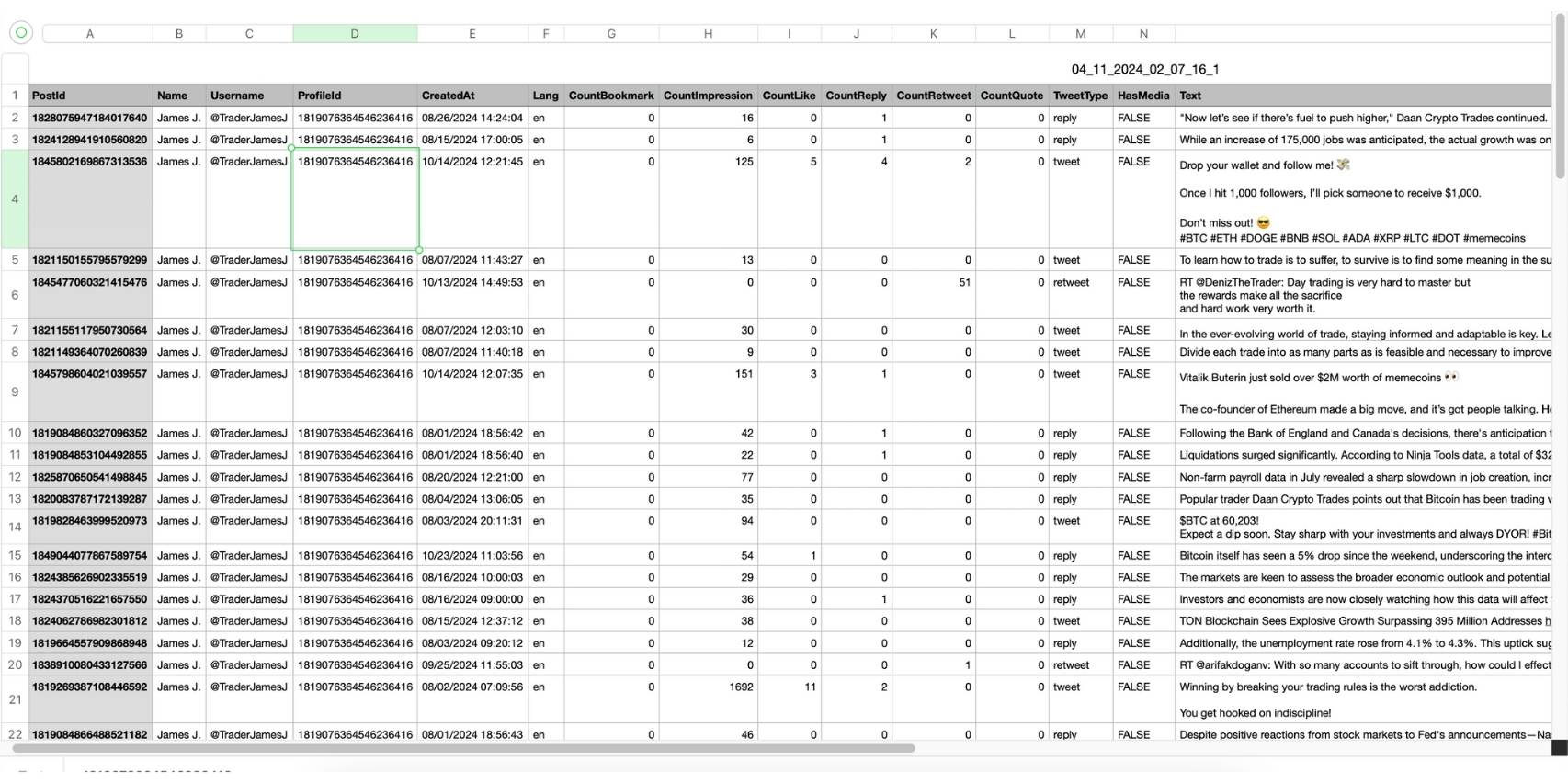
Step #4: After entering your email address, Circleboom sends the exported tweets in a CSV format directly to your inbox.
This CSV file includes essential details like Post ID, username, tweet text, engagement metrics (likes, retweets, replies), language, and timestamps, making it easy to review, analyze, or archive the tweets.
How to Find Your Own Most Popular Tweet
Circleboom Twitter shows all your tweets with detailed engagement metrics in one place, allowing you to quickly sort them and identify your best-performing content without needing to go through your profile manually.
Here’s how you can find and reuse them:
Step #1: Navigate to the Analytics Menu
From the left-hand menu, click on the "X AI WRITER FOR CREATOR + Post Analytics" tab, then select "Post Analytics" from the dropdown.
Within Post Analytics, select the "Post Engagement Analytics" option.

Circleboom will display a detailed breakdown of your posts, including metrics like impressions, likes, retweets, replies, and more.
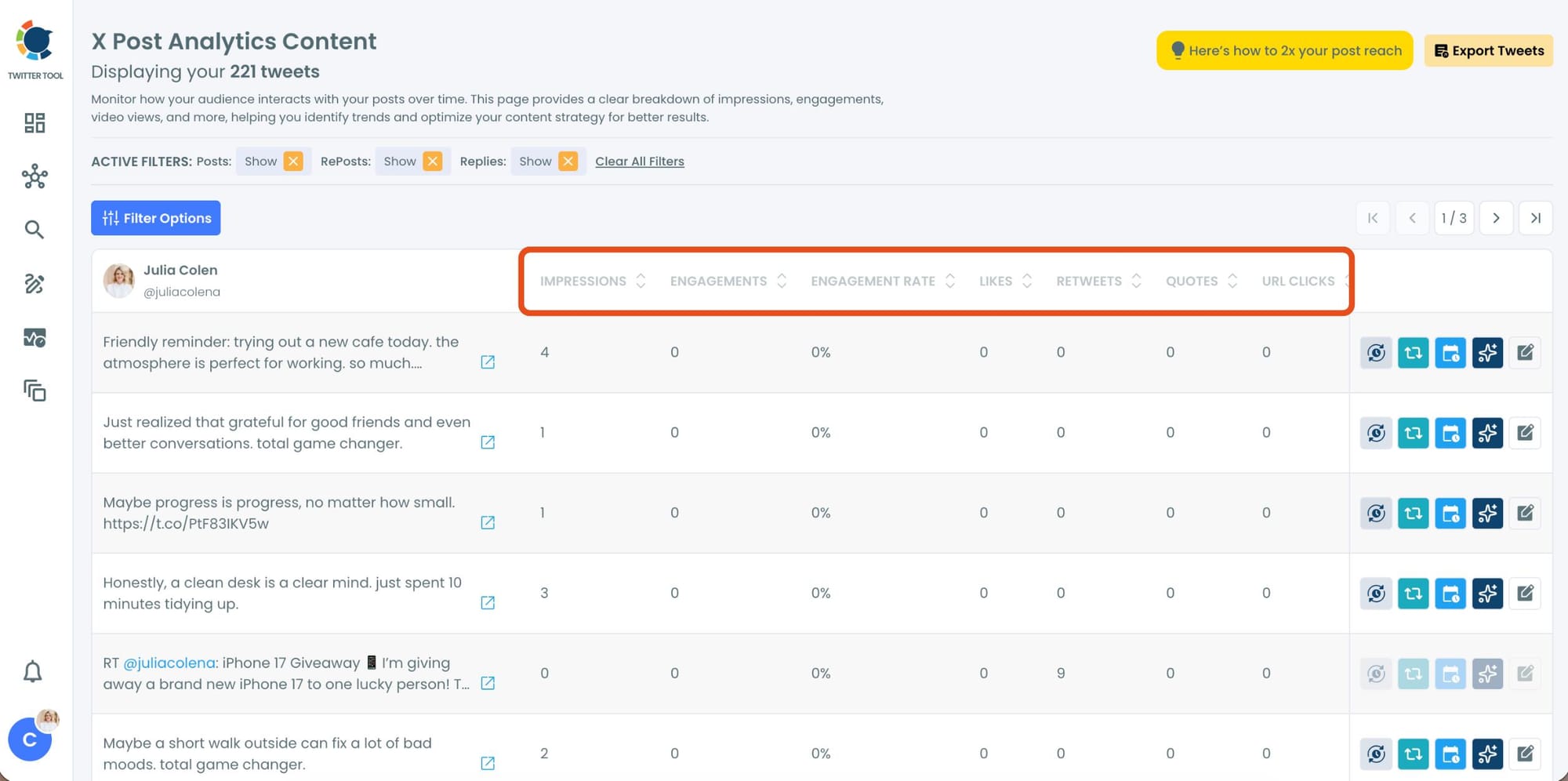
Step #3: Sort by Likes
Locate the "Likes" column in the content list.
Click on the column heading, and Circleboom will automatically arrange your tweets from the highest to the lowest number of likes.
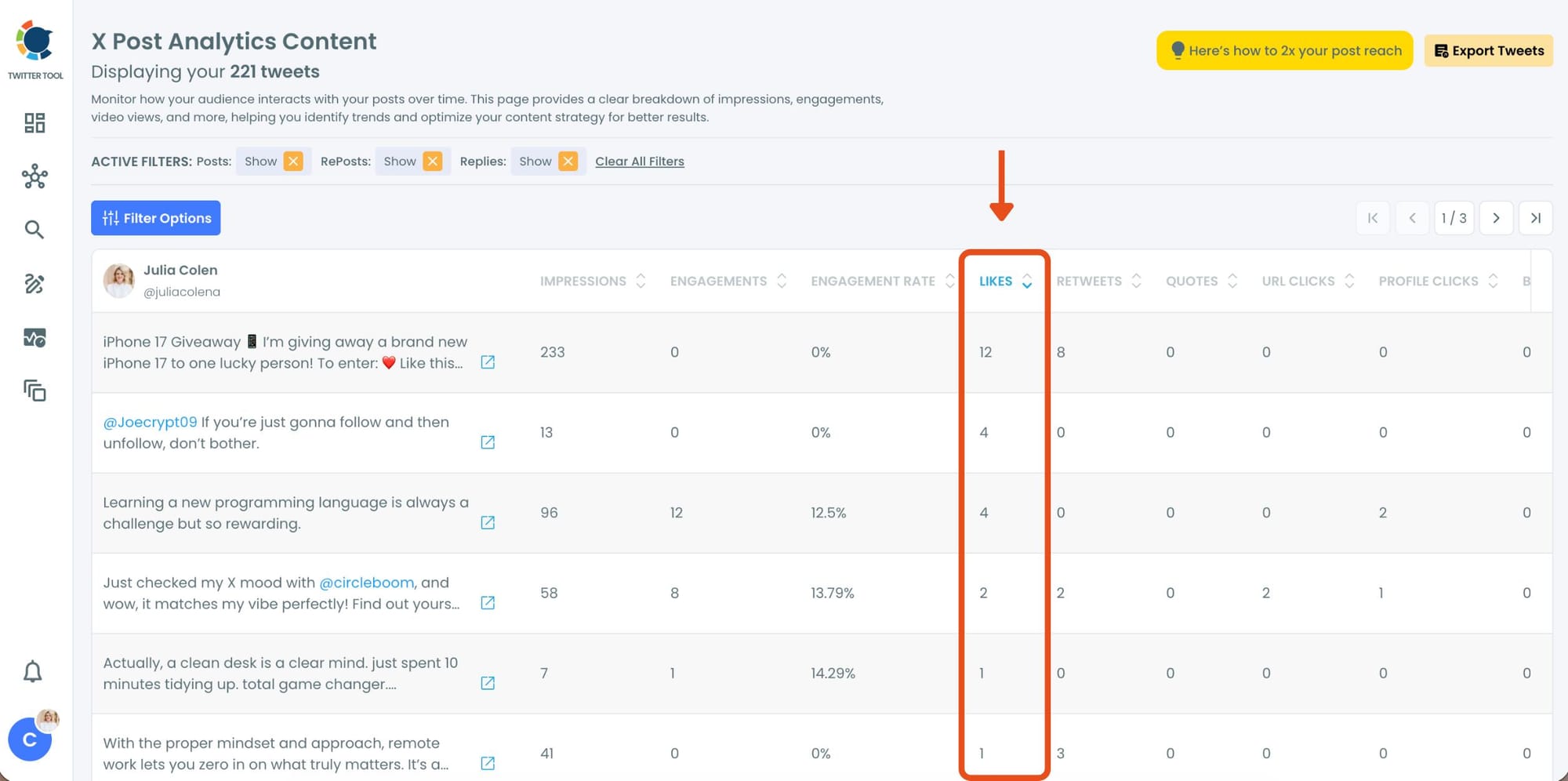
Here, you’ll instantly see your most popular tweets at the top, making it easy to identify which content performed best.
Step #3: Once you’ve found your old tweets, Circleboom offers several tools to make the most of them; choose which you want to use:

🟢 Reschedule Popular Tweets: Found a tweet that’s still relevant or hilarious but didn’t get the engagement it deserved?
With Circleboom, you can reschedule it to repost it at a better time.

Maybe your audience wasn’t active when you first tweeted it, or perhaps it just got lost in the noise. Rescheduling ensures your best content gets a second chance to shine.
🔵 Refresh Content with AI: Some of your old tweets might feel outdated or could use a fresh twist. Circleboom’s AI-powered tweet generator can help you rewrite or improve them.

Whether you want to update the language, add a modern twist, or make it more engaging, the AI feature has got you covered.
🟡 Set Auto-Retweets: If you’ve got evergreen tweets that are still relevant, why not let them work for you on autopilot?

Circleboom’s auto-retweet feature allows you to automatically retweet your best-performing content at regular intervals. This is perfect for driving consistent engagement without lifting a finger.
Conclusion
Finding the most popular tweets depends on your goal.
If you want to explore what’s trending across the platform, Creator Studio Inspiration is the best place to start. It helps you discover high-performing tweets based on region, language, and timeframe.
But if you want deeper insights, like identifying someone’s most liked tweets or analyzing your own top-performing content, you need a more advanced solution.
That’s where Circleboom Twitter stands out.
It doesn’t just show tweets. It helps you analyze, sort, and reuse them, turning raw data into an actionable strategy.
And that’s what actually helps you grow.



)